

A home server can host files, run virtual machines, manage smart-home services, or protect your network, but compact PCs vary widely in how well they fit those jobs. The Best Mini PC for Home Server setups depends on whether you need quiet 24/7 operation, dual 2.5GbE networking, room for more memory, or extra processing and graphics capability.
This guide compares listed specifications and practical fit, from a fanless dual-port network appliance to upgradeable Ryzen systems. Check the operating system, memory, storage expansion, and network speed before choosing, especially if you plan to use Proxmox, pfSense, OPNsense, or a NAS service.

Pros
- Dual 2.5GbE ports
- Triple 4K display support
- Expandable memory and storage
- Windows 11 Pro included
Cons
- 8GB RAM may limit heavier multitasking
- Skip it for workloads needing more than 256GB before upgrades

Pros
- Dual 4K display support
- Gigabit Ethernet and WiFi 5
- Compact design with VESA mount
Cons
- 8GB RAM and 256GB SSD may constrain heavier workloads
- Who should skip it: users needing more memory or local storage
Pros
- Triple-display connectivity
- Upgradeable RAM and storage
- Dual 2.5Gb Ethernet ports
- Windows 11 Pro preinstalled
Cons
- Wi-Fi 5, not Wi-Fi 6
- Who should skip it: buyers needing more than 512GB out of the box

Pros
- Ryzen 7 8745HS with eight cores and 16 threads
- 1TB NVMe SSD and dual M.2 slots
- Up to four 4K displays
- Dual 2.5G LAN ports
Cons
- Skip it if you need more than 16GB RAM

Pros
- Dual 2.5GbE ports
- Triple 4K display support
- Expandable memory and storage
Cons
- Skip it for demanding 3D work or intensive gaming
- 8GB RAM may limit heavier multitasking

Pros
- Windows 11 Pro preloaded
- 256GB M.2 SSD
- HDMI and DisplayPort outputs
- VESA mounting bracket included
Cons
- 8GB RAM may constrain demanding workloads
- Skip it if you need more memory for intensive tasks

Pros
- Dual Intel 2.5GbE ports
- Fanless, silent design
- Upgradeable RAM up to 32GB
- Three 4K display outputs
Cons
- Who should skip it: users needing more than 32GB RAM
The Best Mini PCs by Use Case
Best for Silent Network Services: MeLE Quieter DL Fanless Mini PC N150 16GB 512GB
The MeLE Quieter DL Fanless Mini PC N150 16GB 512GB is the clearest fit for a quiet firewall, router, or always-on home server. Its fanless design avoids fan noise, while two Intel I226-V 2.5GbE ports suit network setups that need two wired connections. The listing specifies 16GB RAM, a 512GB NVMe SSD, and compatibility with Proxmox VE, pfSense, and OPNsense.
Its compact, fanless design may suit a bedroom, office, or network cabinet where audible fan noise is unwelcome. The listing also claims about 6W idle draw and less than 12W at full load; treat these as manufacturer figures, not a guarantee for your workload.
Reasons to buy:
- Fanless design for silent operation.
- Two Intel 2.5GbE ports for firewall and network appliance setups.
- 16GB RAM and 512GB NVMe storage, with memory upgrade support up to 32GB.
Reasons to avoid:
- Its N150 processor is a less compelling choice for demanding CPU-heavy virtual machines than the Ryzen 7 option.
- Fanless cooling makes workload and placement worth checking for a sustained, intensive server role.
Skip it if you need a higher-performance processor for compute-heavy tasks or want to add a cooling fan.
Best Value for Expandable Networking: BOSGAME E5 11 Pro Mini PC, AMD Ryzen 5300U 4C/ 8T
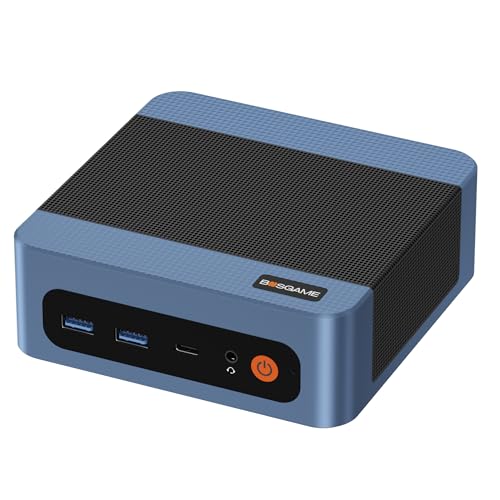
The BOSGAME E5 11 Pro Mini PC, AMD Ryzen 5300U 4C/ 8T offers a useful starting point for a home lab on a tight budget. Its Ryzen 3 5300U has four cores and eight threads, and its two 2.5GbE ports can support firewall, software-router, or NAS projects. The listing also describes an extra M.2 slot and two SODIMM slots, giving you expansion options beyond the included 8GB RAM and 256GB SSD.
This model makes more sense if you are comfortable upgrading memory or storage as your services grow. The provided memory is modest for running several virtual machines at once, so check the planned operating system’s needs and budget for a potential upgrade rather than assuming the included setup will cover every workload.
Reasons to buy:
- Dual 2.5GbE ports for wired network projects.
- Two SODIMM slots support up to 64GB RAM, according to the listing.
- An additional M.2 slot allows storage expansion without replacing the system drive.
Reasons to avoid:
- Included 8GB RAM may limit multitasking or virtual-machine workloads.
- Wi-Fi 5 is available, but wired networking is the more relevant connection for many server roles.
Skip it if you want more memory and storage ready out of the box, without planning upgrades.
Best for Storage-Ready Home Labs: BOSGAME E5 Mini PC with Ryzen 5300U Computer
The BOSGAME E5 Mini PC with Ryzen 5300U Computer provides a more ready-to-use starting configuration than the 8GB version. It combines the same four-core, eight-thread Ryzen 3 5300U class with 16GB RAM and a 512GB SSD. Its two 2.5GbE ports and extra M.2 slot make it a practical candidate for a small home lab that needs local storage and wired network flexibility.
The extra memory and SSD capacity may reduce the need for immediate upgrades, though the listing does not specify a preconfigured NAS operating system. It ships with Windows 11 Pro according to the product description, and the listing says Ubuntu can be installed. Confirm that your preferred server software supports the operating system and network controller before purchasing.
Reasons to buy:
- 16GB RAM and 512GB SSD included.
- Dual 2.5GbE ports for faster wired connections than standard Gigabit Ethernet, when the rest of the network supports them.
- An extra internal M.2 slot offers a path to add storage.
Reasons to avoid:
- Its 5300U processor is not presented as a choice for demanding 3D workloads.
- Wi-Fi 5 and Bluetooth 5.0 are listed; buyers seeking newer wireless standards should compare requirements.
Skip it if you need a fanless design or a higher-tier processor for compute-intensive services.
Best for Compute and Media Tasks: Glorlin Mini PC Ryzen 7 8745HS
The Glorlin Mini PC Ryzen 7 8745HS stands out for workloads that need more CPU capacity and integrated graphics. Its Ryzen 7 processor has eight cores and 16 threads, paired with 16GB DDR5 RAM and a 1TB NVMe SSD. Dual 2.5G LAN ports provide wired network options, while the Radeon 780M graphics and USB4 may help if the mini PC will also handle media or light gaming.
The listing says the system has two M.2 slots and supports storage expansion up to 4TB, but verify drive compatibility and the exact upgrade arrangement before buying. Its single 16GB memory module has 3GB assigned to VRAM by default, according to the listing, so account for that when estimating memory available to server applications. The stated one-year warranty is shorter than the BOSGAME models’ listed coverage.
Reasons to buy:
- Eight-core, 16-thread processor for heavier multitasking.
- 1TB NVMe SSD included, plus two M.2 slots for storage growth.
- Dual 2.5G LAN and USB4 broaden connection options.
Reasons to avoid:
- Single-module memory and the stated 3GB graphics allocation affect available system memory.
- The listing specifies a one-year warranty.
Skip it if your server mainly needs quiet, low-power network duties rather than CPU and graphics headroom.
Best for Compact Everyday Services: KAMRUI Pinova P1 Mini PC
The KAMRUI Pinova P1 Mini PC is a compact choice for light server duties alongside ordinary desktop use. Its Ryzen 3 Pro 7330U has four cores and eight threads, and the listing specifies Windows 11 Pro, Linux support, PXE, Wake on LAN, and auto power-on. Those boot and wake options can be useful for a small system that needs to start remotely or recover after a power interruption, depending on setup.
Unlike the dual-2.5GbE models above, this system lists one Gigabit Ethernet port. That is sufficient for many home services, but it is less suitable when you need separate high-speed network interfaces for a firewall or fast storage traffic. Its 8GB RAM and 256GB SSD also make it a better match for modest services than a large virtualized lab.
Reasons to buy:
- Linux and PXE support are specified in the listing.
- Wake on LAN and auto power-on support remote or scheduled startup workflows.
- HDMI, DisplayPort, and Type-C outputs support a multi-display desktop setup.
Reasons to avoid:
- One Gigabit Ethernet port, rather than dual 2.5GbE, limits network flexibility.
- 8GB RAM and 256GB SSD leave less room for multiple virtual machines or large local datasets.
Skip it if your plan depends on dual high-speed Ethernet or substantial memory for virtualization.
Also Considered
The Gaming category covers a different use case, but two remaining compact PCs may suit simpler server plans: the GMKtec G3S Mini PC Intel N95 Processor could work for basic services and media, while the BOSGAME E5 Mini pc, Ryzen 5300U offers dual 2.5GbE and upgrade options but comes with only 8GB RAM and a 256GB SATA SSD.
How to Choose the Best Mini PC for Home Server Use
Match the processor and memory to your services
A file server, DNS service, or lightweight smart-home controller usually asks less of a CPU than several virtual machines or media services running together. Processor core and thread counts give a useful starting comparison, but they do not guarantee a particular workload’s speed. The MeLE N150 offers a lower-power network-appliance direction, while the Glorlin Ryzen 7 has eight cores and 16 threads for more demanding multitasking.
Memory can become the limit before storage or network speed when you run multiple guests. Look for the installed RAM and the maximum supported capacity, then check whether memory is replaceable or upgradeable. The BOSGAME 8GB models list support for up to 64GB, while the MeLE listing states an upgrade ceiling of 32GB. Confirm the number and type of modules supported before ordering memory.
Count Ethernet ports and check their speed
Two Ethernet ports can simplify a firewall or router setup, where one interface connects toward the modem and another toward the local network. They can also support separate network paths in a lab, though software setup and switch capability still matter. Several listed models have dual 2.5GbE ports; the KAMRUI lists one Gigabit Ethernet port, and the GMKtec lists one Gigabit Ethernet port.
Port speed alone does not make the whole network faster. Your router, switch, cabling, storage, and client devices must also support the required speed. Check the controller model when the product listing provides it, and confirm operating-system driver support for your intended server platform. The BOSGAME listings identify Realtek RTL8125 controllers, while the MeLE listing identifies Intel I226-V controllers.
Plan storage around capacity and expansion
An SSD holds the operating system, applications, and any locally stored files, but a small boot drive may fill quickly with virtual-machine images or media. Compare the supplied drive capacity with your expected data and look for an additional M.2 slot if you want to expand internally. The BOSGAME models specify an extra M.2 slot, and the Glorlin listing describes two M.2 slots.
Do not assume that every slot accepts the same drive type or capacity. Check interface, physical size, and supported drive capacity in the product details or with the seller. A second SSD can add space, but it does not replace a separate backup. Choose a backup plan based on how much data you can afford to lose and how quickly you need to restore it.
Consider noise, power, and placement
A machine that stays on around the clock may sit in a living area, bedroom, or cabinet, making cooling design and placement relevant. The MeLE is specified as fanless; the BOSGAME E5 listings describe a cooling fan. The Glorlin product data does not provide a noise figure, so do not assume it will be silent.
Power use matters over long operating periods, but only one listing supplies explicit draw estimates: the MeLE claims about 6W at idle and under 12W at full load. Actual consumption depends on configuration and workload. Treat the figure as a listing claim, and look for independent power measurements if electricity cost is a major part of your decision.
Verify operating system, ports, and remote startup
Server software compatibility depends on more than a processor name. Confirm support for your chosen operating system, network controller, storage interface, and virtualization platform. The published listings name Proxmox VE support for the MeLE and Linux support for several other models, but verify current compatibility details for your exact software and intended configuration.
Display outputs matter mainly during setup or if you will also use the mini PC as a desktop. USB-C functions vary by model: the listings describe video output on some ports, and the BOSGAME E5 listings specify Power Delivery support. Do not assume another USB-C port provides the same features. If you plan to manage the system remotely, check for Wake on LAN, PXE, or BIOS startup settings, and confirm that your network and operating system can use them.
How We Compared
We compared the published product specifications, design details, stated compatibility, expansion options, and warranty information. Product descriptions provide the basis for claims about processors, RAM, storage, networking, ports, cooling, and supported software. No customer review text was supplied, so this guide does not rely on customer feedback or treat manufacturer performance statements as independently verified results.
Frequently Asked Questions
Can these mini PCs run Proxmox or a home server operating system?
The MeLE listing specifically names Proxmox VE compatibility, while other listings mention Linux support or home-server use. Compatibility can depend on network-controller drivers, storage setup, and the software version. Check the operating system’s hardware support and community documentation for the exact model before installing it.
Do I need two Ethernet ports for a home server?
No. One wired port can serve a basic file server, media service, or home automation system on your existing network. Two ports are more useful for firewall and router setups or projects that need separate wired connections. Check your network layout first, since two ports do not automatically provide faster internet or storage.
Is 8GB RAM enough for a mini PC server?
It can be enough for a few lightweight services, but it leaves less headroom for multiple virtual machines or memory-heavy applications. If you expect to run several services together, consider a model with 16GB included or confirm that the installed memory can be upgraded. Also check how much memory your chosen operating system and applications need.
Is a fanless mini PC better for 24/7 use?
A fanless design removes fan noise and one moving component, which can be useful in a quiet room. It does not guarantee that a system will suit every sustained workload or environment. Review the manufacturer’s operating guidance and keep the PC in a location with the clearance it needs.
Can I use a mini PC as a NAS?
These models can provide a small-computer foundation for NAS software, but the listed internal SSD capacity may not meet your storage needs. Check how many drives the system supports, what interfaces are available, and whether external storage is appropriate for your setup. Keep a separate backup of important files; a server drive alone is not a backup.
Should I choose Windows or Linux for a home server?
Choose based on the applications you intend to run and your familiarity with administration. Some listings include Windows 11 Pro, while several state Linux support; that does not mean every server application or driver works identically on each system. Check software requirements, licensing, remote-management needs, and hardware compatibility before deciding.







Write Your Review
No reviews yet. Be the first to share your experience!