

Choosing the right laptop under $1,500 often comes down to a practical compromise: a smaller screen is easier to carry, while a larger display gives you more room for documents, calls, and entertainment. This guide compares two MacBook Air sizes with the same M5 chip, memory, and storage, so you can focus on screen area, portability, and the listed differences in audio and price.
Both models list Wi-Fi 7, a 12MP Center Stage camera, and up to 18 hours of battery life as a manufacturer claim. The published listings do not provide display resolution, weight, or independent battery results, so check those details if they matter to your decision. For more Apple laptop context, see our MacBook comparison guide.
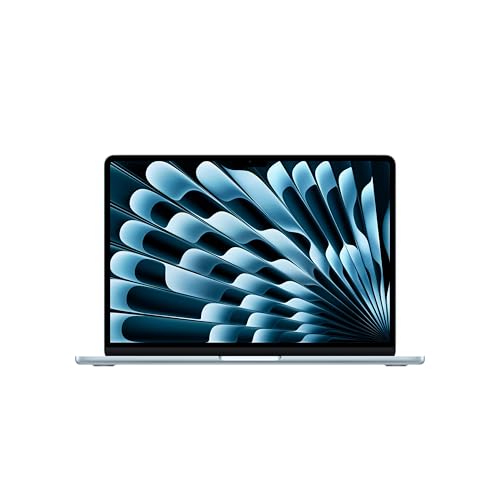
Pros
- Up to 18 hours of manufacturer-rated battery life
- Bright 13.6-inch Liquid Retina display with wide color
- Lightweight aluminum chassis weighs under 2.8 pounds
- Fast Wi-Fi 7 support and Thunderbolt 4 connectivity
Cons
- Only two Thunderbolt ports limit direct wired accessories
- External display output caps at two monitors
- Users needing broad port selections should skip it

Pros
- Spacious 15.3-inch Liquid Retina display
- Up to 18 hours of advertised battery life
- Support for up to two external displays
- Upgraded Wi-Fi 7 and Bluetooth 6 support
Cons
- Limited to two Thunderbolt 4 ports
- Heavier than compact 13-inch alternatives at 3.33 pounds
The Best Laptops by Use Case
Best for Carrying Between Classes: Apple 2026 MacBook Air 13-inch Laptop with M5
The 13.6-inch model suits students, commuters, and anyone who wants a smaller screen footprint. It has the same listed M5 chip, 16GB unified memory, and 512GB SSD as the larger option, so the choice is primarily about screen size and portability rather than a listed difference in core components. The listing also specifies two Thunderbolt 4 ports, MagSafe charging, a headphone jack, and support for up to two external displays.
Reasons to buy:
- 13.6-inch Liquid Retina display supports 1 billion colors, according to the listing.
- Smaller listed display size makes it the more compact-screen option in this pair.
- 12MP Center Stage camera and Desk View support can help with video calls and showing a workspace.
Reasons to avoid:
- The 13.6-inch screen provides less viewing area than the 15.3-inch model.
- The listing does not specify weight, resolution, or the amount of memory that can be upgraded, so verify requirements before buying.
Who should skip it: Choose the larger model if you often keep several windows visible or prefer more screen space without connecting an external monitor.
Best for a Larger Built-In Display: Apple 2026 MacBook Air 15-inch Laptop with M5
The 15.3-inch model is the better fit when you want a larger built-in display for reading, split-screen work, or watching video. The listing gives it the same M5 chip, 16GB unified memory, and 512GB SSD as the 13-inch version, but specifies a six-speaker sound system instead of the smaller model’s four speakers. Apple lists Spatial Audio and Dolby Atmos support for this model.
Reasons to buy:
- 15.3-inch Liquid Retina display offers more screen area than the 13.6-inch option.
- Six-speaker system is a listed distinction for this size, with Spatial Audio and Dolby Atmos support.
- Same listed memory and storage as the smaller model, giving buyers a screen-size choice without a stated reduction in those capacities.
Reasons to avoid:
- The larger screen may be less convenient if you carry your laptop frequently or work in tight spaces.
- The published listing does not state weight or dimensions, so compare those details if bag fit is important.
Who should skip it: Look at the 13.6-inch model if compactness and everyday carrying matter more than a larger display and speaker system.
How to Choose the Best Laptop Under $1500
Choose screen size for your usual workspace
A laptop display affects how much you can see at once and how easily the computer fits into your routine. The 13.6-inch MacBook Air is the smaller-screen choice for classes, commuting, and desks where space is limited. The 15.3-inch model gives you more visible area for documents, side-by-side windows, and video, though the listing does not provide body dimensions or weight to quantify its carrying difference.
Both listings call the screen Liquid Retina and state support for 1 billion colors. Neither published description states resolution or refresh rate. If you need a particular pixel density, accessibility setting, or display behavior for your work, confirm that information on the current product listing before ordering. A bigger screen alone does not establish that one panel has higher resolution or better image quality.
Match memory and storage to your workload
Both models list 16GB of unified memory and a 512GB SSD. That shared configuration makes screen size a clearer distinction between these two choices, but it does not establish that every demanding task will run at a particular speed. The product information describes the M5 chip as having a faster CPU, Neural Engine, and next-generation GPU with Neural Accelerators, but provides no benchmark figures.
For schoolwork, web browsing, and routine productivity, consider how many applications and files you expect to keep open. For photo, video, or other creative work, check the requirements of the specific apps and projects you use, including storage needs. The published listing does not state whether memory or internal storage can be upgraded later, so make sure the listed capacities suit your expected ownership period.
Check battery claims against your routine
Apple lists up to 18 hours of battery life for both models. Treat that as a manufacturer claim, not a guarantee of your own runtime: screen brightness, applications, wireless use, and workload can affect battery life. If you regularly spend a full day away from an outlet, compare the claim with your expected use and consider whether you can carry a charger.
The published descriptions do not specify battery capacity, charging time, or whether a power adapter is included. Confirm included accessories and charging details on the retailer listing rather than assuming them. MagSafe charging is listed on both models, along with two Thunderbolt 4 ports, but buyers should check their existing dock, display, and cable requirements instead of assuming every USB-C accessory supports the same functions.
Plan ports, displays, and wireless connections
Each model lists two Thunderbolt 4 ports, a MagSafe charging port, a headphone jack, Wi-Fi 7, and Bluetooth 6. Both are listed as supporting up to two external displays. These details can suit a desk setup with external screens, but you should confirm your monitor’s connector and any dock requirements before relying on a particular arrangement.
Think through what you connect during a normal day: external displays, storage, headphones, or other peripherals. With two Thunderbolt 4 ports, some setups may need a compatible dock or adapter, depending on the accessories involved. The published details do not specify adapter inclusion or the exact conditions for external-display support. If you are comparing broader laptop options, our laptop guide at a lower budget and guide to laptops for graphic design cover other shopping needs.
Check software and ecosystem fit
Both laptops run macOS and list Apple Intelligence support. The listings also mention built-in apps such as FaceTime and Messages, built-in virus protection, and free software updates. These features may suit people already using Apple services, but check that the applications you need are available for macOS and that your essential school or workplace tools work with your setup.
Compatibility is especially important if you rely on Windows-only software, specialized peripherals, or a managed work environment. The published information does not describe every app’s requirements or any setup process for moving from another operating system. Check with your school or employer when they require specific software or device policies. More options and related advice are collected in our MacBook category.
How We Compared
This comparison uses the published product descriptions and listed specifications, including screen size, M5 chip, memory, storage, camera, ports, wireless features, speaker counts, operating system, and manufacturer battery-life claims. We focused on the differences that can guide a purchase: the smaller display for a more compact-screen preference, the larger display and six-speaker system for users who value more viewing area and listed audio hardware, and the shared core specifications. The published product data contains no customer-review detail, so this guide does not infer owner satisfaction or long-term reliability.
Frequently Asked Questions
Which MacBook Air size is better for students?
Choose based on how you carry and use the laptop. The 13.6-inch version is the smaller-screen option for moving between classes, while the 15.3-inch version gives more built-in display area for reading and working with multiple windows. Both list 16GB of unified memory, 512GB SSD storage, and up to 18 hours of battery life as a manufacturer claim.
Do these two models have the same chip and storage?
Yes. The published listings specify an M5 chip, 16GB of unified memory, and a 512GB SSD for both. The stated differences include display size and speaker count: the 13-inch model has a 13.6-inch display and four speakers, while the 15-inch model has a 15.3-inch display and six speakers.
Can either laptop connect to external displays?
Both listings state support for up to two external displays and include two Thunderbolt 4 ports. The published data does not explain every display setup or state which cables or adapters are included. Check your monitor connections and the current technical details before buying accessories.
Will these laptops work with my current apps and accessories?
Both run macOS, so verify that the applications you rely on support macOS. The listings specify Thunderbolt 4, MagSafe, a headphone jack, Wi-Fi 7, and Bluetooth 6, but compatibility depends on the particular accessory and how you plan to connect it. Confirm your dock, display, storage device, or workplace requirements before choosing.
Should I rely on the listed 18-hour battery life?
Use it as Apple’s stated maximum, not a promise of runtime under every workload. Your screen brightness, applications, and wireless use can affect how long a charge lasts. If you need a dependable schedule away from power, check the manufacturer’s current battery information and plan around your own usage.


Write Your Review
No reviews yet. Be the first to share your experience!