

A desk mat needs to cover enough surface for your keyboard, mouse, and daily work without crowding your desk. Material matters too: PU leather offers a wipeable surface, while felt provides a softer feel but can absorb water. This guide compares sizes, backing, cleaning needs, and useful design details so you can find the best desk mat for your setup.
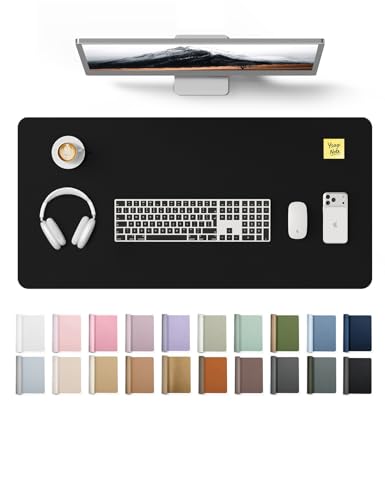
Pros
- Large surface for mouse and writing
- Wipe-clean PU leather
- Suede-style non-slip backing
Cons
- Large footprint may not suit compact desks
- Who should skip it: anyone needing a compact pad

Pros
- Water-resistant, wipe-clean surface
- Suede-style non-slip backing
- Useful for writing and mouse use
Cons
- Who should skip it: users needing a larger desk mat

Pros
- Large surface for common desk items
- Water-resistant PU leather
- Smooth writing and mouse surface
- Suede-style non-slip backing
Cons
- Who should skip it: users with limited desk space

Pros
- Large 35 x 17-inch work surface
- Waterproof, scratch-resistant surface
- Non-slip suede base
- Soft cushioning and cable organizer
Cons
- Who should skip it: people with limited desk space

Pros
- Room for keyboard, laptop, and mouse
- Soft surface for writing and typing
- Natural rubber non-slip base
Cons
- Absorbs water rather than repelling it
- Who should skip it: anyone needing a spill-resistant mat

Pros
- Broad surface for multiple desk tasks
- Waterproof and oil-proof surface
- Wipe-clean care
Cons
- Who should skip it: users with limited desk width
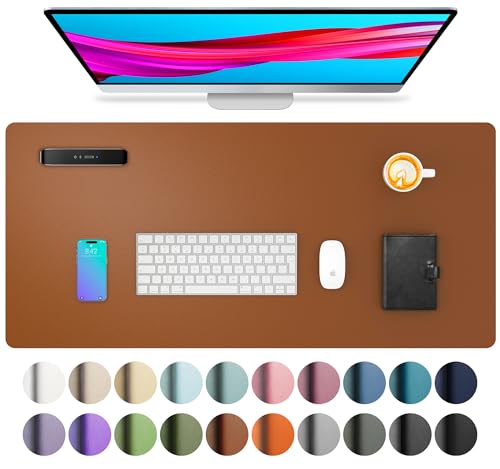
Pros
- Fits a laptop, mouse, and keyboard
- Water-resistant, wipe-clean surface
- Suede-style non-slip backing
Cons
- Who should skip it: users needing a larger writing surface

Pros
- Room for laptop, keyboard, and mouse
- Water-resistant, wipe-clean surface
- Suede-style non-slip backing
Cons
- Skip if you need a larger full-desk surface

Pros
- Large mouse and writing surface
- Waterproof, wipe-clean surface
- Suede backing designed for grip
- Light pink color
Cons
- Who should skip it: anyone needing more than 23.6 by 13.8 inches
- No material certification is specified
The Best Desk Mats by Use Case
Best for a Spacious Work Surface: YSAGi Leather Desk Protector, Office Mat
The YSAGi Leather Desk Protector, Office Mat measures 31.5 by 15.8 inches, giving you room for a laptop, keyboard, and mouse without taking up the area of an extra-wide desk pad. Its PU leather surface is listed as water-resistant and easy to wipe clean, and the suede backing is designed to resist sliding. The listing also describes the surface as suitable for writing and everyday mouse use, making this a practical choice for a mixed work setup. Compare desk accessories with a USB-C dock for two laptops if your workspace also needs help managing multiple computers.
Reasons to buy:
- The 31.5-by-15.8-inch surface offers more coverage than the compact mats in this comparison.
- PU leather provides a smooth area for writing, typing, and mouse movement.
- The listing specifies a suede back and a one-year warranty.
Reasons to avoid:
- PU leather does not offer the soft, absorbent feel of a felt mat.
- Check available color and size options before ordering, since the listing describes multiple variants.
Skip it if you want a felt surface or need a compact pad that leaves most of your desktop uncovered.
Best for Cable Organization: Nordik Leather Desk Mat – Pebble Black
The Nordik Leather Desk Mat – Pebble Black pairs a 35-by-17-inch PU leather surface with a listed cable organizer, a useful detail if a charging cord tends to drift across your work area. The listing describes a non-slip suede base, waterproof and scratch-resistant surface, and soft cushioning intended to support wrists and forearms. Its larger footprint suits a laptop-centered workspace with room for accessories, but you should measure your desk before choosing it.
Reasons to buy:
- The included cable organizer addresses cord placement, a feature not specified for the other mats here.
- The 35-by-17-inch size can cover a broad work area.
- The listing specifies a suede base and a waterproof surface.
Reasons to avoid:
- The larger footprint may crowd a shallow or narrow desk.
- The listing does not give the cable organizer’s exact capacity or placement details, so verify that it suits your cords.
Skip it if you have limited desk space or do not need a cable organizer.
Best for a Soft Desk Surface: DAWNTREES Felt Desk Mat, Computer Mat for Desk
The DAWNTREES Felt Desk Mat, Computer Mat for Desk uses a 36-by-12-inch felt surface with a natural rubber non-slip base. The listing says the mat can accommodate a laptop, keyboard, and mouse, and describes felt as a comfortable surface for typing, writing, or gaming. It also claims the dense felt structure absorbs keyboard and mouse-click noise, though no measured noise reduction is supplied. Felt can absorb water, so this option makes more sense for a desk where spills are uncommon.
Reasons to buy:
- The soft felt surface differs from the smooth PU leather options.
- The 36-by-12-inch layout gives keyboard and mouse a shared area.
- The listing specifies a natural rubber non-slip base and says debris can be brushed away.
Reasons to avoid:
Reasons to avoid:
- Felt absorbs water, so it is less suited to a workspace where drinks may spill.
- The 12-inch width may not provide enough front-to-back coverage for every keyboard and mouse arrangement.
Skip it if easy wipe-clean spill protection matters more than a soft felt surface.
Best for a Compact Desk: Aothia Leather Desk Pad Protector, Mouse Pad
The Aothia Leather Desk Pad Protector, Mouse Pad measures 23.6 by 13.7 inches, a more compact choice for a smaller desk or a setup that needs room for other items. Its PU leather surface is listed as water-resistant and easy to wipe, and the suede backing is designed to increase grip against the desktop. The size is described as large enough for a laptop, mouse, and keyboard, though actual fit depends on your equipment’s footprint.
Reasons to buy:
- The compact dimensions suit desks where an extended mat would take up too much room.
- The wipe-clean surface can protect a desktop from common spills and marks.
- The listing specifies a one-year warranty.
Reasons to avoid:
Reasons to avoid:
- The smaller surface leaves less room for broad mouse movement or extra accessories.
- Measure your keyboard and laptop together before ordering; the stated capacity does not guarantee every combination will fit comfortably.
Skip it if you want one mat to cover a wide keyboard-and-mouse area.
Best for a Wide PU Leather Layout: Aothia Leather Office Desk Pad Protector
The Aothia Leather Office Desk Pad Protector measures 31.5 by 15.7 inches, providing a longer work surface than Aothia’s compact pad while retaining its wipeable PU leather design. The listing describes the surface as suitable for a laptop, keyboard, mouse, and writing, with a suede back intended to prevent slipping. This format can suit a home office where you want a single surface beneath several everyday items, but it does not include the cable organizer specified for the Nordik mat.
Reasons to buy:
- The 31.5-by-15.7-inch dimensions provide extended coverage for a common computer setup.
- The PU leather surface is listed as water-resistant and easy to clean with a damp cloth.
- The listing specifies a one-year warranty.
Reasons to avoid:
Reasons to avoid:
- It takes up more desk area than the 23.6-by-13.7-inch Aothia option.
- The listing does not specify a cable organizer or felt-like surface.
Skip it if you have a small desktop or prefer a soft fabric mat.
Also Considered
The YSAGi Leather Desk Protector, Office Mat could suit shoppers who want the listed light pink color and a 23.6-by-13.8-inch size; it missed the main list because its size and general PU leather features overlap with other compact options. The Aothia Leather Desk Pad Protector in jungle green offers a compact 23.6-by-13.7-inch format, but its listed features closely match the other small Aothia mat. The Aothia Non-Slip Waterproof PU Leather Desk Pad may suit buyers who want the same compact dimensions in black, though its listed features overlap with the Aothia compact pick. The AFIING Large Desk Mat, 47" x 17",Black,Leather could interest buyers seeking a particularly broad mat, but its product data gives conflicting size information, so verify the exact variant dimensions before buying.
How to Choose the Best Desk Mat
Measure the usable desktop area
Start with the open space you can dedicate to a mat, not the desk’s full width. Measure the area from front to back and side to side, then account for monitor stands, desk edges, and objects that need to remain outside the mat. The 23.6-by-13.7-inch Aothia pad is a compact option, while the 35-by-17-inch Nordik mat needs substantially more room. If you want space for a keyboard and wide mouse movement, check both dimensions rather than relying on a listing’s general claim that a mat is large.
Match material to your work habits
PU leather is the practical choice if you want a smooth surface that the listings describe as water-resistant and easy to wipe clean. It can also serve as a writing area, but it will not have the soft feel of felt. The DAWNTREES felt mat offers a softer surface, and its listing describes a brushed cleaning method, but felt absorbs water. If drinks sit near your keyboard, that difference may matter more than appearance.
Check the backing and desk surface
A mat that shifts can interrupt mouse movement and leave parts of the desktop exposed. The PU leather listings describe suede backing intended to increase friction, while DAWNTREES specifies a natural rubber base. These are product descriptions, not a guarantee of grip on every desk finish. Review the listing’s backing details and check the return terms if your desktop has an unusual texture or surface treatment.
Consider cleaning and spill exposure
For frequent coffee or water spills, the PU leather options are listed as water-resistant and suitable for wiping with a cloth. That does not mean you should leave liquid on the mat or assume it is fully waterproof under every condition. Felt can absorb water, according to its listing, so it may need more attention after a spill. Consider where you keep drinks and how much routine cleaning you want to do.
Look for extras you will use
Extra features should solve a real desk problem. The Nordik listing specifies a cable organizer, which could help keep a cord in a preferred spot; confirm its design and suitability for your cables in the product details. The AFIING listing describes natural cork and PU leather, but gives several possible sizes despite its short name showing one size. Verify the exact variant before ordering, especially if your desk has limited clearance.
How We Compared
This comparison uses the published product listings, including stated dimensions, materials, backing, cleaning guidance, and design features. We considered how those details relate to common desk setups, such as compact work areas, wider keyboard-and-mouse layouts, and desks where spill cleanup matters. Customer feedback was not supplied in usable form, so the recommendations rely on listed product information rather than claims about recurring owner experiences.
Frequently Asked Questions
Will a desk mat work with any mouse?
The published listings describe these mats as suitable for mouse use, but they do not identify particular mouse models or sensor requirements. Check the surface details and your mouse maker’s guidance if your mouse has unusual tracking needs. A larger mat also gives you more room to move the mouse without reaching the desktop.
Is PU leather or felt easier to clean?
The PU leather mats are listed as wipe-clean, often with a damp cloth, which can be convenient for everyday dust and spills. The DAWNTREES felt listing recommends brushing away debris and notes that felt absorbs water. Choose based on the messes you expect and follow the care directions for the specific mat.
How large should a desk mat be?
Choose dimensions that fit your keyboard, mouse, and other items while leaving room for anything that needs to sit directly on the desk. Measure the available area and compare it with the mat’s stated width and depth. A compact pad can work well for a laptop setup, while a longer mat may suit a keyboard and mouse placed side by side.
Can I write directly on these desk mats?
The PU leather listings describe their surfaces as suitable for writing, and the DAWNTREES listing also names writing as a use. The published details do not specify how each surface performs with every pen or paper type. If writing directly on the mat is important, check the product details and consider using a notebook or writing pad for ink-heavy work.
Will the mat stay in place on my desk?
Several listings specify suede backing, and DAWNTREES specifies a natural rubber base, both described as non-slip designs. Actual grip can depend on the desk surface and whether the mat lies flat. Check that the backing matches your needs, and allow for any rolled mat to settle according to its product directions.






Write Your Review
No reviews yet. Be the first to share your experience!