

A braided jacket can help a cable handle daily handling, but it does not tell you how much power it supports or whether it can carry video. This guide to the best braided USB-C cable compares charging ratings, lengths, pack sizes, and stated data or display limits so you can choose one that fits your devices and charging routine.

Pros
- Two cables included
- 10-foot length
- Braided construction
Cons
- No video output
- Skip if you need USB-C video output

Pros
- Up to 240W charging support
- Six-foot length
- USB-IF certified
- Recycled braided exterior
Cons
- Does not support screen mirroring
- Skip if you need screen mirroring
Pros
- Long 10-foot cable
- Up to 240W charging rating
- USB-IF certified
- Braided exterior uses recycled materials
Cons
- No screen mirroring; skip if you need display output

Pros
- Three cables included
- Long 10-foot length
- Nylon-braided design
- Power Delivery up to 60W
Cons
- No Lightning or USB-A connection
- Does not support media display
- Skip if you need Lightning, USB-A, or display support

Pros
- Two cables included
- 6-foot length
- Up to 60W Power Delivery
- Hook-and-loop cable ties included
Cons
- Who should skip it: Lightning-device or USB-A-charger owners
- Does not support media display

Pros
- Two cables included
- 10-foot length
- Supports up to 100W charging
- Nylon exterior
Cons
- Does not support video output
- Skip it if you need USB-C video output

Pros
- Two 6.6-foot cables
- Up to 240W charging support
- Nylon-braided covering
- LED indicator
Cons
- Fast charging requires a suitably powered USB-C charger
- Skip it if you need a cable longer than 6.6 feet

Pros
- Up to 240W charging support
- Six-foot cable length
- Recycled braided outer layer
- Manufacturer-stated bend durability
Cons
- USB 2.0, no screen mirroring
- Skip it if you need screen mirroring
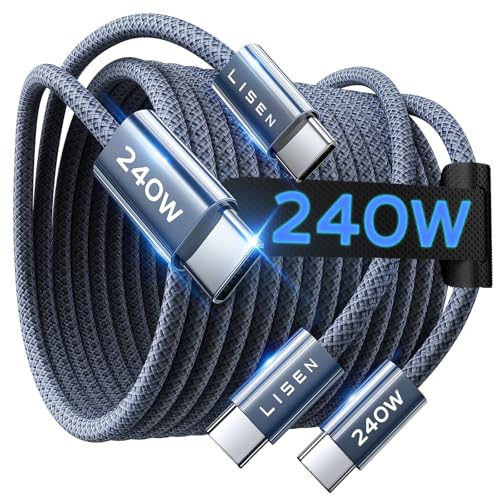
Pros
- Two cables included
- 6.6-foot length per cable
- Up to 240W charging support
- Braided cable construction
Cons
- USB-C connectors only, no USB-A
- Who should skip it: anyone needing USB-A connectivity

Pros
- Up to 240W charging support
- Two 6.6-foot cables
- Nylon-braided construction
- LED indicator
Cons
- Full 240W requires a compatible charger
- Who should skip it: users needing USB-A connectors
The Best Braided USB-C Cables by Use Case
Best for High-Wattage Charging: Anker Nano USB C to USB C Cable
The 6-foot Anker Nano USB C to USB C Cable supports charging up to 240W, making it a flexible option for people who use one cable with both phones and higher-power USB-C laptops. Anker specifies a USB-IF-certified cable with a braided exterior made from post-consumer recycled materials, a 30,000-plus bend lifespan, and no screen-mirroring support. The shorter length is easier to manage at a desk or bedside than a 10-foot cord.
Reasons to buy:
- 240W charging rating supports compatible high-power USB-C charging setups.
- Six-foot length offers useful reach without the extra slack of a longer cable.
- Listing includes a silicone cord organizer and a 24-month warranty.
Reasons to avoid:
- It does not support screen mirroring, so choose a cable with confirmed video support if you need display output.
- 240W capability does not make a device charge at 240W; charger and device limits still apply.
Skip it if you need a cable for video output or want a longer reach across a room.
Best for Long-Reach Laptop Charging: Anker USB C to USB C Cable
The 10-foot, two-pack Anker USB C to USB C Cable supports charging up to 100W when paired with a compatible charger. That length can help when a wall outlet is far from a desk or sofa, while the two-cable pack lets you keep a spare in another room. Anker specifies a nylon exterior and a 5,000-bend lifespan, and states that this cable does not support video output.
Reasons to buy:
- Ten-foot length suits setups where a standard short cable cannot reach comfortably.
- Two cables provide a spare or let you set up separate charging spots.
- Up to 100W charging supports compatible phones, tablets, and laptops.
Reasons to avoid:
- The 5,000-bend rating is lower than the bend-life figures listed for several higher-rated alternatives.
- It cannot carry video output, according to the product listing.
Skip it if you need a cable for an external monitor or want a higher stated bend-life figure.
Best Value: SwaggWood 60W USB C to USB C Cable 10ft 3 Pack
The SwaggWood 60W USB C to USB C Cable 10ft 3 Pack offers three 10-foot braided USB-C-to-USB-C cords for charging locations around a home or office. Its listed 60W Power Delivery rating suits compatible phones and tablets, as well as devices that charge within that power limit. The listing says the cables do not support media display and do not connect to USB-A chargers or Lightning ports.
Reasons to buy:
- Three long cables make it practical to place one at several charging spots.
- 60W Power Delivery is suitable for many everyday USB-C charging needs.
- Nylon braiding is specified as part of the cable design.
Reasons to avoid:
- 60W is below the 100W and 240W ratings of higher-capacity choices in this guide.
- No media display support; the cable also needs USB-C ports at both ends.
Skip it if your laptop needs more than 60W or you plan to connect a USB-A charger or Lightning device.
Best for Everyday Two-Cable Charging: Anker USB C to USB C Cable
The 6-foot, two-pack Anker USB C to USB C Cable is a straightforward choice for charging compatible phones, tablets, and laptops at up to 60W. Anker lists a reinforced nylon exterior, a 5,000-bend lifespan, and data transfer up to 480Mbps. The two cables include hook-and-loop ties, but the listing says they do not support media display.
Reasons to buy:
- Two 6-foot cables suit common desk, bedside, and travel charging setups.
- 480Mbps data transfer is specified for moving files between compatible devices.
- Included ties help keep spare cable length organized.
Reasons to avoid:
- The 60W limit may not meet the charging needs of some higher-power laptops.
- It does not support display output.
Skip it if your laptop needs more than 60W or you want to connect a USB-C display.
Best for Stated Long-Term Flexibility: Anker Prime USB C to USB C Cable
The 6-foot Anker Prime USB C to USB C Cable combines a listed 240W charging capacity with a USB 2.0 connection. Anker specifies more than 300,000 bends and an outer layer made from post-consumer recycled materials. The listing also says it does not support screen mirroring, so its high power rating should not be mistaken for video capability.
Reasons to buy:
- 240W rating accommodates compatible high-power USB-C charging equipment.
- The stated bend-life figure is higher than those listed for the other picks here.
- Six-foot length works for common desk and bedside arrangements.
Reasons to avoid:
- USB 2.0 and lack of screen mirroring make this a charging-focused choice, not a high-speed display cable.
- The listing’s extreme-temperature claims do not establish that connected devices can operate in those conditions.
Skip it if you need video output or faster data transfer than the listed USB 2.0 connection provides.
Also Considered
The USBC to USBC 100W [10ft/2 Pack] may suit buyers seeking two long 100W cables, but its listing says it does not support video output.
The Anker Nano USB C to USB C Cable is the 10-foot version of Anker’s 240W Nano cable; consider it when extra reach matters more than a shorter, easier-to-manage cord.
The INIU 240W USB C to USB C Cable, [6.6ft+6.6ft] includes two 6.6-foot cables and an LED indicator, but the listing provides less detail about data speed and display support.
The LISEN USB C to USB C Cable is a two-pack rated up to 240W with listed 480Mbps data transfer; verify its USB-C-only connectors and display needs before choosing it.
The INIU 240W USB C to USB C Cable, [6.6ft+6.6ft] offers two cables and a stated 240W rating, but its listing does not specify data speed or video output.
How to Choose a Braided USB-C Cable
Match the wattage to your device and charger
Check the maximum charging power your device accepts and the output rating of your USB-C charger. The cable, charger, and device all affect the charging rate; a 240W cable cannot make a phone draw 240W if the phone or charger supports less. A 60W option such as the SwaggWood or Anker two-pack may fit everyday devices, while a 100W or 240W cable gives more headroom for compatible laptops.
Look for a stated Power Delivery rating and, for higher-wattage cables, confirm the listing describes support for the charging setup you intend to use. Product claims about charging percentages are manufacturer statements, not guarantees for every charger, device, battery level, or use pattern.
Choose length for the outlet location
A 6-foot cable usually leaves less slack on a desk, while a 10-foot cable can reach a sofa or a more distant outlet. Longer cords can be harder to keep tidy, so consider where the cable will sit and whether you will carry it in a bag. Multi-packs are useful when you have several charging locations, but compare each cable’s length and rating rather than assuming every product in a category uses the same configuration.
Separate charging, data, and video needs
USB-C describes the connector shape, not a guarantee of identical data speed or video support. Several listings explicitly rule out screen mirroring or media display. If you want to connect a monitor, check for an explicit video-output specification; a high wattage rating alone does not indicate that capability.
For file transfers, look for a stated data rate. The Anker 60W two-pack lists 480Mbps, while the Anker Prime listing identifies USB 2.0. If the listing does not clarify data or display support, confirm those details with the seller or manufacturer before buying.
Check both connector ends and device compatibility
The products in this guide are USB-C-to-USB-C cables. They need USB-C ports at both ends, so they will not plug directly into a USB-A charger or a Lightning port. If your charger has a different connector, choose a cable with the correct ends rather than relying on an adapter unless the adapter is suitable for your charging needs.
For a broader look at connector types and everyday use, see our USB-C cable comparison. If a device has specific charging requirements, check its documentation and charger rating before selecting a cable.
Read durability and warranty details as claims
Braided jackets and bend-life figures can help you compare how manufacturers describe cable construction, but they do not guarantee how a cable will hold up in every household. Notice whether the product specifies a bend count, included organizer, and warranty, then consider how often you unplug, coil, or transport the cable. Anker lists a 24-month warranty for its Nano cable and an everlasting warranty for its Prime cable; confirm the applicable terms before purchase.
Also consider pack size. One cable may be simpler for travel, while a two- or three-pack can reduce the need to move cords between rooms. Choose the arrangement that suits your routine rather than paying for lengths or extras you will not use.
How We Compared
This comparison uses the published product listings, including stated charging ratings, lengths, pack quantities, data and display notes, construction details, included accessories, and warranty information. Manufacturer performance and durability statements are presented as listing claims, not as independently verified outcomes. The recommendations focus on matching those stated features to distinct needs, while noting missing or limited compatibility information where it affects a buying decision.
Frequently Asked Questions
Can any USB-C cable charge any USB-C device?
Not necessarily. The connector may fit, but supported charging power varies by cable, charger, and device. Check that both ends match your ports and that the cable’s stated rating meets your device’s needs. A cable rated for more power can work with a lower-power device, but it will not increase that device’s charging limit.
Does a 240W cable charge every device faster?
No. A 240W rating describes the cable’s stated capacity, not the power every connected device will draw. The charger and device must also support the relevant charging mode and power level. For phones and tablets with lower limits, a 240W cable may offer extra compatibility headroom without changing their maximum charging rate.
Can these braided USB-C cables connect a laptop to a monitor?
Do not assume so. Several products in this comparison explicitly do not support video output or screen mirroring. Check the cable listing for explicit display support and confirm that the laptop and monitor ports also support video over USB-C.
Is 480Mbps fast enough for file transfers?
It can suit basic transfers, but it is not the same as a cable marketed for faster data links. The listed 480Mbps figure appears on the Anker 60W cable and the LISEN listing. If you regularly move large files, check the exact data specification for the cable and both devices before choosing.
Will a USB-C-to-USB-C cable work with a USB-A charger?
No, not directly. Both ends of these products are USB-C, so the charger also needs a USB-C port. The SwaggWood listing specifically notes that it does not work with USB-A chargers. If your existing charger has USB-A output, choose a cable with a USB-A end instead.
Does braided construction guarantee a longer-lasting cable?
No. Braiding describes the outer jacket, while lifespan depends on the cable’s construction and how it is handled. Listings provide different bend-life claims, but those figures should be treated as manufacturer specifications rather than a guarantee for your use. Avoid sharp bends, crushing, and pulling by the cord when practical.






Write Your Review
No reviews yet. Be the first to share your experience!