

Finding a gaming mouse that feels manageable in a smaller hand is not as simple as comparing DPI or button counts. The published listings give limited measurements, so this guide weighs documented shape, controls, connection options, and intended use, and points out where you should verify fit before buying.
These options range from conventional gaming mice with many programmable controls to vertical designs intended for a handshake-style grip. The best gaming mouse for small hands depends on whether you prioritize a compact-feeling shape, wireless play, comfort-oriented posture, or quick access to game commands.

Pros
- Three connection modes
- Twelve programmable buttons
- Five-direction thumb rocker
- Onboard storage for button settings
Cons
- Right-handed shape excludes left-handed users
- Button customization requires software
- Who should skip it: left-handed users or anyone avoiding software setup

Pros
- 11 programmable buttons
- Switchable scroll wheel modes
- Customizable 11-zone RGB lighting
- Thumb rest and ergonomic shape
Cons
- Skip it if you need wireless connectivity

Pros
- Three selectable DPI settings
- Dedicated next and previous buttons
- USB receiver stores in mouse
Cons
- Requires two AAA batteries, not included
- Uses 2.4 GHz USB receiver, not Bluetooth
- Who should skip it: left-handed users or Bluetooth-only setups

Pros
- Nine programmable controls
- HyperSpeed and Bluetooth connectivity
- Up to 535 hours on Bluetooth
- Gen-2 mechanical switches
Cons
- Battery life varies with usage
- Who should skip it: buyers needing a stated polling rate
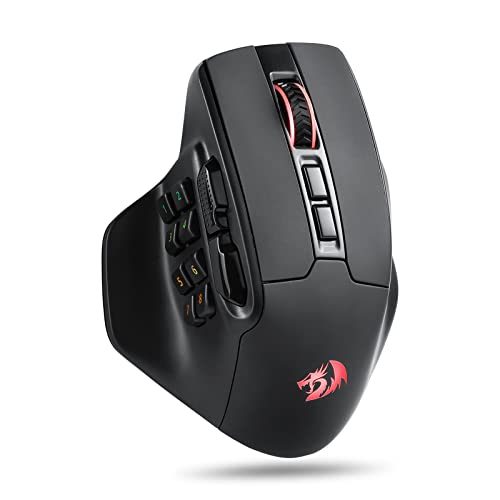
Pros
- Fifteen programmable buttons
- DPI adjustable from 100 to 26,000
- 2.4 GHz wireless connection
- Customizable RGB lighting
Cons
- Skip it if you prefer a simpler button layout
- Button and lighting customization requires Redragon software
The Best Gaming Mice by Use Case
Best for Adjustable Vertical Controls: Attoe Gaming Mouse with 5 D Rocker
The Attoe is a vertical gaming mouse with a five-direction thumb rocker and 12 programmable buttons. Its listing says the contoured shape accommodates small to large hands, making it the clearest fit claim in this group for buyers who want a vertical shape. It connects over Bluetooth 5.0, 2.4GHz wireless, or USB-C wired, but the listing does not provide dimensions, so check its shape carefully if you have especially small hands. Attoe Gaming Mouse with 5 D Rocker
Reasons to buy:
- Listing explicitly describes the contoured shape as suitable for small to large hands.
- Five-direction rocker adds thumb-operated directional inputs for compatible games.
- Tri-mode connectivity and 12 programmable buttons support varied setups.
Reasons to avoid:
- The vertical grip and rocker may feel unfamiliar if you prefer a conventional mouse.
- Confirm operating-system and software support for your setup; the listing describes attached configuration software but does not specify platform coverage.
Skip it if you want a traditional low-profile shape or need published dimensions before choosing a mouse.
Best for Wired Gaming and Scroll Control: Razer Basilisk V3 Customizable RGB Wired Ergonomic
The Razer Basilisk V3 is a wired ergonomic gaming mouse with a thumb rest, 11 programmable buttons, and a tilt wheel that switches between free-spin and tactile modes. Those controls may suit players who use macros or switch weapons and skills frequently. Its listing does not give dimensions or describe a small-hand fit, so treat its ergonomic form as a feature to assess rather than proof that it will fit you. Razer Basilisk V3 Customizable RGB Wired Ergonomic
Reasons to buy:
- Eleven programmable buttons provide options for macros and secondary commands.
- HyperScroll tilt wheel offers free-spin and tactile scrolling modes.
- Wired connection avoids needing to manage a mouse battery.
Reasons to avoid:
- The listing provides no dimensions, so buyers with small hands should check the shape before purchase.
- Wired operation may not suit a setup where cable-free movement is a priority.
Skip it if you need a documented compact size or specifically want wireless play.
Best for Wireless Gaming and Multi-Device Use: Razer Basilisk V3 X HyperSpeed Customizable
The Razer Basilisk V3 X HyperSpeed Customizable pairs a familiar ergonomic form with nine customizable controls and a choice of Razer HyperSpeed wireless or Bluetooth. The listing specifies up to 285 hours on HyperSpeed and up to 535 hours on Bluetooth, with actual battery life varying by use. This model has no published dimensions or explicit small-hand fit claim, so confirm its shape and button reach before choosing it for a smaller grip. Razer Basilisk V3 X HyperSpeed Customizable
Reasons to buy:
- HyperSpeed wireless and Bluetooth provide two connection options.
- Nine customizable controls support game commands and macros.
- The listed battery-life figures distinguish wireless and Bluetooth use.
Reasons to avoid:
- Battery life is a manufacturer-listed maximum and may vary with use.
- The listing does not establish that the ergonomic shape suits small hands.
Skip it if you prefer a wired mouse or cannot verify that its shape fits your grip.
Best for MMO-Style Keybinds: Redragon M811 PRO Wireless RGB Gaming Mouse 26K
The Redragon M811 PRO Wireless RGB Gaming Mouse 26K is designed around extensive button customization, with 15 programmable buttons and a 2.4GHz wireless connection. Its listing describes two plus eight side buttons, which may help players who rely on many hotkeys in MMO games or work. The listing does not provide dimensions or a specific small-hand fit claim, so check whether you can comfortably reach its side controls before choosing it. Redragon M811 PRO Wireless RGB Gaming Mouse 26K
Reasons to buy:
- Fifteen programmable buttons allow extensive keybind customization.
- Five listed DPI presets range from 1,000 to 26,000 DPI.
- Dedicated software supports button, hotkey, media, DPI, and lighting customization.
Reasons to avoid:
- The many side buttons may be difficult to reach if your thumb span is limited.
- The published listing specifies 2.4GHz wireless, not Bluetooth or wired modes.
Skip it if you want a simple layout with few side buttons or need a listed compact size.
Best for a Vertical Work-and-Play Grip: Anker 2.4G Wireless Ergonomic Mouse
The Anker 2.4G Wireless Ergonomic Mouse is a right-handed vertical mouse with five buttons and a USB receiver. Its listed dimensions are 120 × 62.8 × 74.8 mm, useful information for checking fit against your hand and desk space. It is better suited to casual play and general computer use than games that depend on high sensitivity, since its listed DPI settings are 800, 1,200, and 1,600. Anker 2.4G Wireless Ergonomic Mouse
Reasons to buy:
- Published dimensions let you compare the mouse with your preferred size.
- Vertical shape is designed to promote a neutral handshake-style wrist and arm position.
- Three listed DPI settings cover basic pointer-speed adjustments.
Reasons to avoid:
- It connects through a 2.4GHz USB receiver and is not Bluetooth-compatible, according to the listing.
- Its five buttons and maximum listed 1,600 DPI offer less gaming customization than the other picks.
Skip it if you need numerous game macros, a Bluetooth connection, or higher listed DPI settings.
How to Choose the Best Gaming Mouse for Small Hands
Check dimensions and reachable controls
Hand size alone does not establish whether a mouse will feel comfortable. Length, height, width, thumb-rest shape, and button placement all affect how far you must stretch. Of these options, the Anker listing provides dimensions; the Attoe listing makes a small-to-large-hand fit claim but does not provide measurements. For the other models, look for manufacturer dimensions and shape images, then compare them with a mouse you already use comfortably. Check whether your fingers rest naturally on the main buttons and whether your thumb can reach side controls without shifting your grip.
Match the shape to your grip and task
Vertical mice use a different hand position from conventional gaming mice. Attoe and Anker are vertical; the Razer and Redragon listings describe ergonomic or natural-grip shapes without stating that they are designed specifically for small hands. A vertical design may be appealing if you want a handshake-style posture, but it changes how you move and aim. If precise, familiar movement matters most, consider a conventional shape and verify its dimensions before ordering.
Choose DPI settings for your games, not the largest number
DPI describes how sensitively the pointer responds to mouse movement. A high maximum gives you a wider adjustment range, but it does not prove better aim or performance. The Attoe listing identifies five presets from 1,600 to 24,000 DPI, the Redragon listing gives five defaults from 1,000 to 26,000 DPI, and the Anker tops out at 1,600 DPI. Compare the available settings and software controls with your preferred sensitivity. A player who uses consistent, low sensitivity may care more about comfortable movement and dependable button placement than a very high maximum.
Decide how many buttons you can use
Extra programmable buttons help when you regularly use macros, push-to-talk, weapon changes, or MMO hotkeys. They can also be awkward if your thumb cannot reach them easily. The Redragon offers 15 programmable buttons, Attoe offers 12, the wired Basilisk V3 offers 11, and the wireless Basilisk V3 X offers nine. Anker has five buttons, including next and previous buttons described for browsing. Choose controls you can reach naturally, and check whether the software supports the assignments you need.
Check connection type and software details
A wired mouse avoids wireless battery management, while wireless models can reduce cable clutter. Attoe lists Bluetooth, 2.4GHz wireless, and USB-C wired connections. The Razer Basilisk V3 X lists HyperSpeed wireless and Bluetooth, Redragon lists 2.4GHz wireless, and Anker uses a 2.4GHz USB receiver, not Bluetooth. Confirm that your computer has a suitable connection and that the mouse software supports your operating system. Attoe and Redragon both describe dedicated software, but the published information does not specify every compatible platform.
How We Compared
This comparison uses the published product listings, including stated shape, dimensions where provided, connection types, DPI options, buttons, battery-life claims, and software details. We considered each model for a distinct use case and treated manufacturer fit and battery claims as listing statements, not independently verified results. Customer rating figures were supplied without review text, so they do not support conclusions about recurring owner experiences.
Frequently Asked Questions
How can I tell whether a gaming mouse will fit small hands?
Start with the product’s length, width, and height, then compare those measurements with a mouse that already feels comfortable. Also check button reach and thumb-rest placement. Only Anker supplies dimensions among these five listings, while Attoe explicitly describes its shape as suitable for small to large hands.
Are vertical mice suitable for gaming?
They can suit casual play or games where a vertical grip and programmable controls fit your preferences. The Attoe model includes a five-direction rocker and 12 programmable buttons, while Anker has five buttons and lower listed DPI settings. A vertical grip feels different from a conventional gaming mouse, so consider whether that movement suits the games you play.
Which of these mice connects over Bluetooth?
Attoe lists Bluetooth 5.0, and the Razer Basilisk V3 X lists Bluetooth alongside HyperSpeed wireless. Anker uses a 2.4GHz USB receiver and is not Bluetooth-compatible according to its listing. The supplied Redragon information specifies 2.4GHz wireless, while the wired Basilisk V3 uses a cable.
Does higher DPI make a mouse better for gaming?
No. A higher maximum DPI offers more sensitivity choices, but it does not by itself establish better control or accuracy. Match the available settings to your preferred pointer speed and game, and consider shape, button placement, and connection type too.
Do programmable buttons work without installing software?
That depends on the model and what you want to customize. Attoe says programmed data is saved on the mouse, and Redragon describes software for assigning controls and lighting. The listings do not establish identical software behavior across operating systems, so check platform support and setup instructions before buying.



Write Your Review
No reviews yet. Be the first to share your experience!