

Smart glasses listings can blur an important distinction: camera-equipped glasses do not necessarily have a display that puts images or text in front of your eyes. This guide compares three camera-and-audio models and explains what their listed features do, and do not, tell you about display capability.
Use the comparison to match recording resolution, lens type, translation features, battery claims, and phone connectivity to your routine. If you mean glasses with a visual screen or heads-up display, verify that feature directly before buying: none of the published listings specifies one.

Pros
- Hands-free 1080p video with electronic anti-shake technology
- Real-time two-way translation across over 100 languages
- Open-ear Bluetooth 5.4 audio preserves environmental awareness
- Two-hour recharge time using standard Type-C cable
Cons
- Photochromic lenses transition slowly in low ultraviolet lighting
- Users wanting rapid indoor tint clearing should skip it

Pros
- Hands-free 4K video recording with stabilization
- Open-ear speakers maintain situational environmental awareness
- Multi-language real-time translation features without subscription fees
- Includes both sun and anti-blue light lenses
Cons
- Video recording limited to eighty minutes per charge
- Who should skip: long-session videographers needing hours of continuous recording

Pros
- Lightweight 35g frame with three swappable lenses
- Six-axis electronic image stabilization for video
- IP65 water resistance against sweat and light rain
- Dual-microphone noise cancellation for calls
Cons
- Video recording capped at 12 minutes per session
- Limited internal storage of 4GB without card expansion
- Skip if you need continuous long-format video recording
The Best Smart Glasses by Use Case
Best for Adaptive Lenses: AI Smart Glasses with camera
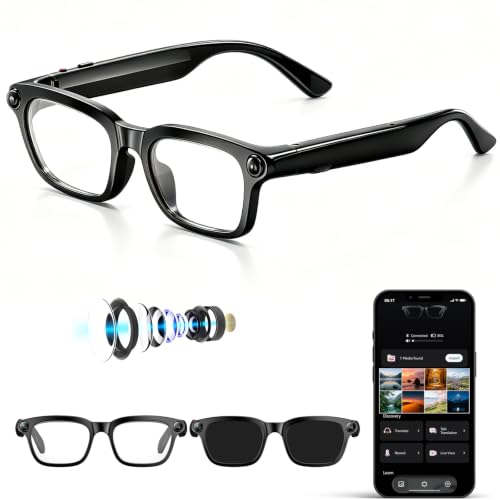
The Osawalla AI Smart Glasses with camera suit people who move between indoor and outdoor settings and want lenses that respond to ultraviolet light. The listing describes photochromic lenses, 1080P video with anti-shake technology, open-ear audio, and real-time translation in more than 100 languages. That feature mix favors everyday wear and travel, though the listing does not specify a visual display or state how quickly the lenses change in different conditions. Browse more Smart Glasses to compare this category with other designs.
Reasons to buy:
- Photochromic lenses adjust tint in response to UV changes, according to the listing.
- Bluetooth 5.4, touch controls, and open-ear speakers support calls and listening while walking or commuting.
- The listing specifies Type-C charging and a 300mAh battery, with a stated two-hour full charge.
Reasons to avoid:
- Video is listed as 1080P, not 4K video.
- The listing says photochromic tint changes more slowly where UV exposure is low, and does not give a video recording duration.
Skip it if you need a specified visual display, 4K video recording, or a confirmed recording runtime.
Best for Hands-Free Capture: iONCT AI Smart Glasses with Camera
The iONCT AI Smart Glasses with Camera are aimed at people who want first-person photos and clips without holding a phone. The listing specifies an 8MP IMX219 sensor, 32MP photos, 4K video, and electronic image stabilization (EIS), plus voice-activated capture. It also lists two lens types, one for sunglasses and one with blue-light filtering, giving buyers an option for different lighting and use settings. Those camera and lens claims do not establish that the glasses include an in-lens display.
Reasons to buy:
- Voice capture and a shutter button offer two listed ways to take photos.
- The listing states up to 80 minutes of total video recording or up to 10 hours of music playback on a full charge.
- Bluetooth 5.3 and Wi-Fi are listed for phone connectivity and file transfer.
Reasons to avoid:
- The listed video runtime is limited to 80 minutes total, so frequent recording may mean charging or managing clips carefully.
- Phone operating-system compatibility, storage capacity, and file-transfer details are not specified in the published information.
Skip it if you need longer stated video runtime, known built-in storage, or a confirmed visual display rather than a camera view captured to the glasses.
Best for Lens Swaps: AI Smart Glasses with POV Camera for 4K Photo
The Haulvean AI Smart Glasses with POV Camera for 4K Photo may fit buyers who want to change lens styles across work, travel, and outdoor use. Its listing includes three replaceable lenses: blue-light, sunglasses, and brown gradient. It also specifies 4K photo capture, 1200P HD video with six-axis EIS, 4GB built-in storage, and IP65-rated protection. The product description limits scheduled recording to up to 12 minutes, so check whether that fits the length of clips you plan to capture.
Reasons to buy:
- Three listed interchangeable lens options provide more flexibility than a single fixed lens type.
- The listing specifies 4GB of built-in storage and Wi-Fi file transfer.
- The stated 35g weight and IP65 rating may matter to buyers seeking a lightweight pair for everyday use; the rating does not mean protection from every kind of water exposure.
Reasons to avoid:
- The listing describes scheduled recording up to 12 minutes, a limit to confirm against your intended clips.
- It gives a 290mAh battery capacity but does not state recording or playback runtime.
Skip it if you need a stated all-day recording runtime or do not want to manage interchangeable lenses.
Best for Voice-First Travel: iONCT AI Smart Glasses with Camera
The iONCT AI Smart Glasses with Camera also suit travelers who value voice-led assistance and translation alongside camera capture. The listing claims translation support across more than 165 languages, object recognition, and an assistant activated with “Hey Star.” It describes several translation modes, including photo translation through the app and video-call translation. These are manufacturer-listed capabilities; the published information does not identify supported phone operating systems, app requirements, or whether features work offline.
Reasons to buy:
- The listing specifies more than 165 languages and multiple translation modes.
- Voice activation can request answers, weather information, and object recognition, according to the product description.
- Open-ear speakers allow calls and audio while leaving the ears uncovered.
Reasons to avoid:
- Translation depends on app and phone details that are not provided here, so verify device compatibility and connectivity needs before purchase.
- The product listing does not specify a visual display for translated text.
Skip it if you need offline translation, confirmed language performance, or a screen that displays translations in your field of view.
How to Choose Smart Glasses with Display Features
Confirm what “display” means
A camera, an AI assistant, and a phone app do not prove that glasses have a display in the lenses. None of these three published product descriptions specifies a heads-up display, waveguide, projected text, or visual screen. If you want navigation prompts, captions, or notifications visible without looking at your phone, check the product listing for those exact features and confirm where information appears. Do not treat a camera preview in an app as an in-glasses display.
This distinction affects the entire purchase. The models here are more accurately considered camera-equipped audio glasses with AI features, based on the available descriptions. For broader category context, see the VR and AR category.
Match capture quality and clip length to the task
Resolution labels describe different parts of the recording feature, not guaranteed real-world image quality. The iONCT listing specifies 4K video and 32MP photos; Haulvean specifies 4K photos and 1200P video; Osawalla specifies 1080P video. Do not compare those numbers as if they were identical measurements. Lens quality, lighting, stabilization, and the companion app may also affect results, but the published details do not establish how these glasses perform in those conditions.
Check recording limits before choosing. Haulvean lists scheduled clips up to 12 minutes, while iONCT states 80 minutes of total video recording on a full charge. Osawalla does not provide a recording runtime in the published information. For short first-person moments, those limits may be adequate; for long events, verify recording duration, storage, and how files transfer to your phone.
Choose lenses for your usual lighting
Lens options determine where a pair may be convenient, but they do not make every pair suitable for every setting. Haulvean lists three interchangeable lenses, including sunglasses, blue-light, and brown gradient options. iONCT lists a sunglass lens and a separate blue-light lens. Osawalla lists photochromic lenses that respond to UV changes, with a note that tint transitions more slowly in low-UV environments.
Consider whether you prefer swapping lenses, choosing one of two supplied lenses, or letting tint change with UV exposure. Ask the seller to clarify how lenses attach and what comes in the package if that detail matters, since the published descriptions do not provide a full accessory inventory. Check whether the listing gives any use restrictions relevant to your activities; do not assume camera glasses replace protective eyewear.
Check phone, app, and connection requirements
Camera transfer, AI recognition, and translation can depend on a phone app or an internet connection. The iONCT listing mentions Wi-Fi and Bluetooth 5.3 file syncing, and Haulvean lists Wi-Fi transfer and app controls. Osawalla lists Bluetooth 5.4 and touch controls. None of the published details confirms operating-system versions, supported phone models, offline functions, or account requirements.
Before buying, look for the companion app name, minimum phone requirements, and whether recording can happen without the phone nearby. A wireless connection label alone does not confirm compatibility or explain how quickly files transfer. If you rely on translation while traveling, verify whether it needs mobile data or Wi-Fi.
Compare battery claims and open-ear audio
Battery numbers are not directly comparable when listings describe different uses. iONCT gives separate playback and video-recording claims, while Haulvean states a 290mAh capacity without runtime. Osawalla specifies a 300mAh battery and a two-hour charging time, but not hours of use. Recording, calls, translation, and music may draw power differently, so consider which feature you will use most and check whether a listing gives runtime for that specific activity.
All three descriptions mention open-ear audio or speakers. That design lets you hear audio without sealing the ear, but it does not provide noise isolation, and nearby people may hear sound depending on volume and surroundings. For a commute, think about whether you need calls, music, or awareness of nearby sounds, and confirm how the glasses control volume and playback.
How We Compared
We compared the published product descriptions, listed specifications, lens choices, connectivity details, battery claims, and stated AI features. The published ratings show 4.6 out of 5 for each product, but each also has zero reviews listed in the provided data, so those figures do not offer a body of customer feedback to evaluate. Recommendations therefore focus on the stated features and note missing details that buyers should verify, including display capability, phone compatibility, and recording runtime.
Frequently Asked Questions
Do these smart glasses have a display in the lenses?
The published descriptions do not specify an in-lens screen or heads-up display for any of the three models. They describe cameras, audio, voice assistants, object recognition, and translation. If visual information in your field of view is essential, confirm that the exact model projects or shows content through the lenses before buying.
Can I use these glasses without a smartphone?
The provided details do not establish which features work independently of a phone. Haulvean lists built-in 4GB storage, but that alone does not confirm standalone AI, translation, or playback. The iONCT and Osawalla descriptions also do not state which functions require an app or phone connection. Check the product listing or ask the seller about offline recording, file access, and assistant requirements.
Which pair lists the most flexible lens options?
Haulvean lists three replaceable lenses: blue-light, sunglasses, and brown gradient. iONCT lists two lens types, while Osawalla lists photochromic lenses. The most useful choice depends on whether you prefer changing lenses, selecting between separate lenses, or using a tint that responds to UV exposure.
Which model is specified for 4K video?
The iONCT listing specifies 4K video recording. Haulvean specifies 4K photo capture and 1200P video, while Osawalla specifies 1080P video. These are listing claims and do not establish comparative image quality. Check whether you need high-resolution video, high-resolution still photos, or a stated clip duration.
Are open-ear smart glasses suitable for calls outdoors?
Each published description includes Bluetooth calling and open-ear audio, and iONCT and Haulvean mention dual-microphone ENC. These features indicate intended hands-free calling, but the published information does not provide independent call-quality results or wind-noise performance. Check microphone controls and return terms if outdoor calling is a main reason for buying.
Can I wear these glasses in rain?
Haulvean lists an IP65 rating and describes resistance to sweat and light rain. That rating should not be treated as protection from every kind of water exposure. The published descriptions do not list a water-resistance rating for iONCT or Osawalla, so verify the product guidance before exposing either pair to moisture.


Write Your Review
No reviews yet. Be the first to share your experience!