

Smart glasses can record from your point of view, play audio without covering your ears, or offer translation and voice assistance. But features vary: some models include cameras, some do not, and advertised video resolutions and battery claims are not directly comparable.
This guide to the best smart glasses with hands-free camera and audio compares listed features, phone-dependent functions, lens options, and stated recording limits. Use the picks to match glasses to your actual tasks, then verify app support and prescription compatibility before buying.
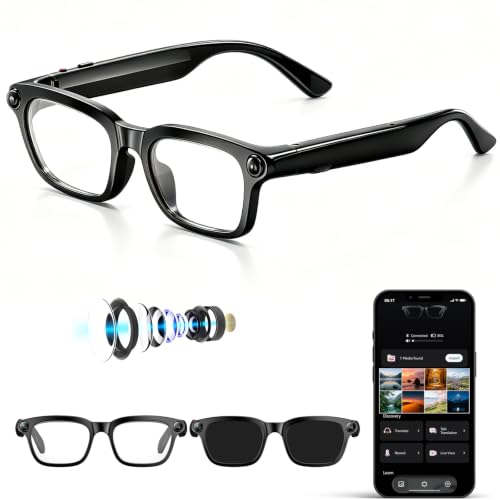
Pros
- Hands-free video and photo capture
- Open-ear Bluetooth audio
- Translation listed for 139 languages
- Includes clear and swappable sunglasses lenses
Cons
- Recording runtime and phone compatibility details are unspecified
- Who should skip it: buyers needing specified recording runtime

Pros
- Lightweight frame weighing only 0.1 pounds
- Up to ten hours of music playback
- Built-in multi-language translation and meeting transcription
- Lenses filter ultraviolet rays and blue light
Cons
- Lenses do not darken inside most vehicles
- No built-in camera for photos or video
- Both temples require charging before initial use

Pros
- Hands-free 4K video recording with electronic stabilization
- Open-ear audio keeps outdoor ambient sounds audible
- Adaptive photochromic lenses transition indoors to outdoors
- App-based translation supports over 100 languages
Cons
- Requires smartphone companion app for AI and translation
- Open-ear design does not isolate external noise
- Buyers needing private listening should skip them

Pros
- Hands-free first-person photo and video capture
- Open-ear design maintains ambient environmental awareness
- Includes both polarized and blue light lenses
- Voice assistant enables quick hands-free translations
Cons
- Open-ear audio provides no passive noise isolation
- Camera resolution and battery capacity specifications are unlisted

Pros
- Hands-free photo and short video capture
- Integrated open-ear speakers and microphones
- Touchpad and responsive voice control support
- Portable charging case included
Cons
- Frames cannot accept prescription lenses
- Continuous battery life limited to three hours
- Skip if prescription lenses are required

Pros
- Lightweight 30-gram build ensures comfortable all-day wear
- Fast photochromic tint transition under direct sunlight
- Automatic wear-sensing power control saves battery life
- IP54 rating protects against sweat and minor splashes
Cons
- Temple arms charge independently and both require charging
- Open-ear speakers naturally leak audio in quiet settings
- Who should skip: buyers wanting noise isolation or bass

Pros
- Hands-free first-person POV photo and video recording
- Real-time AI voice translation for international travel
- Open-ear speakers maintain environmental awareness
- Photochromic lenses adapt automatically to UV sunlight
Cons
- Open-ear speakers provide no ambient noise isolation
- Large frame size offers limited fit options

Pros
- Hands-free 1080p video with electronic anti-shake technology
- Real-time two-way translation across over 100 languages
- Open-ear Bluetooth 5.4 audio preserves environmental awareness
- Two-hour recharge time using standard Type-C cable
Cons
- Photochromic lenses transition slowly in low ultraviolet lighting
- Users wanting rapid indoor tint clearing should skip it

Pros
- Hands-free 4K video recording with stabilization
- Open-ear speakers maintain situational environmental awareness
- Multi-language real-time translation features without subscription fees
- Includes both sun and anti-blue light lenses
Cons
- Video recording limited to eighty minutes per charge
- Who should skip: long-session videographers needing hours of continuous recording

Pros
- Lightweight 35g frame with three swappable lenses
- Six-axis electronic image stabilization for video
- IP65 water resistance against sweat and light rain
- Dual-microphone noise cancellation for calls
Cons
- Video recording capped at 12 minutes per session
- Limited internal storage of 4GB without card expansion
- Skip if you need continuous long-format video recording
The Best Smart Glasses by Use Case
Best for Established Brand Design: Ray-Ban Stories | Wayfarer Square Smart Glasses
Ray-Ban Stories | Wayfarer Square Smart Glasses pair a recognizable Wayfarer frame with dual 5MP cameras, open-ear speakers, and three microphones. The listing says video clips can run up to 60 seconds, while the Facebook View app handles imports and sharing. Choose these if you value a familiar eyewear brand and social-media workflow more than long-form recording. The outdoor smartwatch guide may also help if you are comparing hands-free devices for activity use. See Ray-Ban Stories | Wayfarer Square Smart Glasses.
Reasons to buy:
- Dual cameras capture photos and short first-person video.
- Three built-in microphones support calls and video audio.
- A portable charging case is listed for charging on the go.
Reasons to avoid:
- Video recording is limited to clips of up to 60 seconds, according to the listing.
- The listing says frames cannot be replaced with prescription lenses, and attempting replacement invalidates the warranty.
Skip it if you need prescription lens replacement or longer continuous clips.
Best for Camera Features: iONCT AI Smart Glasses with Camera
iONCT AI Smart Glasses with Camera are aimed at people who want hands-free capture alongside calls, translation, and object recognition. The listing specifies 4K video, 32MP photos, an 8MP lens with an IMX219 sensor, and EIS stabilization. It also states up to 80 minutes of total video recording per charge, a useful limit to check if you plan to record whole outings. Find MicroSD card guidance only if considering other devices that use removable storage: this model’s published information does not specify removable-card support. See iONCT AI Smart Glasses with Camera.
Reasons to buy:
- Listing specifies 4K video, EIS, and 32MP photos.
- Translation supports more than 165 languages, according to the listing.
- Dual microphones with ENC are specified for calls.
Reasons to avoid:
- Stated total video recording time is 80 minutes per charge.
- Confirm phone, app, and translation-mode requirements before purchase.
Skip it if you need extended continuous recording or have not confirmed app compatibility.
Best for Replaceable Lens Choices: AI Smart Glasses with POV Camera for 4K Photo
AI Smart Glasses with POV Camera for 4K Photo include three replaceable lenses: blue-light, sunglasses, and brown gradient options. The listing describes 4K photo capture, 1200P video with six-axis EIS, 4GB built-in storage, and Wi-Fi transfers. This combination suits buyers who want lens choices and onboard storage, but the stated video resolution is 1200P rather than 4K. See portable display options for a separate travel-work comparison, and AI Smart Glasses with POV Camera for 4K Photo.
Reasons to buy:
- Three listed lens options support different settings.
- Built-in 4GB storage and Wi-Fi transfer are specified.
- IP65 protection is listed for sweat and light rain exposure.
Reasons to avoid:
- Video is specified as 1200P, despite 4K photo capture.
- Confirm which AI and transfer features require the companion app.
Skip it if you need listed 4K video rather than high-resolution still photos.
Best Budget Audio Pick: AI Smart Glasses with ChatGPT
AI Smart Glasses with ChatGPT combine photochromic lenses, open-back Bluetooth audio, voice assistance, and translation, but the listing explicitly says there is no camera. It claims up to 10 hours of music and eight hours of talk time, and names ChatGPT, Gemini, and Deepseek as assistant options. This is an audio-first choice for someone who does not need first-person photos or video. See AI Smart Glasses with ChatGPT.
Reasons to buy:
- Photochromic lenses and open-ear audio combine in one frame.
- Listing claims up to 10 hours of music and eight hours of calls.
- Translation and meeting transcription features are described.
Reasons to avoid:
- No camera, according to the listing.
- Photochromic lenses may not darken inside most vehicles.
Skip it if you want to capture photos or video from the glasses.
Best for Long-Clip Recording: AI Smart Glasses with 4K Camera, AI Translation
AI Smart Glasses with 4K Camera, AI Translation suit buyers who want camera functions, translation, and lenses that adapt to changing light. Its listing specifies 4K video, EIS, real-time translation for more than 100 languages, and photochromic lenses. Those details make it a versatile option on paper, though the published information does not state a recording-duration limit or battery runtime. See power bank options for other travel charging needs, and AI Smart Glasses with 4K Camera, AI Translation.
Reasons to buy:
- 4K video and EIS are specified for camera capture.
- Photochromic lenses adapt their tint to light conditions, according to the listing.
- Bluetooth audio supports music and hands-free calls.
Reasons to avoid:
- Battery runtime and maximum recording duration are not provided in the published details.
- Translation and AI functions use a companion app, so confirm phone support and app requirements.
Skip it if you need documented battery or recording-duration figures before choosing.
Also Considered
Dubite Ai Smart Glasses with Camera and Bluetooth could suit buyers drawn to the listing’s 4K capture and 139-language translation, but it provides no specified recording-time figure, and its rating has no review count to assess.
AI Smart Glasses with Camera offers a camera, assistant, and two lens types, but the published details do not state video resolution or battery runtime.
Fecoul AI Smart Glasses with Camera may suit photochromic-lens users seeking POV capture and translation, though its published description does not specify camera resolution or recording duration.
AI Smart Glasses with camera from Osawalla lists 1080P EIS video and photochromic lenses, but it is less suitable if you specifically want 4K video.
Aviator Smart Glasses, Photochromic Lens focuses on open-ear Bluetooth audio and a 30g frame, but it has no camera in the published feature list.
How to Choose Smart Glasses with Hands-Free Camera and Audio
Decide whether you need a camera
Audio-first glasses can be lighter on features and still handle calls, music, and voice assistants. The KWENRUN model explicitly has no camera, while the Giwbeiv aviator listing focuses on audio, calls, and photochromic lenses. If capturing first-person moments is essential, exclude camera-free models before comparing anything else.
Compare video resolution, stabilization, and clip limits
Listings use different terms for photos and video, so do not treat a 4K photo claim as proof of 4K video. Haulvean specifies 4K photos and 1200P HD video, while Ray-Ban Stories specifies clips of up to 60 seconds. iONCT states 4K video and 80 minutes of total recording per charge. Check resolution, stabilization type, and maximum duration separately against your intended use, such as short social clips or longer travel recordings.
Check phone, app, and translation dependencies
Camera transfers, AI recognition, translation, and meeting tools may depend on a companion app or connected phone. The product details name Facebook View for Ray-Ban Stories and an app for several AI models, but do not provide a complete compatibility list. Before buying, verify your phone’s operating system, app availability, language modes, account needs, and whether a feature works without an internet connection.
Choose lens type for where you wear them
Photochromic lenses change tint with light, but performance depends on UV exposure. KWENRUN’s listing warns that its lenses do not darken inside most vehicles, and Osawalla notes slow transitions where UV is limited. Replaceable lenses, such as Haulvean’s three listed options, give you distinct choices, but check whether replacement lenses can be bought separately and whether your prescription is supported.
Match battery and water claims to your routine
Battery claims vary by activity: music playback, calls, and video recording can have different runtimes. For example, iONCT lists up to 10 hours of music but 80 minutes of total video recording. Treat each figure as a manufacturer claim, not a guaranteed result. Check the stated rating and its limits, too: IP65 or IP54 does not mean the glasses are suitable for swimming or every kind of liquid exposure.
How We Compared
This comparison uses the published product descriptions and listed specifications, including camera resolution, stabilization, audio design, lens options, battery claims, app references, and stated protection ratings. Customer feedback was not supplied, so ratings alone do not establish recurring owner experiences. Where a listing omits a key detail, such as runtime or phone compatibility, the guide identifies it as something to verify rather than filling the gap with an assumption.
Frequently Asked Questions
Can smart glasses record video without a phone?
Some models list onboard recording or storage, but the published details do not establish that every camera works independently of a phone. Transfer, AI, or translation functions may use an app. Check the product’s setup instructions and confirm whether recording, storage, and playback work without a connected phone.
Do open-ear smart glasses keep audio private?
Open-ear speakers leave your ears uncovered, which can help you hear surrounding sounds, but they do not provide the isolation of earbuds. The published listings do not provide sound leakage measurements. Consider your listening environment and keep volume appropriate, especially around traffic or other hazards.
Are photochromic lenses dark enough for driving?
Do not assume so. Photochromic response depends on UV exposure, and one listing specifically says its lenses do not darken inside most vehicles. Check the lens maker’s information for driving suitability and use a separate pair if the tint does not meet your needs.
Can I add prescription lenses?
Compatibility varies by model. Ray-Ban Stories’ listing says its frames cannot be replaced with prescription lenses and that attempting replacement invalidates the warranty. For other models, the published details do not confirm prescription support, so ask the seller or manufacturer before purchasing.
Do translation features work without internet access?
The published descriptions mention companion apps and real-time translation, but do not confirm offline translation. Check the app’s requirements, supported languages, and whether offline language packs are available before relying on the glasses during travel.




Write Your Review
No reviews yet. Be the first to share your experience!