

A high refresh rate can make fast games look smoother, while higher resolution can make detailed scenes sharper. Under $500, you may need to choose which matters most, and check that your computer or console can use the monitor’s resolution and refresh rate together.
This guide compares OLED models for quick response and contrast with Samsung options that prioritize 4K resolution, curved viewing, or dual refresh modes. Use the differences to find the best gaming monitor under $500 for your screen space, game genres, and connected devices.
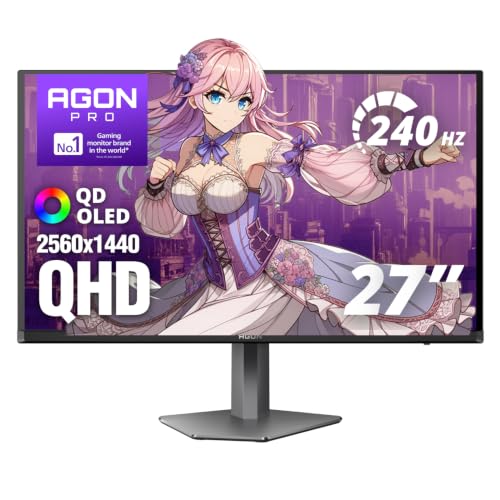
Pros
- 240Hz refresh rate
- 0.03ms response time
- QD-OLED panel with genuine blacks
- Height-adjustable stand and VESA mount
Cons
- Who should skip it: buyers seeking 4K resolution

Pros
- 240Hz OLED display
- G-SYNC Compatible and FreeSync Premium Pro
- Height, tilt, and pivot adjustments
- Two-year limited warranty includes OLED panel
Cons
- Who should skip it: shoppers wanting resolution above QHD

Pros
- QHD OLED display
- 240 Hz refresh rate
- 0.03 ms response time
- Monitor arm included
Cons
- OLED burn-in remains a consideration
- 1,000-nit HDR peak applies to 3% of screen
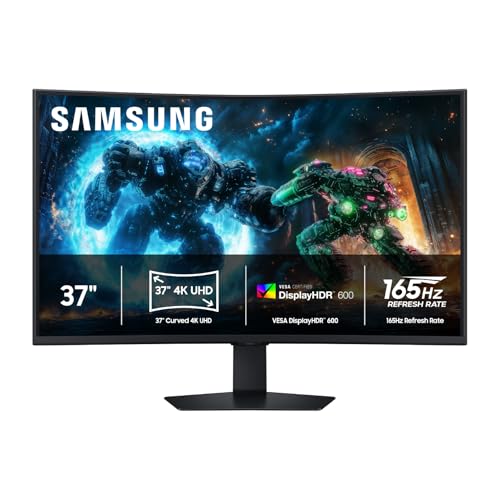
Pros
- 37-inch 4K UHD display
- 165Hz refresh rate
- 1000R curved screen
- VESA DisplayHDR 600
Cons
- Who should skip it: buyers who prefer smaller or flat screens

Pros
- Choice of 4K 180Hz or Full HD 360Hz
- Fast IPS panel
- Height-adjustable, tilting, pivoting stand
- G-Sync compatible and FreeSync Premium
Cons
- 360Hz mode is Full HD, not 4K
- Who should skip it: gamers seeking 360Hz at 4K
The Best Gaming Monitors by Use Case
Best OLED for Dark-Scene Contrast: AOC AGON Pro 27 Inch Gaming Monitor QD OLED 240Hz
The AOC AGON Pro 27 Inch Gaming Monitor QD OLED 240Hz suits players who want QHD resolution, OLED contrast, and a fast refresh rate in one 26.5-inch display. Its listing specifies a 2560 x 1440 OLED panel, up to 280Hz refresh rate, and 0.03ms GTG response time. The listing also describes HDR10 and broad color-gamut coverage, which may appeal if you play visually rich games as well as competitive titles. Browse more gaming monitors if you want to compare other screen formats.
Reasons to buy:
- OLED panel and HDR10 support suit games with dark scenes and vivid color.
- Up to 280Hz and 0.03ms GTG response time target fast, responsive play.
- Height adjustment and built-in speakers are listed features.
Reasons to avoid:
- The listing gives both a 240Hz product name and up to 280Hz in its feature details. Confirm supported refresh rates and the connection needed to reach them.
- OLED may not suit buyers who prefer an LCD panel or want to avoid OLED-specific care considerations.
Skip it if you want a larger 4K screen or do not need OLED contrast and high refresh rates.
Best for Adjustable OLED Setup: LG 27GS93QE 27-inch Ultragear OLED Gaming Monitor
The LG 27GS93QE 27-inch Ultragear OLED Gaming Monitor is a strong fit for players who want QHD OLED and a stand with several positioning options. The listing specifies 240Hz, 0.03ms GtG response time, anti-glare treatment, and support for both NVIDIA G-SYNC Compatible and AMD FreeSync Premium Pro. Height, tilt, and pivot adjustments make it easier to set the screen for your desk and posture. It also lists a two-year limited warranty covering the OLED display panel, subject to the manufacturer’s warranty terms.
Reasons to buy:
- 240Hz and 0.03ms GtG are suited to quick-moving games.
- Both G-SYNC Compatible and FreeSync Premium Pro are specified.
- Anti-glare treatment and an adjustable stand address reflections and viewing position.
Reasons to avoid:
- Its 2560 x 1440 resolution is lower than the 4K Samsung models in this guide.
- Check warranty terms and whether your graphics card or console supports the refresh rate you want.
Skip it if your priority is 4K resolution or you want a screen larger than 27 inches.
Best OLED Warranty Coverage: ASUS ROG PG27AQDM-R 27 Inch 1440p 240Hz OLED
The ASUS ROG PG27AQDM-R 27 Inch 1440p 240Hz OLED may suit OLED buyers who place particular value on the stated warranty coverage. Its listing specifies a three-year warranty with advanced replacement and burn-in coverage, plus a monitor arm included with the product. The 26.5-inch QHD OLED screen runs at 240Hz, and the listing names G-SYNC compatibility and an anti-glare micro-texture coating. These details make it worth considering for a gaming setup where positioning flexibility and OLED care coverage matter.
Reasons to buy:
- The listing specifies three-year coverage that includes burn-in; review the full warranty terms before buying.
- An included monitor arm offers a different positioning option from a conventional stand.
- QHD OLED, 240Hz, and 0.03ms response time target vivid, responsive gaming.
Reasons to avoid:
- The listing names G-SYNC compatibility but does not specify FreeSync support.
- Its QHD resolution will not provide the same pixel count as the 4K choices.
Skip it if you need a clearly specified AMD sync option or prefer a 4K display.
Best for Large Curved 4K Play: Samsung 37” Odyssey G7 (G75F)
The Samsung 37” Odyssey G7 (G75F) serves players who want a large 4K screen and a curved viewing surface. Its listing specifies a 37-inch 1000R curve, 4K UHD resolution, 165Hz refresh rate, and VESA DisplayHDR 600. That combination prioritizes screen size and detail while still offering a refresh rate suited to fast gameplay. The 1ms GtG response time and AMD FreeSync Premium Pro are also listed, but your PC needs enough graphics performance to drive games at high resolution and high frame rates.
Reasons to buy:
- The 37-inch curved 4K screen suits players who want a broad, immersive view.
- 165Hz refresh rate supports smoother motion than standard 60Hz displays.
- DisplayHDR 600 and FreeSync Premium Pro are specified.
Reasons to avoid:
- A 37-inch screen needs more desk space than the 27-inch models.
- Confirm your desk depth, viewing distance, and computer’s ability to run games at 4K.
Skip it if you have limited desk space or prefer a compact monitor for competitive play.
Also Considered
The Gaming category also covers related setup choices; among these monitors, the Samsung 27” Odyssey G7 (G70F) could suit players who want a smaller 4K screen and a listed dual mode reaching 360Hz in Full HD, but it did not make the main list because its 4K mode is specified at 180Hz and the listing’s “4K FHD” naming is unclear.
How to Choose the Best Gaming Monitor Under $500
Match resolution to your PC or console
Resolution affects image detail, but a higher pixel count also asks more of your gaming PC. The three OLED models here use QHD at 2560 x 1440, while both Samsung models list 4K UHD. QHD can be a practical fit if your system prioritizes high frame rates; 4K may suit a powerful PC or a setup where fine detail and screen space matter more. A console’s output also depends on its capabilities and the game, so check its supported resolutions and refresh rates before choosing.
Choose refresh rate for your games
Refresh rate describes how often the display can update each second. Higher rates can make motion look smoother, but your computer must produce enough frames to take advantage of them. The OLED picks list 240Hz, with AOC’s features claiming up to 280Hz, while Samsung lists 165Hz for the 37-inch model and dual modes of 180Hz at 4K or 360Hz at Full HD for the 27-inch model. Verify which mode works at your desired resolution and what connection your system needs.
Compare OLED and Fast IPS for your room and use
The AOC, LG, and ASUS are OLED models. Their listings emphasize deep blacks, color, and very fast response, making them appealing for games with dramatic lighting and quick action. Samsung’s 27-inch G70F uses a Fast IPS panel, while the 37-inch G75F is listed as curved without a panel type in the published details. If you prefer LCD or want to compare panel characteristics, check the full manufacturer specifications. OLED buyers should also read the maker’s guidance on panel care and warranty coverage, especially for ASUS and LG, whose listings provide specific coverage details.
Check sync support and connection details
Variable refresh technologies can reduce tearing and stutter when the display and graphics source coordinate their refresh rates. LG lists both NVIDIA G-SYNC Compatible and AMD FreeSync Premium Pro; ASUS lists G-SYNC compatibility; Samsung G75F lists AMD FreeSync Premium Pro; and Samsung G70F lists both G-SYNC compatibility and FreeSync Premium. AOC’s listing mentions G-Sync. Before buying, confirm the exact model’s supported connection, the ports available on your computer or console, and whether your chosen resolution and refresh rate work through that connection.
Measure your desk and check adjustments
Screen size and stand design affect where a monitor can sit and how comfortably you can view it. The 37-inch Samsung has a much larger footprint than the 27-inch LG and ASUS models, while the product names for the OLED monitors describe them as 27-inch models and their listed panels measure 26.5 inches. LG lists height, tilt, and pivot adjustment; AOC lists height adjustment; ASUS includes a monitor arm; Samsung G70F lists an ergonomic stand with tilt, height, and pivot. Check product dimensions and mounting details on the manufacturer page if your desk or mount has strict limits.
How We Compared
This comparison uses the published product listings, including their stated resolution, refresh rate, response time, panel type, adaptive-sync support, HDR features, and stand or mount details. We also considered the listed warranty information where provided. Customer feedback data available here does not include review text, so this guide does not draw conclusions from buyer experiences. Product specifications can vary by input, mode, or source device, so confirm the manufacturer’s full details for your intended setup.
Frequently Asked Questions
Is QHD or 4K better for gaming?
Neither is automatically better for every setup. QHD uses fewer pixels than 4K and may be easier for a PC to drive at high frame rates. 4K shows more detail, but your graphics hardware and game settings affect achievable performance. Compare the monitor’s supported modes with your PC or console before deciding.
Will a 240Hz monitor work with my console?
A monitor can accept a high refresh rate while a console or individual game outputs a lower one. AOC’s listing says its monitors can support up to 120Hz for console gaming, with exact performance depending on the console. Check your console’s video output, the game’s frame-rate options, and the monitor’s supported input modes.
Do these monitors support both AMD and NVIDIA sync?
The listed support varies by model. LG specifies G-SYNC Compatible and FreeSync Premium Pro; Samsung G70F specifies G-SYNC compatibility and FreeSync Premium. ASUS lists G-SYNC compatibility, Samsung G75F lists FreeSync Premium Pro, and AOC mentions G-Sync. Check the exact model’s official compatibility details and your graphics card connection.
Should I choose an OLED gaming monitor?
OLED may appeal if deep blacks, color, and fast response are priorities. The AOC, LG, and ASUS listings describe OLED panels and 0.03ms response times. Consider your intended use, read manufacturer guidance about panel care, and check warranty coverage. The ASUS listing specifically states burn-in coverage; LG lists a two-year limited warranty covering the OLED panel, with terms to review.
What should I check before buying a 4K high-refresh monitor?
Confirm that your computer or console supports the resolution and refresh rate you want at the same time. Check the monitor’s input specifications, the source device’s output, and the cable or connection requirements in the manufacturer documentation. For Samsung G70F, verify whether you intend to use 4K at 180Hz or Full HD at 360Hz, since the listing describes those as separate dual modes.




Write Your Review
No reviews yet. Be the first to share your experience!