

Choosing a gaming chair means matching its shape to your setup: a rolling desk chair can suit PC play, while a floor seat or pedestal recliner may fit console gaming better. This guide to the best gaming chair under $300 compares those formats, plus support features, upholstery, recline, and platform connections, so you can focus on what fits your room and play habits.

Pros
- Independently adjustable backrest and footrest
- 360-degree swivel
- Built-in cup holder and side pouch
- Easy-clean PU leather
Cons
- 264.5 lb maximum capacity
- Who should skip it: buyers seeking specified massage settings

Pros
- Built-in speakers and subwoofer
- Bluetooth and wired audio options
- Rocking and reclining features
- Padded vegan leather with armrests
Cons
- May need separate digital audio transmitter for some TVs
- Who should skip it: buyers seeking a lightweight or raised chair

Pros
- Built-in footrest
- 135° recline and 360° swivel
- Cup holder and removable side pouch
- Five-year limited warranty
Cons
- Skip if you need support above 275 lb

Pros
- Multi-directional lumbar adjustment
- Flip-up, five-way armrests
- Extendable footrest with two angle settings
- BIFMA-certified structure
Cons
- Skip if you need support above 300 lb

Pros
- 90° to 135° recline
- Built-in massage lumbar support
- Footrest, cup holder, and side pocket
- Manufacturer-listed 500 lb capacity
Cons
- Skip if you need a rolling chair

Pros
- Roomy 375 mm seat width
- Fabric upholstery
- Lumbar and detachable neck pillows
- 100 mm seat-height adjustment
Cons
- Weight capacity not specified
- Who should skip it: buyers requiring a stated weight capacity
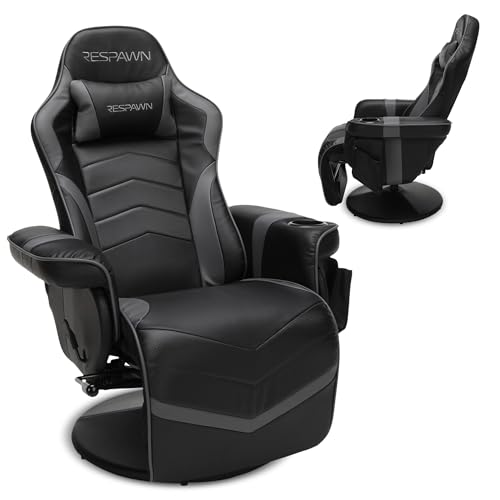
Pros
- Built-in footrest
- 360-degree swivel
- Cup holder and removable side pouch
- Supports up to 275 lb
Cons
- No wheels for users needing desk-chair mobility
- Who should skip it: users needing a wheeled desk chair
The Best Gaming Chairs by Use Case
Best for PC and Console Audio: X Rocker G-Force RGB LED Video Gaming Floor Chair
The gaming setup that needs built-in sound and a seat close to the floor may suit the X Rocker G-Force RGB LED Video Gaming Floor Chair. Its listing specifies two headrest-mounted speakers, a backrest subwoofer, Bluetooth and wired audio connections, and rocking and reclining positions. It also lists compatibility with PS5, Xbox Series X/S, Xbox One, PlayStation 4, Nintendo systems, TVs, PC computers, and smart devices, though some TV outputs may need a separate digital audio transmitter.
Reasons to buy:
- Integrated speakers and subwoofer offer an audio-focused seat without separate speakers beside the chair.
- Bluetooth and wired options support a range of listed devices.
- Folding design can help when you need to put the chair away.
Reasons to avoid:
- Floor-chair height may not work well at a standard desk.
- Check your TV’s audio outputs before buying, since the listing notes that a separate transmitter may be needed.
Skip it if you need a height-adjustable rolling chair for desk work.
Best for Desk Work and Gaming: ELABEST X100 Ergonomic Mesh Office Chair
The ELABEST X100 Ergonomic Mesh Office Chair takes an office-chair approach, with breathable mesh, adjustable lumbar support, flip-up armrests, and an extendable footrest. Its listing describes lumbar adjustment for depth, height, and rotation, plus three recline stages. Those adjustments may suit people who move between work and gaming at the same desk, but the dense feature list makes it worth checking the control layout and chair dimensions on the listing before ordering.
Reasons to buy:
- Mesh upholstery offers a ventilated alternative to PU leather and padded fabric.
- Flip-up armrests can make it easier to tuck the chair under a desk.
- Adjustable lumbar support and an extendable footrest serve different seated positions.
Reasons to avoid:
- The many adjustment functions may be more than you need for casual console play.
- Confirm seat dimensions and desk clearance, since the provided details do not give those measurements.
Skip it if you want a low floor seat or a recliner without wheels.
Best for Fabric Comfort: Corsair TC100 Relaxed Fabric Gaming Chair
The Corsair TC100 Relaxed Fabric Gaming Chair is a conventional desk chair with a racing-inspired shape, but its relaxed bolstering and fabric cover distinguish it from tighter, leather-look racing seats. The listing specifies a 375 mm seat width, adjustable seat height with 100 mm of movement, adjustable armrests, a lumbar pillow, and a detachable memory foam neck pillow. Its fabric may appeal if you prefer a soft upholstery surface, while the included pillows add separate support that you can reposition.
Reasons to buy:
- Fabric exterior offers a different feel from PU leather upholstery.
- Included lumbar and detachable neck pillows let you adjust support placement.
- 100 mm seat-height adjustment helps match chair height to a desk.
Reasons to avoid:
- The listing does not specify a recline angle or weight capacity, so verify both if they matter to your setup.
- It does not list built-in audio, a footrest, or a cup holder.
Skip it if you want a built-in footrest or a console-style pedestal recliner.
Best for a High Listed Weight Capacity: Dowinx Gaming Recliner Chair No Wheels
The Dowinx Gaming Recliner Chair No Wheels is designed for relaxed gaming away from a rolling desk chair. Its listing specifies a 90° to 135° recline, a footrest, a cup holder, breathable fabric, and a stated support capacity of up to 500 lb. It also describes dual massage points in the lumbar area. Treat that feature as a comfort option, not a medical claim, and check the listing’s assembly and dimensions to confirm the recliner fits your room.
Reasons to buy:
- The listed 500 lb capacity is higher than the capacities provided for the other chairs in this guide.
- Reclining backrest and footrest suit relaxed play away from a desk.
- Fabric cover, cup holder, and side pocket keep the design focused on lounging convenience.
Reasons to avoid:
- No wheels make it less suited to moving between a desk and other work areas.
- The listing describes massage points but does not provide detailed control or power information; verify those details if they matter.
Skip it if you need a chair that rolls, adjusts to desk height, or has a stated swivel function.
Best for Console Reclining: RESPAWN 900 Gaming Recliner Chair with Footrest
The RESPAWN 900 Gaming Recliner Chair with Footrest is a pedestal-base seat for console players who prefer a reclined position. The listing specifies a 135° recline, 360° swivel, built-in footrest and cup holder, removable side pouch, and a 275 lb weight capacity. Its continuous seat-and-footrest design is described as helping avoid wire snags, which may matter if cables run near the chair. This version’s listing also states a five-year limited warranty; check the current warranty terms before purchase.
Reasons to buy:
- Swivel and recline suit relaxed gaming without a standard wheeled base.
- Built-in cup holder and removable side pouch keep small items close.
- The listing states a five-year limited warranty.
Reasons to avoid:
- The 275 lb listed capacity may not suit every buyer; check the limit against your needs.
- A pedestal recliner does not offer the listed desk-chair features such as adjustable seat height and rolling casters.
Skip it if you need a rolling PC chair or a higher listed capacity.
Also Considered
The Goplus Massage Gaming Chair may suit buyers who want a cup holder, side pouch, footrest, and independently adjustable backrest, but its listed 264.5 lb capacity and 90° to 140° recline offer a different fit from the main picks.
The Respawn 900 Gaming Recliner Chair with Footrest is another console recliner with a 135° recline, 360° swivel, and 275 lb listed capacity. Its published details overlap closely with the newer RESPAWN 900 listing, so compare the specific listing and warranty terms before choosing between them.
How to Choose the Best Gaming Chair Under $300
Match chair type to your setup
Start with where you sit and what your screen height demands. A rolling desk chair such as the Corsair or ELABEST can suit a PC desk, while the X Rocker sits on the floor and the RESPAWN and Dowinx models focus on reclining. A floor chair may put you below a desk or TV that works well with an upright seat, so compare your usual viewing position with the chair’s intended format.
Check adjustments and support style
Adjustment options matter when you change posture or share a chair. The ELABEST specifies adjustable lumbar support, armrests, recline, and footrest; the Corsair offers height adjustment and separate support pillows. Recliners instead offer a backrest angle and footrest, while the Goplus listing says its backrest and footrest adjust independently. Check each listing for the controls you will use, not just a long feature count.
Choose upholstery for your room and preference
Fabric and mesh feel different from PU leather and vegan leather, and the product data does not establish which will feel coolest or last longest in your home. ELABEST lists breathable mesh, Corsair and Dowinx list fabric, and Goplus lists PU leather. X Rocker lists vegan leather. Consider your room temperature, cleaning preferences, and whether you prefer a soft textile surface or a wipe-clean cover, then confirm care guidance in the product listing.
Verify capacity, space, and movement
Weight limits and chair footprint affect fit and safe use. The published listings give capacities of 264.5 lb for Goplus, 275 lb for both RESPAWN versions, 300 lb for X Rocker and ELABEST, and 500 lb for Dowinx; Corsair’s provided details do not state a capacity. These are listing specifications, not a substitute for checking the current product page. Also measure the space needed for a reclined backrest or extended footrest, and confirm whether you need wheels, swivel, or a stationary base.
Confirm audio and platform connections
Most chairs here do not claim built-in audio, so your existing headset or speakers remain part of the setup. X Rocker is the exception, with Bluetooth and wired audio options and a stated list of consoles and devices. The listing warns that some TV outputs may need a separately sold digital audio transmitter. Verify your console, TV, and audio-output connections before relying on that setup; compatibility statements do not guarantee that every connection method works with every screen.
How We Compared
This guide compares the published product specifications and design details, including chair type, listed adjustments, upholstery, connectivity, weight capacities, accessories, and stated warranty coverage. Customer feedback data was supplied as a rating without review text, so it does not support conclusions about recurring owner experiences. Recommendations reflect how the listed features match different gaming setups, not a claim that one chair suits every player.
Frequently Asked Questions
Which type of gaming chair suits console gaming?
A floor chair or pedestal recliner may suit console gaming when you play away from a desk. The X Rocker adds listed built-in audio, while the RESPAWN and Dowinx models add reclining support and footrests. Choose based on screen height, room layout, and whether you want audio integrated into the chair.
Can the X Rocker connect to a TV?
The listing says it can connect to TVs by Bluetooth or a wired option, and notes that some TV outputs may require a separate digital audio transmitter. Check your TV’s available audio outputs and the chair’s current connection instructions before buying.
Are gaming recliners suitable for PC desks?
They can work in a PC setup if your desk, monitor, and seated position line up, but the listed RESPAWN and Dowinx chairs do not have the rolling, height-adjustable desk-chair format described for the Corsair and ELABEST. Measure the space and consider how you will reach your keyboard and mouse while reclined.
Which chair has built-in speakers?
The X Rocker G-Force is the only chair in this group whose published details specify built-in speakers and a subwoofer. The other product descriptions focus on seating, adjustment, recline, or accessories rather than integrated audio.
What should I check before buying a chair with a footrest?
Check how far the footrest extends, whether the backrest and footrest adjust together or independently, and whether there is enough clear floor space. The published listings describe different designs: Goplus says its backrest and footrest adjust independently, while other models describe reclining footrest setups. Confirm the product page’s current dimensions and instructions.




Write Your Review
No reviews yet. Be the first to share your experience!