

A gaming mouse can feel quick and accurate on paper yet still be a poor fit if its shape strains your hand, its buttons sit awkwardly, or its connection does not suit your setup. This guide to the best gaming mouse under $50 compares wired and wireless options, sensor specifications, programmable controls, ergonomics, and compatibility so you can narrow the field to your games and grip.

Pros
- Adjustable DPI up to 25,600
- Six programmable buttons
- Removable 10 g weight
- 1 ms report rate
Cons
- 25,600 DPI requires a G HUB software update
- Who should skip it: shoppers seeking a wireless mouse

Pros
- Designed for larger hands and palm grips
- Seven programmable buttons
- Sensitivity adjusts in 1 DPI steps
- Rated for more than 50 million clicks
Cons
- Who should skip it: shoppers seeking a wireless mouse

Pros
- 16 programmable buttons
- Adjustable 100 to 16,000 DPI
- Wireless and wired modes
Cons
- Who should skip it: players who prefer simpler button layouts

Pros
- 11 programmable buttons
- Switchable scroll wheel modes
- Customizable 11-zone RGB lighting
- Thumb rest and ergonomic shape
Cons
- Skip it if you need wireless connectivity

Pros
- Eleven programmable buttons
- Adjustable scroll-wheel modes
- Customizable RGB lighting
- Ergonomic shape with thumb rest
Cons
- Wired connection
- Who should skip it: wireless-mouse shoppers

Pros
- Nine programmable controls
- HyperSpeed and Bluetooth connectivity
- Up to 535 hours on Bluetooth
- Gen-2 mechanical switches
Cons
- Battery life varies with usage
- Who should skip it: buyers needing a stated polling rate
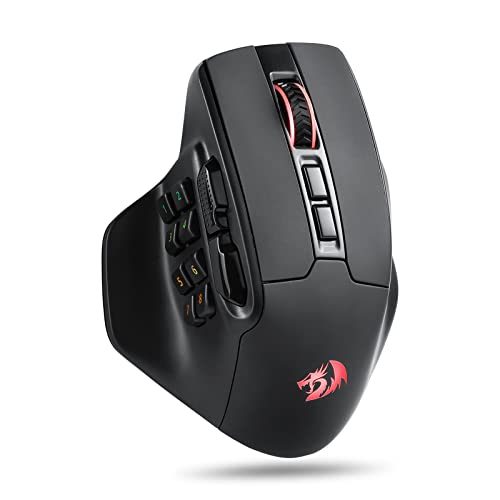
Pros
- Fifteen programmable buttons
- DPI adjustable from 100 to 26,000
- 2.4 GHz wireless connection
- Customizable RGB lighting
Cons
- Skip it if you prefer a simpler button layout
- Button and lighting customization requires Redragon software

Pros
- LIGHTSPEED and Bluetooth connectivity
- Included AA battery
- Up to six programmable buttons
- 300-plus-hour claimed battery life
Cons
- POWERPLAY system required for 68 g weight and unlimited battery life
- Skip if you want a lightweight mouse without POWERPLAY

Pros
- Three connection modes
- Six programmable buttons
- Asymmetric shape with thumb rest
- Long stated battery life with RGB off
Cons
- Skip if you need stated battery life with RGB enabled
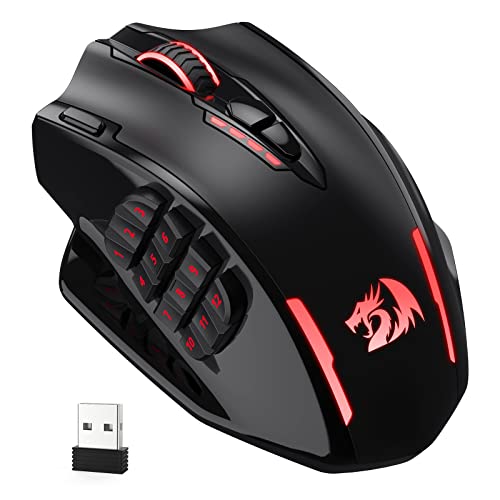
Pros
- Twelve programmable side buttons
- Wireless and USB-C wired modes
- Five onboard DPI levels
- Customizable controls in wireless mode
Cons
- Who should skip it: players who prefer simpler button layouts
The Best Gaming Mice by Use Case
Best Lightweight Wired Option: Logitech G403 Hero RGB Gaming Mouse – Black | 25K
The Logitech G403 Hero RGB Gaming Mouse – Black | 25K suits players who want a comparatively light wired mouse with a simple button layout. It weighs 87 g before its optional 10 g weight, has rubber side grips, and offers six programmable buttons through G HUB. The listing specifies a HERO 25K sensor with up to 25,600 DPI after a free software update, plus a 1 ms report rate.
Reasons to buy:
- 87 g starting weight, with a removable 10 g weight for personal adjustment.
- Six programmable buttons suit players who want a direct layout rather than a large MMO keypad.
- G HUB provides DPI, button, and LIGHTSYNC RGB customization.
Reasons to avoid:
- It is wired, so the cable may matter if you prefer an uncluttered desk.
- The 25K sensor specification depends on the stated G HUB software update.
Skip it if you want wireless play or need many thumb buttons for MMO skills.
Best for Palm Grips and Large Hands: Corsair IRONCLAW RGB Wired FPS/MOBA Gaming Mouse
The Corsair IRONCLAW RGB Wired FPS/MOBA Gaming Mouse is designed for larger hands and palm grips, making its shape the main reason to consider it. Its listed 105 g weight and contoured body contrast with lighter, smaller-feeling choices. The native 18,000 DPI optical sensor adjusts in 1 DPI steps, while seven programmable buttons allow remaps or macros through Corsair iCUE.
Reasons to buy:
- Contoured design specifically described for larger hands and palm grips.
- Seven programmable buttons offer more shortcuts than a basic six-button layout.
- Omron switches are rated by the manufacturer for more than 50 million clicks.
Reasons to avoid:
- The 105 g weight may not suit players who favor very light mice.
- It is a wired model, and the listing does not give a cable length.
Skip it if your hands are small or you prioritize a low-weight wireless mouse.
Best for MMO Button Access: UtechSmart Venus Pro Wireless MMO Gaming Mouse
The UtechSmart Venus Pro Wireless MMO Gaming Mouse targets MMO players who want numerous thumb-accessible commands without a cable during play. It has 16 programmable buttons, including 12 thumb buttons, and supports 2.4 GHz wireless or wired use. Its listing specifies a PixArt PMW3335 optical sensor, up to 16,000 DPI, a 1,000 Hz polling rate, and battery life of up to 70 hours. Treat battery life as a manufacturer claim that can vary with use.
Reasons to buy:
- Sixteen programmable buttons provide room for macros and game commands.
- Dual wired and 2.4 GHz modes give you a cable option when needed.
- The listing states up to 70 hours of wireless battery life and a 1,000 Hz polling rate.
Reasons to avoid:
- The many thumb controls may be unnecessary for shooters or games with few commands.
- Check software support for your operating system before relying on custom profiles.
Skip it if you prefer a clean, lightweight layout with only a few side controls.
Best Wired Customization: Razer Basilisk V3 Customizable RGB Wired Ergonomic
The Razer Basilisk V3 Customizable RGB Wired Ergonomic is a fit for players who want many controls and a versatile scroll wheel in a wired ergonomic design. Its 11 programmable buttons include a thumb rest, while the HyperScroll tilt wheel can free-spin or switch to tactile scrolling. Razer lists a Focus+ 26K DPI optical sensor and second-generation optical switches rated for up to 70 million clicks. The supplied black and white listings describe the same core feature set, so choose the color variant you prefer and verify the listing details.
Reasons to buy:
- Eleven programmable buttons support macros and secondary functions.
- Switchable free-spin and tactile scroll modes suit both fast browsing and controlled selection.
- Eleven Chroma lighting zones and Synapse software offer extensive customization.
Reasons to avoid:
- The wired connection limits freedom of movement compared with wireless picks.
- Its many controls and features may be more than a simple FPS setup needs.
Skip it if you want a wireless mouse or do not want to configure profiles in software.
Best Wireless Flexibility: Logitech G309 Lightspeed Wireless Gaming Mouse
The Logitech G309 Lightspeed Wireless Gaming Mouse suits players who want both a low-latency 2.4 GHz receiver connection and Bluetooth. The listing specifies six programmable buttons and a HERO 25K sensor, with an included AA battery bringing the weight to 86 g. Logitech states more than 300 hours of use with the AA battery; the 68 g battery-free figure applies when using the separately required POWERPLAY wireless charging system, not the included battery setup.
Reasons to buy:
Reasons to buy:
- LIGHTSPEED 2.4 GHz and Bluetooth provide two wireless connection choices.
- An AA battery is included, so the mouse does not depend on a built-in battery charge cycle.
- Six programmable buttons keep the layout relatively straightforward.
Reasons to avoid:
- The 68 g weight requires POWERPLAY wireless charging, which is not listed as included.
- Confirm that the included receiver connection suits your computer and setup.
Skip it if you need a large bank of thumb buttons or prefer a wired connection.
Also Considered
The Razer Basilisk V3 Customizable RGB Wired Ergonomic white variant offers the listed Basilisk controls and sensor in another color, but overlaps closely with the black wired pick. The Redragon M811 PRO Wireless RGB Gaming Mouse 26K may suit players wanting 15 programmable buttons and 2.4 GHz wireless, but its listing gives fewer specific details about battery life and compatibility. The Corsair Harpoon v2 Wireless Gaming Mouse – Black offers 2.4 GHz, Bluetooth, and USB-C wired modes, but its published feature details give less information about software and platform compatibility. The Redragon M913 Wireless RGB MMO Gaming Mouse 16000 combines 12 side buttons with wired and 2.4 GHz modes, though its listed sensor ceiling is lower than some alternatives here.
How to Choose the Best Gaming Mouse Under $50
Connection type and platform support
A wired mouse avoids charging and receiver placement, but its cable can restrict movement or add desk clutter. Wireless models here use 2.4 GHz, Bluetooth, or both; these modes are not interchangeable in every setup. For example, the Logitech G309 lists LIGHTSPEED and Bluetooth, while the UtechSmart Venus Pro supports 2.4 GHz and wired use. Check the exact platform and connection methods in the listing before buying, especially for a console. The Corsair IRONCLAW listing names PC, Mac, PS5, PS4, and Xbox, but compatibility can depend on the game and connection method.
Shape, grip, and weight
Shape affects whether you can reach the buttons comfortably through a long session. The Corsair IRONCLAW is explicitly designed for larger hands and palm grips; the Logitech G403 lists rubber side grips and an 87 g starting weight. Those descriptions help narrow options, but hand size and grip are personal. Check available product images and the seller’s current specifications for dimensions, which are not supplied for these picks. Weight figures also need context: the Logitech G309 weighs 86 g with its included AA battery, and its 68 g claim requires a separate POWERPLAY charging system.
Button count and game type
Extra programmable buttons can place MMO abilities or macros close to your thumb, but they add controls you may not need in an FPS. The UtechSmart Venus Pro has 16 programmable buttons, including 12 on the thumb area; the Razer Basilisk V3 has 11, while the G403 and G309 each list six. Compare button positions as well as totals, and confirm that the mouse software supports the assignments you want. More buttons help only when you can reach them reliably.
Sensor and polling specifications
DPI describes sensitivity settings, not a direct measure of gaming accuracy. A very high maximum DPI is useful only if it matches your preference, display setup, and game settings. These listings include sensors up to 25,600 DPI on the G403, 26,000 DPI on the wired Basilisk V3, and 18,000 DPI on the IRONCLAW. The Venus Pro also specifies a 1,000 Hz polling rate. Compare adjustment ranges and software options, but do not choose solely by the largest DPI number.
Software, battery, and setup
Software can control button assignments, lighting, and sensitivity, so check whether you are comfortable installing and using the manufacturer’s app. The published listings name Logitech G HUB, Corsair iCUE, Razer Synapse, and UtechSmart software. Wireless battery claims also vary by mode and lighting: the G309’s stated 300-plus hours uses its included AA battery, while Corsair lists the Harpoon v2 for up to 140 hours over 2.4 GHz with RGB off and up to 210 hours over Bluetooth with RGB off. Treat advertised runtimes as conditional figures, and verify what charging cable, receiver, or battery comes in the specific package.
How We Compared
This comparison uses the published product descriptions and specifications, including connection modes, listed sensor and polling details, button layouts, shape guidance, software names, and stated battery claims. We also considered the published ratings as listing information, not as independent proof of reliability or performance. Where a feature depends on an update, accessory, wireless mode, or RGB setting, the guide calls out that condition so you can verify it against the exact product listing.
Frequently Asked Questions
Can these gaming mice work with consoles?
Some product listings name console compatibility, but support can vary by console, game, and connection mode. The Corsair IRONCLAW listing names PS5, PS4, and Xbox alongside PC and Mac. Check the mouse listing and the game support details for your specific console before buying; do not assume every programmable feature works on every platform.
Is a wired mouse better for competitive games?
A wired model avoids battery charging and wireless receiver setup, which can simplify a desk. Wireless options in this guide list dedicated 2.4 GHz connections, and the Logitech G309 also supports Bluetooth. Pick based on your preferred setup and the connection details provided, rather than assuming wired always means better performance.
How much DPI do I need for gaming?
There is no single DPI maximum that suits every player. A mouse with adjustable sensitivity lets you select a setting that feels comfortable in your games. Check the adjustment range and whether the mouse software or onboard controls support your preferred changes; a high maximum does not automatically improve aim.
Which type of mouse suits MMO games?
MMO players who assign many skills or macros may benefit from a mouse with a larger programmable button bank. The UtechSmart Venus Pro lists 16 buttons, including 12 thumb buttons, while the Redragon M913 lists 12 side buttons. If you use only a few shortcuts, a six-button model may be easier to navigate.
Does a wireless gaming mouse need charging?
That depends on its power source. The Logitech G309 includes an AA battery and lists more than 300 hours of use, while the Corsair Harpoon v2 lists rechargeable wireless use and different claimed runtimes by connection mode with RGB off. Check whether a model uses replaceable batteries or charging, and note the conditions attached to any battery-life figure.




Write Your Review
No reviews yet. Be the first to share your experience!