

A large screen can make spreadsheets and documents easier to view, while a compact laptop is simpler to carry between classes or meetings. Choosing the best laptop under $1000 means deciding which compromise fits your routine, then checking processor, memory, storage, display, connectivity, and operating system against the apps you use.
This guide compares four listed configurations from HP, Dell, and Apple. The two HP listings describe the same core specifications, so they do not represent clearly different use cases; check the exact listing and seller details before choosing between them.

Pros
- Spacious 17.3-inch Full HD IPS anti-glare display
- Generous 32GB memory for seamless multitasking
- Pre-installed Windows 11 Pro operating system
- Rapid charging restores 50 percent in 45 minutes
Cons
- Large footprint limits easy backpack portability
- Uses DDR4 memory instead of newer DDR5
- Frequent commuters should skip due to wide dimensions

Pros
- 32GB RAM and 1TB SSD
- Large Full HD IPS display
- Windows 11 Pro
- USB-C, USB-A, and HDMI
Cons
- 3.52 pounds is less convenient for frequent carrying
- Who should skip it: shoppers seeking a lightweight laptop

Pros
- Fast 16GB DDR5 memory for smooth multitasking
- Anti-glare display with 300 nits brightness
- Ergonomic lifted hinge design improves typing comfort
- Backlit keyboard assists typing in dim environments
Cons
- Integrated graphics limit performance in demanding visual software
- Users needing discrete graphics should skip it

Pros
- Up to 16 hours of advertised battery life
- Lightweight aluminum chassis at under 2.8 pounds
- Crisp Liquid Retina display supporting one billion colors
- Built-in 1080p FaceTime camera and dual-microphone array
Cons
- 8GB unified memory limits demanding professional workflows
- Demanding creative professionals should skip this configuration
The Best Laptops by Use Case
Best for a Large Workspace: HP 17 Inch FHD Laptop Computer for Business
The HP 17 Inch FHD Laptop Computer for Business pairs a 17.3-inch, 1920 x 1080 IPS anti-glare display with a Ryzen 5 7430U processor, 32GB RAM, and a 1TB SSD, according to the published listing. That combination suits desk-based work, online classes, spreadsheets, and multitasking when a roomy screen matters more than carrying a smaller computer. The listing also specifies Windows 11 Pro, Wi-Fi 6, Bluetooth 5.4, a numeric keypad, and HP Fast Charge. Buy this listing through HP 17 Inch FHD Laptop Computer for Business.
Reasons to buy:
- Large 17.3-inch Full HD IPS screen offers more room for documents and side-by-side windows.
- 32GB RAM and 1TB SSD provide generous listed memory and storage for everyday multitasking and files.
- Windows 11 Pro, numeric keypad, and stated USB-C, USB-A, and HDMI ports suit a work-focused desk setup.
Reasons to avoid:
- The 17.3-inch size is less convenient if you regularly carry a laptop in a small bag.
- The listing does not give battery capacity or a typical-use runtime, so mobile users should verify battery details.
Skip it if you need a compact laptop for frequent travel or prefer macOS.
Best for Windows Pro Features: HP 17 Inch FHD Laptop Computer for Business
This second HP listing specifies the same Ryzen 5 7430U, 32GB RAM, 1TB SSD, 17.3-inch Full HD IPS display, and Windows 11 Pro as the other HP entry. It may suit buyers comparing separate listings for the same described configuration, rather than readers seeking a materially different laptop. The published details do not explain a hardware difference between the two entries, so confirm the exact model, seller, and configuration on the product page. See HP 17 Inch FHD Laptop Computer for Business.
Reasons to buy:
- Windows 11 Pro is listed, which may fit buyers who specifically need Pro features for work.
- Its stated 17.3-inch IPS screen and numeric keypad support a fixed desk setup and data entry.
- USB-C, USB-A, HDMI, Wi-Fi 6, and Bluetooth 5.4 are listed for connecting peripherals and wireless devices.
Reasons to avoid:
- The published specifications match the other HP entry, so the data does not establish a separate advantage.
- Battery runtime and the exact USB-C capabilities are not stated; confirm both if they affect your setup.
Skip it if you want a distinct screen size or operating system, since this listing describes the same core setup as the other HP pick.
Best for a Windows Laptop with a Backlit Keyboard: Dell 15.6 Laptop, FHD, Intel Core Ultra 5 225U
The Dell 15.6 Laptop, FHD, Intel Core Ultra 5 225U has a 15.6-inch Full HD display, 16GB DDR5 RAM, and a 512GB SSD, based on the published product data. Its backlit keyboard can help when you work in dim rooms, while the listing also identifies a 300-nit anti-glare WVA display and Windows 11 Home. This is a more moderate screen-size option than the HP models, but the published information does not include battery runtime or port details. See Dell 15.6 Laptop, FHD, Intel Core Ultra 5 225U.
Reasons to buy:
- The listed 15.6-inch Full HD screen offers a middle ground between the HP’s large display and Apple’s 13-inch screen.
- 16GB DDR5 memory and a 512GB SSD are specified for everyday Windows tasks and file storage.
- A backlit keyboard, anti-glare screen, and ComfortView are listed for extended work sessions.
Reasons to avoid:
- The listing does not specify battery life, port selection, or the display’s panel technology beyond WVA.
- Windows 11 Home is listed, not Windows 11 Pro; verify required work or school software before buying.
Skip it if you need a confirmed Windows Pro installation, a 17-inch screen, or macOS.
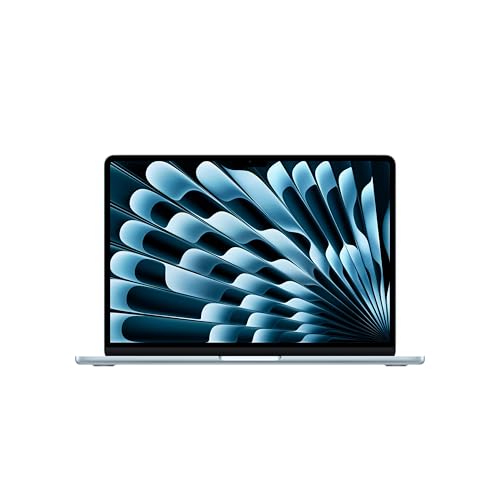
Best for a Compact Apple Laptop: Apple 2026 MacBook Neo 13-inch Laptop with A18 Pro
The Apple 2026 MacBook Neo 13-inch Laptop with A18 Pro is the smallest-screen option in this comparison, with a 13-inch Liquid Retina display, 8GB unified memory, 512GB SSD, and macOS. Apple lists up to 16 hours of battery life, but actual runtime depends on how you use the laptop. The listing also specifies a 1080p FaceTime HD camera and Touch ID. Its compact form and Apple software ecosystem may suit students or mobile users, while the 8GB memory is worth considering if you keep many demanding apps open. See Apple 2026 MacBook Neo 13-inch Laptop with A18 Pro.
Reasons to buy:
- The 13-inch display makes this the smallest-screen model among the supplied picks.
- Apple lists up to 16 hours of battery life, a useful claim to compare if you work away from outlets.
- macOS, Touch ID, and a 1080p FaceTime HD camera suit buyers already using Apple apps and services.
Reasons to avoid:
- Its 8GB unified memory is lower than the listed memory in the HP and Dell models.
- Windows-only apps or accessories may not work as they do on a Windows laptop; confirm compatibility before switching.
Skip it if your required apps are Windows-only or you need more listed memory for heavier multitasking.
How to Choose the Best Laptop Under $1000
Match processor and memory to your workload
For browser tabs, documents, video calls, and school platforms, compare processor model and memory before focusing on marketing terms. The HP listings specify a six-core, 12-thread Ryzen 5 7430U and 32GB RAM; Dell lists an Intel Core Ultra 5 225U and 16GB DDR5; Apple lists an A18 Pro chip and 8GB unified memory. Those figures describe different platforms and memory types, so they do not establish a direct speed ranking. Check the apps you rely on, their system requirements, and whether you expect to run many programs at once.
Choose screen size for your work and bag
A 17.3-inch screen gives documents and spreadsheets more visible space, but the computer may be less convenient to carry. The Dell’s 15.6-inch display is a middle size, while Apple’s 13-inch screen favors a smaller viewing area. Consider where you will use the laptop most: at a fixed desk, a shared classroom table, or during a commute. Resolution alone does not describe the whole viewing experience, so compare panel type, anti-glare details, and brightness where supplied.
Check storage capacity and file habits
The HP listings specify a 1TB SSD, while Dell and Apple each list a 512GB SSD. More capacity can leave more room for downloaded files, class projects, and installed software; it does not make a laptop faster by itself. Estimate how much data you keep locally and whether you already use cloud storage or external drives. The published details do not identify upgrade options, so verify whether storage can be expanded before relying on that possibility.
Confirm operating system and app compatibility
The HP models list Windows 11 Pro, Dell lists Windows 11 Home, and Apple runs macOS. Check whether your workplace, school, printer, or specialist software requires a particular operating system or feature. If you are considering a Mac after using Windows, confirm that essential apps have macOS versions and that needed accessories support the change. You can browse more laptop guides, including our MacBook comparison and laptop guide for graphic design.
Inspect battery, ports, and connectivity details
Apple lists up to 16 hours of battery life, while the HP listing describes fast charging but does not state a typical runtime. Treat manufacturer battery figures as claims, not a guarantee of your own day away from an outlet. HP lists USB-C, USB-A, HDMI, Wi-Fi 6, and Bluetooth 5.4; Dell’s published details mention Wi-Fi 6 but omit port selection. Check the full listing for ports, charging behavior, and the capabilities of any USB-C port before planning a monitor or docking setup.
How We Compared
This comparison uses the published product specifications, listed design details, operating systems, and customer-rating information. The provided entries show zero customer reviews for the two HP listings and Dell, and zero for Apple as well, so there is no review feedback here to establish recurring owner experiences. The two HP entries describe matching core specifications; we distinguish their listings for completeness, not because the available evidence shows a hardware difference. Recommendations reflect stated features and the needs they may suit.
Frequently Asked Questions
Is a 17.3-inch laptop too large for school?
It depends on how often you carry it and the size of your bag and workspace. The HP’s 17.3-inch display gives more screen area for reading and side-by-side documents, but buyers who move between classes may prefer a smaller model such as the 15.6-inch Dell or 13-inch MacBook Neo. The published data does not give laptop weight or dimensions, so check those details if portability is a priority.
Do the two HP listings describe different laptops?
The published descriptions list the same Ryzen 5 7430U processor, 32GB RAM, 1TB SSD, 17.3-inch Full HD IPS display, and Windows 11 Pro. No distinct hardware difference is provided. Review the exact product page and configuration before purchase rather than assuming one listing includes an unlisted upgrade.
Is 8GB of memory enough for a laptop?
It may suit everyday tasks such as documents, browsing, and video calls, but needs vary with the number and type of apps you run. The MacBook Neo lists 8GB unified memory, compared with 16GB on Dell and 32GB on the HP listings. Check software requirements and your multitasking habits instead of assuming memory numbers alone predict speed across different operating systems.
Can a MacBook Neo run Windows apps?
The listing specifies macOS, not Windows. Some apps have versions for both systems, while others may not. Confirm that required work, school, and peripheral software supports macOS before switching from a Windows laptop.
Which laptop should I choose for working away from an outlet?
Apple lists up to 16 hours of battery life for the MacBook Neo, but your results can vary by workload and settings. The HP listing mentions charging up to 50% in approximately 45 minutes, while the published data does not state a runtime for HP or Dell. Compare the full battery and charging details for the exact listing, especially if long sessions away from power are routine.




Write Your Review
No reviews yet. Be the first to share your experience!