

Wi-Fi 7 router listings can make it hard to tell whether you need a compact two-unit mesh system or a larger network with more coverage. This guide to the Best Wi-Fi 7 Router Under $300 compares listed coverage, speed claims, Ethernet ports, device capacity, setup, and security features so you can match a system to your home and internet plan.
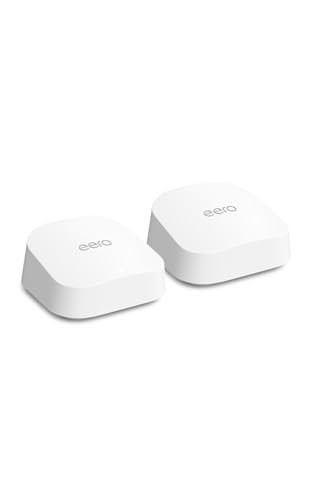
Pros
- Dual auto-sensing 2.5 GbE Ethernet ports
- Coverage spans up to 4,000 square feet
- Backward compatible with previous eero devices
- Three-year manufacturer warranty
Cons
- Advanced security features require paid subscription
- Skip if wanting parental controls without subscription fees

Pros
- Covers up to 6,000 square feet reliably
- WiFi 7 speeds reach up to 5 Gbps
- Supports up to 70 simultaneous connected devices
- 2.5 Gbps port accommodates multi-gigabit internet plans
Cons
- Advanced security suite requires paid subscription after trial
- Hardware restricted to United States operation only
- Skip if needing tri-band operation or international use
The Best Wi-Fi 7 Routers by Use Case
Best for Broad Multi-Room Coverage: NETGEAR Orbi 360 Series WiFi 7 Mesh System
The NETGEAR Orbi 360 Series WiFi 7 Mesh System pairs a router with two satellite extenders, making it the stronger fit here when you want multiple mesh points across a larger home. NETGEAR lists coverage up to 6,000 square feet, support for up to 70 devices, and speeds up to 5 Gbps. Those are manufacturer claims, not a guarantee of the speeds or coverage you will get; walls, placement, client devices, and internet service affect real-world results. Our Wi-Fi router guide for gaming explains why latency and a wired connection can matter alongside a router’s headline speed.
Reasons to buy:
- Router plus two satellites provide three mesh units for distributing coverage.
- Listing specifies up to 6,000 square feet and up to 70 connected devices.
- Orbi app provides guided setup and device and guest Wi-Fi management.
Reasons to avoid:
- Coverage and maximum speed are claims, not guaranteed results in every home.
- NETGEAR Armor security features include a 30-day trial, with a separate subscription required after the trial.
Skip it if you have a smaller home and would rather avoid placing and powering multiple mesh units.
Best for eero Mesh Owners: Amazon eero 7 dual-band mesh Wi-Fi 7 router
The Amazon eero 7 dual-band mesh Wi-Fi 7 router is a two-unit system for shoppers who want Wi-Fi 7 coverage and already use, or plan to use, eero devices. The listing specifies up to 4,000 square feet of coverage, support for more than 120 devices, and internet plans up to 2.5 Gbps. Its two auto-sensing 2.5 GbE ports per eero unit give you wired connection options, while eero’s TrueMesh, TrueRoam, and TrueChannel software is intended to help devices maintain a reliable connection. Our cable modem guide can help you check the other side of your internet setup before choosing a router.
Reasons to buy:
- Two eero 7 units are listed for up to 4,000 square feet and more than 120 devices.
- Two auto-sensing 2.5 GbE ports on each unit support wired connections.
- Backward compatibility with previous eero generations can help existing eero owners extend their system.
Reasons to avoid:
- Wi-Fi is dual-band, and the listing specifies wireless speeds up to 1.8 Gbps, below the Orbi system’s advertised maximum.
- Some advanced security and family features require an optional eero Plus subscription.
Skip it if you need the larger listed coverage area of the Orbi system or do not want to use the eero ecosystem.
How to Choose the Best Wi-Fi 7 Router Under $300
Match the mesh system to your home’s layout
Coverage figures help compare products, but they do not predict an exact signal in every room. The Orbi listing claims coverage up to 6,000 square feet from its router and two satellites; the eero listing claims up to 4,000 square feet from two units. These different unit counts and coverage claims make the Orbi a reasonable starting point for a larger or multi-story home, while the eero set may suit a smaller area. Actual results vary with construction materials, floor plan, satellite placement, and interference.
Before choosing, note where your modem sits, where weak-signal rooms are, and whether you can place satellite units between them. NETGEAR says an additional Orbi 360 Series satellite can add up to 2,000 square feet of claimed coverage. Confirm that any satellite you purchase is compatible with the exact Orbi model, and treat added coverage figures as estimates rather than guarantees.
Compare speed claims with your internet plan and devices
The eero listing specifies wireless speeds up to 1.8 Gbps and support for internet plans up to 2.5 Gbps. NETGEAR lists Wi-Fi speeds up to 5 Gbps and plans up to 2.5 Gbps. Neither maximum means every phone or computer will reach that speed. Your internet plan, the connected device’s Wi-Fi capabilities, distance from the router, network activity, and other conditions all matter.
Check your plan’s actual speed and the Wi-Fi standard supported by your main devices. A Wi-Fi 7 router can also connect Wi-Fi 6 and Wi-Fi 5 devices, according to the Orbi listing, but older devices do not gain Wi-Fi 7 capabilities just by joining a newer network. If your internet plan is slower than a router’s advertised maximum, stronger coverage or wired connectivity may matter more than the largest headline figure.
Check Ethernet ports for wired equipment
Ethernet can be useful for a desktop computer, game console, or other device that stays near a mesh unit. The eero listing specifies two auto-sensing 2.5 GbE ports on each eero 7. NETGEAR lists a 2.5 Gig port, but the published product details do not clarify the complete port configuration across the router and satellites. Check the current listing and product documentation if you need several wired connections or want to connect a wired device to a satellite.
A port’s maximum link speed is not the same as internet speed. The connected device, cabling, router, modem, and service plan all affect the connection. If you need more wired ports than the product provides, verify whether adding a compatible network switch fits your setup.
Consider device capacity and dual-band design
The eero system is listed for more than 120 devices, while the Orbi system is listed for up to 70. These figures offer a comparison point, not a promise that every device will receive equal speed under heavy use. Count the phones, computers, TVs, smart home devices, and other equipment that may connect at once, then consider whether they stream, download, or make video calls simultaneously.
Both products are dual-band systems. The Orbi listing describes Enhanced Backhaul to help deliver Wi-Fi across the mesh, but neither listing identifies a separate third wireless band. If you are comparing systems for many busy devices, check the detailed manufacturer specifications for band use and backhaul behavior rather than assuming all Wi-Fi 7 systems work alike.
Review setup, compatibility, and ongoing security costs
Both systems are intended to work with an existing modem. NETGEAR says the Orbi connects to cable or fiber provider equipment and supports plans up to 2.5 Gbps. Before buying either system, confirm that your provider’s modem or gateway can connect to a separate router and check whether you need to change any settings. For a modem purchase, see the guide to cable modem and provider fit.
The Orbi app guides setup and lets you manage devices and guest Wi-Fi. The eero system uses eero software and supports selected Amazon Echo devices with eero Built-in, but the listing does not identify which Echo models; check compatibility before relying on that feature. Both brands describe optional paid security services: eero Plus and NETGEAR Armor. Compare included features, trial terms, and ongoing subscription requirements before treating those services as part of the router’s standard offering.
How We Compared
This comparison uses the published product specifications and feature descriptions, including each system’s listed Wi-Fi speed, coverage, unit count, Ethernet details, device capacity, setup options, compatibility statements, and security terms. We assessed how those claims relate to common needs such as extending coverage, connecting wired equipment, and supporting multiple devices. Manufacturer coverage and speed figures are presented as claims, since actual results depend on the home, internet service, placement, and client devices. The supplied material did not include customer feedback that could support conclusions about recurring owner experiences.
Frequently Asked Questions
Will these Wi-Fi 7 routers work with older Wi-Fi devices?
The Orbi listing says it supports Wi-Fi 6 and Wi-Fi 5 devices, and eero describes the eero 7 as backward compatible with previous eero generations. Check device and system documentation for your specific equipment. Older clients can connect where compatible, but they do not gain Wi-Fi 7 features or speeds.
Do I need a modem with either mesh system?
These products are routers or mesh systems, not replacements for every kind of internet-provider equipment. NETGEAR says Orbi connects to existing cable or fiber ISP equipment. Check whether your provider’s device is a modem, gateway, or router, and confirm the required connection and settings with your provider before purchase.
Which system makes more sense for a larger home?
The Orbi’s listed coverage is up to 6,000 square feet with a router and two satellites, compared with up to 4,000 square feet for the two-unit eero set. That makes Orbi the stronger on-paper fit for a larger home. Actual coverage depends on layout, building materials, placement, and interference, so the listing figure cannot guarantee signal in every room.
Can mesh satellites connect devices by Ethernet?
The eero listing specifies two auto-sensing 2.5 GbE ports on each eero 7 unit. The Orbi information supplied lists a 2.5 Gig port but does not explain the full port layout for every unit. Check the manufacturer’s port details for the exact unit before buying if you plan to wire a device to a satellite.
Are paid security subscriptions required?
The listings describe optional eero Plus and NETGEAR Armor services, rather than making them requirements for basic router operation. NETGEAR specifies a 30-day Armor trial and says a separate subscription is required. Review each service’s current terms and included features if parental controls, ad blocking, VPN access, or expanded security tools matter to you.


Write Your Review
No reviews yet. Be the first to share your experience!