

Phone vlogging can be simple to start, but a tripod, microphone, lights, and remote do not solve the same problem. The right kit depends on whether you record from a fixed spot, move around while filming, or need a taller stand for different framing.
This guide compares three phone-vlogging kits by their listed features, including phone-size compatibility, mic connections, tracking, lighting, and tripod height. These are creator accessories, not phones, so your phone’s camera, recording app, and ports still matter.

Pros
- Plug-and-play wireless microphones require no app setup
- Wide extension range spans 13 to 71 inches
- Versatile 3-in-1 receiver supports Lightning, USB-C, and 3.5mm
- Dual detachable fill lights offer three color temperatures
Cons
- Receiver requires manual disconnection to preserve device battery
- Manual head lacks motorized tracking for dynamic panning
- Creators needing automated motion tracking should skip it
Pros
- Hands-free AI face tracking with gesture activation
- Four-leg aluminum base extends to 63 inches
- Dual clip-on microphones with Lightning and Type-C support
- Integrated fill lights offer three color temperatures
Cons
- Phone clamp specification lists only 4 to 4.7 inches
- Creators with large smartphones should skip this kit

Pros
- Aluminum legs adjust from 11.6 to 71 inches
- Wireless mic includes Type-C and Lightning connectors
- Dual detachable lights feature three color modes
- Includes Bluetooth shutter remote with 33-foot range
Cons
- Phone clamp specifies narrow 4 to 4.7-inch width
- Creators with larger smartphones should skip it
The Best Phone Vlogging Kits by Use Case
Three products are supplied for this guide, so each has a distinct use-case section. The listings describe overlapping basics, including lights, wireless microphones, and remotes. Differences in face tracking, stated phone fit, tripod height, and included receiver connections are more useful for narrowing the choice than broad claims about video quality.
Best for Flexible Phone and Camera Setups: Content Creator Essentials Vlogging Kit
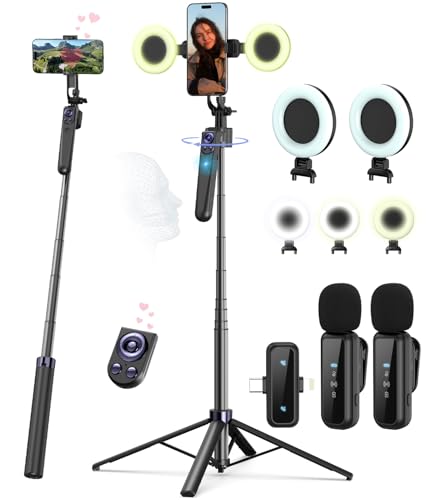
The Ocwqp Content Creator Essentials Vlogging Kit suits creators who want one stand for a phone, a compatible camera, or tabletop recording. Its listing specifies extension from 13 to 71 inches, a 1/4-inch screw, and a phone holder listed for 4.7- to 6.9-inch smartphones. That broader stated phone-size range than the two Yeaki listings may help if your phone is larger, but confirm your device’s dimensions against the clamp width of 2.6 to 3.9 inches.
The kit includes two detachable lights, a wireless remote, and a microphone system with a receiver described as supporting USB-C, Lightning, and 3.5 mm. That range of listed connections may suit creators switching between devices, but the data does not specify which adapters or cable arrangements are needed for every phone. The listing describes manual 360-degree rotation and 270-degree tilt, not automatic subject tracking.
Reasons to buy:
- Listing states support for 4.7- to 6.9-inch smartphones, with a clamp width of 2.6 to 3.9 inches.
- Three listed receiver connections: USB-C, Lightning, and 3.5 mm.
- Extends to 71 inches and includes a 1/4-inch screw for compatible cameras and other devices.
Reasons to avoid:
- Its holder is adjusted manually; the listing does not describe face tracking.
- Verify that your phone fits the clamp and that the receiver connection works with your recording setup.
Skip it if you want a tripod that follows your face automatically while you move around.
Best for Hands-Free Face Tracking: Vlogging Kit for iPhone/Android
The Yeaki Vlogging Kit for iPhone/Android is the only listed option whose listing specifies 360-degree face tracking and gesture controls. It describes an “OK” gesture to start tracking and a “Palm” gesture to stop it, which may be useful for solo creators moving within the frame. Treat those as listed functions, not a guarantee that tracking will suit every room, movement, or recording app.
The tripod extends to 63 inches, and the listing describes a four-leg base, dual LED lights, and two microphones. It lists a phone-holder fit of 4 to 4.7 inches, a narrower stated range than the Ocwqp kit. Before buying, check how the listing’s device-size measurement applies to your phone, since the product data does not give a clamp width.
Reasons to buy:
- Face tracking and gesture controls are specifically described in the listing.
- Includes two microphones and dual LED lights for recording with more than one audio source and added illumination.
- Remote is listed for shutter control, scrolling, and page turning.
Reasons to avoid:
- Listed phone fit is 4 to 4.7 inches, so verify compatibility before ordering.
- At 63 inches, it does not reach the 71-inch maximum height listed for the other two kits.
Skip it if your priority is a wider stated phone-size range or the tallest listed tripod height.
Best for a Taller Tripod on a Budget: Yeaki Vlogging Kit for iPhone/Android
The 71-inch Yeaki Yeaki Vlogging Kit for iPhone/Android may suit creators who want extra height for standing videos, group framing, or shots from farther away. Its listing describes five-stage telescopic legs, an aluminum-alloy tripod, dual fill lights, a wireless microphone, and a Bluetooth remote. The listing also specifies a 1/4-inch thread for compatible cameras, GoPros, and other accessories.
This model’s listed phone fit is 4 to 4.7 inches, so do not assume it fits every phone just because the listing says iPhone and Android. It includes a Type-C/Lightning receiver, but the published information does not state support for a 3.5 mm connection. Its lighting is described as having three color modes and three brightness levels, giving you more stated light adjustments than the other listings specify.
Reasons to buy:
- Extends to 71 inches and uses five-stage telescopic legs.
- Dual lights list three color modes and three brightness levels.
- Includes a 1/4-inch threaded mount for compatible cameras and accessories.
Reasons to avoid:
- Listed phone fit is limited to 4 to 4.7 inches; check your device before buying.
- The supplied connection details list Type-C and Lightning, not 3.5 mm.
Skip it if your phone falls outside the stated holder range or you need a listed 3.5 mm microphone connection.
How to Choose the Best Phone for Vlogging Setup
These products are accessories, so choosing a phone-vlogging setup means checking the connection between your phone and each included component. Start with the holder and microphone receiver, then weigh tracking, lighting, and stand height against how you record.
Check phone fit and microphone connection
A phone that does not fit the holder or connect to the microphone receiver can make a full kit less useful. The Ocwqp listing gives both a phone-size range and clamp width, while the Yeaki listings state a 4- to 4.7-inch fit but provide no clamp width. Compare your phone with the exact holder measurements, and confirm whether your phone uses USB-C or Lightning and whether its recording app accepts the receiver’s connection.
The Ocwqp listing names USB-C, Lightning, and 3.5 mm for its receiver; the Yeaki listings name Type-C and Lightning. Do not assume a port or adapter works simply because a product uses the phrase “iPhone and Android.” If you use a phone case, check whether you can connect the receiver with the case installed.
Decide whether automatic tracking matters
Automatic face tracking can help when you walk or gesture in front of the camera, but it is not necessary for a fixed talking-head video. Of these three listings, only the 63-inch Yeaki kit specifies face tracking and gesture controls. The other two describe manual positioning, so they may be a better fit if you set your frame once and stay in place.
Before relying on tracking, check the product instructions for supported gestures and setup requirements. The published information does not explain whether tracking depends on an app, how it behaves in low light, or whether all phone cameras and recording apps support it.
Match microphone setup to your recording
Wireless lavalier microphones can make it easier to record while standing away from your phone, and two microphones may help with an interview or a second speaker. All three listings describe a wireless microphone setup and state a 79-foot range and 12-hour runtime. Those figures come from product listings and should not be treated as guaranteed results in every environment.
Check how many transmitters, microphones, and receiver parts are included, since similar terms can describe different arrangements. The product information does not provide independent audio measurements or explain how noise reduction performs in busy settings. For quiet voiceovers, you may care more about receiver compatibility and microphone placement than maximum stated range.
Compare light controls and placement
Built-in lights can help illuminate a face indoors, but their usefulness depends on position, brightness, and the room. Each kit lists two lights and warm, cool, and natural or white color options. The 71-inch Yeaki listing also specifies three brightness levels; the other published descriptions do not give a matching brightness-level count.
Consider whether you need detachable lights for separate placement or prefer lights attached to the stand. These listings do not provide light output measurements, so they cannot establish how much area each kit can illuminate. If you record in daylight or already own lighting, microphone connection and tripod features may matter more.
Choose tripod height and movement for your space
Maximum height matters when you film standing up, while a short tabletop setup can be easier to position for desk videos. Two products list a 71-inch maximum; the face-tracking Yeaki kit lists 63 inches. The Ocwqp kit also lists a 13-inch minimum, and the other Yeaki lists a 11.6-inch minimum, details that can help if you switch between desk and standing shots.
Look at how the stand folds, what accessories it includes, and whether you need a standard 1/4-inch mount for a camera or light. The Ocwqp listing says it folds to 12 inches and includes a storage bag. The published data does not give folded dimensions for the Yeaki kits, so check the listing if you plan to pack one in a small bag.
How We Compared
This comparison uses the published product descriptions and listed features, including phone-holder fit, receiver connections, tripod height, lights, microphones, remotes, and tracking functions. The product data includes no customer-review text, so this guide does not treat ratings as evidence of recurring owner experience. Manufacturer-listed range, runtime, and performance descriptions are presented as claims, not independently verified results.
For broader context, see our guides to iPhone camera phone differences, budget smartphones for photography, and more camera phone guides.
Frequently Asked Questions
Do these kits include a phone?
No phone is listed as included. These products are creator accessory kits with items such as a tripod, lights, microphone, and remote. You need a compatible phone separately.
Which kit follows you while you move?
The 63-inch Vlogging Kit for iPhone/Android is the only listed product whose listing specifies 360-degree face tracking and gesture controls. The other listings describe manually adjusted holders and stands. Confirm tracking setup and recording-app compatibility before relying on it.
Will every kit fit a large phone?
No. The Ocwqp listing specifies a 4.7- to 6.9-inch phone range and a 2.6- to 3.9-inch clamp width. Both Yeaki listings specify a 4- to 4.7-inch fit. Compare your phone’s dimensions with the product listing rather than relying on the brand or operating system name alone.
Can I use these microphones with an iPhone or Android phone?
The listings describe support for iPhone and Android, but receiver connections vary. The Ocwqp kit lists USB-C, Lightning, and 3.5 mm; the two Yeaki kits list Type-C and Lightning. Verify the exact receiver connection for your phone model and recording setup before purchase.
Are the lights bright enough for every room?
The published information does not give measured brightness or coverage, so it cannot establish that any kit will light every room. All three list two lights and multiple color options. The 71-inch Yeaki listing also specifies three brightness levels, which offers stated adjustment options but does not reveal maximum output.
Can I attach a camera instead of a phone?
The Ocwqp and 71-inch Yeaki listings specify a 1/4-inch thread for compatible cameras and accessories. The supplied face-tracking kit information does not specify a camera mount. Check your camera’s mounting point and the stand’s instructions before attaching equipment.



Write Your Review
No reviews yet. Be the first to share your experience!