

Choosing a robot vacuum means matching its cleaning and navigation features to your floors, household, and tolerance for maintenance. A model that maps rooms and returns to charge can save effort, but features such as mopping and self-emptying docks add complexity and may not suit every home.
This guide explains what to check before you buy, how to compare three options, and which details to confirm with the manufacturer. Allow time to measure tight spaces, review your Wi-Fi setup, and check the app’s available controls.
What You Need
Start with a floor plan, a list of floor types, and notes on pet hair, thresholds, cords, and furniture clearance. Check your home Wi-Fi frequency, preferred voice assistant, dock space, and willingness to empty bins or maintain mop components. Browse the robot vacuum category for more models, or explore the wider Smart Home category for connected-home options.
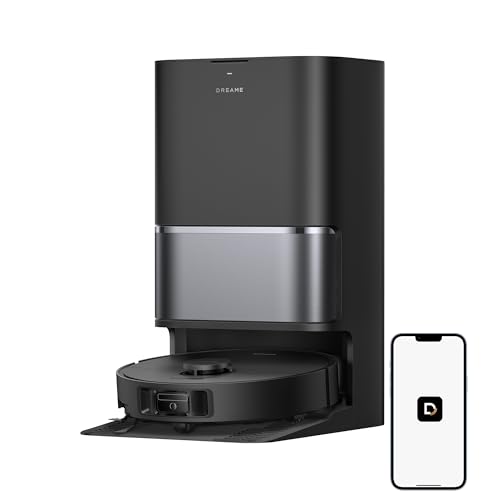
Pros
- Self-emptying and cleaning dock
- Extending brush and mop
- Four carpet-care modes
- Alexa, Siri, and Google Home support
Cons
- App control supports 2.4GHz Wi-Fi only in the USA
- Optional auto-detergent module sold separately
- Skip it if your home Wi-Fi lacks 2.4GHz support

Pros
- LiDAR mapping and obstacle avoidance
- App, remote, Alexa, and Google Assistant control
- Large 660ml dustbin
- Automatic recharge and resume
Cons
- Who should skip it: buyers seeking a vacuum-and-mop combo

Pros
- LiDAR home mapping
- Self-emptying HEPA base
- Alexa and Google Assistant control
- Recharge and Resume
Cons
- Up to 120 minutes of runtime per charge
- Skip if you need a documented runtime above 120 minutes
How to Choose a Robot Vacuum
Step 1: Match cleaning functions to your floors
List the rooms with hard flooring and carpet. If you want both vacuuming and mopping, check how the robot handles carpets while carrying or using a mop. The dreame L40 Ultra Gen 2 Robot Vacuum and Mop lists carpet avoidance, suction boost, intensive carpet cleaning, and mop lifting up to 0.41 inches. Those controls may help in mixed-floor homes, but confirm that its carpet handling suits your rugs.
If you only need vacuuming, a mop may add maintenance without helping your routine. Check whether the model includes a dock and which tasks still need manual attention.
Step 2: Consider dirt, hair, and bin upkeep
Pet hair and frequent debris make brush design, filtration, and emptying options worth comparing. The Shark AV2501S AI Ultra Robot Vacuum lists a self-cleaning brushroll, true HEPA filtration, and a bagless base with a claimed capacity of up to 30 days. The Redroad model lists a 660 ml dustbin. These are different approaches: a larger onboard bin reduces interruptions, while a self-emptying base can reduce how often you empty the robot, though the base still needs care.
Manufacturers’ suction figures are not directly comparable measures of cleaning results. Treat them as listed specifications, and check replacement-part availability and care instructions before purchase.
Step 3: Check navigation and obstacle handling
Mapping helps a robot follow planned routes, while obstacle avoidance may reduce collisions with everyday items. The three listings describe LiDAR-based mapping or navigation, but their named systems differ. Think about whether your floors are usually clear or often have toys, cables, and shoes in the way. No navigation system makes floor preparation unnecessary.
Look for details on map controls, room selection, and restricted areas in the app or manual. If a feature matters to your layout, confirm that the specific model supports it rather than assuming all mapped vacuums offer the same controls.
Step 4: Measure clearance and dock space
Measure under beds and sofas if you expect the robot to clean beneath them, and leave enough room for its dock according to the maker’s instructions. The Redroad listing gives a robot profile of 2.5 inches, which may suit some low-clearance spaces. Verify actual clearance at home, including any furniture supports or hanging fabric.
Step 5: Match runtime to your floor area
Compare stated runtime with the area you want cleaned, but remember that cleaning mode and floor conditions can affect operating time. The listings claim up to 120 minutes for Shark, up to 150 minutes for Redroad, and up to 231 minutes in Quiet Mode for dreame. Shark and Redroad also list recharge-and-resume features. Treat these as manufacturer claims, not guaranteed cleaning times for every home.
Step 6: Confirm app, Wi-Fi, and voice support
Check the app’s operating-system requirements and your router’s Wi-Fi bands before buying. The dreame listing specifies 2.4 GHz Wi-Fi for USA use and names Alexa, Siri, and Google Home support. Shark lists Alexa and Google Assistant, while Redroad lists app, remote, Alexa, and Google Assistant control. Confirm compatibility and available features with the manufacturer, especially if voice control is essential.
Step 7: Weigh convenience against ongoing care
A self-emptying or mop-cleaning dock can reduce routine work, but it does not remove the need to inspect brushes, filters, sensors, and water-related parts. Check what the dock does automatically, what supplies it needs, and which accessories are sold separately. The dreame listing says its optional auto-detergent dispenser is a separate purchase, so do not assume it comes with the robot.
Common Mistakes to Avoid
Do not choose by suction numbers alone. Listings use different specifications, and the listing information does not establish a direct performance comparison. Consider navigation, brush care, floor types, and bin maintenance alongside suction.
Do not assume mapping means a robot will handle every obstacle or automatically recognize every room. Pick up loose cords and small objects, and follow the manufacturer’s guidance for maps and restricted areas.
Do not buy a mop model without checking its water and pad care requirements. Keep water away from electrical connections, use only cleaning solutions approved by the manufacturer, and do not add detergent unless instructions allow it.
Do not overlook dock dimensions, furniture clearance, or Wi-Fi requirements. Confirm these details in the manual or product support information before ordering, and keep small parts and cleaning supplies away from children and pets.
Recommended Gear
For vacuuming and mopping: Robot vacuum options include the dreame L40 Ultra Gen 2 Robot Vacuum and Mop. Its listed extendable brush and mop, all-in-one dock, and carpet modes may suit homes seeking combined floor care. Pros: listed mopping, obstacle avoidance, and multiple carpet modes. Cons: the optional detergent dispenser costs extra, and its 2.4 GHz Wi-Fi requirement may not fit every setup. Who should skip it: buyers who only want a basic vacuum or do not want mop upkeep.
For pet-focused vacuuming and reduced bin handling: Shark AV2501S AI Ultra Robot Vacuum lists a self-cleaning brushroll, HEPA filtration, a bagless self-emptying base, and recharge-and-resume. Pros: features aimed at pet hair and less frequent manual emptying. Cons: it does not list mopping, and its claimed 120-minute runtime is shorter than the other listed maximums. Who should skip it: shoppers who need mopping or prefer a longer stated runtime.
For a slim robot with a large onboard bin: Robot Vacuums,10000Pa Robotic Vacuum Cleaner is listed with LiDAR navigation, app and remote control, and a 660 ml dustbin. Pros: 2.5-inch listed profile, up to 150 minutes of claimed runtime, and a stated two-year warranty. Cons: the published details do not list a self-emptying dock or mopping. Who should skip it: buyers who prioritize an automated emptying base or combined vacuuming and mopping.
Frequently Asked Questions
Is LiDAR navigation worth considering?
It can help a robot map rooms and follow planned routes. The published listings describe LiDAR features, but map controls and obstacle handling vary. Check the manufacturer’s app details for functions you need.
Do robot vacuums work on both carpet and hard floors?
Some models are designed for both, and all three listings describe use on multiple floor types or hard floors and carpet. For a mop-and-vacuum model, check how it avoids or manages rugs and whether its lifting clearance suits your carpets.
Does self-emptying mean no maintenance?
No. A self-emptying base can reduce how often you empty the robot’s bin, but you still need to follow care instructions for the base, brushes, filters, and sensors. The Shark listing describes its base as bagless, while other dock details vary by model.
Can I use voice control with these models?
The listings name voice-assistant support, including Alexa and Google Assistant for Shark and Redroad, and Alexa, Siri, and Google Home for dreame. Confirm the exact app, Wi-Fi, and assistant requirements before purchase.
How much runtime do I need?
Estimate the area you want cleaned and consider whether the robot can return to charge and resume. Listed maximum runtimes are manufacturer claims and may not reflect every cleaning mode, floor, or home layout.


Write Your Review
No reviews yet. Be the first to share your experience!