

Luxury vinyl plank floors can collect dust, crumbs, and pet hair, but excess water and poorly planned cleaning routes can make daily care less convenient. The best robot vacuum for LVP floors depends on whether you need dependable mapping, a mop with adjustable water flow, a self-emptying dock, or a simpler vacuum for routine pickup.
This guide compares listed features, floor compatibility, app and voice controls, and upkeep needs. Use it to narrow down options for homes with rugs, pets, multiple rooms, or a preference for remote controls. For more models, browse our robot vacuum category.

Pros
- Combines vacuuming and mopping
- Four water adjustment levels
- App and voice controls
- Designed to reduce hair tangles
Cons
- Listed carpet suitability limited to low pile
- Skip it if your home mainly has high-pile carpet

Pros
- Large 2.7L sealed dust bag
- Dual anti-tangle brush design
- LiDAR mapping for multiple rooms
- Adjustable water-flow settings
Cons
- App supports 2.4GHz Wi-Fi only
- Skip it if your Wi-Fi lacks 2.4GHz support

Pros
- Self-emptying 3.5L dustbin
- LiDAR mapping with no-go zones
- Vacuum and mop in one pass
- Google Assistant and app control
Cons
- Supports only 2.4 GHz Wi-Fi
- 110–120V only
- Who should skip it: homes requiring 220–230V or other Wi-Fi bands

Pros
- Simultaneous vacuuming and mopping
- Remote and app controls
- Four suction levels
- Slim 3.23-inch profile
Cons
- App setup supports only 2.4 GHz Wi-Fi or Bluetooth
- Who should skip it: households needing 5 GHz Wi-Fi app setup
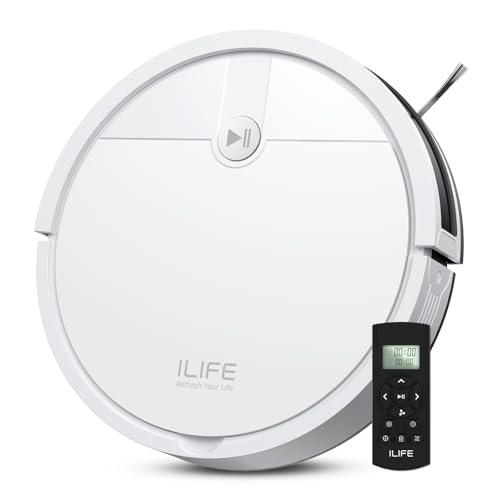
Pros
- Tangle-free suction port
- Slim 2.99-inch profile
- Physical remote control
- Scheduled cleaning and automatic charging
Cons
- Skip if you need coverage beyond low-pile carpet

Pros
- LiDAR mapping and obstacle avoidance
- App, remote, Alexa, and Google Assistant control
- Large 660ml dustbin
- Automatic recharge and resume
Cons
- Who should skip it: buyers seeking a vacuum-and-mop combo

Pros
- Bagless self-emptying dust cup
- Supports up to five maps
- App scheduling and no-go zones
- Auto-recharge and resume
Cons
- 2.4GHz Wi-Fi only
- Mop holder must be removed before carpet cleaning
- Skip if home requires 5GHz-only connectivity

Pros
- Simultaneous vacuuming and mopping
- Four control methods
- Four cleaning modes
- Slim 2.99-inch height
Cons
- 150-minute maximum runtime applies in quiet mode
- Skip if you need a stated runtime beyond quiet mode

Pros
- Bagless self-empty base
- LiDAR mapping with object detection
- App and voice control
- Recharge-and-resume cleaning
Cons
- Advertised runtime is up to 90 minutes
- Who should skip it: shoppers seeking a robot without a docking base

Pros
- Low-foam concentrate
- Two dilution ratios for different cleaning needs
- Listed for multiple robot mop and wet-dry vacuum brands
Cons
- Skip if you need ready-to-use cleaner; dilution is required
The Best Robot Vacuums by Use Case
Best for Mapped, Frequent Cleaning: roborock Q7 M5+ Robot Vacuum and Mop
The roborock Q7 M5+ Robot Vacuum and Mop suits homes that need planned routes, pet-hair pickup, and less frequent dustbin emptying. Its PreciSense LiDAR navigation maps rooms, while the app supports scheduling, spot cleaning, and no-go zones. The listing specifies three water-flow settings, giving you a way to adjust damp mopping for different cleaning needs on LVP.
Reasons to buy:
- LiDAR mapping supports systematic room coverage and no-go zones.
- The self-empty dock uses a 2.7L sealed dust bag, with a listed estimate of up to 7 to 9 weeks between bag changes.
- Three water-flow settings and dual anti-tangle features address mopping and pet-hair upkeep.
Reasons to avoid:
- The app supports 2.4GHz Wi-Fi only.
- The listing does not specify a mop-lifting feature, so remove or manage the mop before carpet cleaning as needed.
Who should skip it: Skip it if your home network cannot provide 2.4GHz Wi-Fi or you want a robot that handles mop-to-carpet transitions automatically.
Best for Bagless, Low-Upkeep Cleaning: Airzeen Bagless Robot Vacuum and Mop Self-Emptying
The Airzeen Bagless Robot Vacuum and Mop Self-Emptying combines LiDAR mapping, mopping, and a reusable bagless dust cup. Its app supports room targeting, no-go zones, virtual walls, schedules, and water-flow adjustment, which can help you keep a robot away from cords or pet bowls. The listing gives up to 45 days of self-emptying convenience, but actual time between emptying depends on debris and cleaning frequency.
Reasons to buy:
- The bagless dock avoids replacement dust bags and has a rinseable reusable dust cup.
- LiDAR supports up to five maps, useful for a multilevel home.
- Adjustable water flow and no-go zones help tailor vacuuming and mopping routines.
Reasons to avoid:
- The app requires 2.4GHz Wi-Fi.
- The manufacturer advises removing the mop holder before carpet cleaning.
Who should skip it: Skip it if you want one-pass carpet cleaning without first removing the mop holder, or if you prefer disposable dock bags.
Best for Simple Hard-Floor Pickup: ILIFE V2 Robot Vacuum Cleaner
The ILIFE V2 Robot Vacuum Cleaner is a straightforward option for LVP owners who want vacuuming rather than a combined mop system. It has a tangle-free suction port, a 2.99-inch profile, and a physical remote, so it can clean under some furniture without needing a Wi-Fi connection. Its listed surfaces include hardwood, tile, laminate, stone, and low-pile carpet.
Reasons to buy:
- The remote and one-touch button operate without a Wi-Fi setup.
- The low profile is designed to reach beneath beds and sofas.
- Scheduled cleaning, three cleaning modes, and automatic return to the dock cover basic routine needs.
Reasons to avoid:
- It does not include a mopping function or app-based mapping.
- The listing gives up to 120 minutes of runtime, but does not describe room mapping or no-go zones.
Who should skip it: Skip it if you need mapped room-by-room cleaning, app controls, or damp mopping for sealed LVP.
Best for Long Cleaning Runs: Tikom Robot Vacuum and Mop Combo
The Tikom Robot Vacuum and Mop Combo fits households that want vacuuming and mopping in one pass, with a listed maximum of 150 minutes in quiet mode. It pairs a dustbin and water tank, offers app, remote, voice, and button controls, and includes a zig-zag mode intended to cover floor areas systematically. The listing names hard floors and rugs among its supported surfaces.
Reasons to buy:
- Simultaneous vacuuming and mopping can reduce the need for separate cleaning runs.
- Four control methods give you options beyond a phone app.
- The slim 2.99-inch design is intended to reach under some furniture.
Reasons to avoid:
- The listing describes smart sensors but does not specify LiDAR mapping or room-level no-go zones.
- For carpet cleaning, check whether the mop setup needs removal or other adjustment to avoid wetting rugs.
Who should skip it: Skip it if you need detailed mapped routes, custom room boundaries, or a self-emptying dock.
Best for Self-Emptying Pet-Hair Pickup: Shark AI Ultra Robot Vacuum, Black/Silver
The Shark AI Ultra Robot Vacuum, Black/Silver is a vacuum-only choice for homes prioritizing pet hair, allergen capture, and less frequent dust disposal. Its listing specifies a bagless base designed to hold up to 60 days of debris, a self-cleaning brushroll, HEPA filtration, and 360-degree LiDAR mapping. Matrix Clean uses a grid pattern with multiple passes, which may suit households that want repeat coverage instead of a combined mop function.
Reasons to buy:
- The bagless base avoids buying disposal bags and is listed for up to 60 days of debris.
- LiDAR mapping and Matrix Clean provide mapped, grid-pattern vacuuming.
- The listing includes HEPA filtration and a self-cleaning brushroll for pet-hair and allergen-related needs.
Reasons to avoid:
- It does not mop, so LVP owners need a separate method for damp cleaning.
- The listing specifies up to 90 minutes of runtime, less than the listed maximum for some longer-running alternatives.
Who should skip it: Skip it if you want one device to vacuum and mop, or if you do not need its self-emptying base and mapping features.
Also Considered
The ROPVACNIC Robot Vacuum and Mop Combo 5200Pa may suit budget-focused buyers who want adjustable water flow and voice control, but its listing does not describe LiDAR mapping or a self-empty dock.
The Lorvida Robot Vacuum and Mop Combo offers LiDAR, no-go zones, and a listed 90-day self-emptying estimate, but the listing also calls for 2.4GHz Wi-Fi and 110 to 120V power.
The UMMUND Robot Vacuum and Mop Combo could fit buyers who want remote control, a slim design, and separate water and dust tanks, though its listed app network setup supports 2.4G and Bluetooth.
The Robot Vacuums,10000Pa Robotic Vacuum Cleaner may suit buyers who want a mapped vacuum with long listed runtime, but it does not include mopping or self-emptying.
How to Choose the Best Robot Vacuum for LVP Floors
Decide whether you need mopping
A vacuum-only robot can handle loose dust, crumbs, and hair, while a combo model adds a damp cleaning pass for fine residue. A mop attachment is not a substitute for checking your flooring maker’s care instructions: confirm that damp mopping is appropriate for your specific LVP and use a conservative water setting where available. If the listing offers adjustable flow, as the Roborock and Airzeen do, that gives you more control than a model with no stated water adjustment.
Match navigation to your floor plan
LiDAR mapping can make room coverage and virtual boundaries easier to manage, particularly in homes with several rooms or furniture that should be avoided. Check whether the product supports saved maps, room selection, and no-go zones, rather than assuming every app-controlled robot offers those functions. Simple sensor-based models can still suit open spaces, but they may offer fewer ways to direct cleaning precisely.
Consider rugs, thresholds, and mop handling
LVP homes often include area rugs or low-pile carpet. Check whether the listing names your rug type, states how the robot handles transitions, and explains whether you must remove a mop pad or holder before vacuuming carpet. The Airzeen listing explicitly advises removing its mop holder for carpet cleaning, while the Roborock listing does not specify automatic mop lifting. Do not assume a robot can keep rugs dry without a stated feature or manual setup.
Weigh dock upkeep against convenience
A self-emptying dock cuts down on handling the robot’s dustbin, but it adds a base to accommodate and maintain. Bagged docks need replacement bags; a bagless dock avoids that purchase but still needs regular emptying and cleaning. Treat listed intervals such as 45, 60, or 90 days as manufacturer estimates, not guarantees for every home. Pet hair, dust levels, and how often you run the robot can change how soon the dock fills.
Check controls, network, and runtime details
App controls can add schedules, room targeting, and cleaning boundaries, while a remote can be easier if you do not want to connect a device to Wi-Fi. Verify the required network band before buying: several listings specify 2.4GHz Wi-Fi, and app availability alone does not mean the robot works with every network setup. Treat runtime as a listed maximum or mode-specific claim, then consider whether auto-recharge and resume are stated for your preferred model.
For more context on connected devices and control options, see our guides to smart home hubs for Google users and smart home hubs versus Wi-Fi. Those guides cover broader smart home choices, not a guarantee that a particular robot integrates with a hub.
How We Compared
This comparison uses the published product listings, including stated floor compatibility, navigation and mapping features, mop controls, dust handling, runtime claims, and app or voice compatibility. We also considered the supplied customer-feedback information, but no review text or recurring customer experience was provided. Manufacturer-stated capabilities are presented as listing claims, not as independently verified results.
Frequently Asked Questions
Can a robot vacuum mop LVP floors?
Some combo models include a water tank and mop attachment, but suitability depends on the care instructions for your specific flooring. Choose a model with adjustable water flow if you want more control, and avoid assuming that every product can limit water to a particular level.
Should I choose a vacuum-only robot or a vacuum-mop combo?
Choose vacuum-only if you mainly need daily pickup of loose debris and prefer fewer components to manage. A combo can add a damp pass, but you must refill and maintain its water tank and handle the mop when the robot moves onto rugs or carpet.
Do robot vacuums need 2.4GHz Wi-Fi?
Some do. Check the network requirement in the exact listing before purchase; the Roborock and Airzeen listings specify 2.4GHz Wi-Fi. A remote-controlled option such as the ILIFE can operate without a Wi-Fi connection.
Is LiDAR mapping worth choosing for LVP?
LiDAR is useful when you want a mapped route, room controls, or boundaries around cords and pet bowls. It is not essential for every home: a simpler robot may be enough for open areas and routine pickup if you do not need custom maps or no-go zones.
Can I use floor cleaner in a robot mop?
Check the robot manufacturer’s instructions before adding any cleaning solution. The WoldoClean Robot Mop Floor Cleaning Solution 25 oz is listed as a low-foam concentrate for compatible robot mops and sealed surfaces, including LVP, but that does not establish compatibility with every model. Confirm the cleaner and dilution directions match your robot’s guidance.
What should I check before letting a robot mop run unattended?
Confirm your flooring permits damp cleaning, set an appropriate water flow if available, and keep the mop away from rugs or areas where it could leave excess moisture. Review the robot’s mapping and boundary options, and check the dock, water tank, and mop attachment instructions before scheduling unattended runs.


Write Your Review
No reviews yet. Be the first to share your experience!