

Choosing a Kindle for reading involves more than picking a screen size. A compact black-and-white reader may suit everyday novels, while a larger screen, color display, waterproof design, or longer stated battery life can matter more for other routines.
This guide compares four Amazon models by their listed features and intended use. The best Kindle for reading depends on what you read, where you read, and which features justify paying for a larger or color display.

Pros
- Compact 6-inch glare-free display
- Adjustable front light and dark mode
- 16 GB storage for thousands of books
- Up to six weeks of claimed battery life
Cons
- Who should skip it: readers who prefer larger screens
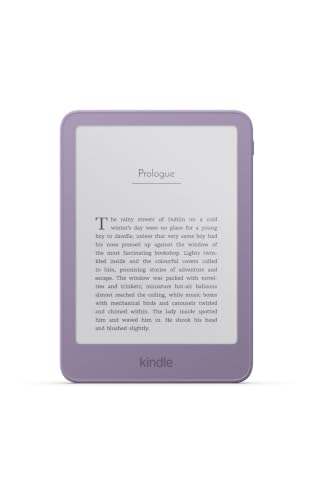
Pros
- Glare-free display with adjustable brightness
- Replaceable battery
- 16GB storage
Cons
- Page-turn remote sold separately
- Protective cover sold separately
- Who should skip it: readers who prefer larger screens
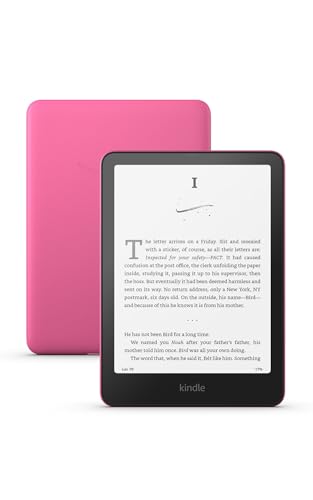

Pros
- 7-inch color display
- Four highlight colors
- Adjustable display tone and Dark Mode
- USB-C charging
Cons
- Who should skip it: readers focused on black-and-white reading
The Best Kindles by Use Case
Best Compact Everyday Reader: Amazon Kindle 16 GB (2024 model)
The Amazon Kindle 16 GB (2024 model) suits readers who want a straightforward, lightweight e-reader for books and novels. Its 6-inch glare-free display, adjustable front light, and dark mode support reading in different lighting. The listing specifies up to six weeks of battery life, though actual runtime varies with use.
Reasons to buy:
- Compact 6-inch glare-free screen is suited to carrying between home and work.
- Adjustable brightness and dark mode let you adapt the screen to bright or dim rooms.
- 16 GB storage is listed as enough for thousands of books.
Reasons to avoid:
- The 6-inch screen is smaller than the 7-inch displays on the Paperwhite and Colorsoft.
- The listing describes a black-and-white reading experience, not color highlighting.
Skip it if you want color pages, a larger screen, or a waterproof Kindle.
Best for Faster Page Opening: Amazon Kindle 16GB (newest model), Now thinner
The Amazon Kindle 16GB (newest model), Now thinner is aimed at readers who prefer a slim 6-inch reader and value quicker access to books. Amazon says books open 30% faster than on the previous Kindle. The listing also describes a replaceable battery, which may appeal to buyers who want the option to swap the battery later.
Reasons to buy:
- The redesigned model is described as thinner and lighter, supporting easy carrying.
- Amazon states that books open 30% faster than on the previous Kindle.
- The back panel opens for a battery swap, according to the listing.
Reasons to avoid:
- The 6-inch display is smaller than the two 7-inch models in this comparison.
- Kindle Click page-turn remote is sold separately, not included according to the listing.
Skip it if you want a larger reading area or need a remote included with your device.
Best for Long Reading Sessions and Water Use: Amazon Kindle Paperwhite 16GB (2024 model)
The Amazon Kindle Paperwhite 16GB (2024 model) fits readers who want a larger black-and-white screen and expect to read near water. It has a 7-inch glare-free display, adjustable white-to-amber lighting, and a waterproof design, as specified in the listing. Amazon claims up to 12 weeks of battery life on a charge, the longest stated battery estimate among these four listings.
Reasons to buy:
- The 7-inch screen gives text more room than the 6-inch Kindle models.
- Waterproof construction suits reading by a pool or in a bath, as described by Amazon.
- White-to-amber display adjustment supports reading in sunlight or at night.
Reasons to avoid:
- The display is optimized for black-and-white reading, not color pages and highlights.
- Its larger screen may be less compact than a 6-inch Kindle for readers prioritizing a small device.
Skip it if color content is a priority or you prefer the smallest Kindle in this group.
Best for Color Covers and Highlights: Amazon Kindle Colorsoft 16 GB (2024 model)
The Amazon Kindle Colorsoft 16 GB (2024 model) is the choice for readers who want book covers and supported content displayed in color. Its 7-inch Colorsoft screen supports highlights in yellow, orange, blue, and pink, and the listing says the display is optimized for color reading. The device is also listed as waterproof, with a stated battery life of up to eight weeks.
Reasons to buy:
- Color display brings supported covers and content into color.
- Four highlight colors make passages easier to distinguish visually.
- Waterproof design and adjustable white-to-amber lighting suit varied reading settings.
Reasons to avoid:
- Its color display is a specialized feature that may add little value if you read only standard text books.
- The listing describes the Colorsoft screen as different from the Paperwhite screen, so compare the display type you prefer.
Skip it if you mainly read novels and do not need color covers or highlights.
How to Choose the Best Kindle for Reading
Screen size and reading material
Screen size affects how much text fits on the display and how compact the reader feels to carry. The two standard Kindle models here have 6-inch screens, while the Paperwhite and Colorsoft have 7-inch screens. If you mostly read novels, a smaller screen may be sufficient and easier to carry. If you want a larger page area, compare the 7-inch choices in person where possible or check the listing details before ordering.
Consider the kind of content you actually read. A larger screen alone does not make every book easier to read, and the supplied information does not specify resolution or page-layout support for individual titles. Check whether your preferred ebooks, illustrated books, and other content display as you expect.
Black-and-white versus color
For text-focused reading, the standard Kindle and Paperwhite offer black-and-white reading displays. The Colorsoft adds color for covers and supported content, along with four highlight colors. That difference matters most if colored passages or color artwork are part of your reading routine. If your library consists mainly of text, consider whether the color feature would change your reading experience enough to matter.
Amazon notes that Colorsoft’s display is optimized for color and differs from the Paperwhite display, which is optimized for black-and-white reading. Do not assume the two display types will look identical. Review the model-specific listing and product images if screen appearance is a deciding factor.
Lighting and where you read
All four listings describe a glare-free screen and adjustable brightness, while the Paperwhite and Colorsoft also specify adjustment from white to amber. The 2024 standard Kindle listing additionally mentions dark mode. These features can help you adapt the screen to bright sunlight or nighttime reading, but the exact controls differ by model. Check each listing if a particular lighting mode matters to you.
Think about your usual reading locations. If you take a Kindle near a pool or into a bath, the Paperwhite and Colorsoft are the models whose supplied descriptions explicitly call them waterproof. The product data does not give a water-resistance rating or define limits for liquid exposure. Read Amazon’s current care information and use the device within its stated limits.
Battery claims and charging expectations
The listings state up to six weeks for both 6-inch Kindles, up to 12 weeks for the Paperwhite, and up to eight weeks for Colorsoft. These are manufacturer claims, not guaranteed results for every reader. Reading frequency, lighting use, and other settings can affect battery life, and the supplied information does not provide a shared measurement method for comparing the estimates.
If fewer charging interruptions matter most, the Paperwhite has the longest stated estimate here. Treat the number as a comparison point rather than a promise. The product data identifies USB-C charging for the Paperwhite and Colorsoft, but does not specify charging details for both standard Kindle listings. Verify the exact model’s charging information if cable or charger compatibility matters.
Storage, library access, and accessories
Each listed model has 16 GB of storage. Amazon describes the 2024 standard Kindle’s storage as holding thousands of books, but the supplied data does not provide equivalent book-count estimates for every model. Actual space use depends on the files you keep on the device. Check the listing for current storage details if you plan to save more than ebooks.
The product data describes access to the Kindle Store and optional Kindle+ subscriptions on several listings. A subscription is an additional choice, not a stated requirement to use the reader. The newer standard model mentions Kindle Click page-turn support, but says the remote is sold separately. Confirm accessory availability and whether an accessory is included before making it part of your budget or setup.
For a broader look at how dedicated readers differ from general-purpose tablets, see our guide to choosing between a tablet and a Kindle. Readers comparing e-readers can also browse our Kindle Paperwhite alternatives guide.
How We Compared
This comparison uses the supplied product listings, including screen size and type, lighting features, storage, battery-life claims, waterproof descriptions, and accessory details. We considered how those listed features fit common reading situations, such as carrying a compact reader, reading near water, and viewing color content. Customer feedback supplied with these products did not provide usable experience details, so we do not draw conclusions from it.
Frequently Asked Questions
Which Kindle is the most compact option in this comparison?
Both standard Kindle models have 6-inch screens, compared with 7 inches on the Paperwhite and Colorsoft. The newer standard model is described as thinner and lighter, while the 2024 standard Kindle is described as light and compact. The supplied information does not provide dimensions or weights to establish which one is smaller by measurement.
Which models are described as waterproof?
The Paperwhite and Colorsoft listings describe their devices as waterproof. The supplied information does not include a water-resistance rating or specify conditions and limits, so check Amazon’s current product information before using either device around water.
Is the Colorsoft a better choice than the Paperwhite?
It depends on what you read. Colorsoft is designed for color content and adds colored highlights, while Paperwhite is optimized for black-and-white reading and has a longer stated battery estimate. Choose based on whether color features or the Paperwhite’s listed battery claim matters more to you.
Do these Kindles need a Kindle+ subscription?
The listings present Kindle+ as an optional subscription. They also describe access to books through the Kindle Store. Check current subscription terms and title availability if you are considering a membership, since the supplied product details do not specify its current terms.
Does the newer standard Kindle include the page-turn remote?
No. Its listing says Kindle Click is sold separately. Confirm the current accessory listing and device compatibility before purchasing a remote, since the supplied details do not specify further compatibility requirements.
Which model has the longest stated battery life?
The Paperwhite listing states up to 12 weeks, compared with up to eight weeks for Colorsoft and up to six weeks for the two standard Kindles. These are manufacturer estimates, and the supplied information does not establish typical runtime under identical use.


Write Your Review
No reviews yet. Be the first to share your experience!