

Choosing an e-reader often feels like an automatic choice to buy an Amazon device, but locked ecosystems restrict how you purchase books, borrow from local libraries, and view illustrated content. Readers looking for the best Kindle Paperwhite alternatives often want color screens for graphic novels, direct library access, and freedom from proprietary file restrictions.
Moving away from the default choice introduces new considerations around screen size, display technology, and day-to-day handling. This guide evaluates 2 color e-readers to help you select a device that matches your personal reading habits, travel needs, and digital library preferences.

Pros
- Glare-free color screen for illustrations and covers
- IPX8 water resistance for safe poolside reading
- Built-in OverDrive access for public library loans
- Adjustable color temperature reduces nighttime eye strain
Cons
- Compact six-inch display restricts full comic page visibility
- Readers requiring large format displays should skip it

Pros
- Glare-free 7-inch color E Ink display
- Waterproof build protects against accidental water exposure
- Lightweight body weighs under half a pound
- Supports both digital eBooks and audiobooks
Cons
- Who should skip: readers wanting full multimedia tablet features
Buying Guide: Choosing the Best Kindle Paperwhite Alternatives
Color E Ink Technology vs. Monochrome Screens
Standard e-readers rely on monochrome displays that render text crisply but flatten book covers, diagrams, and comic books into shades of gray. Modern color alternatives use E Ink Kaleido 3 panels, which overlay a color filter array on top of a standard electronic paper base. This allows you to view book covers, comics, and colorful highlights directly on the page without screen glare in direct sunlight.
The trade-off lies in background brightness. Because the color layer sits above the black-and-white capsule layer, unlit color screens appear slightly darker than traditional monochrome displays. You will often rely on the front light at lower brightness levels indoors to maintain comfortable contrast. If your primary reading list consists purely of standard novels, a standard monochrome screen remains slightly sharper, but color screens transform non-fiction, illustrated books, and study materials.
Screen Dimensions and Portability
Display size changes how much text fits on a single page and how easily a reader travels in a jacket pocket or small bag. A compact 6-inch display offers maximum portability, fitting easily into compact bags for daily commutes. The smaller footprint feels lightweight during long reading sessions held in one hand, though it requires more frequent page turns when reading larger fonts.
Upgrading to a 7-inch display creates a layout closer to a standard paperback book. The extra surface area provides extra space for reading comic panels and taking handwritten notes without shrinking text down to unreadable sizes. However, a 7-inch device adds chassis width and weight, making it less convenient to slip into small pockets without dedicated folio protection.
Water Resistance Ratings for Travel and Home
Accidental spills, splashes, and poolside reading require proper water ingress protection. Devices rated at IPX8 are certified against fresh water submersion up to two meters for sixty minutes. This rating prevents internal board damage if the e-reader slips into a bathtub or gets caught in heavy rain.
Keep in mind that waterproof certifications apply strictly to fresh tap water. Pool chemicals such as chlorine and ocean salt can degrade internal rubber gaskets and corrode exposed USB-C charging ports over time. If your device comes into contact with pool water, rinse the exterior gently with fresh water and allow the USB-C port to dry completely before plugging in a charging cable.
Ecosystem Openness and Library Borrowing
A major reason to evaluate non-Kindle options is ecosystem flexibility. While Amazon devices rely heavily on proprietary bookstore formats, alternatives often include native integration with OverDrive and public libraries. Built-in OverDrive access lets you browse, borrow, and read library books directly on the device using your local library card without requiring a computer transfer.
Support for open formats such as EPUB means you are not tied to a single commercial storefront. You can load DRM-free titles from independent digital bookstores, web archives, and digital comic services directly onto your storage drive. If you prefer keeping full ownership of your book files across multiple reader brands, an open ecosystem simplifies file organization significantly.
How We Compared These Products
Our comparison relies on published technical specifications, verified hardware documentation, screen panel capabilities, and documented user experiences. We analyzed display technologies, storage allocations, waterproof certifications, and physical dimensions to assess how each reader serves different reading habits without relying on marketing hype.
Which Option Fits Your Needs?
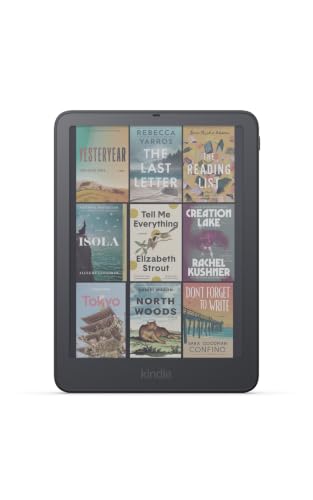
Readers prioritizing compact travel and everyday carry should consider the Kobo Clara Colour | Colour eReader. It combines a 6-inch E Ink Kaleido 3 color screen with 16GB of internal storage, holding up to 12,000 eBooks or 75 audiobooks. It includes ComfortLight PRO to reduce blue light exposure at night, full IPX8 water protection, and built-in OverDrive support for library borrowing. Pros: pocket-friendly size, colorful highlighting, full waterproofing, and ocean-bound plastic construction. Cons: smaller screen area makes graphic novels tight to read, and lacks physical page-turn buttons. Who should skip it: readers who want a spacious screen for extensive note-taking or reading complex comics.
For readers who want a larger canvas for comics, illustrations, and note-taking, the Kobo Libra Colour eReader, 7” Color E Ink is the practical step up. The 7-inch display provides noticeably more screen space while retaining the glare-free benefits of E Ink Kaleido 3 technology and IPX8 water resistance. The larger layout makes full-color illustrations, graphic novels, and textbook diagrams easier to examine without frequent zooming. Pros: expanded 7-inch color display, note-taking capability, waterproof design, and distraction-free interface without pop-up notifications. Cons: higher cost and wider body that requires a dedicated travel sleeve. Who should skip it: commuters who need an ultra-compact device that fits inside a coat pocket.
Frequently Asked Questions
Can I read color E Ink screens outdoors in direct sunlight?
Yes. E Ink Kaleido 3 displays are reflective rather than emissive. Bright sunlight improves contrast naturally, allowing you to read text, graphic novels, and book illustrations without screen reflections or glare.
Can I transfer my existing Kindle eBooks to a Kobo e-reader?
Books purchased from Amazon that carry proprietary digital rights management (DRM) cannot be loaded directly onto non-Kindle hardware. However, DRM-free MOBI or standard EPUB files can be transferred over a standard USB-C cable or organized using desktop catalog software.
How does public library borrowing work on these devices?
Kobo devices include integrated OverDrive support. You simply sign in with your public library card number on the e-reader itself, search your local library collection, and download available eBooks directly over Wi-Fi without needing a computer.
Do color e-readers drain battery faster than standard black-and-white models?
Because color filter layers reduce ambient background brightness slightly, users often keep the front light on at low levels more frequently. Even with the front light active, these devices still provide weeks of reading time between battery charges under standard use.
Can I listen to audiobooks on these color e-readers?
Both models support audiobooks through Bluetooth wireless headphones or external speakers. The 16GB storage capacity on the compact model stores approximately 75 full audiobooks alongside thousands of text-based titles.




Write Your Review
No reviews yet. Be the first to share your experience!