

A power bank that charges a phone may not deliver enough power to keep a laptop running. For travel, you also need to consider battery capacity, USB-C output, port count, cable convenience, and airline limits. This guide to the best portable power bank for laptop travel compares those factors across nine options, so you can narrow the field to devices that fit your laptop and trip.
Check your laptop’s charging requirements before buying. A USB-C port does not automatically support laptop charging, and a power bank’s total output may differ from the maximum output available from one port. The listings do not provide every detail, such as exact dimensions or complete port-by-port power sharing, so confirm those points when they matter to your setup.

Pros
- High 65W output suitable for charging laptops
- Four-port array charges multiple devices at once
- Broad fast-charging support including PD and PPS
- Compact size meets airline carry-on regulations
Cons
- Output limited to 65W for high-draw laptops
- High-performance workstation users should skip it

Pros
- High 165W total output with 100W single-port charging
- Dual integrated USB-C cables eliminate loose cords
- Airline-compliant 25,000mAh capacity fits carry-on rules
- Simultaneous charging for up to four devices
Cons
- Wall charger not included in package
- Heavier build at 1.31 pounds
- Ultra-light travelers should skip this bulky design

Pros
- Slim, packable flat form factor
- High 100W output charges laptops rapidly
- Four ports for simultaneous multi-device charging
- Integrated digital battery status display
Cons
- Square footprint is too wide for pockets
- Weighs nearly one pound

Pros
- Built-in 100W AC port powers small appliances
- Fast 65W USB-C input recharges in 1.5 hours
- Meets TSA carry-on limit under 100Wh
- Four diverse output ports for multi-device charging
Cons
- Cannot power appliances exceeding 100W draw
- Users running high-draw heavy electronics should skip it

Pros
- Up to 65W fast charging for laptops
- Compact footprint measuring 4.3 by 2.8 inches
- Built-in detachable USB-C lanyard cable
- Generous three-year replacement warranty
Cons
- Weighs 0.84 pounds which feels heavy in pockets
- Short 4.7-inch cable limits device placement while charging
- Skip if you need an ultralight everyday charger

Pros
- Up to 65W single-port laptop charging
- Integrated durable USB-C cable
- Fast 1.5-hour recharge with 65W charger
- Airline-approved 20,000mAh capacity
Cons
- Heavy 15.5-ounce weight limits pocket portability
- Who should skip: ultralight travelers wanting compact carry
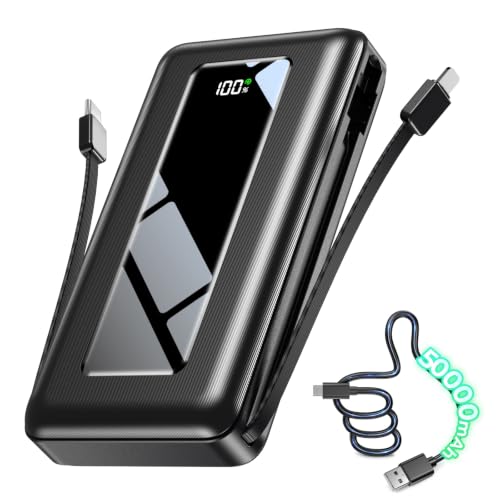
Pros
- Massive 50000mAh capacity for multiple device recharges
- Integrated cables reduce need for loose cords
- Clear digital LED battery percentage readout
- Built-in emergency flashlight for power outages
Cons
- Bulky one-inch thick profile limits pocket carry
- 22.5W output limits laptop charging speeds
- Skip if needing lightweight everyday pocket carry

Pros
- Fast 45W output for quick device top-ups
- Slim, pocket-friendly half-inch profile
- Detachable and replaceable braided USB-C cable
- Flight-safe capacity complies with airline carry-on guidelines
Cons
- Included 0.4-foot cable provides very limited reach
- Users needing multi-day battery reserves should skip it

Pros
- High 165W total output with 100W single-port delivery
- Convenient built-in retractable charging cable
- Detailed TFT display tracks real-time power metrics
- Durable aluminum unibody shell aids heat dissipation
Cons
- Relatively heavy at nearly 1.5 pounds
- Recharging capped at 65W maximum input
- Frequent light packers should skip this bulky unit
The Best Laptop Power Banks by Use Case
Best for Higher-Wattage Charging: AsperX Laptop Power Bank
The AsperX Laptop Power Bank lists 165W total output and up to 100W from a single port, with a claim of charging two computers at 100W and 65W simultaneously. Its retractable cable and display showing battery level, input, and output information may suit travelers who want an integrated charging setup. The listing also specifies a 20,000mAh capacity and a TSA-approved design. See the guide to USB-C docks for two laptops if you are comparing portable power with desk charging options.
Reasons to buy:
- Up to 100W single-port output, with 165W total output specified.
- Retractable cable reduces the need to pack a separate USB-C cable.
- TFT display provides battery and power information.
Reasons to avoid:
- Confirm your laptop accepts USB-C charging; the listing notes some USB-C ports support data only.
- Verify how power is divided across ports for your devices.
Skip it if your laptop needs more than 100W from one port or cannot charge through USB-C.
Best for Three USB-C Devices: Anker Laptop Power Bank, 25,000mAh Travel
The Anker Laptop Power Bank, 25,000mAh Travel lists three USB-C ports rated for up to 100W each and 165W total output. It is a strong fit for a traveler carrying a laptop and multiple USB-C devices, while its 25,000mAh capacity offers more stored energy than the 20,000mAh picks here. The listing says it complies with the 100Wh airline limit and includes two built-in USB-C cables, one retractable.
Reasons to buy:
- Three USB-C ports support flexible charging for a multi-device setup.
- 25,000mAh capacity is suited to longer days away from outlets.
- Built-in cables reduce loose accessories in a travel bag.
Reasons to avoid:
- It costs more than the other options in this comparison, without listed dimensions or weight here.
- Confirm combined output when charging several devices at once.
Skip it if you need an AC outlet or prefer a smaller-capacity, simpler charger.
Best Slim Option for a Laptop Bag: Baseus Laptop Portable Charger 100W 20000mAh
The Baseus Laptop Portable Charger 100W 20000mAh pairs a stated 100W USB-C PD output with a flat design intended for a laptop bag or briefcase. Its two USB-C and two USB-A ports offer useful flexibility if your travel kit includes older USB-A accessories as well as a laptop. A display shows power information, and the listing describes the 20,000mAh model as suitable for airline travel.
Reasons to buy:
- 100W USB-C PD output targets laptops that support that charging rate.
- Four ports include both USB-C and USB-A.
- Flat form is designed to fit in a laptop bag with less bulk.
Reasons to avoid:
- It has less capacity than the 25,000mAh and 27,000mAh choices.
- Check whether the advertised 100W output remains available when other ports are in use.
Skip it if your laptop needs an AC plug or you want the highest listed capacity in this group.
Best for Devices with a Wall Plug: Portable Power Bank with AC Outlet
The Portable Power Bank with AC Outlet stands apart from USB-C-only options by providing a 100W AC outlet, plus a 65W USB-C PD port and two USB-A ports. Its listed 98Wh capacity may suit travelers who need to power a compatible device that charges from a wall plug. The listing says the AC outlet is for devices under 100W and describes the unit as TSA compliant; check both the laptop’s wattage and airline rules before packing it.
Reasons to buy:
- AC outlet can serve devices that lack USB-C charging.
- 65W USB-C PD output supports compatible laptops and other USB-C devices.
- Four output types provide options for a mixed-device kit.
Reasons to avoid:
- The AC outlet is limited to devices below 100W, according to the listing.
- Confirm the permitted carry-on rules with your airline; airline policies can vary.
Skip it if you want a compact USB-C-only pack or your laptop draws 100W or more through its AC adapter.
Best Compact 65W Pick: INIU Laptop Power Bank, Smallest 20000mAh 65W
The INIU Laptop Power Bank, Smallest 20000mAh 65W is aimed at buyers who want laptop-capable USB-C output in a compact form. It lists 20,000mAh capacity, 65W charging, triple-port charging, and a detachable short USB-C cable that also serves as a carry handle. Its 65W ceiling makes it more appropriate for compatible laptops with modest charging needs than for systems that require higher-wattage input.
Reasons to buy:
- 65W USB-C output and 20,000mAh capacity target laptop and phone travel use.
- Three ports can serve a laptop and smaller accessories.
- Detachable cable can be replaced if it is damaged or lost.
Reasons to avoid:
- 65W may be insufficient for laptops that need a higher input wattage.
- Confirm which ports support the power levels your devices need.
Skip it if you need 100W charging, multiple high-power laptop connections, or an AC outlet.
Also Considered
The JUOVI 65W Portable Charger for Laptop Power Bank may suit buyers who want 65W output, four ports, and a 20,000mAh capacity, but the picks above offer a more distinct feature match for this guide.
The Anker Power Bank, 20,000mAh Travel Essential could fit a traveler seeking a built-in USB-C cable and up to 65W from one device, though its listed 87W total output is lower than the higher-output options selected.
The 50000mAh Portable Charger Power Bank offers high stated capacity and built-in phone cables, but its 22.5W output is not a strong match for many laptop charging needs.
The INIU 10000mAh 45W Fast Charging Portable Charger may work as a light phone or tablet backup, but its 10,000mAh capacity and 45W output make it less suited to laptop-focused trips.
How to Choose the Best Portable Power Bank for Laptop Travel
Match output to your laptop
Start with the wattage printed on your laptop’s charger or listed in its specifications. A power bank’s maximum output should meet the laptop’s charging needs for the best chance of maintaining charge during use, but charging speed can also depend on the laptop and cable. This comparison includes models ranging from 45W to 100W single-port output, so do not assume that every product labeled for laptops can charge every laptop at full speed.
For example, the AsperX model lists up to 100W from one port, while the INIU 20,000mAh model lists 65W. Check the exact power profile and charging method your computer supports. If the listing does not state the port-level output clearly, confirm it with the manufacturer before relying on it for work travel.
Compare capacity with trip length and carry-on rules
Capacity gives a rough indication of stored energy, not a guaranteed number of laptop charges. Device power draw, conversion losses, charging habits, and whether you use the laptop while charging all affect how long a bank can help. A 25,000mAh option may be more useful for extended time away from an outlet, while a smaller pack can reduce what you carry on a short commute.
Airline limits are commonly expressed in watt-hours, while product listings often emphasize milliamp-hours. This group includes products whose listings state airline compliance or a capacity below 100Wh, but airline rules and approval requirements can change. Check the watt-hour rating printed on the device and your carrier’s current carry-on policy before departure. Do not rely only on a broad phrase such as “flight-ready.”
Count ports and check shared output
Port count matters when you need to charge a laptop, phone, and headphones together. Yet a bank’s total wattage may be divided across connected devices, so multiple ports do not mean each device receives its maximum rate at the same time. The Anker 25,000mAh model lists three USB-C ports and 165W total output, while the Baseus model combines two USB-C ports with two USB-A ports.
Look for separate details about maximum output per port and combined output. If the listing does not explain power sharing, treat simultaneous full-speed charging as unconfirmed. Match USB-A ports to accessories that need them, and prioritize USB-C PD output when your laptop charges over USB-C.
Choose cable convenience without ignoring compatibility
Built-in or retractable cables can cut down on loose items, especially when you travel between meetings or pack light. A detachable cable, like the one listed with the INIU 20,000mAh model, can be replaced separately; an integrated cable is convenient but should be protected from wear. Check the cable connector and confirm that it supports the charging rate you need.
Also confirm that the laptop’s USB-C port accepts charging. Some USB-C ports handle data but not power input, as the AsperX listing cautions. If your laptop charges only through a proprietary connector or wall adapter, a USB-C power bank may not work without a compatible, supported charging path.
Decide whether you need USB-C output or an AC outlet
USB-C banks are generally the more direct choice for laptops designed to charge through USB-C. An AC outlet can help with devices that need a wall plug, but the outlet’s wattage limit and the device’s power draw matter. The Paopaoyu listing specifies a 100W maximum for its AC outlet and a 65W USB-C PD output, so compare those limits with your adapter’s requirements.
An AC outlet should not be treated as a higher-power option simply because it accepts a standard plug. Check the power bank’s output rating, your device’s adapter rating, and the product’s stated limits. For other computer accessories, see our portable monitor guide and laptop privacy screen guide.
How We Compared
This comparison uses the published product listings, including stated capacity, output wattage, port configuration, cable design, travel claims, and listed protections or warranty terms. We considered how those specifications map to common travel needs, such as charging one laptop, carrying several USB devices, or powering equipment that uses an AC plug. Some listings leave details unclear, including dimensions, weight, and power sharing across ports, so we identify those as points to verify rather than treating them as established facts. No customer review information was supplied for these products.
Frequently Asked Questions
Can any USB-C power bank charge a laptop?
No. The laptop must support charging through its USB-C port, and the power bank must provide a compatible charging protocol and enough output wattage. Confirm both details in the laptop and power bank specifications; a USB-C connector alone does not establish compatibility.
Is 65W enough for a travel laptop?
It depends on the laptop. A 65W bank may suit a computer that accepts 65W USB-C charging, but it may charge a higher-demand model slowly or fail to maintain its battery during heavy use. Compare the bank’s output with the laptop’s recommended charger rating.
Does higher mAh always mean more laptop charging?
Not by itself. Milliamp-hours describe capacity at a particular battery voltage and do not directly guarantee a number of laptop charges. Watt-hours, conversion losses, laptop power draw, and usage during charging all affect delivered energy. Compare stated watt-hours when available and treat charge-count claims as estimates.
Can I charge a laptop and phone at the same time?
Many models in this guide have multiple output ports, but available power may be shared. Check the listing for total output when several ports are active and the maximum output for each port. If those figures are missing, do not assume the laptop will continue receiving its full rated charging speed.
Should I choose a power bank with an AC outlet?
Choose one when you need to connect a device that charges from a wall plug and its power draw falls within the outlet’s rating. For a USB-C-chargeable laptop, a USB-C PD bank may be a more direct option. Compare the outlet limit and laptop adapter rating, and confirm airline rules for the specific bank before flying.
How do I know whether a power bank is allowed on a flight?
Check the power bank’s watt-hour rating, the airline’s current battery rules, and any destination or security requirements. The product listings make airline-related claims, but those claims do not replace checking your carrier’s policy. Keep power banks in carry-on baggage when required by airline rules, and do not pack them in checked baggage unless the carrier explicitly permits it.


Write Your Review
No reviews yet. Be the first to share your experience!