

Photo libraries can fill laptop storage quickly, but a portable SSD only helps if its capacity and connection fit your computer and backup routine. This guide compares options for photographers who want a compact copy of their files, from basic photo transfers to large creative projects.
When choosing the best portable SSD for backing up laptop photos, consider listed transfer speeds alongside the USB interface, capacity, and protection features. Manufacturer speed claims depend on the host device and connection, so a high number alone does not guarantee faster transfers on your laptop.

Pros
- Transfer rates reach up to 2000MB/s
- Durable IP65 water and dust resistance rating
- Compact and lightweight design at 0.1 pounds
- Built-in 256-bit AES hardware encryption
Cons
- Modest 500GB capacity limits large media archives
- Users needing multi-terabyte storage should skip it

Pros
- Advertised transfer speeds reach up to 550 MB/s
- Extremely light 27-gram pocketable design
- Included two-in-one USB-C and USB-A cable
- Hardware supports TRIM and SMART health monitoring
Cons
- Incompatible with Apple Lightning port devices

Pros
- Fast peak read speeds up to 2000 MB/s
- Includes protective silicone sleeve and dual-format cables
- Extremely lightweight and compact metal housing
Cons
- Requires USB 3.2 Gen 2x2 for maximum speed
- Water resistance claims lack official IP certification
- Who should skip: users lacking Gen 2x2 ports

Pros
- Up to 800MB/s read speeds
- Two-meter drop-resistant exterior
- Extremely lightweight at 0.09 pounds
- Built-in rubber loop for secure attachment
Cons
- Maximum read speeds capped at 800MB/s
- Who should skip: creators needing faster drive speeds

Pros
- Lightweight design weighs under two ounces
- Drop protection up to two meters
- Integrated rubber hook for easy transport
- Read speeds reach up to 800MB/s
Cons
- Includes USB-C to USB-A cable only
- Manufacturer does not specify write speeds
- Power users needing top NVMe speeds should skip it
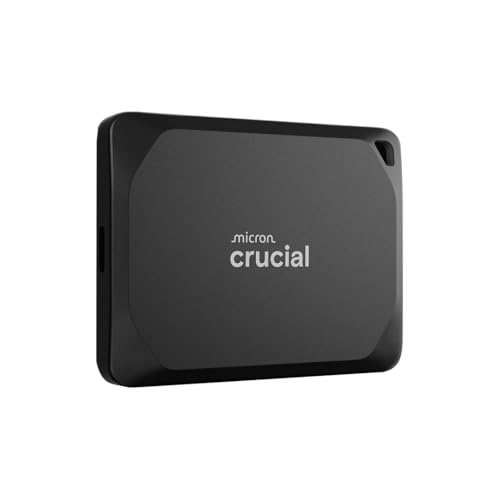
Pros
- Up to 2,100MB/s read speeds for fast transfers
- IP55 water resistance and 7.5-foot drop durability
- Compact frame weighing under 0.1 pounds
- Broad multi-platform compatibility across computers and consoles
Cons
- Registration required to unlock bundled software
- Maximum transfer speeds require specific compatible ports
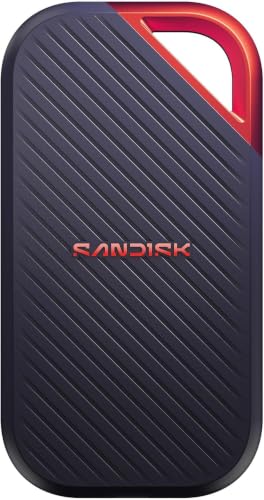
Pros
- Up to 4000 MB/s read speeds via USB4
- Sustained 3100 MB/s write speeds for heavy transfers
- IP65 rating and three-meter drop protection
- Hardware 256-bit AES password encryption
Cons
- Requires USB4 hardware to achieve maximum transfer speeds
- Who should skip: buyers needing standard USB-A compatibility
The Best Portable SSDs by Use Case
Best for Everyday Photo Backups: SANDISK 500GB Extreme Portable SSD
The portable SSD lineup includes drives with very different capacity and speed targets. SANDISK 500GB Extreme Portable SSD suits someone who wants a compact drive for a current photo collection and values specified water and dust protection. Its listing claims transfer speeds up to 2,000MB/s and says it can move 1,000 high-resolution photos in under 60 seconds, though actual speed depends on the laptop and connection.
Reasons to buy:
- The listing specifies IP65 water and dust protection and drop protection up to 3 meters.
- 256-bit AES encryption with password protection helps protect private files.
- Pocket-sized design and a stated top speed of 2,000MB/s suit portable photo workflows.
Reasons to avoid:
- Its 500GB capacity may not suit a large archive or frequent video backups.
- The listed speed depends on a compatible host device and interface; check your laptop’s USB support.
Skip it if you need 1TB or more on one drive or cannot confirm that your laptop can use its advertised transfer speed.
Best Value: SSK External Hard Drive 512GB up to 550MB/s
SSK External Hard Drive 512GB up to 550MB/s is the lowest-capacity, lower-speed choice in this set, with a USB-C and USB-A cable and stated read and write speeds up to 550MB/s and 500MB/s. That makes it a reasonable fit for routine photo copying when you do not need near-2,000MB/s transfer claims. The listing also describes support for OTG-enabled Android devices, Windows, macOS, Linux, and iPadOS, with Lightning-port devices excluded.
Reasons to buy:
- The included USB-C and USB-A cable options can connect to different port types.
- S.M.A.R.T. monitoring and TRIM are specified features.
- At 512GB, it can suit a smaller photo collection or a secondary backup copy.
Reasons to avoid:
Reasons to avoid: Its capacity and stated speeds are below several alternatives here. The compatibility listing is broad, but you should verify your exact laptop, phone, and file system needs before relying on cross-device transfers.
Skip it if you routinely move very large photo libraries or need more than 512GB on a single portable drive.
Best for High-Speed Creative Work: Crucial X10 Pro 1TB Portable SSD
Crucial X10 Pro 1TB Portable SSD pairs 1TB of listed capacity with claimed read speeds up to 2,100MB/s and write speeds up to 2,000MB/s. It may suit photographers who back up large sessions and also move active projects between supported devices. The listing names Windows, Mac, iPad Pro, Chromebooks, Android, Linux, PS4, PS5, and Xbox compatibility, and specifies USB-C and USB-A connectivity.
Reasons to buy:
- High stated read and write speeds suit frequent transfers when the host connection supports them.
- IP55 water and dust resistance and drop resistance up to 7.5 feet are specified.
- Password protection, a lanyard loop, and an activity light add practical details for mobile use.
Reasons to avoid:
- Its 1TB capacity may be limiting for a large long-term archive.
- The listed maximum speeds are not guaranteed on every device or USB connection.
Skip it if basic periodic backups matter more than fast transfers, or if you want the largest capacity in this selection.
Best for a Lower-Cost 1TB Backup: Sandisk 1TB Portable SSD – Lavender
Sandisk 1TB Portable SSD – Lavender offers a 1TB capacity and listed read speeds up to 800MB/s. Its specifications focus on portable everyday storage rather than the higher speed claims of creator-oriented models. A tough rubber hook is specified for attaching the drive to a belt loop or backpack, and the listing states drop protection up to two meters.
Reasons to buy:
- 1TB provides more room for photo backups than the 500GB and 512GB options here.
- The rubber hook offers an attachment option while traveling.
- Up to 800MB/s read speed is specified for routine file access and transfers.
Reasons to avoid:
- The listing does not specify water or dust protection.
- Its stated read speed is lower than the high-speed options in this guide.
Skip it if your work depends on very fast large-file transfers or you need a stated water and dust rating.
Best for Larger Photo Archives: Sandisk 2TB Extreme PRO Portable SSD
Sandisk 2TB Extreme PRO Portable SSD has the largest stated capacity in this comparison at 2TB, making it a better match for extensive photo libraries and mixed photo-video work. Its listing claims speeds up to 4,000MB/s and average sustained write speeds of 3,100MB/s for 2TB to 4TB models. USB-C and USB4 connectivity, IP65 protection, drop protection up to 3 meters, and 256-bit AES encryption are also specified.
Reasons to buy:
- 2TB capacity provides more room for a growing archive than other listed models.
- The manufacturer specifies sustained write performance for high-volume transfers.
- IP65 protection, drop protection, and password-protected encryption support mobile storage use.
Reasons to avoid:
- Its advertised top speed depends on suitable host and interface support; a laptop may not reach it.
- The listing emphasizes heavy creative workloads, which may be more capability than occasional backups need.
Skip it if you only need a modest photo backup drive or your laptop cannot make use of its higher-speed connection.
Also Considered
The Sandisk 1TB Portable SSD may suit buyers who want 1TB, USB 3.2 Gen 2, USB-C to USB-A cable support, and stated read speeds up to 800MB/s, but its listing describes an older model and does not specify water or dust protection.
The KOOTION Portable SSD 1TB USB-C Up to 2000MB/s USB could appeal to shoppers seeking 1TB and claimed speeds up to 2,000MB/s read and 1,800MB/s write, plus a protective silicone case; its listing does not provide a specific water-resistance rating, so verify what its waterproof wording means before exposure to moisture.
How to Choose the Best Portable SSD for Backing Up Laptop Photos
Match capacity to your photo library
Capacity determines how much you can keep on the drive before you need to remove files or add another storage device. The models here range from 500GB and 512GB to 1TB and 2TB. A smaller drive may work for a selected set of current photos, while a 1TB or 2TB option gives more room for larger libraries and future additions.
Check the size of your existing photo folders and estimate how often you add new files. Also decide whether this drive will hold only laptop backups or include video and active creative projects. A portable SSD is one copy, not a substitute for keeping important files in more than one place.
Check the connection your laptop can use
USB-C describes a connector shape, not a guaranteed data speed. The listed maximum speeds may depend on the drive’s interface, the laptop port, the cable, and other conditions. Before choosing a fast model, check your laptop’s specifications for the USB generation or USB4 support, and confirm which cable is included.
For example, the SSK listing specifies a USB-C and USB-A cable, while the Crucial X10 Pro listing describes USB-C and USB-A connectivity. A fast drive connected through a slower port can still transfer files, but the laptop may limit performance. If you switch between computers, confirm that each has a compatible port and can read the drive’s file system.
Read speed claims in context
Higher listed transfer speeds can reduce waiting during large transfers, especially when you regularly copy photo sessions or video files. For occasional backups, a drive with a lower stated speed may be sufficient. Manufacturer figures are maximum claims, not a promise that every transfer will reach that rate.
Look for both read and write information when available. Reading files from a drive and saving new backups are different tasks; the Crucial and KOOTION listings state both read and write speeds, while some other listings provide only read-speed figures. Consider the files you move and the port on your laptop rather than buying by the largest speed number alone.
Decide how much protection and security matter
If you carry the drive in a camera bag or use it away from home, a stated drop rating may be useful. The SANDISK Extreme models specify IP65 water and dust protection, while the Crucial X10 Pro specifies IP55. These ratings do not mean a drive is safe in every liquid exposure or environment, so follow the manufacturer’s limits.
Security features also vary. The SANDISK Extreme and Extreme PRO listings specify 256-bit AES encryption with password protection, while Crucial lists SSD password protection. Do not assume that another model includes encryption simply because it is an SSD. Check how password setup works and whether the feature supports the computers you use.
Confirm device and workflow compatibility
Some listings name several operating systems and devices, but compatibility can still depend on the exact model, connector, and formatting. The Crucial listing names Mac, Windows, Chromebooks, Android, Linux, tablets, and game consoles. The SSK listing names several platforms and notes that Lightning-port devices are incompatible. Verify the specific laptop and any phone or tablet you plan to connect.
For laptop photo backups, also decide whether you want a simple manual copy or software-managed backup. The published listings do not give a consistent backup-software feature set, so check each manufacturer’s current instructions if scheduled or automatic backups matter. For more storage options, browse our storage guides and our guide to the best MicroSD card.
How We Compared
We compared the published product specifications, stated capacity and speed claims, connection details, compatibility information, and listed durability and security features. Product-specific performance and protection statements are manufacturer claims, and actual results can depend on the connected laptop and usage conditions. The published rating figures have no accompanying review details, so they do not establish a pattern of customer experience.
Frequently Asked Questions
Will any portable SSD work with my laptop?
Not necessarily. Check the drive’s connector and listed operating-system compatibility against your laptop, and confirm that the included cable fits its port. USB-C connector shape alone does not establish the data speed a port supports. You may also need to format a drive for your intended operating system, so check the manufacturer’s setup guidance before moving files.
Is 500GB enough for backing up laptop photos?
It can be enough for a smaller or carefully selected collection, but there is no single capacity that fits every photo library. Check the current size of your folders and consider how much you add over time. If you want space for video or a growing archive, compare 1TB and 2TB options as well.
Does a 2,000MB/s SSD always transfer files faster than an 800MB/s SSD?
No. Those figures are listed maximums, and the laptop, port, cable, file sizes, and usage conditions can affect transfer speed. A laptop with a slower connection may not make full use of the faster drive. Check the port specifications before paying for a speed tier you cannot use.
Can I connect a portable SSD to a phone or tablet?
Some listed models name phone and tablet support, but connector and operating-system details matter. The SSK listing specifies OTG support for compatible Android devices and excludes Lightning-port devices. Crucial lists iPad Pro and Android compatibility. Confirm your exact device and cable, and check whether it can supply the needed connection and access the drive’s format.
Does an IP rating make an SSD waterproof?
No. An IP rating describes a specified level of resistance, not protection from every kind of liquid exposure. The listed SANDISK Extreme models specify IP65, and the Crucial X10 Pro specifies IP55. Follow the product’s handling guidance and do not treat a resistance rating as permission to submerge a drive.
Should an SSD be my only photo backup?
No. A portable drive can provide a separate copy, but it can be lost, damaged, or fail. Keep important photos in another independent location as well, such as a second storage device or a suitable cloud backup. Check that your backup process includes the folders you care about and that you can restore files when needed.


Write Your Review
No reviews yet. Be the first to share your experience!