

A monitor purchase often comes down to a practical choice: prioritize a lower-cost Full HD screen, or spend more for a sharper QHD OLED display? This guide to Best Black Friday Gaming Monitor Deals compares three 27-inch options by resolution, refresh rate, panel features, and adjustment options, so you can narrow the choice to your PC or console and the games you play.


Pros
- 27-inch QHD QD-OLED display
- 240Hz refresh rate
- HDMI 2.1 connectivity
- Height-adjustable, pivoting stand
Cons
- Skip if you need 4K resolution

The Best Gaming Monitors by Use Case
Best Value: Samsung 27" Odyssey G3 (G30D)
The Samsung 27" Odyssey G3 (G30D) is the Full HD choice for players who want a high refresh rate and a flexible stand without stepping up to an OLED screen. Its 180Hz refresh rate and 1ms MPRT response time are aimed at quick-moving games, while AMD FreeSync is designed to reduce tearing when the monitor and graphics card are in sync. It also includes Black Equalizer for adjusting dark areas and Virtual Aim Point for an on-screen crosshair.
Reasons to buy:
- 180Hz refresh rate and 1ms MPRT response time suit fast action and competitive play.
- AMD FreeSync can help reduce screen tearing with a compatible graphics card.
- The stand adjusts for height, tilt, swivel, and pivot, which helps when arranging a comfortable viewing position.
Reasons to avoid:
- Its Full HD resolution is less detailed than the QHD screens in this roundup, particularly if you want more desktop space or finer image detail.
- Its listed sync feature is AMD FreeSync, so confirm that its connection and sync support suit your specific computer or console.
Skip it if you want a QHD OLED display, HDR10, or the 240Hz refresh rate offered by the other two options.
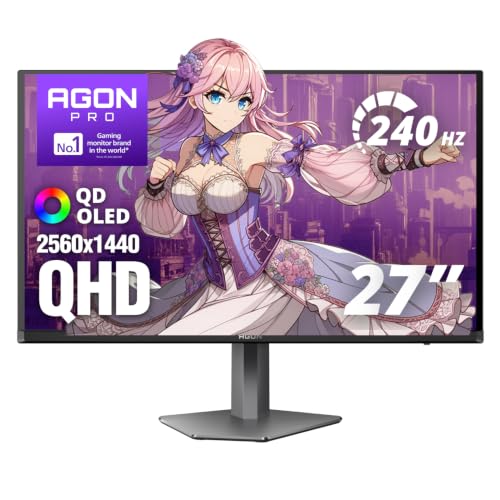
Best for Fast QHD OLED Gaming: AOC 27" Gaming Monitor QHD 240Hz QD OLED NVIDIA
The AOC 27" Gaming Monitor QHD 240Hz QD OLED NVIDIA pairs 2560×1440 resolution with a 240Hz QD-OLED panel. That combination suits players who want more image detail than Full HD while keeping a high refresh rate for responsive-feeling gameplay. AOC lists a 0.03ms response time, True Black HDR, and G-SYNC compatibility, and the monitor includes HDMI 2.1 and DisplayPort 1.4 for connecting a PC or supported console.
Reasons to buy:
- QHD resolution gives games and desktop content more detail than the Full HD option here.
- QD-OLED, True Black HDR, and the stated color coverage are aimed at vivid color and deep blacks.
- Its HDMI 2.1 and DisplayPort 1.4 connections, G-SYNC compatibility, and USB 3.2 hub support a broad range of gaming setups.
Reasons to avoid:
- To take advantage of 240Hz at QHD, check that your computer can deliver the frame rates you want in your games.
- OLED is a different purchase proposition from the Full HD LCD option, so consider your usual mix of games and everyday screen use before deciding.
Skip it if a Full HD screen meets your needs and you would rather keep your monitor choice simpler than move to QHD OLED.
Best for Glare-Conscious Setups: Samsung 27" Odyssey OLED G6 (G61SH) QD-OLED
The Samsung 27" Odyssey OLED G6 (G61SH) QD-OLED is another 27-inch QHD OLED monitor with a 240Hz refresh rate and a listed 0.03ms response time. It adds Glare Free technology, HDR10, and an adjustable stand, making it a possible fit for players who want OLED contrast and a screen feature intended to reduce reflections from external light. Samsung also includes OLED Safeguard technology to help prevent burn-in.
Reasons to buy:
- QHD QD-OLED, HDR10, and Pantone validation support a focus on color and contrast as well as gaming speed.
- Glare Free technology is intended to keep reflections from external light sources from interfering with the view.
- The height-adjustable stand tilts, swivels, and pivots, and AMD FreeSync Premium is included to reduce tearing and choppiness.
Reasons to avoid:
- Its QHD resolution and 240Hz refresh rate make it important to check your system’s ability to drive your games at the settings you prefer.
- Glare reduction does not remove the need to consider where a monitor sits relative to windows and lights.
Skip it if you do not need an OLED display or would rather choose the Full HD model for a less demanding resolution.
How to Choose the Best Black Friday Gaming Monitor Deals
Match resolution to your computer and games
Resolution affects image detail and the workload placed on your gaming system. The Samsung Odyssey G3 is Full HD, while both OLED models are QHD at 2560×1440. QHD can make fine detail clearer and gives you more room for desktop content, but running games at that resolution can take more graphics power than Full HD. Before buying, check the resolution and frame rates your computer can manage in the games you actually play, not only the monitor’s maximum refresh rate.
Console owners should also verify that the monitor’s connections and supported display modes meet their console’s needs. The AOC model lists HDMI 2.1 and support for PS5 and Xbox Series X, but connection support alone does not guarantee that every game or console mode will run at the monitor’s maximum refresh rate. Check the console’s output settings and the monitor’s supported modes.
Choose a refresh rate that fits your games
A higher refresh rate can show more frames per second when your system can produce them. The 180Hz Samsung G3 is a high-refresh Full HD option, while the AOC and Samsung OLED monitors list 240Hz. That difference matters most if you play fast competitive games and your computer can reach high frame rates. For slower-paced or story-driven games, you may prefer to weigh resolution, panel type, and price against a refresh rate you might not regularly use.
Refresh rate is not the same as response time. These monitors list different response-time measurements, including MPRT for the G3 and 0.03ms for the OLED models. Treat the figures as manufacturer specifications rather than a guarantee of how motion will look in every game. Check the exact model’s settings and supported connection modes, and remember that the graphics card, game, and display settings all affect the result.
Decide whether OLED fits your everyday use
The AOC and Samsung OLED options use QD-OLED panels and highlight deep blacks, color, and HDR features. That can appeal if you want a display suited to visually rich games as well as fast play. The Samsung G3 is the non-OLED choice in this comparison, with gaming features such as Black Equalizer and Virtual Aim Point instead. Think about whether image contrast and color are priorities, or whether a fast Full HD screen better matches your budget and setup.
OLED buyers should consider the content they leave on screen for long periods, such as static interface elements or desktop windows. Samsung says its OLED Safeguard technology helps prevent burn-in, but that wording is not a promise that burn-in cannot occur. Review the monitor’s care guidance and warranty terms before purchasing, and compare the particular panel features that matter to you rather than assuming all OLED monitors have identical protections.
Check adaptive sync and your connections
Adaptive sync can help reduce tearing when a display’s refresh rate follows the graphics output. The G3 lists AMD FreeSync, the AOC lists G-SYNC compatibility, and the Samsung OLED lists AMD FreeSync Premium. If you use a specific graphics card or console, confirm compatibility and the supported refresh rate for the connection you plan to use. HDMI and DisplayPort versions matter, but the cable, source device, resolution, and selected display mode can also affect what is available.
For a multi-device setup, check how many ports you need and whether the monitor’s USB hub is useful for your desk. The AOC lists HDMI 2.1, DisplayPort 1.4, and a USB 3.2 hub. Do not assume the USB hub replaces computer ports or provides a particular charging speed. Look up the port arrangement and the requirements of your connected devices before you finalize a choice.
Consider ergonomics, lighting, and desk placement
A stand with height, tilt, swivel, or pivot adjustment can make it easier to position the screen at a comfortable viewing angle. All three monitors list adjustable stands, though the specific adjustment descriptions differ. If you already use a monitor arm, confirm that the mount and setup suit your needs before relying on VESA compatibility, which is specifically listed for the AOC.
Room lighting also affects the viewing experience. Samsung’s OLED G6 lists Glare Free technology, while the other models highlight different gaming or eye-comfort features. That feature is intended to reduce reflections, not to make a screen immune to glare in every room. Consider where your monitor will sit and whether a window or lamp will shine toward it.
How We Compared
We compared the three monitors by their stated resolution, panel type, refresh rate, response-time measurement, adaptive-sync support, connections, and stand features. The recommendations reflect how those differences may fit common gaming setups, from a Full HD PC to a QHD OLED desk or a console connected over HDMI. Manufacturer performance claims are presented as specifications, not as a promise that every system or game will produce the same experience. Where compatibility matters, check the exact monitor mode alongside your computer or console capabilities.
Frequently Asked Questions
Is a 240Hz gaming monitor worth choosing over a 180Hz model?
It can be worthwhile if you play fast-paced games, your computer can produce high frame rates, and you value the higher listed refresh rate. The Samsung G3’s 180Hz is already a high refresh rate, while the AOC and Samsung OLED models list 240Hz. For a system that cannot approach those frame rates, resolution and panel features may matter more to your experience.
Is QHD a good fit for a gaming monitor?
QHD provides more image detail than Full HD, which can be appealing on a 27-inch screen or for desktop use. It also asks more of your graphics hardware when running games at native resolution. If your PC is better suited to Full HD, the Samsung Odyssey G3 may be the more practical match; if it can handle QHD at your preferred settings, either OLED option may suit you.
Can I use these monitors with a PS5 or Xbox Series X?
The AOC model specifically lists HDMI 2.1 and support for PS5 and Xbox Series X. The provided feature details for the Samsung monitors do not specify the same console compatibility, so check their connection options and supported display modes before purchasing for a console. For any monitor, confirm that the console, game, and selected settings support the resolution and refresh rate you want.
What is the practical difference between QD-OLED and Full HD?
These terms describe different things. QD-OLED identifies the panel technology in the AOC and Samsung OLED models, while Full HD describes the resolution of the Samsung G3. The two OLED monitors also use QHD resolution, so they differ from the G3 in both panel type and resolution. Compare the complete combination, including the games and system you use, rather than treating one specification as the only measure of image quality.
Does a monitor stand adjust enough for every desk?
Adjustment options vary, so check the features that address your setup. The G3’s stand can swivel, tilt, pivot, and adjust in height. The AOC lists height, tilt, swivel, and pivot adjustment, while the Samsung OLED lists height adjustment, tilt, and swivel. If you need a VESA mount, the AOC specifically lists VESA compatibility; confirm mounting details for another model before planning an arm or wall setup.
Which monitor should I choose for competitive games?
Start with the frame rates your PC can sustain and the resolution you want to play at. The G3 offers 180Hz at Full HD, while both OLED options list 240Hz at QHD and very low stated response times. If you want the higher refresh rate and QHD OLED features, compare the AOC’s G-SYNC compatibility and HDMI 2.1 with the Samsung OLED’s AMD FreeSync Premium, Glare Free feature, and OLED Safeguard. Choose the option that matches your graphics system and preferred panel features.




Write Your Review
No reviews yet. Be the first to share your experience!