

Choosing a 240Hz gaming monitor involves more than checking refresh rate. Screen resolution, panel technology, size, and ports can change how a display fits your games, desk, and connected devices. This guide compares a 32-inch curved Full HD screen with a 27-inch QHD QD-OLED model so you can match key features to your setup.
Both listings specify a 240Hz refresh rate, but they differ in resolution, display technology, and ergonomics. Use those differences to decide whether you prefer a larger curved screen or sharper QHD resolution with OLED contrast. For more options, browse our Gaming Monitors category.

Pros
- 240Hz refresh rate
- FreeSync support
- HDMI and DisplayPort inputs
- VESA compatible
Cons
- Full HD resolution may look less sharp at 32 inches
- No built-in speakers
- Who should skip it: buyers seeking higher resolution

Pros
- 27-inch QHD QD-OLED display
- 240Hz refresh rate
- HDMI 2.1 connectivity
- Height-adjustable, pivoting stand
Cons
- Skip if you need 4K resolution
The Best Gaming Monitors by Use Case
Best for a Larger Curved Screen: SANSUI 32 Inch Curved 240Hz Gaming Monitor
The SANSUI is a 32-inch curved Full HD monitor with a 1500R curve and a 240Hz refresh rate. Its larger screen may suit players who want a more enveloping view and have room to sit at the listing’s recommended distance of about 1.2 meters. The listing also specifies FreeSync, a 1ms MPRT response time, and HDMI and DisplayPort 1.4 connections that support up to 240Hz.
Reasons to buy:
- The 32-inch curved screen gives more screen area than the 27-inch alternative.
- Both HDMI and DisplayPort 1.4 are listed for up to 240Hz operation.
- The stand tilts, and the monitor supports 100 x 100mm VESA mounting.
Reasons to avoid:
- Its resolution is 1920 x 1080, rather than the AOC’s 2560 x 1440.
- The listing says it has no built-in speakers, so plan to use separate audio equipment if needed.
Who should skip it: Choose another option if you prioritize QHD detail, OLED contrast, or a smaller screen.
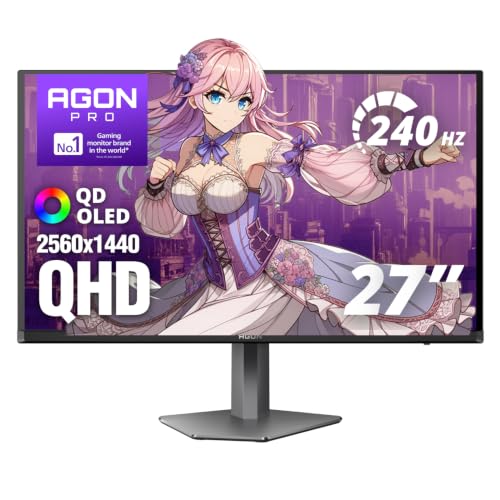
Best for QHD Detail and OLED Contrast: AOC 27" Gaming Monitor QHD 240Hz QD OLED NVIDIA
The AOC pairs a 27-inch 2560 x 1440 QD-OLED panel with a 240Hz refresh rate. Its listed 0.03ms response time and G-SYNC compatibility may appeal to players seeking a high-refresh display with adaptive sync. The listing also specifies True Black HDR, HDMI 2.1, DisplayPort 1.4, a USB 3.2 hub, and a height-adjustable stand.
Reasons to buy:
- QHD resolution provides more pixels than Full HD for compatible games and connected devices.
- QD-OLED is specified with true blacks and infinite contrast, alongside 147% sRGB and 110% DCI-P3 color-gamut claims.
- The stand adjusts for height, tilt, swivel, and pivot, and the monitor includes a USB 3.2 hub.
Reasons to avoid:
- Its 27-inch screen is smaller than the SANSUI’s 32-inch display.
- Check your computer or console’s output settings and cable setup before relying on QHD at 240Hz.
Who should skip it: Look elsewhere if you want the larger 32-inch curved format or plan to stick with Full HD.
Best Value for Full HD 240Hz: SANSUI 32 Inch Curved 240Hz Gaming Monitor
Among these two listings, the SANSUI is the lower-priced option, while still specifying a 240Hz refresh rate and FreeSync. That makes it a sensible value candidate for someone who wants high refresh rate and a large curved screen without moving to a QHD OLED panel. Its metal stand, tilt adjustment, and VESA compatibility add flexibility for arranging a desk setup.
Reasons to buy:
- It combines a 240Hz refresh rate with a 32-inch curved format.
- The listing specifies FreeSync and anti-flicker technology.
- A DisplayPort cable is included, according to the published product details.
Reasons to avoid:
- Full HD resolution is a lower pixel count than QHD, which may matter for fine detail and desktop text.
- It lacks the AOC’s listed USB hub and height adjustment.
Who should skip it: Skip this value-focused pick if QHD resolution and OLED contrast matter more than screen size.
Best for a Flexible Console and PC Setup: AOC 27" Gaming Monitor QHD 240Hz QD OLED NVIDIA
The AOC is the more feature-rich choice for a setup that may connect to a gaming PC, PS5, or Xbox Series X. Its listing names HDMI 2.1 and DisplayPort 1.4, and says the monitor supports high-refresh gaming on those platforms. QHD resolution, an adjustable stand, and a USB hub also make it worth considering if the display will serve gaming and general desk use.
Reasons to buy:
- HDMI 2.1 and DisplayPort 1.4 provide options for connecting listed console and PC types.
- G-SYNC compatibility is specified for adaptive sync.
- Height, tilt, swivel, and pivot adjustments allow more positioning choices.
Reasons to avoid:
- Supported refresh rate and resolution can depend on the connected device, output settings, and cable.
- The listing does not specify built-in speakers, so verify audio needs separately.
Who should skip it: Choose a simpler Full HD display if QHD, OLED, and the additional connections do not serve your setup.
How to Choose the Best 240Hz Gaming Monitor
Resolution, screen size, and viewing distance
Resolution affects how much image detail a display can show, while screen size affects how large that image appears on your desk. The SANSUI combines 1920 x 1080 with a 32-inch panel. The AOC combines 2560 x 1440 with a 27-inch panel. QHD provides more pixels, but that alone does not establish which screen will look better for your room, games, or eyesight.
Consider how far you sit from the screen and how much desk space you have. The SANSUI listing recommends about 1.2 meters for gameplay, a useful detail to compare with your room arrangement. If you want smaller text or more image detail, check whether your computer can output QHD at your desired refresh rate before choosing the AOC.
Refresh rate and response-time claims
Both monitors specify 240Hz, so refresh rate does not separate these two choices on paper. A high refresh rate can display more frequent image updates, but your game, graphics card, console, and connection must support the output you intend to use. Check the device’s video-output specifications and the monitor’s supported modes rather than assuming every resolution works at 240Hz.
The listings report different response-time figures and labels: 1ms MPRT for the SANSUI and 0.03ms for the AOC. These are manufacturer-listed specifications, not directly comparable measurements in the listing information. Treat them as claims to review alongside panel type, refresh rate, and supported connection modes, not as proof that one display will feel faster in every game.
Panel type, contrast, and color
The AOC’s QD-OLED panel is listed with true blacks, infinite contrast, and a True Black HDR feature. Those claims may suit players who value dark-scene contrast and vivid color. Its listed color-gamut figures are manufacturer specifications, so they should not be read as a guarantee of identical color appearance across every setting or unit.
The SANSUI lists a 3500:1 contrast ratio, HDR technology, 300 nits brightness, and 125% sRGB. Its curved VA-style panel type is not stated in the published details, so do not assume a panel technology that the listing does not identify. Compare the stated features with the games you play, and check detailed listing information if panel type or HDR format is a deciding factor.
Ports, adaptive sync, and connected devices
Port choice affects which devices you can connect and which display modes they can use. The SANSUI lists HDMI and DisplayPort 1.4, with both supporting up to 240Hz according to its product details. It also lists FreeSync. The AOC lists HDMI 2.1, DisplayPort 1.4, and G-SYNC compatibility, with the listing naming PC, PS5, and Xbox Series X.
Before buying, match the monitor ports to your graphics card or console, then confirm resolution and refresh-rate support for that exact connection. Adaptive-sync labels also matter if you want variable refresh support, but verify the feature’s compatibility with your device and settings. For other gaming setup ideas, see our Gaming category and our guide to the best xbox controller.
Ergonomics, mounting, and audio
Screen position can affect everyday comfort, especially during long sessions. The SANSUI stand tilts from -5° to 15° and supports 100 x 100mm VESA mounting. The AOC stand adds height, tilt, swivel, and pivot adjustment, as well as VESA mounting. If you already use a monitor arm, confirm that its mount matches the display’s listed VESA pattern.
Also check how you plan to handle sound and accessories. The SANSUI explicitly has no built-in speakers and lists an earphone jack. The AOC lists a USB 3.2 hub, but the published details do not specify the number of USB ports or built-in speakers. Confirm those details on the product listing if they affect your setup.
How We Compared
This comparison uses the published product specifications, design details, connection information, and available customer-feedback data. Product-specific statements are based on listing claims, including refresh rate, resolution, response time, panel features, ports, and adjustability. The listing information reports no customer reviews for either product, so this guide does not infer owner consensus or long-term reliability.
Frequently Asked Questions
Can either monitor run at 240Hz with every connected device?
Not necessarily. Both listings specify 240Hz support, but the available resolution and refresh rate depend on the source device, connection, and settings. Check the graphics card or console output specifications and confirm the monitor’s supported modes for the port you plan to use.
Is QHD always better than Full HD for gaming?
QHD offers more pixels than Full HD, which can provide more image detail when the game and connected device support it. Full HD may be a more suitable match if you prefer the SANSUI’s larger 32-inch curved format or do not need QHD. Consider screen size, viewing distance, and device capability together.
What is the practical difference between the two displays?
The SANSUI is a 32-inch curved Full HD monitor with FreeSync, while the AOC is a 27-inch QHD QD-OLED model with G-SYNC compatibility and a USB hub. Both specify 240Hz, but they target different priorities: larger screen area versus higher resolution and OLED contrast. Their listed response-time figures use different values and labels, so they should not be treated as a direct performance comparison.
Can I use the AOC with a PS5 or Xbox Series X?
The AOC listing names PS5 and Xbox Series X compatibility and specifies HDMI 2.1. It also says the monitor supports high-refresh gaming on those consoles. Check the console’s available output modes and the game’s supported settings; the listing does not mean every game or console mode will run at 240Hz.
Do these monitors include speakers?
The SANSUI listing explicitly says there are no built-in speakers and identifies an earphone jack. The supplied AOC details do not state whether speakers are built in. Verify the AOC listing or plan to use separate audio equipment if monitor speakers are important to you.
Which monitor is easier to position on a desk?
The AOC has the more adjustable stand on paper, with height, tilt, swivel, and pivot movement. The SANSUI stand tilts, and the display supports VESA mounting. Check your desk space, preferred viewing distance, and any monitor-arm requirements before deciding.


Write Your Review
No reviews yet. Be the first to share your experience!