

Choosing a 14-inch laptop means weighing portability against screen clarity, memory, storage, and the work you expect it to handle. This guide compares 9 models, from basic Windows laptops to OLED and touchscreen options, so you can narrow the field by workload and required features.
Check processor and memory first if you keep many apps open, then compare display resolution and ports for your daily setup. Battery figures in product listings are manufacturer claims, not a promise of the same runtime for every user.

Pros
- 1920 x 1200 OLED display
- 16 GB RAM and 512 GB SSD
- 3.13 lb listed weight
- Wi-Fi 6E connectivity
Cons
- 300-nit maximum brightness may limit bright-room visibility
- Who should skip it: users needing a brighter display

Pros
- 14-inch WUXGA touchscreen
- 16GB memory and 1TB SSD
- 1080p FHD IR webcam
- 3.04-pound weight
Cons
- Who should skip it: buyers needing port or OS specifics

Pros
- 16GB RAM
- Light 3.24-pound design
- Wi-Fi 6 and Bluetooth 5.4
- Multiple USB ports and HDMI
Cons
- 1366 × 768 display resolution
- Who should skip it: buyers seeking a sharper display

Pros
- One-year Microsoft 365 Personal subscription included
- HD camera with dual microphones
- Fast Charge claim of 50% in approximately 45 minutes
Cons
- 4GB RAM limits demanding multitasking
- 128GB storage may constrain large local file collections
- Skip it for demanding multitasking or large local libraries

Pros
- Light 2.82 lb design
- OLED touchscreen with 100% DCI-P3
- 1TB SSD storage
- USB4 and HDMI 2.1
Cons
- Integrated graphics are not suited to professional 3D work
- Who should skip it: users seeking dedicated-GPU gaming performance
Pros
- 1920 x 1200 OLED display
- 16 GB LPDDR5x RAM
- FHD IR camera
- Wi-Fi 6E
Cons
- 256 GB SSD may limit local storage
- Who should skip it: buyers needing more built-in storage

Pros
- 16GB RAM and 512GB PCIe NVMe SSD
- Built-in Ethernet port
- Windows 11 Pro
- Weighs 3.15 lb
Cons
- 45% NTSC display may limit color-critical work
- Resealed after system upgrade; skip if factory seal matters
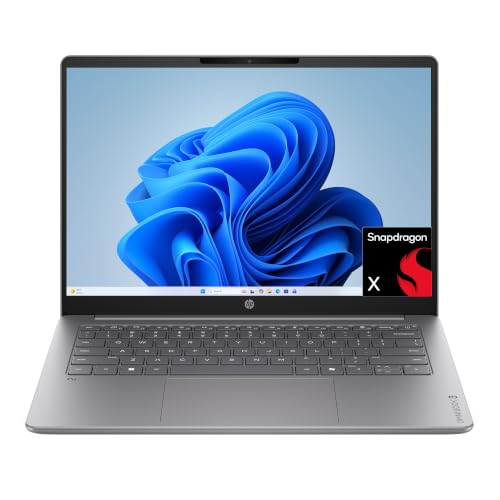
Pros
- 14-inch OLED display with 1920 x 1200 resolution
- Listed weight of 3.13 pounds
- Fast Charge reaches 50% in approximately 45 minutes
Cons
- 8 GB RAM and 256 GB storage may limit heavier workloads
- Skip if you need more memory or storage

Pros
- HDMI and USB-C with DisplayPort
- Wi-Fi 6 and Bluetooth 5.4
- SD card reader included
Cons
- 1366 x 768 display resolution
- Skip if you need confirmed RAM and storage capacity
The Best 14-Inch Laptops by Use Case
Best for Multitasking: HP OmniBook 3 14 inch Next Gen AI PC, 2K Display
The 16GB memory and 512GB SSD version is the most flexible of the listed OmniBook 3 variants for everyday multitasking and keeping files on the laptop. Its 1920 × 1200 OLED display gives you more vertical room than a Full HD 16:9 screen, while Wi-Fi 6E and an FHD IR camera suit remote work. The listing claims up to 41 hours and 45 minutes of battery life; actual runtime depends on workload and settings. Compare other laptop options under $800 if you are also weighing price against specifications.
Reasons to buy:
- 16GB LPDDR5x memory supports more demanding multitasking than the 8GB model.
- 512GB PCIe Gen4 NVMe SSD gives more local storage than the 256GB variants.
- OLED panel, FHD IR camera, and Wi-Fi 6E cover common work and video-call needs.
Reasons to avoid:
- Snapdragon uses an Arm processor, so check that any essential Windows apps and peripherals support Windows on Arm.
- The listing specifies up to 300 nits, which may be limiting in bright environments.
Skip it if you need dedicated graphics for demanding 3D work or want an Intel- or AMD-based laptop.
Best for Touchscreen AI Features: Acer Aspire 14 AI Copilot+ PC
The Acer pairs an Intel Core Ultra 5 Series 2 processor with 16GB LPDDR5X memory, a 1TB Gen 4 SSD, and a 14-inch 1920 × 1200 touchscreen. That mix suits students and mobile workers who want touch input, room for local files, and a higher-resolution display for documents and creative tasks. The listing identifies Copilot+ features and an NPU rated up to 40 TOPS, but supported features depend on software and system requirements.
Reasons to buy:
- Touch display and 180-degree hinge offer flexible ways to use the screen.
- 1TB SSD provides substantial listed local storage for projects and media.
- 1080p FHD IR webcam and Acer PurifiedView and PurifiedVoice features support video calls.
Reasons to avoid:
- The published details do not specify its port selection or operating system edition, so confirm both if they matter to your setup.
- Its advertised battery life of up to 22 hours comes from specific video-playback conditions and may not reflect mixed use.
Skip it if you do not need a touchscreen or Copilot+ features and would rather prioritize known port details or a lower-cost basic laptop.
Best for Business Connections: Lenovo Laptop V14 Gen 4, 14″ FHD, Intel i7-13620H
This Lenovo listing combines an Intel Core i7-13620H processor, 16GB DDR4 memory, and a 512GB SSD with Windows 11 Pro. Ethernet, HDMI, USB-C, and a privacy-shutter camera make it a practical candidate for office desks, campus work, and wired network setups. The listed Full HD anti-glare panel is 45% NTSC, so it is aimed more at everyday work than color-critical design.
Reasons to buy:
- Ethernet port can connect to a wired network without relying on Wi-Fi.
- Windows 11 Pro includes features such as BitLocker and Remote Desktop, according to the listing.
- HDMI and USB-C support connection to external displays; the listing says two monitors can be connected.
Reasons to avoid:
- The listing says the new computer was resealed for an upgrade and specifies a one-year Lenovo warranty; confirm seller and warranty terms before ordering.
- The 45% NTSC display specification may not suit color-sensitive photo or video work.
Skip it if you need a wide-gamut display, a touchscreen, or a configuration with clearly documented manufacturer provenance.
Best for Premium Portable Work: ASUS Zenbook-14 OLED Touchscreen Laptop
The ASUS is the most feature-rich listed choice for users who want Windows 11 Pro, a touchscreen OLED panel, and a large SSD. Its Ryzen AI 9 465 processor, 16GB RAM, and 1TB SSD fit demanding office multitasking and light content creation, while the 1920 × 1200 screen specifies 500-nit peak HDR brightness and 100% DCI-P3 color coverage. At about 2.82 lb, it is described as portable, and its listed ports include USB4, USB-C, USB-A, and HDMI 2.1. The bundle also lists a stylus, sleeve, cleaning cloth, and 128GB USB flash drive.
Reasons to buy:
- USB4 rated at 40Gbps, HDMI 2.1, and USB-A accommodate a range of desk accessories and displays.
- Windows 11 Pro includes business-focused features such as BitLocker and Remote Desktop.
- Touchscreen, stylus, and bundled sleeve add useful options for notes and travel.
Reasons to avoid:
- Integrated Radeon 880M graphics are not presented as a replacement for a dedicated GPU in gaming or professional 3D work.
- Confirm the exact bundle contents and port requirements with the seller before purchase.
Skip it if you need dedicated graphics or prefer a simpler, lower-cost laptop without a touchscreen and accessory bundle.
Best Budget: HP 14 inch Laptop, HD Display, Intel N150
This entry-level HP targets browsing, online classes, streaming, and basic document work. It pairs an Intel N150 with 4GB RAM and 128GB UFS storage, and includes Windows 11 Home plus a one-year Microsoft 365 Personal subscription. The HD display is 1366 × 768, so it costs less in capability than the 1920 × 1200 options and offers less workspace for side-by-side documents.
Reasons to buy:
- HDMI, USB-C, USB-A, an SD card reader, and an audio jack provide useful connection choices.
- Microsoft 365 Personal is listed as included for one year.
- HP Fast Charge is specified to restore the battery from 0% to 50% in about 45 minutes.
Reasons to avoid:
- 4GB RAM and 128GB UFS storage leave limited room for heavy multitasking and large local libraries.
- The HD resolution is lower than Full HD and WUXGA alternatives in this guide.
Skip it if you regularly edit large files, keep many browser tabs open, or need a sharper screen for extended document work.
Also Considered
The laptop options for graphic design provide more context for creative workloads; among the remaining models, the business laptop category may help narrow work-focused choices.
The student laptop category may help compare school-focused choices, while the laptop category covers the broader range.
How to Choose the Best 14-Inch Laptop
Match memory and processor to your workload
Processor names alone do not tell you how a laptop will feel with your apps. For routine browsing and documents, the N150 models may fit, but both listed budget HP options have just 4GB RAM. That can constrain multitasking, so consider 16GB options such as the Acer, ASUS, Lenovo, or higher-memory OmniBook when you regularly work across many tabs, meetings, and large spreadsheets.
Software compatibility also matters. The OmniBook models use Snapdragon X, an Arm processor; verify that essential Windows applications, printers, and other peripherals support your needs on Windows on Arm. The Intel and AMD models avoid that particular Arm-specific check, though you should still confirm software requirements.
Compare screen resolution, panel, and touch input
Resolution affects how much detail and workspace you see. The HD HP screens list 1366 × 768, while the Lenovo lists 1920 × 1080 and several OLED or WUXGA models list 1920 × 1200. The taller 16:10 format on those 1920 × 1200 models can show more vertical content in documents, though scaling settings and app layouts affect usable space.
Panel type and brightness claims matter for different reasons. OLED is specified on the OmniBook and ASUS, while the ASUS also lists 500-nit peak HDR brightness and 100% DCI-P3 coverage. Check whether you need touch input, a wider color range, or stronger listed brightness, and remember that specifications alone do not establish real-world viewing quality.
Choose enough storage and the right storage type
Storage determines how many applications and files you can keep locally. The 128GB UFS budget models suit modest file collections, while the Lenovo lists a 512GB SSD and the ASUS and Acer list 1TB SSDs. OmniBook variants offer 256GB or 512GB PCIe Gen4 NVMe SSDs. Do not treat cloud storage mentioned in a listing as built-in local capacity; confirm subscription terms and whether cloud access fits your needs.
Check ports, wireless features, and workplace compatibility
Make a list of the devices you connect: external displays, wired network, storage drives, and headsets. The Lenovo explicitly lists Ethernet, HDMI, USB-C, and USB-A; the ASUS lists USB4, HDMI 2.1, USB-A, and another USB-C port. USB-C connectors do not all offer the same speed or display support, so check the exact port specification rather than relying on connector shape.
Wi-Fi 6E appears on the ASUS and OmniBook listings, while other models list Wi-Fi 6. Choose based on your router and network needs; the wireless label alone does not promise a particular connection speed. For a work-managed computer, Windows 11 Pro on the ASUS and Lenovo may be useful, but verify any organization-specific software or security requirements.
Read battery claims and portability details carefully
Manufacturers provide battery figures under stated or unspecified conditions, and actual runtime changes with screen brightness, wireless use, applications, and video calls. HP lists up to 41 hours and 45 minutes for the OmniBook models, while the Acer listing claims up to 22 hours under specific video-playback conditions. Treat those figures as reference points, not guaranteed daily runtime.
Weight can help distinguish travel options when specified: the ASUS is about 2.82 lb, and the Lenovo listing gives 3.15 lb. The basic HP models list 3.24 lb. If you carry a laptop every day, compare stated weight alongside charger size and any included accessories; those details are not fully supplied for every option here.
How We Compared
We compared the published listings by processor, memory, storage type and capacity, screen resolution and panel details, battery-life claims, weight where provided, ports, wireless connectivity, operating system, and listed accessories. Product descriptions also supplied limited customer-rating information, but no written customer feedback was provided. Recommendations therefore reflect stated specifications and the fit those specifications suggest, not independently verified performance.
Frequently Asked Questions
Is 4GB of RAM enough for a 14-inch laptop?
It may suit basic browsing, streaming, and document editing, but it leaves less room for multiple demanding apps and browser tabs. The two entry-level HP listings have 4GB RAM; users who multitask regularly should compare the 16GB options in this guide.
Does a 1920 × 1200 screen show more than Full HD?
It has more vertical pixels than a 1920 × 1080 screen and uses a 16:10 aspect ratio in the listed models. That can help with documents and web pages, but the practical difference depends on display scaling and the apps you use.
Will Windows apps run on the Snapdragon OmniBook?
The OmniBook listings specify Snapdragon X processors and Windows 11 Home. Before buying, check compatibility for essential software, printers, and peripherals on Windows on Arm. Do not assume every app or accessory works exactly as it does on an Intel- or AMD-based Windows PC.
Do these laptops support external monitors?
Several listings identify video-capable connections, but the details differ. The Lenovo specifies HDMI and USB-C display support, and the ASUS lists HDMI 2.1 and USB4. Check the exact resolution, refresh rate, and port capability you need; not every USB-C port supports the same functions.
Should I choose OLED or an ordinary LCD screen?
Choose based on the features you value, not the panel label alone. The OmniBook and ASUS listings specify OLED, while the ASUS also lists brightness and color-coverage figures. Compare resolution, brightness, touch support, and your intended use, since the published details do not establish how every display looks in person.
Can I rely on advertised battery life?
Use it as a manufacturer claim, not a guaranteed runtime. The Acer listing ties its up-to-22-hour figure to specific video-playback conditions, and usage such as video meetings, high brightness, or heavy apps can change battery life. Check the return and warranty terms before buying if runtime is a deciding factor.





Write Your Review
No reviews yet. Be the first to share your experience!