

Recording a meeting is only useful if you can hear the speakers and turn the audio into notes you can use. The right device depends on where you meet, whether you need offline transcription, how much editing help you want, and whether you are comfortable using cloud services.
This guide compares the best AI voice recorder for in-person meetings with transcription across dedicated recorders and app-connected devices. It explains which features suit different workflows, where product claims need a closer look, and what to verify before buying.

Pros
- Large 80GB total storage capacity
- Automated transcription and AI meeting summaries
- Dual touchscreen and physical button controls
- Built-in camera for offline photo translation
Cons
- Advanced AI features require subscription after three daily uses
- Cloud storage requires subscription beyond initial five gigabytes
- Skip if you need full AI functionality without subscriptions

Pros
- Offline transcription in five languages protects confidentiality
- Six microphones provide adaptive directional noise cancellation
- Supports direct file export to PDF and Word
- Fast USB-C recharging with long battery life
Cons
- Background noise and accents degrade transcription accuracy
- Microphone performance drops significantly if physically covered
- Skip if needing offline transcription beyond five languages

Pros
- Standalone touchscreen operation without requiring smartphone apps
- Generous 80GB total storage capacity included
- Comprehensive multi-microphone array with noise reduction
- Multi-layered local data encryption and passcode security
Cons
- Does not support USB Power Delivery fast charging
- Requires 2.4GHz Wi-Fi network for device activation
- AI assistant queries capped at three daily without subscription
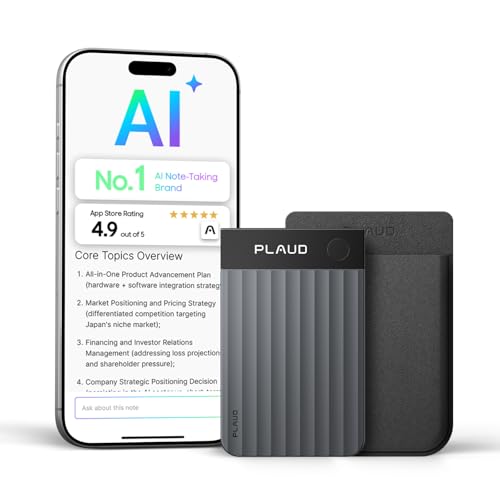
Pros
- Extremely slim credit-card profile fits on phones or wallets
- Transcribes across 112 languages with speaker labels
- Includes magnetic case and charging cable in box
- Multi-microphone array captures voices across full rooms
Cons
- Free Starter Plan caps transcription at 300 minutes monthly
- Heavy transcription users should skip without paid subscription

Pros
- Ultra-slim 3mm aluminum body with magnetic mounting
- Free unlimited basic transcription on starter plan
- Fast Wi-Fi syncing alongside 64GB local storage
- Long 45-hour continuous battery life
Cons
- Advanced analysis features require paid subscription
- Cloud sync availability depends on service tier
The Best AI Voice Recorders by Use Case
Best for Offline Transcription: iFLYTEK Offline Voice Recorder with Playback
The iFLYTEK Offline Voice Recorder with Playback suits confidential discussions or travel where internet access may be limited. Its listing specifies offline speech-to-text in English, Chinese, Japanese, Korean, and Russian, plus four recording modes for meetings, interviews, speeches, and general use. Six microphones and noise reduction target crowded or echoing spaces, though the listing cautions that background noise and accents can affect recognition.
Reasons to buy:
- Offline transcription in five listed languages can help when a network connection is unavailable.
- Four recording modes let you select a setup suited to a conference, interview, speech, or general recording.
- USB import supports MP3 and WAV files, and exported recordings can be saved as PDF, Word, or TXT.
Reasons to avoid:
- Offline transcription supports five languages, fewer than the online language counts listed for some alternatives.
- The listing warns that noise and accents can reduce recognition accuracy, and says not to cover the microphones.
Skip it if you need automatic speaker labels or a broad online language selection, since those features are not specified in this listing.
Best for Summaries and Speaker Labels: AI Voice Recorder, 80GB Digital Recorder
The AI Voice Recorder, 80GB Digital Recorder is aimed at people who want meeting audio organized into summaries, minutes, and to-do lists. Its listing describes transcription in 13 languages and online speaker identification, with ChatGPT-based tools for turning transcripts into follow-up material. The device has a 4.1-inch touchscreen, physical buttons, 16GB of internal storage, and 64GB of expandable storage.
Reasons to buy:
- Transcription, summaries, meeting minutes, and to-do lists cover more of the note-taking workflow than transcription alone.
- Online speaker identification can help make multi-person conversations easier to follow in a transcript.
- Both touchscreen and physical controls offer different ways to start and manage recordings.
Reasons to avoid:
- Cloud features depend on account access and user authorization. The listing says the initial 5GB of cloud storage must be claimed, and extra storage requires a subscription.
- Battery life is listed as 5 to 7 hours of continuous recording, so check that against long sessions away from charging.
Skip it if you want offline transcription without relying on an online service, or need longer continuous recording than its listed battery range.
Best for On-Device Controls and Visual Notes: AI Voice Recorder with Transcription & Summary
The AI Voice Recorder with Transcription & Summary suits users who want a large touchscreen and built-in recording controls without pairing a phone. It offers a 5-inch touchscreen, recording markers, and an 8MP rear camera for capturing visual references alongside audio. The listing specifies online transcription in 134 languages with speaker differentiation, plus summaries and mind maps, while also noting that the AI assistant is limited to three uses per day unless you subscribe.
Reasons to buy:
- The larger touchscreen provides an on-device way to choose a language, record, and review files.
- Markers can help you return to selected moments, and the camera can capture information to accompany a recording.
- The listing describes local encryption, a screen passcode, and USB data protection, with cloud uploads requiring account login and permission.
Reasons to avoid:
- Online transcription and first activation depend on Wi-Fi; the listing specifies 2.4GHz Wi-Fi for activation.
- Its AI assistant has a daily use limit unless you subscribe, even though the listing describes transcription and summaries as unlimited and free.
Skip it if you need a small recorder to carry in a wallet or want transcription that works without an internet connection.
Best for Calls and In-Person Meetings: Plaud Note Pro AI Voice Recorder Transcribe
The Plaud Note Pro AI Voice Recorder Transcribe is designed to move between in-person conversations, phone calls, and online meetings. Its listing describes four MEMS microphones and one VPU microphone, automatic switching between call and in-person recording, and free Plaud Desktop for capturing online meetings without a bot. Plaud’s service transcribes in 112 languages, adds speaker labels, and can produce decisions, action items, and follow-ups.
Reasons to buy:
- Support for in-person, phone, and online meetings makes it a flexible option for mixed workdays.
- The connected Plaud app, web, and desktop workspace gives users several ways to access recordings and finished notes.
- The free Starter Plan includes 300 minutes per month of AI transcription and access to Plaud Intelligence features.
Reasons to avoid:
- The free transcription allowance is limited to 300 minutes per month; the listing describes paid Pro and Unlimited plans for higher use.
- Transcription and summaries are part of a connected software workflow, so buyers should check the service and account requirements that fit their organization.
Skip it if you need unlimited transcription included without a plan limit, or require offline speech-to-text.
Best Value for Unlimited Starter-Plan Transcription: Comulytic Note Pro AI Voice Recorder
The Comulytic Note Pro AI Voice Recorder is a compact choice for people who want transcription and basic summaries without a monthly Starter Plan fee. The listing specifies unlimited transcription, basic summaries, and support for 113 languages through the Comulytic app. Its triple-mic array, adaptive recording, and 45-hour continuous recording claim make it worth considering for long workdays, but those claims come from the product listing and do not establish results in every room.
Reasons to buy:
- The Starter Plan includes unlimited transcription and basic summaries without a monthly fee.
- The listing specifies 64GB of local storage and Wi-Fi transfer through the Comulytic app.
- Magnetic accessories are included for attaching the recorder to a phone, laptop, or meeting notebook.
Reasons to avoid:
- Transcription and summaries are delivered through the app, so confirm that its account and connectivity workflow suits your needs.
- Advanced summaries and other listed tools require the optional Premium Plan.
Skip it if you want a standalone touchscreen recorder or need its advanced AI features without paying for an optional plan.
How to Choose the Best AI Voice Recorder for In-Person Meetings with Transcription
Decide whether transcription must work offline
Offline speech-to-text matters when you record in locations with unreliable internet or want to avoid sending audio to an online service. Among these picks, the iFLYTEK listing specifically identifies offline transcription, and names five supported languages. Other products describe online transcription, cloud storage, or app-based services. Check whether a listing says transcription itself works offline, not merely whether audio can be stored on the device.
Match microphone features to the room
A small one-on-one conversation and a large conference room make different demands on a recorder. Look for details about microphone count, direction, recording modes, and stated pickup range, but treat range and noise-reduction descriptions as manufacturer claims rather than guarantees. The iFLYTEK recorder offers multiple modes, while the Plaud model lists beamforming microphones. For any device, placement still matters: avoid covering microphones and put the recorder where speakers can be heard.
Check language support and speaker labeling
Language counts can help narrow choices, but they do not tell you how well a device handles accents, specialized terms, or overlapping speech. Confirm the exact language you need and whether transcription requires an online connection. Speaker labels are separately useful for meetings with several participants; the HUREWA, Rpbznr, and Plaud listings describe speaker identification or labels. The iFLYTEK listing does not specify that feature, so do not assume it is included.
Understand minutes, subscriptions, and cloud storage
“Unlimited transcription” does not necessarily mean every AI feature or cloud service is unlimited. The Plaud Starter Plan lists 300 transcription minutes per month, while Comulytic describes unlimited transcription and basic summaries in its Starter Plan but reserves additional tools for Premium. HUREWA’s listing says extra cloud storage requires a subscription, and Rpbznr limits daily AI assistant use unless you subscribe. Check plan terms, storage limits, and which features depend on an account before choosing.
Compare battery, storage, and ways to retrieve notes
For back-to-back meetings, compare the listed continuous recording time with your longest expected session and consider how you will recharge. The products list different battery claims, but actual use can vary. Storage also affects how often you need to move or delete files. Finally, check export formats and transfer methods: iFLYTEK lists several audio import formats and document exports, while Comulytic describes Wi-Fi transfer through its app. If you also digitize meeting handouts, see our guide to document scanners for paperwork.
How We Compared
This comparison uses the published product listings, including stated recording modes, microphone details, language support, battery and storage information, privacy features, and plan terms. We considered customer feedback where supplied, but no review feedback was included in the product data. Features and performance statements are attributed to the listings when appropriate, and recommendations reflect the needs each described feature may serve.
Frequently Asked Questions
Can these recorders transcribe meetings without Wi-Fi?
The iFLYTEK listing specifically describes offline transcription in five languages. The other listings describe online or app-based transcription, so check each product’s current instructions if offline use is essential. Recording audio locally is not the same as transcribing it offline.
Do all of these devices identify different speakers?
No. HUREWA describes online speaker identification, Rpbznr describes speaker differentiation, and Plaud lists speaker labels. The supplied iFLYTEK and Comulytic descriptions do not specify speaker labels, so confirm that feature before buying if your notes need named or separated speakers.
Do I need a phone to use an AI voice recorder?
It depends on the model and feature. Rpbznr says recording can start on its 5-inch touchscreen without a phone, app, or pairing, while its cloud features require login and permission. Plaud uses a connected app, web, and desktop workspace, and Comulytic describes app-based transcription and transfer. Check whether standalone recording also includes the transcription and export tools you plan to use.
Which recorder suits confidential meetings?
For transcription without internet access, the iFLYTEK model is the clearest fit in the published information because its listing specifies offline speech-to-text. Rpbznr and HUREWA describe local privacy controls, encryption, and permission-based cloud upload, while Plaud lists several privacy and security standards. Review how each device stores and transfers files, and follow workplace rules and local consent laws before recording other people.
Are listed transcription accuracy claims a guarantee?
No. Accuracy can depend on room noise, speaker distance, accents, overlapping voices, and language. The iFLYTEK and Rpbznr listings both note that noise or accents can affect recognition. Treat advertised accuracy figures as manufacturer claims, and plan to review important names, figures, and action items against the audio.






Write Your Review
No reviews yet. Be the first to share your experience!