

A child’s first drone should match the space where they will fly and the controls they can manage. A fully enclosed propeller guard suits indoor practice, while a camera, phone-free screen, or brushless motors may matter more to older beginners who want to explore outdoors.
This guide to the best drone for kids compares beginner controls, propeller protection, camera viewing options, and manufacturer-stated battery time. Use those details to narrow the choices, then check each listing for age guidance, app requirements, and flight limitations before buying.

Pros
- Beginner-focused flight controls
- Two batteries included
- Foldable with carrying case
- Adjustable 90-degree camera
Cons
- Flight time per battery is not specified
- Who should skip it: buyers needing detailed camera specifications

Pros
- Beginner-oriented flight controls
- Two batteries included
- Foldable with carrying case
- Camera tilts up to 90 degrees
Cons
- About 15 minutes per battery
- Who should skip it: Buyers seeking detailed aerial photography
- Who should skip it: Buyers requiring named safety certifications

Pros
- Full propeller guard
- One-key takeoff and landing
- Two included batteries
Cons
- Who should skip it: buyers seeking an outdoor drone or longer flight sessions

Pros
- 1080P camera with adjustable 80° lens
- Two batteries included
- Foldable, lightweight design
- Multiple beginner-focused controls
Cons
- Who should skip it: buyers needing specified frame rates or stabilization

Pros
- Foldable design with storage box
- Multiple control methods
- Two included batteries
- One-key takeoff and landing
Cons
- Manufacturer advises using propeller guards for flight stability
- Who should skip it: buyers needing specified video frame rates

Pros
- Built-in screen avoids phone dependence
- Two batteries included
- Foldable design
- Camera angle adjusts vertically
Cons
- SD card required for playback, not included
- Who should skip it: buyers seeking longer stated flight time
Pros
- Two included 500mAh batteries
- Altitude hold and headless mode
- One-button takeoff and landing
- Four propeller guards
Cons
- Flight time and control range are not specified
- Skip if you need stated flight time or range

Pros
- Beginner-focused controls
- Upper and side propeller guards
- Two modular batteries included
- Multiple flight tricks
Cons
- Recommended flight distance is limited to 60 feet
- Who should skip it: buyers seeking longer-range flights
Pros
- Controller screen works without a phone
- Foldable design
- Two batteries included
- Multiple flight modes
Cons
- SD card required for saving footage
- Camera frame rate and stabilization unspecified
- Skip it if you need confirmed recording capacity
Pros
- Altitude hold and headless mode for beginners
- Three batteries included
- Propeller protection guards
- Toss-to-launch and 3D flips
Cons
- Pair each drone and remote separately when flying multiple units
- Who should skip it: buyers needing more than 21 minutes of claimed flight time
The Best Drones by Use Case
Best for Indoor Protection: SYMA X100 Indoor Drone for Kids 8-12
The SYMA X100 is designed for indoor flying, with a fully enclosed propeller guard and four-way infrared sensors that the listing says detect obstacles within about 12 inches. Altitude hold, headless mode, and two speed settings give new pilots straightforward controls, while two batteries are specified for up to 20 minutes of combined flight time. The sensors and cage make it a sensible fit for playrooms, but they do not remove the need for adult supervision or clear space.
Reasons to buy:
- Fully enclosed guard helps keep fingers away from propellers.
- Four-way infrared obstacle detection is aimed at indoor play.
- Two batteries and one-button flips add variety to practice.
Reasons to avoid:
- The listing positions it as an indoor model, not a choice for breezy outdoor flights.
- Obstacle detection is specified at about 12 inches, so it should not be treated as full collision prevention.
Skip it if the child wants camera footage or an outdoor flyer built for stronger air movement.
Best Phone-Free Camera Option: Drone with Camera, Screen on Controller Remote
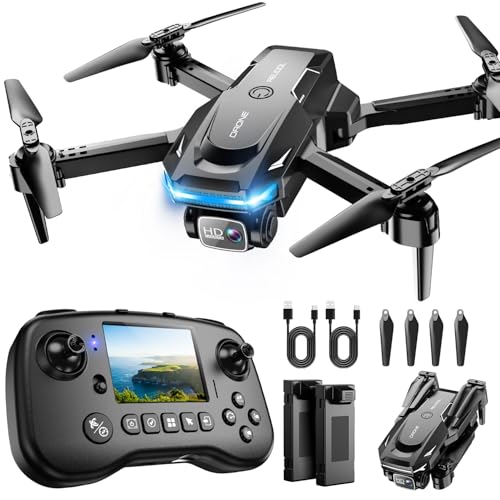
The RELIDOL PK01 stands out for families who do not want a child to use a smartphone as the live-view screen. Its controller has a built-in display for live footage, and the listing specifies a 1080P camera with an 80-degree adjustable lens. It also includes one-key takeoff and landing, headless mode, an emergency stop, and two batteries with up to 25 minutes of stated total flight time. The screen supports viewing, but an SD card is required to save photos and video.
Reasons to buy:
- Built-in controller screen shows live footage without a phone.
- Emergency stop, child lock, and propeller guards are listed safety features.
- Remote and app control are both specified.
Reasons to avoid:
- An SD card is not included, so saving footage needs an additional purchase.
- Some listed flight functions require the app, so check which controls work without a phone.
Skip it if you want a simple indoor toy without a camera or extra setup steps.
Best Brushless Camera Pick: Drone with Camera for Kids Adults
The PLEGBLE PL516 is a foldable camera drone whose listing specifies brushless motors, optical-flow positioning, and a 4K camera with a 130-degree wide-angle lens and 90-degree adjustment. Brushless motors are a useful distinction for buyers considering outdoor practice, though the listing’s claims do not establish performance in every wind condition. Two batteries are specified for up to 28 minutes total, and the drone includes child lock, propeller guards, low-battery alerts, and an emergency-stop function.
Reasons to buy:
- Brushless motors distinguish it from the brushed-motor designs common in basic toy drones.
- Optical-flow positioning and altitude hold are listed for assisted hovering.
- Foldable design and a storage box support carrying it between flying locations.
Reasons to avoid:
- The listing instructs users to keep propeller guards installed for flight.
- Camera resolution alone does not confirm image quality, and app or phone compatibility details should be checked before purchase.
Skip it if the child needs a fully enclosed propeller cage or you want to avoid app-based camera features.
Best for Longer Practice Sessions: Holy Stone Mini Drone for Kids and Beginners RC
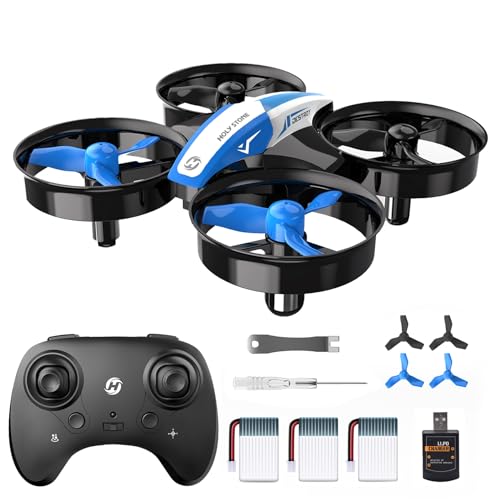
The Holy Stone HS210 is a compact beginner quadcopter focused on indoor play rather than camera use. It includes three batteries, with up to 21 minutes of flight time stated by the listing, plus altitude hold, headless mode, and adjustable speed. Its propeller guard surrounds the blades, and low-battery alerts help signal when a flight should end. The listing also describes toss-to-launch, circle flight, and flips, giving children several simple maneuvers to learn.
Reasons to buy:
- Three included batteries allow multiple practice sessions before recharging.
- Altitude hold and adjustable speed support a gradual learning curve.
- Propeller guards and low-battery alerts are specified.
Reasons to avoid:
- No camera is listed, so it is not suited to aerial photo or video practice.
- The manufacturer says to pair each drone and remote separately when flying multiple units.
Skip it if camera viewing or phone-free video playback is central to the gift.
Best Foldable Starter Camera Drone: Pallton Drone with Camera for Adults
The Pallton is a foldable camera quadcopter with one-key takeoff and landing, altitude hold, headless mode, and three speed modes. Its listing specifies a 1080P Wi-Fi camera with a 90-degree adjustable view, two batteries rated for up to 24 minutes combined, and a carrying case. Those features suit a beginner who wants both basic flight practice and phone-based FPV viewing. Confirm the required app and phone operating-system compatibility before relying on the camera feed.
Reasons to buy:
- Three speed modes let beginners start slowly and progress.
- Two batteries and a carrying case are included according to the listing.
- Gesture control, app routes, and flips offer optional ways to expand play.
Reasons to avoid:
- Live FPV uses a Wi-Fi camera and companion app, unlike a controller with its own screen.
- Its listing does not specify brushless motors or a fully enclosed propeller cage.
Skip it if you prefer a camera drone that displays footage directly on its controller.
Also Considered
The 1080P Drone with Camera for Kids & Adults may suit families who want a foldable camera drone with two batteries and a manufacturer-stated total flight time of up to 30 minutes, but its listing has no customer feedback supplied here to weigh alongside its specifications.
The Drone with 1080P Camera lists optical flow, altitude hold, an emergency stop, and two batteries, but buyers should confirm how its app-dependent functions and camera feed fit their setup.
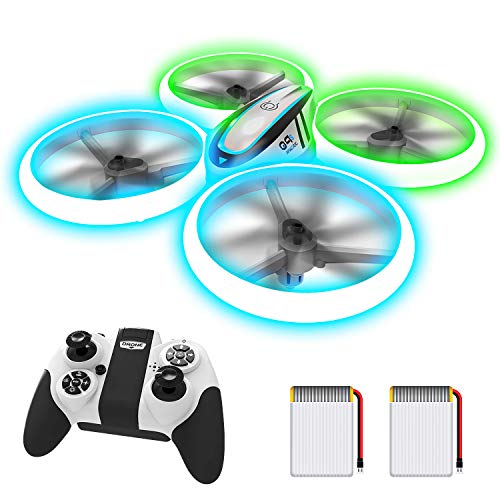
The Q9s Drones for Kids,RC Drone with Altitude Hold may appeal to children who value bright blue and green LEDs, guarded propellers, and flips more than photography; it has no camera listed.
The Swifsen Drones for Kids with Camera,Rc Drone lists an upper protective cover as well as guards, but its stated two-battery flight time is about 15 minutes, shorter than several alternatives here.
How to Choose the Best Drone for Kids
Match propeller protection to the flying space
Indoor flights often involve walls, furniture, and close supervision. A full cage, such as the one listed for the SYMA X100, surrounds the propellers more completely than perimeter guards. Guards still do not make a drone harmless, so keep hands clear while it is powered and choose an open practice area. Check listing photos and product details to see whether protection fully encloses the blades or only covers their edges.
Choose controls that suit the pilot
One-key takeoff and landing reduce the number of steps a beginner must manage, while altitude hold can help maintain height without constant throttle corrections. Headless mode makes directional control less dependent on which way the drone’s nose points. Speed settings offer room to progress, but they do not replace learning basic orientation. Look for the exact control features and number of speed modes in the listing, then consider whether the child can follow the instructions and use the remote safely.
Decide whether camera viewing needs a phone
Many camera drones send live video to a phone through Wi-Fi and an app. That adds a device and setup step, and a camera listing does not guarantee that every phone will work with the app. The RELIDOL PK01 instead lists a screen on its controller, while its SD card for saving footage is sold separately. Before choosing, verify app availability for your phone or confirm what the built-in screen can display and record.
Read battery claims as total session estimates
Manufacturers state flight-time estimates for specific battery bundles, but actual time can vary with flying style and conditions. Compare both the number of included batteries and the stated total: for example, the Holy Stone lists three batteries and up to 21 minutes, while the SYMA lists two and up to 20 minutes. Check whether batteries are removable, how they charge, and whether the package includes the needed charging cables. Allow time for charging between sessions.
Separate indoor toys from outdoor-capable designs
Small, light drones can be difficult to control outdoors when air is moving. Brushless motors may be a reason to compare models for outdoor use, but a motor type does not guarantee stable flight in wind. The PLEGBLE and RELIDOL PK01 listings specify brushless motors; the SYMA is explicitly positioned for indoor play. Check manufacturer guidance and fly only in an open area with suitable conditions. For US flights, verify current FAA rules for the drone’s weight and intended use rather than assuming that a small size removes every flight requirement.
How We Compared
We compared the published product specifications and design details, including propeller protection, beginner controls, camera and display arrangements, listed battery bundles, and stated motor types. Customer feedback was also part of the supplied source material, but no review details were provided for these products here. Manufacturer-stated flight times and feature claims are presented as listing information, not as independently verified results.
Frequently Asked Questions
What age is appropriate for a child’s first drone?
Age guidance varies by model, and the published listings do not establish one age that fits every child. Consider whether the pilot can follow instructions, keep a safe distance from spinning propellers, and control the remote. An enclosed propeller cage and slower speed setting can be useful features for a beginner, but adult supervision remains important.
Does a camera drone always need a smartphone?
No. Some models use a phone app for live FPV, while the RELIDOL PK01 and G3 list screens built into their controllers. Check whether the screen supports live viewing, playback, or both, and note that the G3 and PK01 listings say an SD card is needed to save photos and videos.
What is the difference between altitude hold and headless mode?
Altitude hold helps the drone maintain its height when the pilot is not adjusting throttle. Headless mode changes directional control so forward and backward are relative to the pilot rather than the drone’s nose. They address different beginner challenges, and a listing may include one or both.
Can a mini drone fly outdoors?
Some listings describe indoor and outdoor use, but lightweight toy drones may be affected by wind. Choose a calm, open space, keep the aircraft in sight, and follow the manufacturer’s instructions and applicable FAA rules. Avoid treating brushless motors or a camera as proof that a model can handle strong wind.
Do these drones need an SD card?
It depends on the model and whether you want to save footage. The G3 and RELIDOL PK01 listings specify that an SD card is required for saving photos and videos, and that one is not included. Other camera models describe app-based viewing, so check their listing for storage requirements before purchase.
Are these drones exempt from FAA registration?
Some published listings describe their models as under 249 grams or exempt from registration, but buyers should verify the actual drone weight and current FAA rules. Registration and other requirements can depend on weight and how the drone is used. Follow current FAA guidance before outdoor flight.
For more gift ideas, browse our Gift Guides or the broader Christmas and Holiday collection.



Write Your Review
No reviews yet. Be the first to share your experience!