

A child’s smartwatch can be a simple activity tracker or a way to call family and share location, but those roles come with different setup needs and ongoing costs. This Best Kids Smartwatch guide compares four options by communication features, parental controls, fitness tools, phone compatibility, and subscription requirements.

Pros
- Calls, SMS, and FaceTalk video
- Real-time GPS and route history
- Up to 100 approved contacts
- Protective case included
Cons
- TickTalk Radio requires a premium plan or separate subscription
- Skip if you need music without a subscription
- GPS and SOS should supplement adult supervision
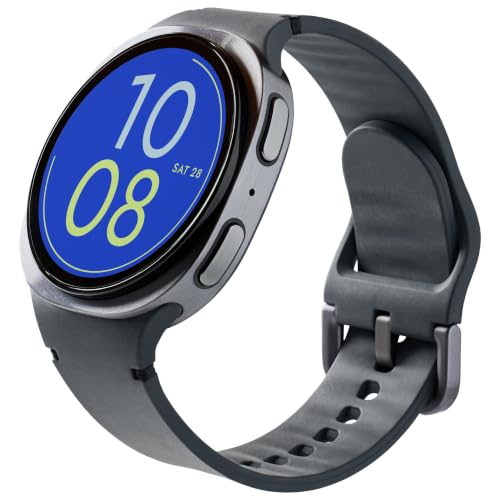
Pros
- GPS location tracking
- Parent-managed contacts
- Emergency SOS feature
Cons
- Skip it if you want a watch without monthly service

Pros
- Standalone use available
- 80 sports modes
- Parent-controlled games
- Customizable watch faces
Cons
- Some functions require a compatible smartphone and app
- Skip it if you need every function to work phone-free

Pros
- Two-way text and voice messaging
- Live location tracking with boundary alerts
- Swim-friendly design
- Assistance feature shares live location
Cons
- Messaging and tracking require subscription and LTE connectivity
- Battery life varies with use and network conditions
- Who should skip it: Families avoiding subscription-based connected features
The Best Kids Smartwatch by Use Case
Best for Calls and Messaging: TickTalk 6 Kids SmartWatch with GPS Tracker
The TickTalk 6 Kids SmartWatch with GPS Tracker is the strongest fit here for families who want a child to contact approved people without relying on a separate phone. The listing specifies cellular and Wi-Fi calls, real SMS, video calling through its 5MP camera, and a location history feature. Parents can manage up to 100 approved contacts, block unknown numbers, and schedule School Mode or Focus through the TickTalk app. Browse more gift guides if you are comparing devices for different ages.
Reasons to buy:
- Calls and real SMS provide several ways to reach approved contacts.
- Parents can review location and route history, and SmartPin learns from corrections at familiar places.
- School Mode, Focus, and contact controls support tighter boundaries around use.
Reasons to avoid:
- Cellular features depend on activation with TickTalk Wireless; confirm service terms and coverage before buying.
- TickTalk Radio requires a premium plan or separate subscription, and music use may add cost.
Skip it if you want a basic fitness watch without cellular service or communication features.
Name it once: the broader Christmas and Holiday gift section includes other seasonal buying guides.
Best for Message Monitoring: Bark Watch – Smartwatch for Kids – GPS Tracking
The Bark Watch – Smartwatch for Kids – GPS Tracking is aimed at families who want contact controls alongside alerts about potentially concerning text content. Bark describes monitoring for topics such as bullying, drugs or alcohol, violence, and suicidal ideation, and says texts cannot be deleted without parental permission. The watch also supports GPS location tracking and an SOS feature. These are monitoring and communication tools, not a substitute for talking with your child about online safety.
Reasons to buy:
- Content alerts cover several safety concerns parents may want to discuss.
- Parents manage the contacts their child can call or text.
- GPS tracking and SOS add location and emergency-contact functions.
Reasons to avoid:
- Activation is required, and the listing specifies a $15 monthly service charge.
- Its monitoring approach may not suit families who prefer less oversight of a child’s messages.
Skip it if you do not want an ongoing service charge or message monitoring.
Product link: our Apple Watch screen protector guide covers a different kind of wearable accessory, not a children’s watch.
Best Budget Fitness Option: BIGGERFIVE Kids Smart Watch No Phone Needed
The BIGGERFIVE Kids Smart Watch No Phone Needed suits families who want activity tracking and games rather than calling or GPS contact features. It can count steps, distance, calories, and active minutes, and lists 80 sports modes, heart-rate monitoring, and sleep tracking. The watch can operate without a phone or app, while the companion app adds functions and supports Android 6.0 or later and iOS 9.0 or later. Its five puzzle games can be restricted through the app.
Reasons to buy:
- Standalone operation makes it an option for children who do not need a connected phone watch.
- Sports modes and everyday activity counts encourage movement tracking across different activities.
- Parents can restrict the built-in games through the app, including locking them all the time.
Reasons to avoid:
- The published features do not list calling, messaging, GPS location sharing, or SOS.
- App-based functions depend on a compatible Android or iOS phone.
Skip it if your main priority is contacting your child or checking their location from an app.
For families looking at other wrist-worn accessories, our guide to Apple Watch bands for small wrists addresses a separate fit question.
Best for Garmin Families: Garmin Bounce™, Kids Smartwatch
The Garmin Bounce™, Kids Smartwatch is a communication and location option for families already comfortable using the Garmin Jr. app with a compatible smartphone. It supports two-way text and voice messaging between the app and watch, live location tracking, and alerts when a child enters or leaves parent-defined boundaries. Its Assistance feature can send family contacts a message with the child’s live location. Garmin specifies an active subscription and LTE connectivity for these connected functions, so confirm service availability and terms before choosing it.
Reasons to buy:
- Boundary alerts can notify parents when a child enters or leaves a defined area.
- The Assistance feature sends family contacts a message with live location when network and data connectivity are available.
- The listing describes a swim-friendly design and up to two days of battery life, with connected use and LTE conditions affecting battery life.
Reasons to avoid:
- Messaging and location functions need an active subscription, LTE connectivity, and a compatible smartphone running Garmin Jr.
- Garmin notes that connected use and network conditions can significantly affect the stated battery life.
Skip it if you want a watch that works as a standalone fitness tracker without a subscription.
How to Choose a Best Kids Smartwatch
Decide whether your child needs communication
Start with the job the watch needs to do. If your child needs to call or message approved family members, compare connected models such as TickTalk, Bark, and Garmin. Their communication features depend on service and connectivity, so check activation, monthly charges, carrier coverage, and which people can contact the watch. The BIGGERFIVE is a better match when you want activity tracking without calling or messaging.
Do not assume that every watch with GPS wording offers the same service. Location features on TickTalk, Bark, and Garmin are described alongside their connected services, but the published information does not establish identical coverage, accuracy, update frequency, or service terms. Check the product’s current plan details and network availability where the child will use it.
Compare subscriptions and the total setup
Purchase cost is only part of the decision for a connected watch. Bark explicitly lists a $15 monthly service charge after purchase. Garmin says an active subscription and LTE connectivity are required for messaging and location features. TickTalk calls for activation with TickTalk Wireless and says its music service may require a premium plan or separate subscription. The supplied BIGGERFIVE details do not list a service subscription for standalone use, though its app functions require a compatible phone.
Before ordering, verify what the plan includes, whether the watch needs a separate line or service account, and whether coverage is available in your area. Also check whether a caregiver can use the required app and whether the setup supports the family members who will manage contacts or location settings. Missing plan details are worth confirming directly rather than assuming that a device’s purchase price covers every feature.
Match parental controls to your family’s approach
Parental controls differ in purpose. TickTalk lists approved contacts, unknown-number blocking, reminders, School Mode, and Focus schedules. Bark emphasizes contact management and alerts about possible concerns in text content. BIGGERFIVE lets a parent restrict its games through the app. Garmin’s published details focus on location boundaries and family contact features, rather than message-content monitoring.
Think through what you want to manage and explain those rules to your child. A watch designed to flag message content may feel very different from one that mainly tracks exercise or shares location. Confirm which controls are available to the main parent account, whether other caregivers can receive limited access, and how the child can reach an approved adult.
Check phone compatibility and app dependence
Companion apps can be central to setup, contact management, and location viewing. BIGGERFIVE specifies compatibility with Android 6.0 or later and iOS 9.0 or later for its app features, while stating that the watch can also be used without the app. Garmin’s messaging and location functions use the Garmin Jr. app on a compatible smartphone. TickTalk identifies its app for parental controls, and Bark’s published details call for activation but do not specify phone operating-system requirements.
Check the current app requirements and supported phone before buying, especially if a caregiver uses an older device. App availability alone does not confirm that every function works on every phone. For a non-connected activity watch, verify what can be configured directly on the device and what remains app-dependent.
Consider daily wear, water exposure, and charging
Screen size, battery claims, and water descriptions matter when a child will wear a watch throughout the day. TickTalk lists a 1.6-inch AMOLED touchscreen and up to 135 hours of standby, which is not the same as active-use battery life. Garmin lists a bright color touchscreen and up to two days between charges, while noting that connected use and LTE conditions can substantially reduce battery life. Compare those claims with how often your child will message, use location services, and charge the device.
Water descriptions also vary. Garmin is described as swim-friendly, and BIGGERFIVE lists an IP68 waterproof rating; those statements are not interchangeable, and the published information does not specify every exposure each watch can tolerate. TickTalk lists a machine-washable stretchy band, which refers to the band rather than proof that the watch itself is washable. Check the maker’s care guidance before swimming, bathing, or cleaning any device.
How We Compared
We compared the published product listings by communication options, location tools, parental controls, fitness features, app compatibility, battery claims, and stated water-related details. We also considered service requirements and identified where the published information leaves costs, coverage, or compatibility to verify. The listings provide limited customer-feedback evidence, so the recommendations rely on specified features rather than broad claims about reliability or family experience.
Frequently Asked Questions
Can these watches call or message a parent?
TickTalk lists cellular and Wi-Fi calls, real SMS, and video calling. Bark lists talk and text, and Garmin supports two-way text and voice messaging through Garmin Jr. The BIGGERFIVE’s published features focus on fitness tracking and games, not calls or messages. Connected models may need an active service plan, so confirm requirements before purchase.
Does a GPS kids’ watch need a phone?
Parents generally need a compatible smartphone and the required app to manage or view connected services described for these models. Garmin specifies the Garmin Jr. app for messaging and location, and TickTalk lists its app for parental controls. BIGGERFIVE can be used without a phone or app, but app functions require a compatible Android or iOS smartphone.
Which option suits a child who only wants an activity tracker?
The BIGGERFIVE is the clearest fit among these options if you want steps, sports modes, heart-rate and sleep tracking, and games without listed calling or GPS messaging features. Its app is optional for standalone use, though some functions require a compatible smartphone. The published listing does not establish the accuracy of its health measurements, so treat them as general activity features rather than medical readings.
Are subscriptions required for all four watches?
The listings explicitly require an active subscription for Bark service and Garmin’s connected messaging and location features. TickTalk requires activation with TickTalk Wireless, and its radio feature may require a premium plan or separate subscription. The BIGGERFIVE can operate without its app, and the published details do not list a required subscription for standalone use. Verify current service terms for any feature you plan to rely on.
Can a child swim while wearing one of these watches?
The Garmin listing describes its watch as swim-friendly, and BIGGERFIVE specifies an IP68 rating. TickTalk’s listed machine-washable band does not establish water resistance for the watch itself. Follow each manufacturer’s care and water-use guidance, since general descriptions alone do not explain every limit or exposure condition.


Write Your Review
No reviews yet. Be the first to share your experience!