

Managing desk power lines, peripheral leads, and storage bins presents practical trade-offs between physical footprint, software control, and label longevity. Setting up a dual-display workstation often requires managing dozens of identical black wires alongside stackable bins of spare electronics.
Identifying the best label maker for organizing home office cables and storage requires balancing thermal print width, mobile connectivity, and label durability. This guide evaluates handheld units, compact Bluetooth thermal printers, dedicated wrap-around wire sheets, and storage organizers across 10 options to help structure your workspace efficiently.

Pros
- Compact pocket-sized design with built-in rechargeable battery
- Inkless 203 DPI direct thermal monochrome printing
- Companion mobile app offers extensive fonts and templates
- Automatic roll size detection using built-in NFC
Cons
- Incompatible with desktop or laptop computers
- Restricted to 12mm maximum label width
- Cannot use fast charging adapters

Pros
- Durable shock-resistant EVA construction
- Holds up to three spare paper rolls
- Convenient hand strap for transport
- Interior mesh pouch organizes cables
Cons
- Printer and accessories not included
- Skip if using larger non-Phomemo label makers

Pros
- Direct thermal design requires no ink or toner
- Built-in 2000 mAh rechargeable battery for portability
- Integrated manual cutter for easy continuous tape sizing
- Bluetooth connectivity with multi-template mobile app support
Cons
- Requires a smartphone app to design and print labels
- 203 DPI resolution limits fine graphic printing detail
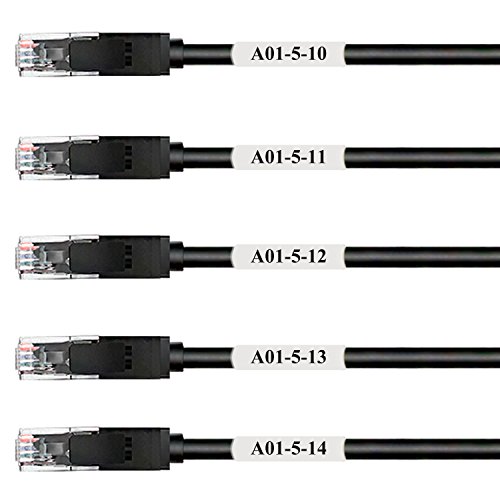
Pros
- Self-laminating design protects printed text from damage
- Heat resistant up to 248 degrees Fahrenheit
- Generous 800-label pack on standard US Letter sheets
Cons
- Compatible with laser printers only, not inkjet models
- Not suitable for cables under 0.24 inches diameter

Pros
- Direct thermal system requires no ink or toner
- Compact, lightweight build under 0.4 pounds fits pockets
- Companion app supports batch Excel imports and OCR
- Wireless Bluetooth connectivity enables cable-free printing
Cons
- Prints only black text without native color support
- Advanced templates require paid app membership upgrade
- Users requiring color printing should skip it

Pros
- Graphical screen previews text effects prior to printing
- Offers multiple font sizes, print styles, and border boxes
- Lightweight handheld body weighs under one pound
- Automatic shutoff feature helps preserve battery life
Cons
- Limited to half-inch tape widths
- Shoppers needing industrial labeling should skip it
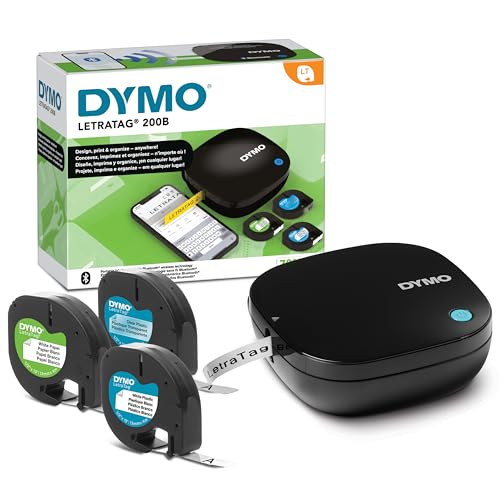
Pros
- Direct Bluetooth pairing with iOS and Android devices
- Lightweight design at roughly 0.71 pounds
- Includes three assorted starter label tapes
- Multiple font sizes, box styles, and icons
Cons
- Requires four AA batteries that are not included
- Who should skip: shoppers needing included power sources

Pros
- Includes three starter rolls of label paper
- Companion app automatically detects label size
- Lightweight and compact 0.65-pound design
- Supports both Bluetooth and wired USB connections
Cons
- Not compatible with tablet devices
- Requires manual driver download for PC use
- Tablet users should skip due to incompatibility

Pros
- No adhesive residue on wires
- Reusable hook-and-loop closure
- Surface resists ink bleeding from standard pens
- Includes 35 multicolored tags
Cons
- Requires manual handwriting for each label
- Users needing printed barcodes should skip
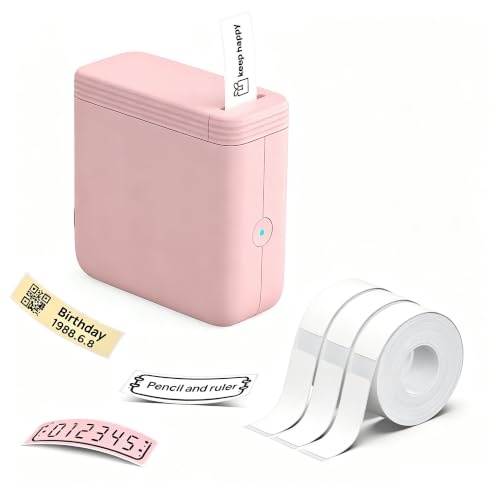
Pros
- Compact and lightweight design weighs only 113 grams
- Inkless thermal printing eliminates ribbon and toner costs
- Includes three rolls of water-resistant label tape
- App supports Excel imports and custom barcode generation
Cons
- Limited to monochrome printing output
- Operates exclusively with mobile devices rather than computers
- Desktop PC users and wide-label creators should skip it
Buying Guide: Choosing the Best Label Maker for Organizing Home Office Cables and Storage
Direct Thermal Printing vs Traditional Tape Cartridges
Direct thermal printing uses heat-sensitive media to generate text without ink or ribbons. This approach lowers recurring operating costs because you only purchase label rolls. Standalone cartridge systems, such as the cassette design found in the DYMO LetraTag series, package the ribbon and adhesive tape into a single plastic cartridge. Cartridges eliminate roll feeding alignment steps but limit flexibility in stock dimensions compared to generic thermal roll compartments.
Label Width and Form Factor Compatibility
Storage bins benefit from wide, readable text, whereas wiring bundles require narrow, flexible wraps that stay adhered around tight circumferences. Narrow tape machines operating up to 12mm or 14mm work well for slim power cords, USB lines, and small drawer bins. For substantial storage bins, network patch bays, or equipment identification where multiple lines of descriptive text are necessary, broad-format thermal printers accommodating up to 50mm or 80mm labels provide superior visibility across a room.
Wireless App Connectivity vs Physical Keyboards
Handheld printers with physical keypads operate instantly without pairing steps, app permissions, or battery drainage on a mobile device. However, smartphone companion apps running over Bluetooth provide substantial design control. Mobile software enables custom font scaling, QR code generation, barcode compilation, and spreadsheet imports. The trade-off is dependency on ongoing mobile OS support and manufacturer software maintenance.
Cable Identification Formats: Wraps, Tags, and Adhesive Tapes
Standard adhesive labels frequently unpeel when wrapped around curved, flexible cords because the plastic backing memory fights the curvature. Self-laminating sheets include a white print area backed by a clear laminate tail that wraps over the text, protecting the legend from handling friction and heat up to 120°C (248°F). Alternatively, reusable hook-and-loop tags wrap securely around cable bundles without leaving adhesive residue when routing lines to a desk setup using tools like a USB-C dock for two laptops.
Power Source and Portability Considerations
Printers powered by internal lithium-ion rechargeable batteries charge over standard USB connections, reducing disposable battery waste when moving around the office. Conversely, hardware relying on standard AA alkaline cells avoids charging downtime entirely, allowing rapid battery swaps during extended inventory projects. Verify your expected usage frequency to decide whether internal lithium charging or replaceable standard batteries match your workflow.
How We Compared These Products
We evaluated the 10 options in this guide by analyzing manufacturer technical specifications, hardware dimensions, power configurations, label media compatibility, and documented customer feedback patterns. Our comparative research focused on print resolution (such as 203 DPI benchmarks), connection reliability, app template functionality, software compatibility across mobile and desktop platforms, and material resistance to heat, water, and adhesive residue.
Which Option Fits Your Needs?
For high-density networking and complex rear-desk wiring, Mr-Label Self-Laminating Wrap Around Cable Labels provide dedicated protection. Running these laser-compatible sheets through an office printer allows batch printing of 800 durable wire markers with protective transparent over-laminate tails, rated for heat up to 120°C (248°F). Who should skip it: anyone without a laser printer or seeking single, on-demand custom labels.
For versatile home office storage organization and larger identification tags, the NIIMBOT B1 Label Maker Came with 3 Rolls of White accommodates broad media widths up to 50x80mm. It supports both mobile Bluetooth editing and PC connectivity via USB, making it suitable for both desk drawer bins and inventory archives. Who should skip it: users requiring a tiny pocket-sized form factor or tablet compatibility, as tablet support is explicitly limited.
For fast, standalone physical operation without mobile pairing, the DYMO LetraTag 100H Silver Handheld Label Maker provides instant keypad input, multiple font sizes, and a graphical display preview. It runs on standard batteries for dependable utility across shelves and storage cabinets. Who should skip it: buyers who want mobile app graphic design, custom icons, or barcode imports.
For daily cord changes without sticky residues, Trilancer Cable Cord Labels Large Size for Wire offer reusable hook-and-loop identification. They support manual handwriting with pens or markers and detach quickly when rearranging peripheral gear like a webcam for home office calls. Who should skip it: users demanding machine-printed typography, barcodes, or serialized asset tracking.
For ultra-compact, app-driven thermal printing on continuous or fixed-size tapes, the Phomemo D30 Mini Bluetooth Label Maker Machine delivers 203 DPI resolution in a pocketable build with extensive template support. Who should skip it: users who prefer physical typing keys or need labels wider than standard miniature thermal formats.
Frequently Asked Questions
Can standard thermal paper labels withstand cable heat?
Standard direct thermal labels can darken or fade when exposed to sustained high temperatures or direct heat sources. For power bricks, dense patch panels, and warm wiring harnesses, self-laminating laser sheets engineered to handle up to 120°C (248°F) provide superior thermal resistance compared to basic desk adhesive stickers.
Do Bluetooth label makers work without internet access?
Most companion apps pair locally over Bluetooth to transmit print data directly to the hardware. However, initial setup requires an internet connection to download the required software from the app store, and certain cloud-based template libraries or account logins may require data connectivity.
Why do wrap-around labels peel off cords over time?
Adhesive failure on wires usually stems from material tension. Flat label tapes resist bending around small wire diameters, slowly pulling the adhesive away from the cord surface. Using flexible vinyl, dedicated self-laminating wrap tags, or hook-and-loop fasteners prevents tension pull-away.
Are rechargeable label makers better than battery-operated units?
Internal lithium-ion batteries eliminate the expense of disposable AA batteries and recharge easily over USB cables. However, standard alkaline battery models avoid mid-project charging delays because fresh cells restore full operating power immediately.
Can I print color labels with direct thermal printers?
Direct thermal print heads generate only monochrome black text by heating chemically treated media. Color accents, patterns, or background hues come entirely from pre-tinted label roll stock rather than colored printer inks.






Write Your Review
No reviews yet. Be the first to share your experience!