

A fitted hard shell helps guard against everyday scuffs while staying on your laptop, but it does not cushion the computer inside a bag like a padded sleeve can. This guide to the best MacBook Neo case options compares fitted shells, carrying sleeves, and accessory bundles so you can match protection and portability to your routine.
Every product here lists compatibility with the 13-inch MacBook Neo model A3404, though included accessories and carrying features vary. Check your laptop’s model number before ordering, especially if you are considering a case that lists compatibility only with A3404.

Pros
- Clear, slim shell design
- Keyboard cover and screen film included
- USB-C to USB-A adapters included
Cons
- Compatible only with MacBook Neo model A3404

Pros
- Includes shell, sleeve, keyboard covers, and screen protector
- Matte finish designed to resist fingerprints
- Sleeve has a handle and front pocket
Cons
- Who should skip it: MacBook models other than A3404
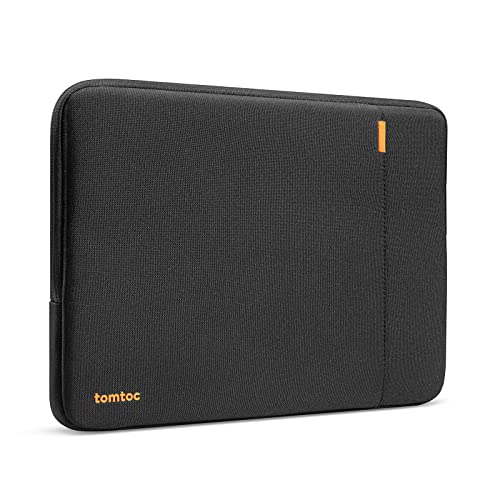
Pros
- Reinforced corners and high-density padding
- Spill-resistant recycled fabric
- Front pocket and accessory strap
- 12-month warranty
Cons
- Who should skip it: users with unlisted laptop models

Pros
- Folding stand for angled viewing and typing
- Access to ports and controls while installed
- Scratch-resistant polycarbonate construction
Cons
- Skip if you own MacBook Air 13 or Pro 13

Pros
- Designed for MacBook Neo model A3404
- Matte, fingerprint-resistant finish
- Includes keyboard covers and screen protector
- Two USB 3.0 adapters included
Cons
- Skip if your MacBook model is not A3404

Pros
- Includes case and three accessory types
- Tool-free snap-on installation
- Thin polycarbonate shell
Cons
- Who should skip it: owners of other MacBook models

Pros
- Thin, lightweight hard-shell design
- Includes keyboard cover and screen protector
- Two USB 3.0 adapters included
Cons
- Who should skip it: owners of MacBooks other than A3404

Pros
- Clear, thin hard-shell design
- Includes screen protector and two keyboard covers
- Tool-free installation and removal
Cons
- Skip if your MacBook is not model A3404

Pros
- Includes screen protector and two keyboard covers
- Top-and-bottom hard shell
- Tool-free installation
Cons
- Skip it if your MacBook isn't model A3404
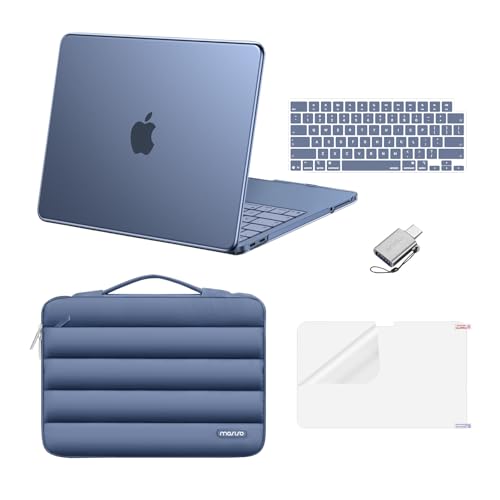
Pros
- Includes hard shell and padded carrying sleeve
- Front pocket has dedicated pen holder
- Two keyboard covers included
Cons
- Who should skip it: owners of MacBook models other than A3404
The Best MacBook Neo Cases by Use Case
Best for a Padded Commute: tomtoc 360° Protective Laptop Sleeve 13-inch
The MacBook buying guide can help you compare laptop models, while this sleeve suits owners who want cushioning and a place for small accessories. The tomtoc 360° Protective Laptop Sleeve 13-inch listing specifies CornerArmor Technology, high-resilience edges, high-density padding, and spill-resistant recycled fabric. Its front pocket accommodates items such as a charger or cable, and a small strap is provided for an AirTag or key.
Reasons to buy:
- Padded sleeve design adds cushioning around the laptop during transport.
- Front pocket offers space for a few everyday accessories.
- The listing specifies a 12-month warranty and A3404 compatibility.
Reasons to avoid:
- This is a separate carrying sleeve, not a shell that stays attached while you use the laptop.
- Check the listed internal dimensions, 11.71 by 8.12 by 0.5 inches, against your laptop and any items you plan to carry.
Skip it if you want a fitted cover or need a carrying bag with a handle.
Best Accessory Bundle for Travel: MOSISO Compatible with MacBook Neo Case 13 inch
The bundle at this link combines a fitted shell with a handle-carrying bag, two keyboard covers, and a screen protector. The 13-inch laptop alternatives guide covers computer choices, but this MOSISO set is aimed at protecting and carrying an A3404. Its bag has a front pocket, and the listing gives internal dimensions of 13.39 by 9.25 by 0.79 inches.
Reasons to buy:
- Includes both an on-laptop hard shell and a separate carrying bag.
- Two keyboard covers and a screen protector add extra surface protection.
- The bag has a handle and front pocket for daily carry.
Reasons to avoid:
- The listing says transparency varies by color, so appearance may differ from expectations.
- Confirm the bag’s dimensions suit your laptop and other items before buying.
Skip it if you want only a slim shell and do not need a separate bag or bundled screen and keyboard covers.
Best for an Adjustable Typing Angle: SEYMAC stock Case for MacBook Neo (A18 Pro)
The 13-inch ultraportable comparison helps with computer selection; this SEYMAC stock case instead adds a foldable stand to the A3404. Its listing describes a polycarbonate construction, full-body coverage, and access to the laptop’s ports and controls while the case is attached. The stand may suit a desk setup where you want to raise the laptop’s angle for viewing or typing.
Reasons to buy:
- Foldable stand provides an adjustable viewing and typing angle.
- The case is described as full-body coverage with shock-absorbing protection.
- The listing specifies access to ports and controls without removing the case.
Reasons to avoid:
- It is specifically listed for the 2026 MacBook Neo A3404 and not MacBook Air 13-inch or MacBook Pro 13-inch models.
- The listing does not give the case’s dimensions or weight, so added bulk is difficult to assess.
Skip it if you want a sleeve for carrying the laptop or need a case for another MacBook model.
Best Budget Clear Shell: EooCoo for MacBook Neo Case 13 inch 2026
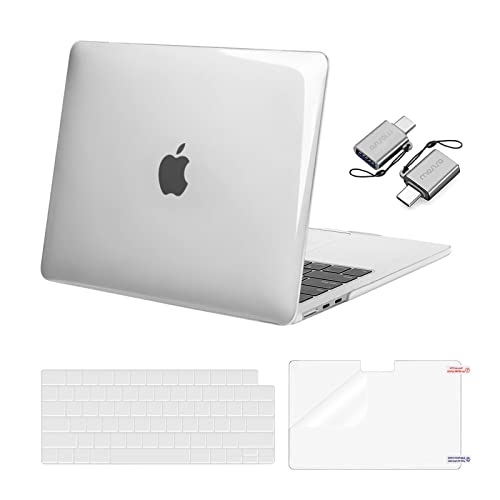
The laptop buying guide looks at computer options, while the EooCoo shell is a low-cost way to cover the Neo’s exterior. Its transparent hard-plastic design is described as slim and lightweight, with edge coverage for everyday scratches, dust, and minor bumps. The package also lists a keyboard cover, screen film, and USB-C to USB-A adapters.
Reasons to buy:
- Clear shell preserves visibility of the laptop’s color and design.
- Includes a keyboard cover, screen protector, and USB adapters.
- Designed specifically for the 13-inch A3404.
Reasons to avoid:
- The listing describes protection against everyday wear and minor bumps, not padded impact protection.
- It is not compatible with other laptop models, so verify A3404 before ordering.
Skip it if your main concern is cushioning the laptop in a bag or protecting it from harder impacts.
Best for Shell-and-Sleeve Coverage: MOSISO Compatible with MacBook Neo Case 13 inch
This MOSISO version pairs a fitted hard shell with a puffy sleeve bag, making it a fit for people who want an attached cover at their desk and a separate layer for carrying. The listing specifies a plush 360-degree lining, a front pocket with a pen holder, two keyboard covers, a screen protector, and one USB adapter. The color is Indigo, and compatibility is limited to the 13-inch A3404.
Reasons to buy:
- Combines a fitted shell and a separate padded carrying sleeve.
- Front pocket includes a pen holder and room for small accessories.
- Includes two keyboard covers, a screen protector, and a USB adapter.
Reasons to avoid:
- The listing does not provide the sleeve’s dimensions or weight.
- It is an Indigo color option, which may not suit buyers seeking a clear or neutral look.
Skip it if you prefer a single thin shell or already have a suitable laptop sleeve.
Also Considered
The MOSISO Compatible with MacBook Neo Case 13 inch in Indigo Clear suits buyers who want a matte shell and a four-in-one accessory kit, but its listing does not specify a carrying sleeve.
The MOSISO Compatible with MacBook Neo Case 13 inch in Burgundy offers a hard shell, two keyboard covers, a screen protector, and a small storage bag, but it does not list the puffy handled sleeve found in a main pick.
The MOSISO Compatible with MacBook Neo Case 13 inch in Crystal Citrus may appeal if you want a bright, lightweight shell with bundled accessories; the listing emphasizes its color and thin design rather than a padded carry bag.
The MOSISO Compatible with MacBook Neo Case 13 inch in Crystal Clear is another shell-and-accessory option for buyers who want a transparent finish, but its listed protection focuses on scratches and everyday wear.
How to Choose the Best MacBook Neo Case
Confirm the exact laptop model
Fit is the first decision because a shell made for another MacBook may not align with the Neo’s body and ports. Several listings specify the 13-inch MacBook Neo A3404, and some explicitly warn that other models are incompatible. Check the model number printed on your laptop and compare it with the listing, rather than relying on screen size or a similar product name.
Choose between a shell and a sleeve
A fitted hard shell stays on the computer and is aimed at protecting its exterior from scratches and minor bumps. A sleeve surrounds the laptop while it is being carried, adding a separate layer of cushioning but needing removal before use. If you commute with the laptop in a backpack, a sleeve or a shell-and-sleeve bundle may suit you better than a shell alone. Check whether the bag is included and whether its dimensions fit your laptop.
Match protection to likely mishaps
Listings describe different levels and kinds of coverage. The EooCoo and MOSISO shells focus on scratches, dust, and minor bumps, while tomtoc and the MOSISO puffy-sleeve bundle add a cushioned carrying layer. These descriptions are not equivalent to a guarantee against damage. For frequent travel, check the sleeve’s padding, dimensions, and closure details, and avoid treating a thin shell as a substitute for a padded bag.
Check every included accessory
Accessory kits vary even when product names look similar. Some listings include two keyboard covers and a screen protector; others also list a small bag, a handled sleeve, or USB adapters. Check the exact color and item list on the version you are buying. Do not assume an adapter supports a particular data speed or charging feature unless the listing states it.
Consider desk use and everyday fit
A stand can be useful if you often work at a desk and want a raised viewing or typing angle, but that feature adds a different kind of bulk than a simple shell. If you carry your laptop in a crowded bag, check the case and sleeve dimensions and consider what else must fit in the pocket. For a clean look, choose between clear, matte, and colored finishes, while keeping in mind that the listings make different claims about fingerprints and clarity.
How We Compared
We compared the published product listings by compatibility, case type, stated materials, carrying features, included accessories, and design details. We also considered the customer feedback information provided, but the published ratings show no review totals, so they do not establish a broad pattern of owner experience. Manufacturer-described protective features are presented as listing claims, not as independently confirmed outcomes.
Frequently Asked Questions
How can I check whether a case fits my MacBook Neo?
Check the model number on the laptop and match it to the case listing. The products in this guide specify the 13-inch MacBook Neo A3404, and some state that they will not fit other MacBook models. Do not choose by screen size alone.
Should I choose a hard shell or a sleeve?
A hard shell stays attached and helps guard the laptop’s exterior against scratches and everyday scuffs. A sleeve is a separate carrying layer that can add cushioning in a bag. If you want both forms, consider a bundle that explicitly includes a shell and a sleeve.
Does a clear case protect against drops?
A clear finish describes appearance, not a particular level of drop protection. The EooCoo listing describes protection against scratches, dust, and minor bumps, while padded sleeves provide a separate cushioning layer. Review the stated construction and protection claims, and do not assume a thin shell prevents damage from a fall.
Are keyboard covers and screen protectors included with every option?
No. The included accessories differ by listing and product version. Check the specific item list for the exact case color and bundle before purchase, because similar MOSISO names refer to different combinations of shells, bags, keyboard covers, screen protectors, and adapters.
Can I use a keyboard cover while closing the laptop?
The published listings include keyboard covers but do not provide enough detail to confirm whether each cover can remain in place when the laptop is closed. Check the accessory instructions and fit guidance before using one, and remove it if it interferes with the lid closing normally.
What should I check before ordering a sleeve?
Compare the sleeve’s internal dimensions with your laptop and consider whether you plan to carry a charger or other items in its pocket. The tomtoc listing provides internal dimensions and front-pocket dimensions; other sleeve listings may provide less measurement detail. Check the version’s dimensions and included carry features rather than assuming all bags in a bundle are the same size.




Write Your Review
No reviews yet. Be the first to share your experience!