

Apartment security often means choosing between easy installation and dependable coverage. Wired cameras need an outlet, battery models need charging, and doorbell mounts only fit certain doors and devices. The best security camera for apartment renters depends on where you need coverage, what your lease allows, and whether you want local or cloud recording.
This guide compares renter-friendly indoor cameras, movable battery models, pan-and-tilt options, and no-drill doorbell mounts. Check your Wi-Fi band, power access, storage preferences, and door measurements before choosing.

Pros
- No-drill installation
- Adjustable door clip
- Specified Ring and Blink compatibility
Cons
- Only fits inward-opening doors
- Requires door gap over 0.065 inches
- Skip it if your door falls outside fit limits

Pros
- No-drill, tool-free installation
- Adjustable clamp with soft foam pad
- Includes screw kit, screwdriver, and manual
Cons
- Fits only left or right in-swinging doors with flat edges
- Not compatible with wired doorbells or several older models
- Skip it if your door swings outward or has uneven edges

Pros
- 1080p video
- Two-way audio and built-in siren
- Night vision up to 30 feet
- Cloud and SD card storage
Cons
- Wired power limits placement flexibility
- Skip it if you need a battery-powered camera

Pros
- Wire-free magnetic mounting
- Built-in 8GB local storage
- No subscription required for playback
- Alexa and Google compatibility
Cons
- Privacy control requires latest firmware
- Who should skip it: buyers needing documented continuous recording

Pros
- 1080p video
- Pan and tilt control
- Two-way audio
- Local storage without monthly fees
Cons
- Requires 2.4 GHz Wi-Fi
- MicroSD card sold separately
- Who should skip it: users without 2.4 GHz Wi-Fi

Pros
- Two cameras included
- Indoor and outdoor use
- Color night vision
- Two-way audio
Cons
- Cloud recording requires subscription
- MicroSD card sold separately
- Skip it if you need included local storage
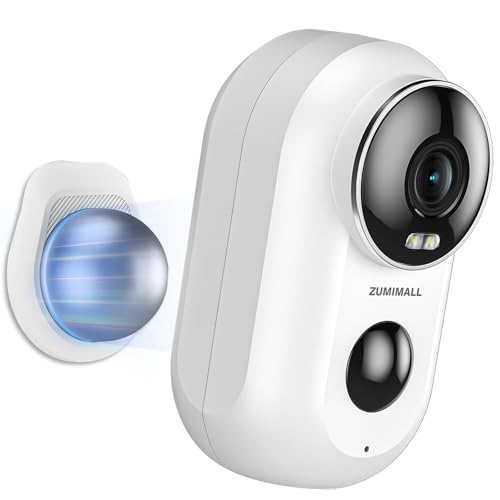
Pros
- Battery-powered, wireless installation
- Magnetic mount included
- Two-way audio and instant siren
- Alexa compatibility
Cons
- Supports 2.4 GHz Wi-Fi, not 5 GHz
- Memory card not included
- Skip if you need longer cloud clips

Pros
- Four cameras included
- Two-way audio
- Cloud and microSD storage options
- Supports up to nine simultaneous live feeds
Cons
- Requires wired power and 2.4GHz Wi-Fi
- Skip if you need 5GHz Wi-Fi or battery power

Pros
- Local storage option without cloud subscription
- Motion tracking and person detection
- Two-way audio
- Up to 30-foot night vision
Cons
- Requires wired power
- Connects only via 2.4GHz Wi-Fi
- MicroSD card not included

Pros
- 2K video at 2304 × 1296
- Supports 5GHz and 2.4GHz Wi-Fi
- Continuous local recording option
- Free one-day rolling cloud storage
Cons
- No pan or tilt
- TF card not included
- Who should skip it: anyone needing a battery-powered camera
The Best Security Cameras by Use Case
Best for Wire-Free Indoor Placement: youkey Magnetic Indoor Security Camera
The youkey Magnetic Indoor Security Camera suits renters who want to move a camera without leaving screw holes or managing a power cable. Its listing specifies 2K video, a battery-powered design, a magnetic base, and built-in 8GB storage, with no subscription required for playback. The manufacturer also describes on-device person and pet detection, app privacy control, and two-way audio. youkey Magnetic Indoor Security Camera stands out when you want flexible placement and local recording together.
Reasons to buy:
- Magnetic mounting and wire-free placement avoid permanent wall installation.
- Built-in 8GB storage supports playback without a separate memory card or subscription.
- App privacy control lets you switch the camera off when you are home.
Reasons to avoid:
- Battery operation means you must recharge it; the listing does not give a guaranteed runtime.
- Confirm that magnetic placement is suitable for the surface and position you have in mind.
Skip it if you need continuous wired recording or want footage stored on a removable memory card.
Best Budget Wired Camera: Tapo 1080P Indoor Security Camera, Baby Monitor
The Tapo 1080P Indoor Security Camera, Baby Monitor is a straightforward choice for monitoring a room, pet, or entry area when an outlet is nearby. Its listed features include 1080p video, motion and person alerts, baby-cry detection, night vision up to 30 feet, and two-way audio with a built-in siren. The listing describes cloud and SD card storage, but buyers should check current app requirements and whether a memory card is included. Tapo 1080P Indoor Security Camera, Baby Monitor also works with Alexa and Google Home for viewing on compatible screens.
Reasons to buy:
- Person detection can help separate relevant alerts from general movement.
- Two-way audio supports speaking to someone in the room or checking on a pet.
- Alexa and Google Home compatibility gives you a voice-viewing option.
Reasons to avoid:
- Wired power limits placement to spots near an outlet.
- Video resolution is 1080p rather than the 2K options in this guide.
Skip it if you need a battery-powered camera or a lens that can pan and tilt remotely.
Best for Room-Wide Viewing: Kasa 1080p Indoor Pan/Tilt Wired Security Camera
The Kasa 1080p Indoor Pan/Tilt Wired Security Camera fits a renter who wants one camera to scan more of a room than a fixed lens can cover. The EC71 listing specifies 360-degree horizontal and 113-degree vertical movement, motion tracking, patrol mode, and person and baby-cry detection. It records to a microSD card up to 256GB, sold separately, or offers optional cloud storage. Kasa 1080p Indoor Pan/Tilt Wired Security Camera is useful for checking several parts of a room, but its wired power and 2.4GHz Wi-Fi requirement shape where it can go.
Reasons to buy:
- Pan and tilt movement provides broad room coverage from one placement.
- Motion tracking and patrol mode add ways to monitor movement or preset areas.
- Local microSD recording is available without a cloud subscription.
Reasons to avoid:
- The camera needs wired power and a 2.4GHz Wi-Fi connection.
- A microSD card is not included, and cloud storage costs extra.
Skip it if you cannot place a powered camera where its Wi-Fi connection will reach.
Best for Outdoor or Entryway Flexibility: ZUMIMALL Security Cameras Wireless Outdoor
The ZUMIMALL Security Cameras Wireless Outdoor is a battery-powered camera with a magnetic mount, making it a flexible option for renters who need a movable view of a doorway or covered outdoor area. Its listing specifies 2K video, a 130-degree viewing angle, color night vision, two-way talk, and 2.4GHz Wi-Fi. It also lists IP66 weather protection, AI detection for people, pets, vehicles, and packages, and up to 128GB microSD support. ZUMIMALL Security Cameras Wireless Outdoor offers cloud recording described as a seven-day loop of six-second clips, so check whether that clip format meets your needs.
Reasons to buy:
- Magnetic mounting gives you a no-drill placement option.
- Wide 130-degree view and listed weather protection suit entryways or outdoor locations.
- AI detection zones and local memory-card support provide recording choices.
Reasons to avoid:
- It supports 2.4GHz Wi-Fi, not 5GHz.
- Battery runtime is not specified, and the microSD card is not included.
Skip it if your router only provides 5GHz access at the intended camera location or you need continuous wired recording.
Best Doorbell Mount for Compatible New Models: QIBOX Anti-Theft Doorbell Mount
The QIBOX Anti-Theft Doorbell Mount is an accessory, not a camera, for renters who already own a compatible battery doorbell and want a no-drill installation. The listing names compatibility with specified 2026 Ring and Blink battery doorbells, including select second-generation models, and says the doorbell is sold separately. It fits inward-opening doors from 1.1 to 2.3 inches thick with a door gap greater than 0.065 inches; it does not fit outward-opening doors. QIBOX Anti-Theft Doorbell Mount uses a bracket that clamps onto the door, so measure first and confirm your exact doorbell model.
Reasons to buy:
- Tool-free mounting avoids drilling into a rental door.
- The bracket is designed to help deter removal of a compatible doorbell.
- Adjustable fit supports the specified range of door thicknesses.
Reasons to avoid:
- It is not a camera, and compatibility is limited to listed Ring and Blink models.
- Outward-opening doors and doors outside the stated measurements are unsuitable.
Skip it if you need an indoor camera, own a wired doorbell, or have an outward-opening door.
Also Considered
The Anti-Theft Ring/Blink Doorbell Mount for 2026 may suit owners of its specified Ring or Blink models, but its narrower door and device compatibility makes careful checking essential.
The Kasa 1080p Indoor Pan/Tilt Wired Security Camera is another pan-and-tilt option with local microSD recording up to 256GB; its listing specifies 2.4GHz Wi-Fi and wired power.
The VIMTAG 2.5K Cameras for Home Security may suit renters who want two cameras, color night vision, and indoor/outdoor use, though local storage needs a separately purchased microSD card and cloud storage requires a subscription.
The LaView Security Cameras 4pcs could cover several indoor spaces from one set, but all four cameras are wired and support 2.4GHz Wi-Fi only.
For more options across a similar category, see our guide to security cameras under $100.
How to Choose the Best Security Camera for Apartment Renters
Installation and lease limits
Start with the surfaces and locations where you are allowed to place a camera. Magnetic bases and tabletop placement avoid permanent holes, while included wall brackets or screws may not suit a strict lease. A doorbell mount can keep a compatible device attached without drilling, but the door’s opening direction, thickness, gap, and edge shape can rule it out. Measure the door and compare it with the mount’s stated limits before ordering.
Power and placement
Wired cameras avoid battery recharging but need an outlet and a cable route that works in your space. Battery cameras are easier to move and do not need a nearby outlet, but the available information does not provide dependable runtime figures for the models here. Think about how often you can recharge a camera and whether missing coverage during charging would matter. The youkey and ZUMIMALL models emphasize wire-free placement, while the Tapo and Kasa indoor cameras need wired power.
Wi-Fi band and camera location
Wi-Fi compatibility can determine whether a camera connects in the room you want to monitor. Several listed cameras require 2.4GHz Wi-Fi; the IHOMWAY model supports both 2.4GHz and 5GHz, according to its listing. A dual-band router does not guarantee that every camera supports both bands. Check the camera’s exact requirement and confirm that your network provides that band at the installation point, especially through walls or near an entryway.
Recording, alerts, and privacy
Decide whether you want continuous recording, event clips, or live viewing only. Local memory-card recording can avoid recurring cloud fees, but cards may be sold separately and storage capacity varies by model. Cloud plans may add video history, but check the plan terms rather than assuming every camera includes long-term cloud playback. The youkey listing describes built-in 8GB storage without a subscription, while the Kasa EC71 supports a separately purchased microSD card up to 256GB.
Detection features can reduce unnecessary notifications, but the available options differ. Person, pet, sound, baby-cry, vehicle, and package detection are not interchangeable. Check which detection types and zones the specific model supports, and consider whether you can turn the camera off through its app when privacy matters. Two-way audio is useful for speaking to someone in the room, but it does not replace a dedicated alarm or emergency service.
Coverage, resolution, and indoor or outdoor use
Choose the camera’s view based on the area, not resolution alone. A pan-and-tilt model can point in different directions, while a fixed camera covers the view it faces. The ZUMIMALL listing specifies a 130-degree viewing angle; the Kasa EC71 lists pan-and-tilt movement. For outdoor placement, check the model’s stated weather protection and operating conditions, plus whether your lease permits attachment to the building. A camera described as weather-resistant is not automatically permitted on shared property.
How We Compared
This guide compares the supplied product descriptions, listed specifications, mounting details, power choices, Wi-Fi requirements, storage options, detection features, and stated smart-home compatibility. Customer feedback was not supplied for these products, so no customer consensus or ownership trend informs the recommendations. Picks reflect how the listed features match distinct renter needs, with compatibility and missing details called out where they affect a purchase.
Frequently Asked Questions
Can I use a security camera in a rental without drilling?
Yes, depending on the camera and the location. Magnetic bases, tabletop placement, and compatible clamp-style doorbell mounts can avoid drilling. Check your lease and building rules first, especially for shared hallways, exterior doors, or cameras that may record areas beyond your home.
Will a no-drill doorbell mount fit my apartment door?
Not necessarily. Compare the mount’s supported doorbell models with your exact device, then measure door thickness and gap. The QIBOX mount listed here is for specified battery models, fits inward-opening doors within its stated measurements, and does not fit outward-opening doors.
Should I choose a wired or battery-powered camera?
Choose wired power when a nearby outlet and steady operation matter more than easy relocation. A battery model is easier to place without a power cable, but it needs recharging, and runtime depends on use and conditions. The supplied product information does not establish a guaranteed battery life for the wireless models.
Do these cameras need a monthly subscription?
Not all of them. Storage varies by model: some offer local memory-card recording, and the youkey listing specifies built-in storage with no subscription required for playback. Other models list optional or subscription-based cloud storage. Confirm whether a card is included, what the free cloud option stores, and how long clips remain available.
Do I need a 2.4GHz Wi-Fi network?
Many models in this guide specify 2.4GHz Wi-Fi, while the IHOMWAY camera listing says it supports both 2.4GHz and 5GHz. Check the exact camera requirements and your router settings before buying. A dual-band router does not make a 2.4GHz-only camera compatible with a 5GHz-only network.
Is a pan-and-tilt camera better than a fixed camera?
It can cover more directions from one position, which helps when you want to check different parts of a room. A fixed camera may be enough when you only need one clear view, such as a doorway or pet area. Compare movement range, power needs, app controls, and the view you actually need rather than assuming one camera type is always better.





Write Your Review
No reviews yet. Be the first to share your experience!