

A thermostat in one hallway may not reflect the temperature in a sunny bedroom or a chilly basement. Room sensors can help a compatible thermostat respond to conditions in another part of your home, but they do not all work with the same systems, and they do not automatically create independent heating zones.
This guide to the best smart thermostat with room sensors for multi-zone comfort compares a thermostat-and-sensor bundle, brand-specific add-on sensors, and a controller listed for multi-zone water-based heating. Use the differences to narrow your choice to your existing equipment and the rooms you want to manage.

Pros
- Manages up to eight distinct heating zones
- Direct integration with boilers and circulating pumps
- Compact wall-mount design fits existing radiant setups
Cons
- Requires compatible hydronic boiler and pump infrastructure
- Users needing single-zone or electric heating should skip

Pros
- Monitors both temperature and humidity levels
- Operates without an external bridge or hub
- Supports Google Home and Amazon Alexa voice control
- Includes mounting tape and hardware for simple installation
Cons
- Requires a separate Cync Smart Thermostat to operate
- Requires a 2.4GHz wireless network for smart functions
- Users without a Cync Thermostat should skip it
Pros
- Included remote sensor balances individual room temperatures
- Automates energy savings using Home Away Assist
- Works with Alexa and Google Assistant voice commands
- Quick setup with all essential install hardware included
Cons
- Heat pump compatibility limited to heating systems only
- Full sensor scheduling requires Nest app configuration

Pros
- Monitors both temperature and humidity
- Includes stand and wall mounting options
- Averages readings to reduce uneven spots
- Wireless build requires no wiring
Cons
- Requires Sensi Touch 2 smart thermostat
- Incompatible with other thermostat models

Pros
- Up to three-year battery life
- Simple setup via Google Home or Nest app
- Supports monitoring across up to six rooms
- Compact placement options for walls or shelves
Cons
- Requires specific compatible Nest thermostat models
- Households without compatible Nest hardware should skip it
The Best Smart Thermostats by Use Case
Best for Water-Based Heating Zones: ABS Central Heating Panel 280mm White Wall
The Helilyco ABS Central Heating Panel 280mm White Wall is a controller listed for up to eight independent heating zones, with wireless panels for setting room temperatures. Its stated integration with a wall-mounted boiler and circulating pump makes it a different kind of option from a room sensor that only changes which room a central thermostat monitors. Consider it for an existing water-based floor-heating setup, but confirm that its control arrangement matches your boiler, pump, and zone equipment before buying.
Reasons to buy:
- Listed for up to eight separately controlled heating zones.
- Designed to link with a wall-mounted boiler and circulation pump.
- Uses a wall-mount format and is described as a wireless control system.
Reasons to avoid:
- The listing focuses on water-based floor heating, not general compatibility with forced-air heating and cooling.
- Confirm wiring, zone-panel requirements, and boiler compatibility with the manufacturer or a qualified installer; the published details do not establish compatibility with every system.
Skip it if you need a room sensor for a standard forced-air thermostat or cannot confirm that your hydronic system supports this controller. The ABS Central Heating Panel 280mm White Wall is a zone-control candidate, not a universal thermostat upgrade.
Best Starter Bundle: Google Nest Thermostat E
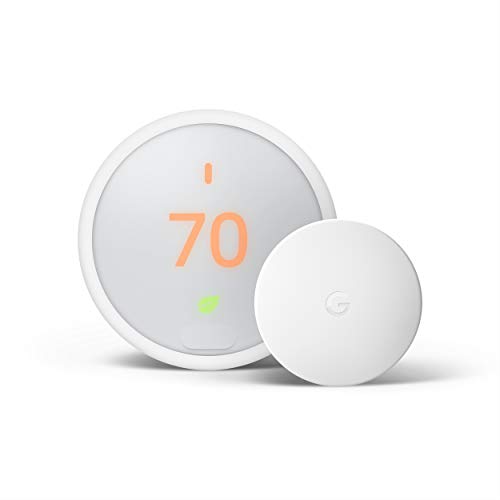
The Google Nest Thermostat E bundles a thermostat with a Nest Temperature Sensor, so it gives you a main control and one remote room reading in one package. You can schedule a room for priority at certain times through the Nest app, which can suit a household that wants a bedroom warmer or cooler overnight. The listing states compatibility with several heating types, including combi boilers, heat-only boilers, heating-only heat pumps, zoned systems, and district heating with electrical control valves, as well as compatibility with 95% of heating and cooling systems. Check your wiring and system type before purchase.
Reasons to buy:
- Includes both the thermostat and one room sensor.
- Supports schedules that prioritize a selected room.
- Offers Home/Away Assist, remote app control, and voice control with Alexa or Google Assistant.
Reasons to avoid:
- One included sensor covers only one remote location; check compatibility before adding sensors.
- The listing describes compatibility broadly, but your specific HVAC wiring and system still need verification.
Skip it if you already own a different thermostat ecosystem and only want an add-on sensor. The Google Nest Thermostat E makes more sense when you want a thermostat and its matching sensor together.
Best for Multiple Nest Rooms: Google Nest Temperature Sensor (2nd Gen) 3 Pack
The Google Nest Temperature Sensor (2nd Gen) 3 Pack adds three room sensors for compatible Nest thermostats. The listing names the Nest Learning Thermostat (3rd and 4th Gen) and Nest Thermostat E as compatible models, and says a Nest setup can use sensors in up to six rooms. In the app, you can schedule a room to take priority or create an average across selected rooms, making the pack a practical expansion for homes with several hot or cold spots.
Reasons to buy:
- Provides three sensors for distributing readings among several rooms.
- Supports room prioritization by time of day or averaging across rooms.
- Listed battery life is up to three years, with shelf or wall placement available.
Reasons to avoid:
- Works with the specified Nest thermostat models, not thermostats from other brands.
- It adds temperature sensing, not separate control of duct dampers or heating circuits.
Skip it if you do not own a compatible Nest thermostat or need the sensors to control independent HVAC zones. The Google Nest Temperature Sensor (2nd Gen) 3 Pack is an expansion pack, not a standalone thermostat.
Best for Sensi Touch 2 Owners: Sensi Room Sensor-Compatible with Sensi Touch 2
The Sensi Room Sensor-Compatible with Sensi Touch 2 is an add-on for the Sensi Touch 2 Smart Thermostat. It reports room temperature and humidity, and the listing says you can prioritize a location or average readings across sensors and thermostats. That flexibility can help if you want to focus on a home office during the day, then use a broader reading later, while keeping the purchase within a compatible Sensi setup.
Reasons to buy:
- Offers both room temperature and humidity monitoring.
- Supports prioritizing a room or averaging readings across sensors and thermostats.
- Can stand on a surface or mount on a wall, with no sensor wires needed.
Reasons to avoid:
- Compatibility is limited to the Sensi Touch 2 Smart Thermostat.
- It is a sensor, not a thermostat; it cannot control your HVAC system by itself.
Skip it if you use Nest, Cync, or another thermostat brand, or if you need a complete thermostat package. The Sensi Room Sensor-Compatible with Sensi Touch 2 suits current Touch 2 owners who want another room reading.
Best for Cync Temperature and Humidity Readings: GE Cync Smart Temperature Sensor
The Cync GE Cync Smart Temperature Sensor pairs with a Cync Smart Thermostat, which the listing says is required and sold separately. Through the Cync app, it reports room temperature and humidity, helping you distinguish a temperature issue from a room that feels uncomfortable because of dry or humid air. The listing specifies 2.4GHz internet for smart control, no bridge or hub, and wall mounting with a screw or removable tape.
Reasons to buy:
- Provides temperature and humidity readings in the Cync app.
- Does not need a separate bridge or hub, according to the listing.
- Supports Google Home and Amazon Alexa voice control when paired with the Cync thermostat and compatible devices.
Reasons to avoid:
- Requires a separately sold Cync Smart Thermostat and a 2.4GHz internet connection for smart control.
- The published details do not establish compatibility with thermostats from other brands.
Skip it if you want a sensor that works without the Cync thermostat or cannot use a 2.4GHz connection. The GE Cync Smart Temperature Sensor is best treated as an ecosystem-specific add-on.
How to Choose the Best Smart Thermostat with Room Sensors for Multi-Zone Comfort
Confirm thermostat and sensor compatibility
Room sensors generally pair with specific thermostat families, so check the exact model names rather than assuming that products using the same wireless or smart-home brand will work together. The Nest three-pack lists three compatible thermostat models, the Sensi sensor specifies the Sensi Touch 2, and the Cync sensor requires a Cync Smart Thermostat. If you are buying a bundle, check that its included thermostat supports your heating and cooling equipment as well as its sensor.
Look for compatibility statements on the product listing and thermostat documentation. If your HVAC system has unusual wiring, a heat pump, or multiple existing zones, verify the match before ordering. A sensor cannot make an incompatible thermostat suitable for your system.
Decide whether you need a sensor or independent zones
A room sensor reports conditions to its paired thermostat. Prioritization or averaging changes which readings inform the thermostat, but a conventional forced-air system may still heat or cool the home through its existing ductwork. Separate room control typically depends on system equipment such as dampers, zone controls, or distinct heating circuits, not on adding a sensor alone.
The Helilyco panel is listed for up to eight independent heating zones and integration with a boiler and circulation pump, so it belongs in a different category from the Nest, Sensi, and Cync sensors. Confirm the details of your heating system and the required control components before treating it as a fit.
Choose between room priority and averaging
Prioritizing one room can suit a predictable routine, such as focusing on a bedroom at night or an office during work hours. Averaging readings across selected rooms may better reflect a household that uses several spaces at once. Neither approach guarantees that every room reaches the same temperature, because airflow, insulation, sunlight, and the location of the sensors affect what each reading represents.
Check the app features for the specific thermostat and sensor combination. The Nest products list room scheduling and prioritization, while the Nest second-generation sensors also list averaging. Sensi lists both prioritization and averaging. Do not assume that a feature offered by one product in a brand family is available on every model.
Check app, network, and voice-control needs
Sensor management often happens through the thermostat maker’s app, so consider which app you already use and whether household members need remote access. The Cync listing specifies 2.4GHz internet for smart control and names Google Home and Amazon Alexa support when paired with the required thermostat and compatible devices. The Nest Thermostat E listing names Alexa and Google Assistant support. These statements do not mean that all features work identically across every assistant or setup.
Check the listing for any stated network requirement, account or app dependency, and required companion product. If voice control matters, confirm that the exact thermostat model and the sensor’s app support your preferred setup rather than relying on a general brand label.
Compare sensor placement and power details
Placement affects whether a sensor reflects the room you want to manage. The Sensi sensor can stand on a surface or mount on a wall; the Cync model includes screw or removable-tape mounting; and the Nest second-generation sensor can sit on a shelf or wall. Keep any sensor away from direct sun, drafts, and supply vents so the reading is less likely to reflect a local hot or cold spot instead of the room overall.
Check whether the listing states how the sensor is powered and how often you may need to replace or recharge it. The Nest second-generation model lists battery life of up to three years. The published details do not state a battery-life figure for the other sensors, so do not assume they match it.
How We Compared
This comparison uses the published product listings, including stated thermostat compatibility, heating-system fit, app features, room-priority or averaging options, mounting details, network requirements, and power information. The listing information also includes customer-rating figures, but does not provide written customer feedback to assess. Where a listing leaves a compatibility or installation detail unclear, we identify it as something to verify rather than treating it as confirmed.
Frequently Asked Questions
Can room sensors create separate temperatures in every room?
Not by themselves. A sensor sends room information to a compatible thermostat, which can prioritize or average readings where supported. The sensor does not independently open a duct damper or heating valve. Separate room control depends on compatible zoning equipment and system design.
Will a Nest, Sensi, or Cync sensor work with another brand’s thermostat?
The published product details list brand-specific compatibility: the Nest sensors work with specified Nest thermostats, the Sensi sensor is for Sensi Touch 2, and the Cync sensor requires a Cync Smart Thermostat. They do not establish cross-brand compatibility. Check the exact thermostat model and sensor documentation before purchase.
Should I choose room priority or temperature averaging?
Room priority suits a schedule that centers on one space at a time, such as a bedroom at night. Averaging can help when you want readings from several selected rooms to inform the thermostat together. Choose based on how your household uses rooms and which method your specific thermostat supports.
Can I use the Nest Temperature Sensor (2nd Gen) with any Nest thermostat?
No. The published listing names the Nest Learning Thermostat (3rd and 4th Gen) and Nest Thermostat E as compatible. Confirm your thermostat generation before buying the three-pack, and do not assume compatibility with an unlisted Nest model.
What should I check before buying a controller for hydronic heating?
Confirm that the controller supports your boiler, circulating pump, valves, and existing zone layout. The Helilyco listing describes up to eight zones and water-based floor-heating use, but the listing information does not spell out compatibility with every hydronic system. Ask the manufacturer or a qualified installer to verify the control requirements before connecting electrical equipment.



Write Your Review
No reviews yet. Be the first to share your experience!