

Wireless chargers can save cable clutter, but advertised speed depends on phone support, operating-system version, and magnetic alignment. This guide to the best wireless charger under $50 focuses on one foldable Belkin station and explains what its charging claims mean for compatible phones, earbuds, and travel setups.
Use the specifications below to decide whether its multi-device layout fits your routine. Before ordering, check your phone model, iOS version if applicable, and case thickness against the listing.

Pros
- Simultaneous iPhone and AirPods charging
- Foldable, adjustable stand
- Power supply and cable included
Cons
- 25W fast charging requires iOS 26 or newer
- Strong magnets may make phone removal harder
- Skip it if you need 25W charging on iOS 18
The Best Wireless Chargers by Use Case
Best for Foldable Travel Charging: Belkin Qi2.2 25W Wireless 2 in 1 Foldable
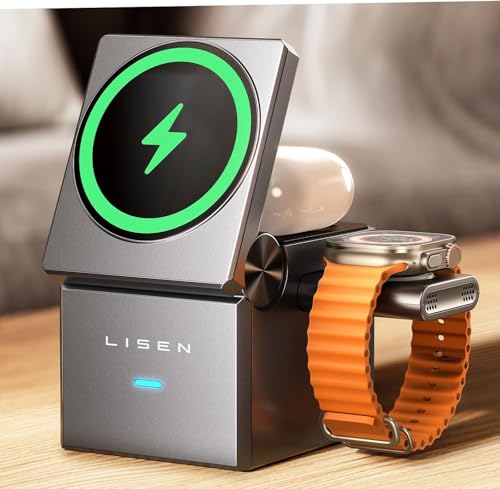
The Belkin Qi2.2 25W Wireless 2 in 1 Foldable combines a magnetic phone charger, a separate wireless charging area for AirPods, and a built-in 5W USB-C port. Its folding design and adjustable stand angle, listed up to 65 degrees, suit a desk that doubles as a travel workspace. The listing specifies up to 25W wireless charging for compatible iPhones and Qi2 devices, with that fast-charging support limited to iOS 26 and newer.
Belkin includes a 45W power supply and a 5-foot USB-C to USB-C cable, so the charging accessories are part of the package. The product listing also describes MagSafe compatibility and support for iPhone StandBy, making the stand useful when you want to view a mounted phone in portrait or landscape orientation. The brand lists a 5W output for the AirPods charging area and the USB-C port; do not assume that port provides high-speed wired charging for a phone.
Reasons to buy:
- Folds for packing and adjusts to a listed maximum angle of 65 degrees.
- Can charge a compatible phone and AirPods wirelessly at the same time.
- Includes a 45W power supply and 5-foot USB-C cable.
Reasons to avoid:
- The listed 25W fast-charging support requires iOS 26 or newer; the listing says iOS 18 does not support that speed.
- Magnetic charging is specified for compatible cases up to 3 mm thick, and strong magnets may make phone removal harder.
Who should skip it: Choose another setup if your phone lacks compatible magnetic charging, your case exceeds the stated thickness, or you need a USB-C port rated above 5W.
How to Choose the Best Wireless Charger Under $50
Check phone support and charging speed
Wireless charging standards and phone support affect the speed you can expect. A charger’s maximum output is not a promise that every compatible-looking phone will receive that output. The Belkin listing specifies up to 25W for iPhone and Qi2 devices, but says its fast charging is supported only with iOS 26 and newer, not iOS 18.
Before buying, confirm your exact phone model, operating-system version, and supported charging standard against the product listing and your phone maker’s specifications. If you have an older iPhone or a phone that does not support Qi2, do not assume you will get the charger’s maximum rate. When peak speed matters, make compatibility the first check, rather than relying on the wattage printed in the product name.
Match magnetic charging to your phone and case
Magnetic alignment helps hold a compatible phone in position over the charging area. It does not make every phone or case magnetically compatible. Belkin specifies support for MagSafe cases up to 3 mm thick and advises trying the phone without its case if charging does not start.
Check whether your phone supports the magnetic charging system named by the charger, and verify the case maker’s compatibility information. A thick case, metal plate, wallet attachment, or other accessory could interfere with alignment or charging; the published product details do not establish compatibility with every such accessory. The listing also warns that strong magnets may make the phone harder to remove, a practical point if you frequently pick up the phone from its stand.
Decide whether you need one charging spot or several
A single charging pad can suit someone who mainly charges one phone. A multi-device station makes more sense if you want to leave a phone and earbuds in one place overnight or at a desk. The Belkin’s phone pad and AirPods charging area support simultaneous wireless charging, while a separate USB-C port is listed at 5W.
Think about which devices you charge together and how you charge them. The listing identifies AirPods as the intended wireless earbud use, but it does not establish that every earbud case will work. Nor should the USB-C port’s presence be mistaken for a high-output phone charger: its stated 5W rating is a limitation for devices that benefit from faster wired charging. Check the power rating for each port, not just the total number of charging spots.
Consider included power equipment and travel shape
A wireless charger is only ready to use if you have a compatible power source and cable. Belkin lists a 45W power supply and a 5-foot USB-C to USB-C cable in the box. That package reduces the need to find separate charging accessories, though the charger’s 25W wireless rating and its included adapter’s 45W rating describe different parts of the setup.
For a travel charger, consider whether it folds, how it fits your bag, and whether it can hold the phone in a useful viewing position. Belkin says this station folds for packing and remains usable while folded, with an adjustable angle up to 65 degrees. The published information does not give folded dimensions or weight, so check the listing if bag space or carrying weight is a deciding factor. Travelers comparing desk equipment can also browse our guide to external monitors for MacBook Air.
Understand cooling and safety details
Wireless charging can produce warmth as power moves between charging coils. Belkin describes this model as using SmartProtect and ChillBoost passive cooling, along with fire-resistant, soft-touch silicone. These are manufacturer descriptions, not independent measurements of operating temperature or proof that a phone will stay cool in every room or charging situation.
Use the charger as directed, keep its charging surfaces unobstructed, and stop using it if the device, cable, or power supply shows visible damage. The published product details do not name a specific safety certification, so check the current listing or product documentation if a particular certification is important to you. For more charging options and related gear, see our wireless charger category and broader Power and Charging section.
How We Compared
This guide uses the published product specifications and design details, including the listed wireless and USB-C outputs, supported operating-system version for peak iPhone charging, case-thickness guidance, folding stand, and included power accessories. We distinguish the manufacturer’s stated features from outcomes that depend on phone, case, and software compatibility. No customer feedback details were supplied for this product, so the recommendation does not rely on reported owner experiences.
Frequently Asked Questions
Will this charger work with an iPhone running iOS 18?
The listing says the charger’s fast charging is supported only on iOS 26 and newer, not iOS 18. Check the current compatibility details for your phone and operating system before buying, and do not expect the stated 25W rate on an unsupported software version.
Can it charge a phone and AirPods at the same time?
Yes, the product description specifies simultaneous wireless charging for a phone and AirPods. It lists up to 5W for the AirPods charging area. Confirm that your particular AirPods case supports wireless charging, since the published details do not cover every case version.
Can I use a case with the magnetic charger?
Belkin lists compatibility with MagSafe cases up to 3 mm thick. If charging does not begin, the product description advises trying the phone without its case. Check for magnetic compatibility and any metal plates, wallet attachments, or other accessories that could affect placement.
Does the USB-C port fast-charge a Pixel or Galaxy phone?
The product description says the built-in USB-C port supplies 5W to a Pixel, Galaxy, or another USB-C device. It does not identify that port as a fast-charging output, so treat it as a low-power secondary connection and check your phone’s wired charging needs before relying on it.
What comes in the box?
The listing specifies a 45W power supply and a 5-foot USB-C to USB-C cable. It says the station can be used out of the box without needing extra MagSafe accessories. Verify the current package details before purchase if a particular cable or power adapter is essential to your setup.
Can the stand hold a phone in portrait and landscape positions?
The product description says the stand angle adjusts up to 65 degrees and supports portrait or landscape phone attachment. It also identifies the charger as compatible with iPhone StandBy. If you plan to use a particular phone case or viewing angle, check that the magnetic connection and stand position suit your setup.


Write Your Review
No reviews yet. Be the first to share your experience!