

Choosing a standalone headset can feel confusing now that multiple versions exist at different price points. The Meta Quest 3 sits as the premium standard in the lineup, offering mixed reality features, upgraded optics, and a faster mobile processor. Many prospective buyers wonder if the higher cost brings enough practical improvements over older devices or budget-friendly models to justify the investment.
To help you decide, we analyzed the listed specifications, real-world user reports, and key differences across current options. Whether you want an immersive gaming device, a virtual workstation, or a personal cinema, understanding where this model excels and where it compromises will show whether it fits your daily routine.
The Short Answer
Is the Meta Quest 3 worth it? For users who prioritize sharp visual clarity, comfortable pancake lenses, and full-color mixed reality, the answer is yes. It offers double the graphical processing power of older generations and nearly 30 percent higher resolution. However, casual gamers who only want basic standalone VR on a tighter budget might prefer the more economical Quest 3S, as it shares the same core processor without the premium display panels.

Pros
- Wireless VR gaming
- Mixed reality support
- 8GB of RAM
- Three-month game catalog trial
Cons
- 128GB storage may limit room for games
- Who should skip it: buyers who need more than 128GB

Pros
- Wireless play
- Full-color passthrough
- 512GB storage
Cons
- Who should skip it: players needing all-day sessions
- Stated battery life is 2+ hours
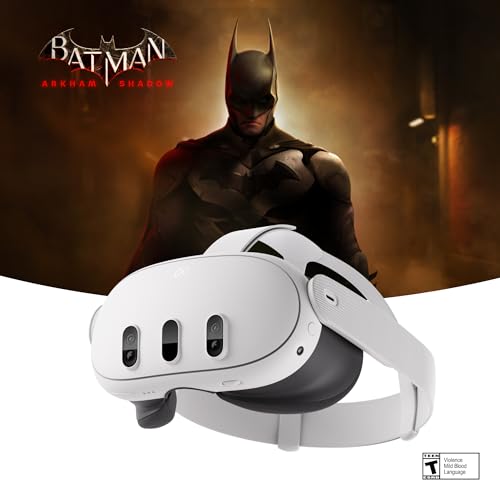
Pros
- Wireless play
- Mixed reality support
- Full-color passthrough
- 512GB storage
- Batman: Arkham Shadow included
Cons
- Skip if you need sessions beyond its 2+ hours
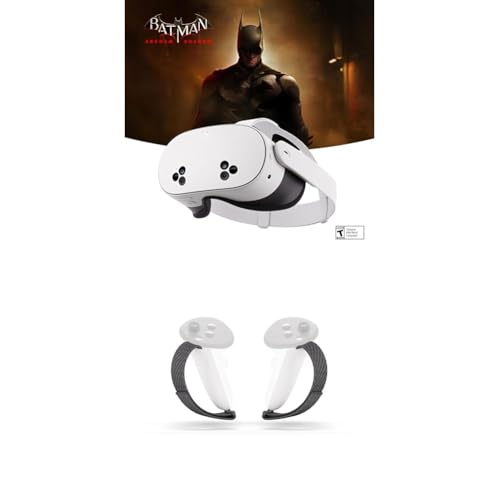
Pros
- Supports mixed reality and VR
- Social gaming and TV casting
- Includes adjustable Active Strap
Cons
- Who should skip it: buyers needing more than 128GB storage

Pros
- Mixed-reality and VR experiences
- Multiple virtual screens
- Batman: Arkham Shadow included
- Parental controls and multiple-user support
Cons
- 3.5mm headphones require a separately sold USB-C adapter
- Who should skip it: users who need direct 3.5mm headphone connection

Pros
- Mixed-reality experiences
- Asgard's Wrath 2 included
- 128GB storage
- Updated graphics platform
Cons
- Who should skip it: buyers needing more than 128GB of storage
What You Get
Sharp 4K+ Infinite Display and Pancake Optics
The visual leap on this headset represents its most immediate upgrade. With its 4K+ Infinite Display and pancake lenses, the view remains crisp across the entire lens rather than blurring at the edges. Reading virtual computer monitors, browsing web pages, and spotting distant objects in games feels natural without excessive head turning.
Snapdragon XR2 Gen 2 Processing Power
The underlying Snapdragon XR2 Gen 2 processor paired with 8GB of RAM delivers twice the graphical processing capability of the previous generation. This extra computing power results in sharper textures, faster game loading times, and smoother frame rates. It handles demanding standalone titles and multitasking across several floating windows without noticeable sluggishness.
Full-Color Passthrough for Mixed Reality
Dual RGB color cameras project your physical surroundings directly into the headset with natural perspective. Instead of the grainy black-and-white view of earlier headsets, you can clearly see your room, grab a drink, or view your phone screen without taking the device off. This technology allows interactive digital objects to integrate smoothly with your actual environment.
Where It Falls Short
Limited Continuous Battery Life
The manufacturer rates runtime at roughly two or more hours per charge. In practical mixed reality use or during high-demand gaming sessions, users often report draining the battery near the lower end of that range. Anyone planning long movie viewings or extended play sessions will likely need an external power bank or an upgraded head strap with a battery pack.
Basic Fabric Head Strap
The standard out-of-the-box fabric strap keeps weight down, but it places notable pressure across the front of the face during longer sessions. Many buyers find they need to invest in ergonomic third-party or official rigid straps to achieve a truly comfortable fit for daily workouts or social VR.
Who Should Buy It and Who Should Skip It
You should buy the Meta Quest 3 if you value edge-to-edge optical clarity, plan to connect to a gaming PC for high-end simulation titles, or want a high-resolution display for virtual desktop productivity. The pancake lenses alone make prolonged reading and general immersion significantly more comfortable than previous optical designs.
You should skip it if your budget is strict or if you only play casual fitness and party games on weekends. In those situations, lower-priced options in the broader VR Headsets category provide nearly identical software libraries without the premium price tag. Additionally, users who experience persistent motion discomfort may want to try standalone VR briefly before committing to a higher-end unit.
Alternatives Worth Considering
If you want the exact same processing capability and gaming library at a lower price point, look at the Meta Quest 3S 128GB | Virtual Reality. It uses the older Fresnel lens design and lower display resolution to reduce costs, making it a sensible starting point for beginners.
For active fitness enthusiasts who plan on using VR for cardiovascular exercise, the Meta Quest 3S 128GB + Active Strap bundle includes controller straps designed to maintain a secure grip during sweaty routines. It combines budget-conscious hardware with extra physical security for high-movement apps.
If you know you want the full Meta Quest 3 experience with maximum storage for large 4K game installs and bundled software, consider the Meta Quest 3 512GB | VR Headset, Get Batman package. The 512GB capacity removes the need to constantly uninstall games to free up local space.
How We Evaluated
We evaluated the Meta Quest 3 lineup by examining technical specifications, optical lens configurations, and processing components from manufacturer data. We also analyzed verified owner feedback to identify consistent reports regarding comfort, battery life, visual clarity, and passthrough quality across diverse usage scenarios.
Frequently Asked Questions
Can the Meta Quest 3 connect to a gaming PC?
Yes. The headset supports PC VR gaming through a high-speed USB-C cable or wirelessly using your local Wi-Fi network, allowing you to access desktop VR platforms such as SteamVR.
How does the Meta Quest 3 compare to the Meta Quest 3S?
Both models use the same Snapdragon XR2 Gen 2 processor and 8GB of RAM, meaning they run the same software. However, the standard Meta Quest 3 features higher resolution 4K+ Infinite Displays and pancake lenses, while the Quest 3S uses traditional Fresnel lenses with slightly lower resolution to reduce cost.
Is 128GB of storage sufficient, or should you choose 512GB?
A 128GB capacity holds around 15 to 25 moderate-sized games comfortably. If you plan to download massive adventure games, store high-resolution video files, or avoid managing storage frequently, the 512GB version provides better long-term flexibility.
Can you wear prescription glasses inside the headset?
The facial interface includes built-in depth adjustment buttons to create extra clearance for small to medium eyeglass frames. Many users also choose custom clip-on prescription lens inserts for enhanced comfort.
Is the headset safe for younger users?
Meta provides parental supervision tools and designated accounts for users aged 10 and older. Parents should monitor play time, set up guardian boundary limits in physical spaces, and supervise content access through the companion app.





Write Your Review
No reviews yet. Be the first to share your experience!