

A Steam Deck case can make handheld play more comfortable, protect the screen in a bag, or carry a charger and dock, but one style rarely covers every need. This guide compares nine options by device fit, protection, storage, grip, and stand design so you can match a case to your travel habits and accessories.

Pros
- Room for handheld and several accessories
- Fits devices with protective cases
- Fleece divider helps protect screen from scratches
Cons
- Not compatible with 2025 ROG Xbox Ally models or Legion Go series
- Who should skip it: owners of listed incompatible handhelds

Pros
- Includes detachable front cover
- Removable metal kickstand
- Accessory strap supports modular add-ons
- Fits OLED and LCD Steam Deck models
Cons
- Who should skip it: buyers wanting a fixed, non-modular case

Pros
- Two protectors included
- Compatible with Steam Deck LCD and OLED
- Guide frame aids alignment
Cons
- Ally X20 owners needing included alignment frame should skip it

Pros
- Four adjustable kickstand angles
- Textured, non-slip sides
- Cutouts for Steam Deck openings
Cons
- Not compatible with JSAUX or official docking stations
- Protective skin decals may prevent a proper fit
- Who should skip it: dock users

Pros
- Protective case and front cover included
- Modular design with stand and strap
- Cooling fan included
Cons
- Specifications focus on 2022 Steam Deck fit
- Skip if you need confirmed OLED compatibility

Pros
- Textured grips
- Built-in tabletop stand
- USB-C dock cutout
- Soft case material
Cons
- Who should skip it: buyers who prefer a bare-console feel
Pros
- Fits Steam Deck and Steam Deck OLED
- Includes right-angle USB-C cable
- Adjustable lower compartment divider
- Built-in stand and carry handle
Cons
- Charger, power bank, and other accessories not included
- Skip if you expect included charger, power bank, or accessories
Pros
- Designed for Steam Deck and Steam Deck OLED
- Felt interior
- Lightweight at about 0.73 lb
- Heavy-duty YKK zippers
Cons
- No accessory storage included
- Skip it if you need room for extras

Pros
- Textured grips
- Built-in tabletop stand
- USB-C dock access
Cons
- Who should skip it: players who prefer using Steam Deck without a case
The Best Steam Deck Cases by Use Case
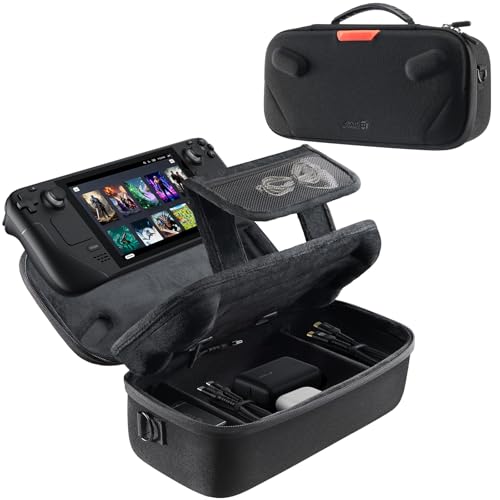
Best for Carrying Accessories: JSAUX Carrying Case for Steam Deck/ROG Ally
The handheld gaming PC category includes devices people often carry with chargers and other gear. The <a href="JSAUX Carrying Case for Steam Deck/ROG Ally suits that packed-bag routine: its listing specifies an expanded storage compartment for a charger, docking station, small power bank, headphones, and the console, even with a protective case fitted. A thickened EVA shell and fleece screen compartment add structure between the device and other items.
Reasons to buy:
- Room for the console and several listed accessories.
- Velcro straps help secure the device inside.
- Fleece compartment helps protect the screen from scratches.
Reasons to avoid:
- The larger accessory compartment may be unnecessary if you carry only the console.
- The listing excludes the ASUS ROG Xbox Ally (2025), ROG Xbox Ally X (2025), and Legion GO Series.
Skip it if you want a slim case for commuting with the console alone.
Best for Modular Coverage: JSAUX PC0104 ModCase Compatible with Steam Deck
The <a href="JSAUX PC0104 ModCase Compatible with Steam Deck combines a body shell with a detachable front cover, removable metal bracket, and silicone accessory strap. Its listing specifies fit for both OLED and original LCD Steam Deck models, with access to buttons, triggers, and the updated OLED power button. The front cover is intended to shield the sticks and screen when the console goes into a backpack, while the stand can come off for handheld play.
Reasons to buy:
- Detachable front cover adds screen and thumbstick coverage.
- Removable zinc alloy bracket provides a stand option.
- Strap can hold compatible accessories such as a power bank or USB-C hub.
Reasons to avoid:
- Its modular pieces add more setup choices than a simple shell.
- Check accessory dimensions and attachment compatibility before relying on the strap.
Skip it if you prefer a one-piece cover without detachable parts.
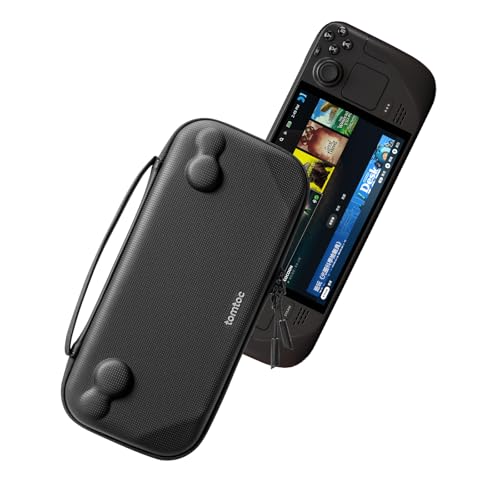
Best for Slim Travel: tomtoc Slim Carrying Case for Steam Deck/OLED
The <a href="tomtoc Slim Carrying Case for Steam Deck/OLED is aimed at carrying the console without a bulky accessory load. Its listing describes a lightweight hard shell with a raised interior fit intended to avoid accidental pressure on controls, plus a padded buffer for shoulder buttons. Splash-proof PU and felt construction and YKK zippers are specified, but the listed contents are the carrying case, not the Steam Deck or accessories.
Reasons to buy:
- Slim profile suits commuting and travel with fewer accessories.
- Raised interior areas are designed to protect sticks and buttons from pressure.
- Includes a stated 12-month warranty.
Reasons to avoid:
- It does not provide the expanded storage described for larger travel cases.
- The listing does not specify a place for a charger or dock.
Skip it if you need one bag to carry your console, dock, and power accessories together.
Best for Comfortable Handheld Play: Skull & Co. GripCase SD for Steam Deck
The <a href="Skull & Co. GripCase SD for Steam Deck is a soft protective shell for people who value grip while playing. Its textured sides are designed to increase friction, and its stand props the console on a tabletop. The listing also specifies a USB-C port cutout for the official dock and third-party docks, making dock access a useful point to confirm if you regularly switch between handheld and desk play.
Reasons to buy:
- Textured grips target a more secure handheld feel.
- Built-in stand supports tabletop use.
- USB-C port cutout is specified for official and third-party docks.
Reasons to avoid:
- A shell does not provide the enclosed travel protection of a carrying case.
- Verify fit with any skin or other cover you use, since the listing does not describe every combination.
Skip it if your main need is a zippered bag for carrying accessories.
Best for Screen Protection on a Budget: JSAUX 2-Pack Ultra HD Screen Protector for Steam
The <a href="JSAUX 2-Pack Ultra HD Screen Protector for Steam is a screen accessory, not a protective case, so it suits buyers who want a separate layer for the display. The listing specifies two tempered-glass protectors for Steam Deck LCD and OLED models, full-screen coverage, an installation guide frame, and an oleophobic coating. It can complement a shell or travel case, but it does not cover the body or controls.
Reasons to buy:
- Two protectors are included in the pack.
- The guide frame is intended to help align installation.
- Oleophobic coating is specified to help resist fingerprints.
Reasons to avoid:
- It protects the screen only, not the console body or sticks.
- The listing says the frame does not fit the ROG Xbox Ally X20, despite noting protector compatibility with that screen.
Skip it if you need a case with impact protection or storage.
Also Considered
The <a href="JSAUX PC0105 Kickstand Protective Case Compatible could suit players who want an adjustable four-angle stand, but its listing warns that it is not compatible with JSAUX and official docking stations.
The <a href="JSAUX ModCase for Steam Deck/Steam Deck OLED adds a cooling fan to a modular cover-and-stand set, but the listing identifies it for Steam Deck (2022), so check model fit carefully.
The <a href="JSAUX Carrying Case for Steam Deck/Steam Deck may suit users wanting dual-layer storage, a folding stand, and a cable port, but its larger feature set may be more than a console-only traveler needs.
The <a href="SAVAGE RAVEN Skull & Co. GripCase SD for Steam offers the listed textured grip and stand features in Coyote Gray, but duplicates the black GripCase’s core design rather than adding a distinct use case.
How to Choose the Best Steam Deck Case
Match the case to your Steam Deck model
Compatibility can vary between LCD and OLED models, and it matters even more when a case has close-fitting cutouts or a front cover. Some listings explicitly name both models, while the cooler-set ModCase listing identifies Steam Deck (2022). Check the listing’s exact model wording and product variation before ordering, especially if you own an OLED model or use a skin.
Choose between a shell and a travel case
A fitted shell stays on the console and can add grip, a stand, or front coverage. A zippered travel case encloses the device for a bag and may provide space for accessories. Decide whether you need protection while playing, protection while carrying, or both; a shell alone does not replace an enclosed travel case.
Check accessory space and case layout
If you carry a charger, dock, power bank, or headphones, look for those items in the listing’s stated storage layout. The JSAUX large-capacity case lists room for several accessories, while the tomtoc slim case emphasizes a thinner carry format and does not specify comparable accessory storage. Accessories shown for demonstration may not be included, so check the included-items description.
Consider grips, stands, and dock access
Textured sides can matter during long handheld sessions, while a stand helps when you set the console on a table. A stand’s angle and construction differ by model: the PC0105 lists four angles, and the ModCase uses a removable metal bracket. If you dock the console, inspect port cutouts and any explicit docking-station exclusions before choosing a shell.
Separate screen coverage from full-device protection
A tempered-glass protector covers the display but does not shield the casing, controls, or triggers. A front-cover case can cover more of the console when stored, while a soft shell focuses on the body and grip. Match protection to where the device spends time, and do not treat a screen protector as a substitute for a carrying case.
How We Compared
This comparison uses the published product listings, including stated compatibility, materials, storage layouts, stand designs, dock cutouts, and included accessories. We considered how those features map to distinct routines, such as commuting with only the console, carrying a charger and dock, or adding grip for handheld play. Customer feedback was limited in the published information, so recommendations rely on listed specifications and design details rather than claims about repeated owner experiences.
Frequently Asked Questions
Will a Steam Deck case fit both LCD and OLED models?
Some listings state compatibility with both versions, while others name a particular model or generation. Check the exact listing and selected variation before buying. Also verify fit if you use a skin or another cover, since added thickness can affect a close-fitting case.
Can I use a protective shell with a Steam Deck dock?
It depends on the shell’s port cutouts and dock design. The Skull & Co. GripCase listing specifies a USB-C cutout for the official dock and third-party docks, while JSAUX PC0105 states that it is not compatible with JSAUX and official docking stations. Check the specific case notes rather than assuming every cutout clears every dock.
Should I choose a hard-shell bag or a fitted protective case?
A fitted shell stays on the device and may improve grip or add a stand. A hard-shell bag encloses the console for transport and may offer storage for accessories. If you carry the Deck in a backpack, an enclosed bag can cover more than a shell alone; if you mostly play at home, a grip shell may better suit your routine.
Does a screen protector protect the whole Steam Deck?
No. The listed JSAUX screen protector is intended for the display and does not cover the console body, controls, or triggers. Pair it with a fitted case or carrying case if you also want coverage for those parts.
Are the accessories shown in carrying-case listings included?
Not necessarily. The JSAUX large-capacity travel case listing says accessories are not included, and the tomtoc listing excludes the Steam Deck and other accessories shown for demonstration. Read the included-items section for the exact package contents before purchasing.


Write Your Review
No reviews yet. Be the first to share your experience!