

Student tablets can make lecture notes, reading, and online classes easier to carry, but a keyboard bundle does not automatically make every tablet a good laptop replacement. Screen size, included accessories, storage, battery claims, and the strength of the published product information all affect which option fits your coursework.
This guide to the best tablet with keyboard for students compares four models for different study needs, from a larger display and included pen to lower-cost bundles with a keyboard and mouse. Check your school’s required apps and accessory compatibility before choosing, especially when your classes depend on particular software.
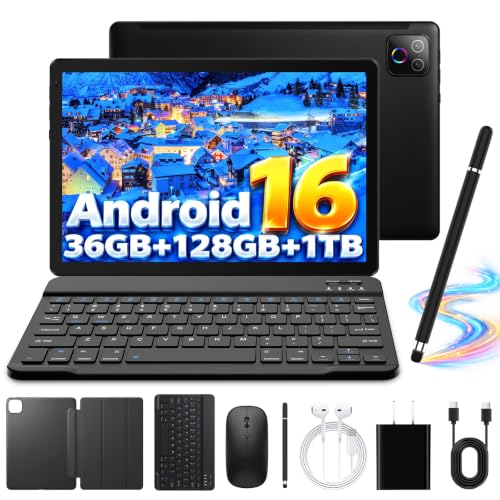
Pros
- Fast Wi-Fi 6 and Bluetooth 5.4 wireless connectivity
- Generous 128GB base storage with 1TB expansion support
- Bundled keyboard, mouse, case, and stylus included
- Modern Android 16 operating system with Play Store
Cons
- Low 1280x800 display resolution reduces text clarity
- Advertised 36GB memory relies heavily on slower virtual RAM
- Power users wanting high-resolution graphics should skip device

Pros
- Sharp 12.7-inch 3K display with eye-care modes
- Includes stylus pen and protective folio case
- Efficient MediaTek Dimensity 8300 processor
- Quad JBL speakers with Dolby Atmos audio
Cons
- Base 128 GB storage limits large media collections
- Weighs over 1.3 pounds without the case attached
- Users needing massive local storage should skip it

Pros
- Included keyboard, mouse, case, and stylus accessories
- WiFi 6 and Bluetooth 5.4 wireless connectivity
- Storage expandable up to 1TB via card
- IPS HD display supports 10-point touch input
Cons
- Base physical memory limited to 3GB RAM
- Moderate 64GB onboard storage capacity
- Heavy multitasking users and gamers should skip

Pros
- Large 13-inch 1920x1200 IPS display
- Comprehensive accessory bundle with keyboard and mouse
- Generous 256GB internal storage with expansion support
- Substantial 10000mAh battery capacity
Cons
- Total RAM relies heavily on virtual memory expansion
- Unisoc T615 processor limits demanding productivity workloads
- Heavy users and high-end gamers should skip it
The Best Tablets with Keyboards by Use Case
Best for a Large Study Display: Lenovo Idea Tab Pro with Google Gemini
The Lenovo Idea Tab Pro with Google Gemini stands out for students who want room to read lecture slides, work across apps, or watch recorded classes. Its 12.7-inch 3K LCD display, 8 GB of memory, and MediaTek Dimensity 8300 processor are specified in the listing, which also says a pen and folio case are included. The listing does not specify a keyboard, so confirm whether you need to buy one separately. See the guide to tablets for handwritten notes if pen input matters to your classes.
Reasons to buy:
- The 12.7-inch 3K LCD gives study materials more screen space than the 10-inch options here.
- The listing includes a Tab Pen Plus and folio case, useful for annotating material and propping up the tablet.
- Lenovo specifies Wi-Fi 6E, quad JBL Dolby Atmos speakers, and 11 hours of video streaming in its product description.
Reasons to avoid:
- A keyboard is not listed among the included accessories, so verify the cost and compatibility of a keyboard before planning to type extensively.
- Its larger display may be less convenient to carry than a compact tablet.
Skip it if you need a keyboard included in the box or prioritize a smaller tablet for carrying between classes.
Best Budget Bundle: Tablet, 10.1 Inch Android 16 Tablets
The Tablet, 10.1 Inch Android 16 Tablets is the lowest-priced pick in this comparison and bundles a Bluetooth keyboard, wireless mouse, stylus, and folding case. That combination may suit students who want basic typing and pointing accessories in one package rather than sourcing each separately. The listing specifies a 10.1-inch IPS HD touchscreen and 64 GB of internal storage, with support for expansion using a TF card.
Reasons to buy:
- The keyboard and wireless mouse are included, along with a stylus and folding protective case.
- Its 10.1-inch screen offers a more compact format than the 12.7-inch and 13-inch choices.
- The listing states that storage can be expanded with a TF card, which is not included.
Reasons to avoid:
- The specified 64 GB of internal storage is the smallest stated capacity in this group; confirm that it suits your apps and offline files.
- The listing describes memory as 24 GB, including 21 GB of expansion, rather than 24 GB of physical RAM.
Skip it if your coursework needs substantial built-in storage or you need confirmed compatibility with a particular academic app.
Best for a Keyboard and Mouse Kit: Evermyth Android 16 Tablet, 10 Inch, Octa-Core
The Evermyth Android 16 Tablet, 10 Inch, Octa-Core is aimed at students who want a compact Android tablet and a keyboard, case, mouse, and stylus in the package. Its listing specifies a 10-inch 1280 × 800 IPS display, 128 GB of storage, and a microSD-style TF card slot supporting cards up to 1 TB, with the card sold separately. The product description identifies 6 GB of physical RAM plus 30 GB of virtual memory, so do not read the advertised 36 GB as 36 GB of physical RAM.
Reasons to buy:
- The bundle includes a keyboard case, mouse, and stylus for typing, navigation, and touch input.
- Its stated 128 GB of internal storage exceeds the capacity listed for the 10.1-inch Jeazans option.
- The listing specifies Wi-Fi 6 and Bluetooth 5.4, plus an 8-hour mixed-use battery claim that should be treated as a manufacturer estimate.
Reasons to avoid:
- The 1280 × 800 resolution is lower than the 1920 × 1200 resolution specified for the 13-inch JJGJ tablet.
- The listing’s RAM figure combines physical and virtual memory, and the TF card needed for additional storage is not included.
Skip it if you want a sharper, higher-resolution screen for viewing detailed documents or expect the full advertised memory figure to be physical RAM.
Best for a Large Keyboard Work Surface: JJGJ 13 Inch Tablet with Keyboard, Android 16 Tablet
The JJGJ 13 Inch Tablet with Keyboard, Android 16 Tablet is the largest-screen pick here, with a 13-inch IPS display specified at 1920 × 1200. Its package listing includes a keyboard, mouse, stylus, folding case, screen protector, charger, and USB-C cable. That broad kit and the larger screen may appeal if you often type assignments at a desk, though the tablet’s size may be less convenient for packed backpacks and small desks.
Reasons to buy:
- The 13-inch 1920 × 1200 display offers the largest stated workspace among these four models.
- The listing specifies 256 GB of internal storage and support for a TF card up to 2 TB, with the card not included.
- The keyboard, mouse, stylus, case, and screen protector are listed as included accessories.
Reasons to avoid:
- The listing specifies Bluetooth 5.0, older than the Bluetooth 5.4 listed for the Evermyth and Jeazans tablets.
- Its 36 GB memory figure combines 6 GB of physical RAM with 30 GB of virtual memory.
Skip it if you need a smaller device for daily commuting or prefer a listing with more detail about its processor and software support.
How to Choose the Best Tablet with Keyboard for Students
Screen size and resolution
A larger screen can make split-screen work, PDFs, and lecture slides easier to view. The Lenovo model has a 12.7-inch 3K LCD, while the JJGJ offers a 13-inch 1920 × 1200 IPS display. Those sizes may suit desk-based study, but they take up more space in a bag. The 10-inch Evermyth and 10.1-inch Jeazans are more compact choices, though their listed resolutions are 1280 × 800 and HD, respectively.
Do not use screen size alone to predict clarity. Check the exact resolution on the product listing and consider what you read most: ordinary web pages and video may be comfortable on a compact screen, while detailed slides or side-by-side documents benefit from more viewing area. Display quality also depends on factors not fully described in these listings.
Keyboard, mouse, and pen accessories
Check the box contents before treating a tablet as a laptop alternative. The Evermyth, Jeazans, and JJGJ listings specify keyboards and mice. Lenovo lists a pen and folio case, not a keyboard, so budget and verify a compatible keyboard separately if typing is central to your routine.
Included accessories can reduce the need to shop for add-ons, but the published details do not describe keyboard layout, key travel, attachment method, or battery arrangements. Check those points on the seller’s listing before relying on the keyboard for long essays. A stylus can help with handwritten notes and marking up PDFs; compare the budget tablets with pen support if pen use is your main priority.
Physical RAM, storage, and expansion
Storage holds apps, downloaded readings, and offline files. The published listings specify 64 GB for the Jeazans, 128 GB for the Evermyth and Lenovo, and 256 GB for the JJGJ. The Evermyth and Jeazans listings describe expandable storage using a TF card, while the JJGJ listing specifies support for a TF card up to 2 TB. These cards are not included where explicitly stated, so check the exact card type and capacity supported before buying.
Memory figures need careful reading. The Evermyth listing says 36 GB total, made up of 6 GB physical RAM and 30 GB virtual memory. The Jeazans specifies 24 GB as 3 GB plus 21 GB, and the JJGJ specifies 36 GB as 6 GB plus 30 GB. Virtual memory is not the same as physical RAM. Compare the physical figure when judging how much memory is available for active apps, and check your school’s software requirements rather than assuming Android will run desktop-only programs.
Battery claims, wireless connections, and software
Battery capacity and runtime claims do not tell the whole story. Lenovo’s listing claims 11 hours of video streaming, and Evermyth claims up to 8 hours of mixed use. The JJGJ specifies a 10,000 mAh battery but does not provide a runtime figure in the published details. Actual use varies with screen brightness, network activity, and apps, so treat manufacturer estimates as guidance rather than a guarantee for a full day of classes.
Wi-Fi 6, Wi-Fi 6E, and Bluetooth versions can matter when connecting to campus networks or wireless accessories, but check the specific bands and accessory requirements you need. These listings do not establish support for every campus login system or school app. Confirm the Android version, app availability, update policy, and any required services with the seller and your school before purchasing.
How We Compared
We compared the published product listings by screen size and resolution, processor and stated memory, internal and expandable storage, battery claims, wireless specifications, operating system, and included accessories. Where a memory figure includes virtual memory, we identified the stated physical portion instead of treating the total as physical RAM. The supplied material contains no customer feedback to assess, and manufacturer battery and performance descriptions are presented as listing claims rather than independently verified results.
Frequently Asked Questions
Do these tablets include keyboards?
The Evermyth, Jeazans, and JJGJ listings specify a keyboard in the package. The Lenovo listing names a Tab Pen Plus and folio case, but does not list a keyboard. Check the current box contents and keyboard compatibility before ordering, since accessories can vary by package or seller.
Can an Android tablet replace a student laptop?
It may handle tasks such as reading, web research, video calls, and writing in Android apps, but these listings do not establish compatibility with every school program. Check whether your classes need desktop software, specialized peripherals, or a specific file workflow. Ask your school which operating systems its required apps support before replacing a laptop.
Which tablet gives the most room for documents?
The JJGJ has the largest stated screen at 13 inches, followed closely by the Lenovo at 12.7 inches. JJGJ lists 1920 × 1200 resolution, while Lenovo lists a 3K LCD display. Compare the screen measurements and resolution together, and consider whether the larger device will fit your bag and study space.
What does virtual RAM mean on these listings?
The Evermyth and JJGJ listings divide their advertised 36 GB figure into 6 GB of physical RAM and 30 GB of virtual memory. Jeazans divides its 24 GB figure into 3 GB and 21 GB. Because those totals combine different types of memory, compare the physical RAM figure separately and do not assume that virtual memory provides the same benefits as installed RAM.
Can I add more storage later?
The Evermyth listing says it supports a TF card up to 1 TB, the Jeazans listing says up to 1 TB, and the JJGJ listing says up to 2 TB. The cards are not included. Lenovo’s published product details do not specify expandable storage, so verify that model’s expansion options before purchase if removable storage matters to you.
Are the listed battery runtimes guaranteed?
No. Lenovo’s listing claims 11 hours of video streaming, and Evermyth’s claims up to 8 hours of mixed use, but the published details do not provide identical conditions for comparison. Screen brightness, connected accessories, wireless use, and running apps can affect runtime. If you need a tablet for a long day away from an outlet, check the manufacturer’s full battery information and charging details.



Write Your Review
No reviews yet. Be the first to share your experience!