

Ray-Ban Meta glasses can slip during movement, need a convenient place to charge, or leave open-ear audio harder to hear in noisy surroundings. This guide to the best Ray-Ban Meta accessories compares charging stands, comfort add-ons, sound guides, and straps, while flagging model compatibility so you can avoid buying an accessory that does not fit your glasses.

Pros
- Adjustable 8 to 15-inch length
- Separate hole sizes for listed frame types
- Flexible stainless steel core
Cons
- Remove before charging Ray-Ban Meta glasses in case
- Who should skip it: shoppers with other frame types

Pros
- Open-ear audio
- Hands-free camera and voice features
- Charging case adds up to 48 hours
Cons
- No augmented-reality display
- Who should skip it: shoppers seeking an augmented-reality display

Pros
- Charges glasses and case together
- Separate status LEDs
- Doubles as a glasses stand
Cons
- Not compatible with Headliner or several Oakley models
- Who should skip it: owners of excluded glasses

Pros
- Transitions lenses adapt to changing light
- Open-ear audio keeps surroundings audible
- Hands-free camera and calling features
Cons
- No augmented reality display; skip if you want visual overlays

Pros
- Includes one pair of ear grips
- Includes four pairs of nose pads
- Tool-free installation
- Designed for original charging case fit
Cons
- Not compatible with Gen 3 glasses
- Who should skip it: Gen 3 owners

Pros
- Designed for several Ray-Ban Meta glasses
- Lightweight, compact silicone design
- Removable for periodic cleaning
Cons
- Sweat buildup may interfere with glasses sensors
- Who should skip it: people without listed compatible glasses

Pros
- Includes ear grips and eight nose pads
- Compatible with several Ray-Ban Meta models
- Ear grips slide onto temple ends
Cons
- Skip if you want nose pads without adhesive
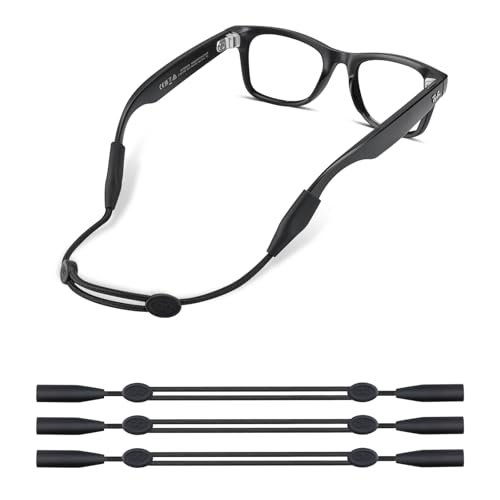
Pros
- Three straps included
- Adjustable up to 14 inches
- Silicone ends designed for wide frames
Cons
- Skip if frame ends are 8.5 mm or smaller

Pros
- Includes one pair of temple grips
- Includes five pairs of adhesive nose pads
- Tool-free installation
Cons
- May need removal if accessories make charging-case fit tight
- Skip it if your glasses are not listed as compatible
The Best Ray-Ban Meta Accessories by Use Case
Best for Desk Charging: 2-in-1 Charging Station for Ray-Ban Meta
The TECBUDD 2-in-1 Charging Station for Ray-Ban Meta is designed to charge compatible glasses and their charging case together at a desk or nightstand. It uses a front pogo-pin contact for the glasses and a rear magnetic USB-C connector for the case, with separate status lights. The listing specifies compatibility with Wayfarer and Skyler Gen 1 and Gen 2, plus Blayzer Optics and Scriber Optics Gen 2.
Reasons to buy:
- Charges compatible glasses and case at the same station.
- Separate LEDs indicate charging or powered/fully charged status.
- Provides a dedicated stand and place to keep the case on a desk.
Reasons to avoid:
- Not compatible with Headliner, Ray-Ban Meta Display, Oakley Meta HSTN, or Oakley Meta Vanguard.
- The listing does not specify a power adapter or charging speed, so check included items and your power setup before ordering.
Skip it if your glasses are an excluded model or you prefer charging only with the original case.
Best for Grip and Nose Comfort: Silicone Ear Grips & Nose Pads Compatible
The CAISATEQ Silicone Ear Grips & Nose Pads Compatible combines temple sleeves with four pairs of nose pads. The listing names Wayfarer Standard and Large, Headliner, and Skyler frames in Gen 1 and Gen 2, and says the sleeves slide on without tools or adhesive. This set suits wearers who want added friction at both the ears and bridge, rather than a strap hanging around the neck.
Reasons to buy:
- Includes one pair of ear grips and four pairs of nose pads.
- Tool-free sleeves cover high-friction areas on the temples.
- The listing says the low-profile grips fit inside the original charging case.
Reasons to avoid:
- Not compatible with Gen 3 glasses.
- Confirm your exact frame style, since compatibility is limited to the listed models.
Skip it if you own Gen 3 glasses or need a lanyard to catch frames that come off your face.
Best for More Directed Audio: HIBLOKS Voice Privacy Ear Tips for Ray-Ban Meta
The HIBLOKS HIBLOKS Voice Privacy Ear Tips for Ray-Ban Meta are small silicone sound-guide tubes intended to direct sound toward the ear. The listing describes them as non-in-ear accessories and claims they can improve clarity and limit sound spill, but it provides no independent measurements. Compatibility is broad in the listing, including several Ray-Ban Meta frame types and certain Meta Optics models, so check the exact model before purchase.
Reasons to buy:
- Designed to guide open-ear speaker sound toward the ear.
- Silicone pieces weigh less than 3 grams, according to the listing.
- Small form factor is described as compatible with case storage.
Reasons to avoid:
- Audio improvement and privacy claims are manufacturer claims, not quantified results.
- The listing warns that accumulated sweat can interfere with sensors, so remove and wipe the tips periodically.
Skip it if you prefer unobstructed open-ear speakers or want a product with documented sound measurements.
Best Adjustable Retention Strap: Adjustable Eyeglass Strap for Ray-Ban Meta Gen
The Polyjoy Adjustable Eyeglass Strap for Ray-Ban Meta Gen is a neck or head strap with an adjustable length of 8 to 15 inches. Its dual-hole ends are listed for Ray-Ban Meta Wayfarer, Skyler, and Headliner frames, as well as Oakley Meta HSTN. It may suit cycling, hiking, or other activities where you want the glasses attached when they are not being worn.
Reasons to buy:
- Adjusts from 8 to 15 inches for different wearing positions.
- Dual-hole design is specified for Ray-Ban Meta frames and Oakley Meta HSTN.
- Listing describes a flexible stainless steel core wrapped in silicone.
Reasons to avoid:
- The strap should be removed before placing Ray-Ban Meta glasses in the charging case.
- Check that the strap ends fit your particular frame before relying on it during activity.
Skip it if you want a retention option that can stay attached while charging in the case.
Best for Changing Light: Ray-Ban Meta (Gen 2) Wayfarer, Matte Black
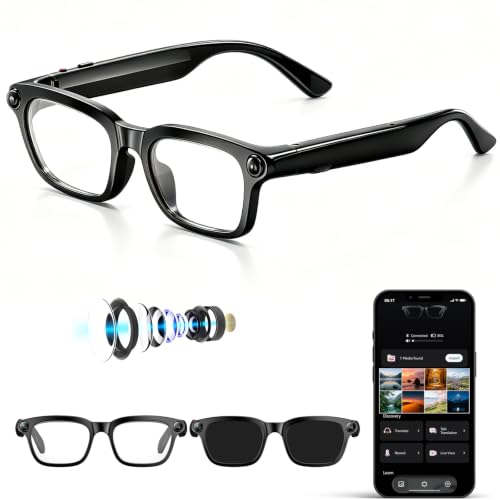
The Meta Ray-Ban Meta (Gen 2) Wayfarer, Matte Black is a pair of smart glasses rather than an add-on, included here as a lens choice for shoppers considering a full setup. This variant has Transitions Grey lenses, which the listing says darken in sunlight and fade clear indoors. It also lists open-ear audio, hands-free calls, camera capture, and Meta AI features; these glasses do not include an augmented-reality display.
Reasons to buy:
- Transitions Grey lenses are intended for changing light conditions.
- Combines camera capture, calls, audio, and voice-enabled Meta AI features.
- The listing claims up to 8 hours of use per charge with moderate use, plus 48 hours from the case.
Reasons to avoid:
- This is a complete pair of glasses, not a separate accessory for existing frames.
- Battery figures are listing claims and depend on use; confirm lens and frame needs before buying.
Skip it if you already own compatible glasses and only need a charging, comfort, or retention accessory.
Also Considered
The Meta Meta Ray-Ban (Gen 2) Wayfarer, Matte Black has polarized gradient graphite lenses and the same broad smart-glasses feature set, but the published data does not establish a reason to prefer it over the Transitions variant for changing light.
The CAISATEQ CAISATEQ 10PCS Anti-Slip Set suits buyers who want ear grips and adhesive nose pads, though its adhesive pads differ from the tool-free nose-pad approach of our comfort pick.
The TBATAIL TBATAIL Glasses Strap for Ray-Ban Meta and Wide includes three straps and may suit buyers wanting spares, but the listing gives less model-specific guidance than the adjustable dual-hole option.
The ZITRONE Anti-Slip Comfort Kit Compatible with Rayban Meta includes one pair of temple grips and five pairs of adhesive nose pads, but its listing says to remove accessories if they make the glasses tight in the charging case.
How to Choose the Best Ray-Ban Meta Accessories
Confirm frame generation and style
Compatibility is the first filter because these accessories are not universal across every Meta or Ray-Ban frame. Match the product listing to your glasses’ generation and style, such as Wayfarer, Skyler, or Headliner. Some listings also name specific optical frames, while the TECBUDD station explicitly excludes several models. If your model is not named, do not assume the accessory fits.
Choose the problem you need to solve
A charging stand organizes a regular home charging spot, while silicone grips aim to reduce slipping and pressure points. A retention strap keeps glasses attached when removed, and sound-guide tubes are intended to direct speaker audio. These products address different needs, so buying several overlapping comfort kits may add little if one suitable set solves the fit problem.
Check charging-case clearance
Accessories attached to the temples or nose bridge can affect how glasses sit in a case or align with charging contacts. CAISATEQ says its low-profile ear grips fit in the original case, while ZITRONE advises removing its grips or pads if the glasses feel tight. Polyjoy specifically says to remove its strap before charging in the case. Check these details before expecting an accessory to remain installed.
Weigh audio direction against comfort and awareness
Ray-Ban Meta glasses use open-ear speakers, which leave ears unblocked according to the product information. The HIBLOKS tubes are designed to guide sound toward the ear, but the published information does not quantify their effect on clarity or privacy. Consider whether you want to change how sound is directed, and follow the listing’s cleaning advice because it warns that sweat buildup may affect sensors.
Separate an accessory purchase from a glasses purchase
The two Meta products in this selection are complete smart glasses, not add-ons for existing frames. Their lens types differ: one has polarized gradient graphite lenses, while the other has Transitions Grey lenses. If you are shopping for a new pair, compare lens needs and features separately from accessory compatibility. For context on related devices, browse the site’s Smart Glasses category and its parent VR & AR category.
How We Compared
We compared the published product listings for stated frame compatibility, accessory type, included pieces, charging arrangement, and intended use. We also considered the listed smart-glasses lens and audio features where a complete pair was included. Product claims, including battery figures and audio benefits, are presented as listing information rather than independently verified performance, and no customer feedback was supplied for these products.
Frequently Asked Questions
Do all Ray-Ban Meta accessories fit every generation?
No. Compatibility varies by accessory and frame. For example, the CAISATEQ silicone set names Gen 1 and Gen 2 Wayfarer, Headliner, and Skyler models, but excludes Gen 3. The charging station lists specific Wayfarer, Skyler, and optical models and excludes other Meta glasses. Check the product’s compatibility list against your exact frame.
Can I charge my glasses with a strap attached?
The Polyjoy listing advises removing its strap before placing Ray-Ban Meta glasses in the charging case. Other straps may also interfere with case fit, but their published listings do not give the same charging instructions. Check the strap and glasses fit rather than forcing the frames into the case.
Will silicone grips and nose pads fit inside the original case?
The CAISATEQ Gen 1/2 set says its low-profile ear grips fit in the original charging case. ZITRONE cautions that its accessories may need to be removed if the glasses feel tight. Fit depends on the specific frames and installation, so confirm that the case closes normally and charging contacts align.
Are voice privacy tips the same as earbuds?
No. The HIBLOKS product is described as a non-in-ear silicone sound guide that attaches near the glasses’ speaker area. It is intended to direct sound toward the ear, not to function as a separate earbud. Its claimed audio and privacy benefits are not accompanied by measurements in the published information.
Do Ray-Ban Meta glasses have an augmented-reality display?
The published product information says Ray-Ban Meta glasses are designed for audio, camera capture, and voice-enabled Meta AI interactions and do not include an augmented-reality display. If a visual display is essential, verify the specifications of the exact model you are considering rather than assuming all smart glasses share the same features.




Write Your Review
No reviews yet. Be the first to share your experience!