

Choosing a gaming desktop means weighing graphics capability against memory, storage, connectivity, and the games you play. The best prebuilt gaming PC for a 1080p setup may not be the right fit for 4K gaming, streaming, or creative work.
This guide compares ten desktops by their listed processors, graphics cards, memory, storage, wireless features, and warranty terms. Use the picks to narrow your options, then check the listing for exact port details and current component variants before ordering.

Pros
- 8-core AMD Ryzen 7 processor
- 1TB PCIe 4.0 NVMe SSD
- Wi-Fi 6 and Bluetooth 5.3
- Keyboard and mouse included
Cons
- 8GB graphics memory may limit some workloads
- Skip it if you need more than 8GB graphics memory

Pros
- 32GB DDR5-6000 memory
- 2TB Gen4 NVMe SSD
Cons
- Graphics card brand may vary
- Skip if you need Wi-Fi 6 or a fixed GPU brand

Pros
- Ryzen 7 9850X3D processor
- RX 9070 XT with 16GB GDDR6
- 32GB DDR5 memory
- 2TB Gen4 NVMe SSD
Cons
- Graphics card brand may vary
- Wi-Fi 5, not a newer wireless standard
- Who should skip it: buyers requiring a specific GPU brand or newer Wi-Fi
Pros
- RTX 5080 with 16GB GDDR7
- 32GB DDR5-6000 memory
- 2TB NVMe SSD
- One-year parts and labor warranty
Cons
- Wi-Fi 5, not a newer wireless standard
- Graphics card brand may vary
- Skip if you need Wi-Fi 6 or fixed GPU brand

Pros
- RTX 3060 Ti graphics
- 16GB RAM and 512GB SSD
- Windows 11 pre-installed
- WiFi 6 and Ethernet
Cons
- 512GB SSD may limit large game libraries
- Who should skip it: buyers needing more storage

Pros
- Ryzen 7 8700F and RTX 5060 Ti 8GB
- 1TB Gen4 NVMe SSD
- WiFi 7 and Bluetooth
- Four DDR5 DIMM slots and three M.2 slots
Cons
- 16GB DDR5 may limit heavier multitasking
- Skip if you need VGA or DVI without an adapter

Pros
- RTX 5060 Ti graphics
- 1TB M.2 NVMe SSD
- USB Type-C port
- Four system cooling fans
Cons
- 16GB RAM may limit heavier multitasking
- Who should skip it: buyers needing more than 16GB RAM

Pros
- 32GB DDR5 memory
- Built-in system status display
- Windows 11 Home pre-installed
- 850W 80 Plus Gold power supply
Cons
- Skip it if you need more than 1TB of storage
- Monitor must connect to graphics-card ports
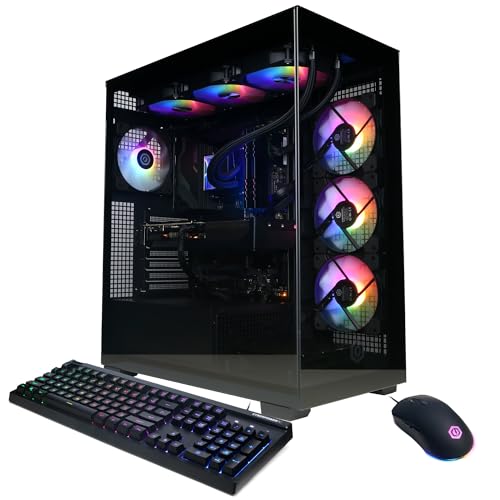
Pros
- Intel Core i9-14900KF, 24 cores
- GeForce RTX 5070 with 12GB
- 32GB DDR5 and 2TB NVMe storage
- Keyboard and mouse included
Cons
- Skip if you need newer wireless: Wi-Fi 5, Bluetooth 4.2

Pros
- 64GB of RAM
- 5TB total storage
- RTX 5070 OC graphics
- Three DisplayPort outputs
Cons
- 4TB of storage is a 7200RPM hard drive
- Who should skip it: buyers wanting all-solid-state storage
The Best Gaming PCs by Use Case
Best Budget: Olialia Gaming PC Prebuilt, RTX 3060 Ti
The Olialia Gaming PC Prebuilt, RTX 3060 Ti pairs an RTX 3060 Ti with a six-core Ryzen 5 5500, 16GB of RAM, and a 512GB SSD. It is the lowest-cost option in this guide and targets buyers who want a Windows 11 desktop for 1080p play, with the listing also claiming smooth 60-plus FPS at 1440p in some titles. Those are manufacturer claims, not a guarantee for every game or setting. Compare other ways to plan a budget setup.
Reasons to buy:
- RTX 3060 Ti graphics and Ryzen 5 5500 processor suit a cost-conscious gaming build.
- Six RGB case fans and a panoramic dual-chamber case add visible lighting.
- Windows 11 comes preinstalled, and rear video connections include HDMI and DisplayPort.
Reasons to avoid:
- The 512GB SSD offers less listed capacity than the 1TB and 2TB alternatives here.
- Its 16GB of RAM and older Ryzen 5 processor are less suited to demanding multitasking than higher-tier options.
Skip it if you want 32GB of memory, a larger drive, or a newer listed graphics generation.
Best for Wi-Fi 7 and Upgrades: KOTIN Gaming PC Desktop, Ryzen 7 8700F
The KOTIN Gaming PC Desktop, Ryzen 7 8700F combines an eight-core Ryzen 7 8700F with an RTX 5060 Ti 8GB, 16GB DDR5, and a 1TB Gen4 NVMe SSD. Wi-Fi 7, a 650W 80 PLUS Gold power supply, four DDR5 DIMM slots, and three M.2 SSD slots make it a useful choice for buyers who value wireless capability and stated room for memory or storage expansion. The listing positions it for 1080p and 1440p gaming, streaming, and creative work.
Reasons to buy:
- Wi-Fi 7 and Bluetooth are specified for wireless connections.
- Four memory slots and three M.2 slots provide listed upgrade paths.
- A six-heat-pipe air cooler and five 120mm ARGB fans are specified.
Reasons to avoid:
- It comes with 16GB RAM, below the 32GB provided by several alternatives.
- The RTX 5060 Ti has 8GB of listed graphics memory, less than the 12GB or 16GB cards in higher-tier models.
Skip it if you want 32GB of memory included or prioritize a higher-tier GPU over upgrade slots.
Best for High-End 1440p Gaming: Skytech Gaming PC Desktop, Ryzen 7 9800X3D
The Skytech Gaming PC Desktop, Ryzen 7 9800X3D pairs AMD’s eight-core Ryzen 7 9800X3D with an RTX 5070 Ti 16GB, 32GB DDR5-6000 memory, and a 2TB Gen4 NVMe SSD. Its listed 360mm AIO cooler and 850W Gold ATX 3 power supply round out a high-spec combination for demanding gaming and larger game libraries. Skytech describes it for detailed 1440p gaming at 60-plus FPS, but actual frame rates vary with game, settings, and display resolution.
Reasons to buy:
- The RTX 5070 Ti includes 16GB of GDDR7 graphics memory.
- 32GB RAM and 2TB SSD offer more included memory and storage than midrange picks.
- The listing specifies a 360mm AIO, 850W Gold ATX 3 supply, and a one-year parts-and-labor warranty.
Reasons to avoid:
- Wi-Fi is listed as 802.11ac, not Wi-Fi 6 or Wi-Fi 7.
- The graphics-card brand may vary, and the listing gives limited port detail, so confirm the exact card and outputs.
Skip it if you mainly play less-demanding games at 1080p or want newer listed wireless standards.
Best for a Built-In Status Screen: KOTIN Prebuilt Gaming PC RTX 5070 12GB
The KOTIN Prebuilt Gaming PC RTX 5070 12GB pairs a Ryzen 7 9700X with an RTX 5070, 32GB DDR5, and a 1TB PCIe 4.0 NVMe SSD. Its distinguishing feature is an integrated 11.3-inch smart display that the listing says shows CPU and GPU temperatures, usage, and weather. Wi-Fi 7, an 850W Gold power supply, and a 360mm liquid cooler also appear in the specifications, making this a fit for buyers who want a visible system-status screen alongside a current-generation graphics card.
Reasons to buy:
- The built-in 11.3-inch display presents system information and weather.
- 32GB DDR5 and an eight-core Ryzen 7 9700X support gaming and multitasking.
- Wi-Fi 7, 850W 80 Plus Gold power, and a 360mm liquid cooler are specified.
Reasons to avoid:
- The 1TB SSD is smaller than the 2TB drives offered in several alternatives.
- Connect the monitor to the graphics card’s lower horizontal ports, not the motherboard ports. VGA or DVI monitors need an HDMI or DisplayPort adapter.
Skip it if you do not want to pay for a built-in display or need 2TB of storage from the start.
Best for CPU-Heavy Work: CyberPowerPC Gaming PC, Intel Core i9-14900KF
The CyberPowerPC Gaming PC, Intel Core i9-14900KF pairs a 24-core Intel Core i9-14900KF with an RTX 5070 12GB, 32GB DDR5, and a 2TB PCIe 4.0 NVMe SSD. That combination may appeal to buyers who game while running demanding background tasks or use CPU-heavy applications as well. The listing also specifies liquid CPU cooling, Wi-Fi 5, Bluetooth 4.2, and a one-year parts-and-labor warranty.
Reasons to buy:
- The 24-core processor has the highest listed core count among these picks.
- 32GB memory and a 2TB NVMe SSD provide substantial included capacity.
- Video outputs include one HDMI and three DisplayPort connections; USB-C and USB-A ports are also listed.
Reasons to avoid:
Reasons to avoid:
- The RTX 5070 has 12GB of graphics memory, below the 16GB RTX 5070 Ti in the Skytech pick.
- Wi-Fi 5 and Bluetooth 4.2 are older listed wireless standards than Wi-Fi 7 alternatives.
Skip it if your priority is maximizing listed GPU memory for graphics-heavy gaming rather than CPU capacity.
Also Considered
The CyberPowerPC Gaming PC, AMD Ryzen 7 8700F could suit buyers wanting an RTX 5060 Ti system with Wi-Fi 6, but it includes 16GB RAM and 1TB storage. The msi Codex Z2 Gaming Desktop, AMD R7-8700F offers a USB Type-C port and four cooling fans, though its listed 16GB RAM and 1TB SSD overlap with less expensive configurations. The Skytech Gaming PC Desktop, Ryzen 7 9850X3D with RX 9070 XT may interest buyers seeking AMD graphics and a claimed 4K focus, but the listing specifies Wi-Fi 5 and a 5600 memory speed. The Skytech Gaming PC Desktop, Ryzen 7 9850X3D with RTX 5080 is the higher graphics tier, but confirm its limited listed port details and whether its features justify choosing it over less expensive options.
How to Choose a Prebuilt Gaming PC
Match the graphics card to your monitor
The graphics card has a direct effect on how much visual detail and resolution you can target in games. The listings position the Olialia for 1080p and some 1440p play, while Skytech describes its RTX 5070 Ti system for 1440p and its RX 9070 XT system for 4K. Treat these as seller claims, not universal frame-rate promises. Check independent game-specific results for your titles and desired settings before paying for a higher graphics tier.
Choose memory for your games and multitasking
Several systems include 16GB DDR5, while the KOTIN RTX 5070, Skytech RTX 5070 Ti, and CyberPowerPC i9 options list 32GB. More memory can give you more room for games, browser tabs, streaming software, and creative apps at once, but the published data does not establish a particular frame-rate increase. If you choose a 16GB model, check whether memory can be expanded and whether the listing identifies open slots. KOTIN’s Ryzen 7 8700F model specifies four DDR5 DIMM slots.
Plan storage around your game library
Storage capacity ranges from the Olialia’s 512GB SSD to 2TB NVMe drives in several systems. A larger drive leaves more room for installed games and files; an NVMe SSD is specified across these models, though speed claims should be checked against the exact drive. Consider whether you are comfortable uninstalling games or adding storage later. The KOTIN Ryzen 7 8700F listing identifies three M.2 SSD slots, while the published information for other systems may not give an equivalent expansion count.
Check wireless, ports, and monitor connections
Wi-Fi generation differs: the KOTIN options list Wi-Fi 7, the CyberPowerPC Ryzen 7 8700F lists Wi-Fi 6, and several Skytech or CyberPowerPC models list Wi-Fi 5 or 802.11ac. A newer standard alone cannot guarantee faster internet; your router and connection matter too. Check the exact USB and display outputs if you rely on a particular accessory, multiple monitors, or wired networking. For KOTIN systems, connect the display to the graphics card ports on the lower back. Older VGA or DVI displays need an appropriate HDMI or DisplayPort adapter.
Weigh cooling, power, and support terms
These desktops use different cooling designs, including air cooling with multiple case fans and 360mm liquid coolers. A cooler type alone does not establish noise level or temperatures, so check the case layout and seller support details if those are priorities. Power supplies also differ: listed examples include 650W Gold and 850W Gold units. Verify the exact power supply and graphics card variant, particularly where a listing says the GPU brand may vary. Warranty terms are not uniform: the published listings include one-year coverage on several products, while the Horizon model lists three years for parts and five years for labor.
How We Compared
We compared the published product specifications, design details, connectivity, storage, memory, graphics and processor tiers, and stated warranty coverage. Where a listing made a gaming resolution or frame-rate claim, we treated it as the seller’s description rather than a guaranteed result. The published ratings do not include customer review text, so this guide does not infer recurring owner experiences from them.
Frequently Asked Questions
Is 16GB of RAM enough for a gaming PC?
It can suit everyday gaming, as the KOTIN Ryzen 7 8700F listing describes, but 32GB gives more capacity for multitasking and demanding applications. Consider the games and other programs you run together. If you choose 16GB, verify expansion options before purchase.
Should I choose an RTX 5060 Ti, RTX 5070, or RTX 5070 Ti?
The listed models list 8GB of graphics memory for the RTX 5060 Ti, 12GB for the RTX 5070, and 16GB for the RTX 5070 Ti. The higher tier may suit higher-resolution or more demanding gaming, but the exact result depends on the game and settings. Compare independent performance data for your preferred titles and monitor rather than relying only on the product’s broad claims.
Can these desktops connect to any gaming monitor?
Check the graphics card’s available video outputs against your monitor’s inputs. Product listings specify HDMI and DisplayPort for several systems, but port counts vary and some listings provide limited details. The KOTIN models state that the monitor must connect to the graphics card, and VGA or DVI displays need an HDMI or DisplayPort adapter.
Does Wi-Fi 7 make a gaming PC faster online?
Wi-Fi 7 is listed on the two KOTIN systems, while other models specify Wi-Fi 6, Wi-Fi 5, or 802.11ac. A compatible router and internet service also affect the connection, so a PC’s Wi-Fi label alone does not promise lower latency or higher speeds. Use Ethernet if your setup supports it and you prefer a wired connection.
Is liquid cooling necessary for a prebuilt gaming PC?
No single cooling type is necessary for every buyer. Several listed systems include 360mm AIO liquid coolers, while the KOTIN Ryzen 7 8700F and MSI model specify air cooling. The product data does not establish comparative temperatures or noise, so choose based on the listed components, case, support, and your preference for the cooling design.


Write Your Review
No reviews yet. Be the first to share your experience!