

Standard Bluetooth audio creates delay that disrupts competitive gameplay. Footsteps register late, gunfire sounds lag behind visual cues, and positional awareness suffers. Finding the best wireless earbuds for gaming involves weighing wireless transmission speed against battery runtimes, microphone clarity, and multi-platform compatibility.
This guide analyzes low-latency wireless transmitters, hybrid connection modes, and wired in-ear alternatives across PC, PlayStation, Switch, and mobile platforms. Matching specific platform rules with your personal audio priorities helps you identify the right model for your setup.

Pros
- Dual-mode 2.4GHz and Bluetooth 5.4 wireless
- Low 20ms latency via LC3 codec
- Four AI-enhanced microphones for team communication
- App-supported customizable equalizer presets
Cons
- Requires companion app for firmware updates and controls
- Players requiring wired analog audio should skip
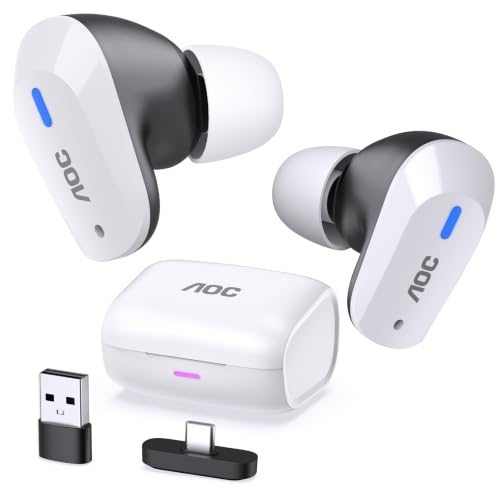
Pros
- Dual-mode 2.4GHz dongle and Bluetooth 5.3 connectivity
- Claimed 20ms low latency for synchronized game audio
- Up to 32 hours total playback with charging case
- Includes USB-C to USB-A adapter for broad compatibility
Cons
- Incompatible with Xbox series consoles
- Xbox console players should skip this model

Pros
- Dual 2.4GHz wireless and Bluetooth 5.3 connectivity
- Low 20ms latency via USB-C dongle
- Up to 32 hours total battery life
- Includes USB-C to USB-A adapter for broad compatibility
Cons
- Incompatible with Xbox consoles; Xbox users should skip

Pros
- Simultaneous 2.4 GHz and Bluetooth audio connectivity
- Bone-conduction microphones for clearer voice pickup
- Adaptive active noise cancellation adjusts automatically
- Case supports wireless and quick USB-C charging
Cons
- Maximum battery life requires disabling RGB lighting
- High-resolution audio restricted to 2.4 GHz mode
- Skip if your setup lacks compatible wireless ports

Pros
- Five-driver hybrid setup produces clear, detailed audio
- Durable stainless steel faceplate and resin housing
- Detachable cable design allows simple upgrades
- Passive noise isolation blocks up to 26dB
Cons
- Lacks built-in microphone and inline controls
- Cable appearance varies due to random shipping
- Users needing phone call functionality should skip it
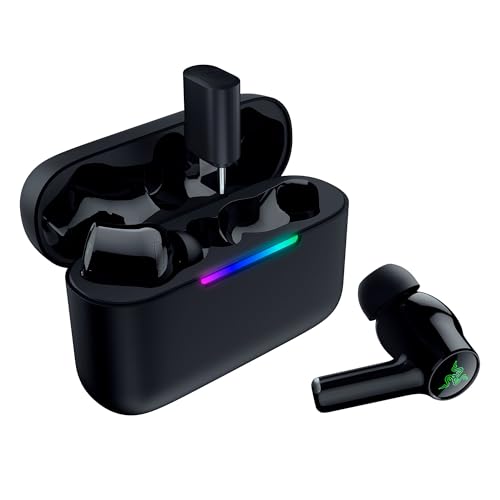
Pros
- Dual 2.4 GHz wireless and Bluetooth 6.0 connectivity
- Up to 40 hours total claimed battery life
- Hybrid active noise cancellation for distraction reduction
- Case supports passthrough charging and dongle storage
Cons
- THX Spatial Audio requires Windows 11 and Razer Synapse
- Skip if spatial surround sound is needed on consoles
Key Factors When Choosing the Best Wireless Earbuds for Gaming
Wireless Latency and Connection Types
Standard Bluetooth connections often introduce between 100 and 200 milliseconds of latency. That delay creates an obvious mismatch between action on the screen and what reaches your ears. Dedicated 2.4GHz Type-C USB transmitters cut delay down to roughly 20 milliseconds by using efficient transmission codecs. Models such as Middle Rabbit SW5 Wireless Gaming Earbuds and AOC Wireless Gaming Earbuds for PS rely on dedicated dongles to keep sound tight and responsive. The main trade-off is that dongles occupy physical ports and draw power from the host device.
Platform Compatibility and Console Limits
Gaming platforms handle wireless audio differently. Sony PlayStation 5 and Nintendo Switch accept standard USB-C audio adapters without trouble, but Microsoft Xbox systems require proprietary wireless protocols. Because of this restriction, models from AOC explicitly state they do not support Xbox consoles. PC, Mac, and Android devices provide broad compatibility, supporting both 2.4GHz dongles and Bluetooth connections. Always check platform support notes before buying wireless gear for a specific console.
Microphone Noise Isolation and Voice Clarity
Because earbud microphones sit far from your mouth, picking up clear speech without ambient noise can be difficult. Mechanical keyboard clatter, system fans, and room noise frequently leak into voice chat. Advanced options such as ASUS ROG Cetra True Wireless SpeedNova employ bone-conduction microphones paired with noise-reduction algorithms to capture vocal vibrations directly from the jaw. Basic noise-filtering microphones help reduce steady background noise. If clear voice transmission is your priority for online work calls rather than games, explore our guide to the 6 Best Wireless Earbuds for Teams Meetings in 2026: Top Headsets Compared.
Battery Life and Charging Case Versatility
High-speed 2.4GHz wireless modes draw more energy than standard Bluetooth connections. Earbuds using 2.4GHz transmitters generally run between 4 and 10 hours before needing their charging case. The Razer Hammerhead V3 Wireless Multi-Platform ANC pairs a 10-hour earbud charge with 30 additional hours in the case and supports USB-C passthrough charging. If you prefer to avoid battery limits entirely, traditional wired earbuds eliminate the need for recharging.
Acoustic Drivers and Positional Sound
Hearing footsteps and directional cues clearly depends heavily on driver construction. Single dynamic drivers provide deep bass for explosions, while multi-driver setups separate distinct audio frequencies. The wired Linsoul KZ ZS10 Pro, 4BA+1DD 5 Driver in Ear uses four balanced armatures alongside a dynamic driver to reproduce high frequencies up to 40kHz without transmission compression. On PC, virtual surround tools such as THX Spatial Audio expand the listening field to help locate opponents in competitive matches.
How We Compared These Products
Our assessment is based on manufacturer specifications, product design details, connection protocols, and verified customer feedback. We evaluated each model by comparing stated latency rates, microphone configurations, driver types, and cross-platform compatibility across PC, PlayStation, Switch, and mobile platforms.
Which Option Fits Your Needs?
Competitive PC and handheld console players: ASUS ROG Cetra True Wireless SpeedNova features high-resolution 24-bit 96kHz audio over 2.4GHz SpeedNova mode, bone-conduction voice pickup, adaptive active noise cancellation, and hybrid multipoint pairing across PC, PS5, Switch, and ROG Ally. Pros: broad platform versatility, clear microphone pickup, and wireless case charging. Cons: premium price point. Who should skip it: gamers on a strict budget or Xbox owners who need native console connectivity.
Cross-platform gamers wanting active noise cancellation: Razer Hammerhead V3 Wireless Multi-Platform ANC provides hybrid active noise cancellation, Bluetooth 6.0, a 2.4GHz Razer HyperSpeed transmitter, and an IPX4 water-resistant build. Pros: versatile dual-mode connectivity, passthrough charging support, and clear touch controls. Cons: THX Spatial Audio requires Windows 11 with Razer Synapse. Who should skip it: console gamers looking for built-in spatial surround processing without PC software dependencies.
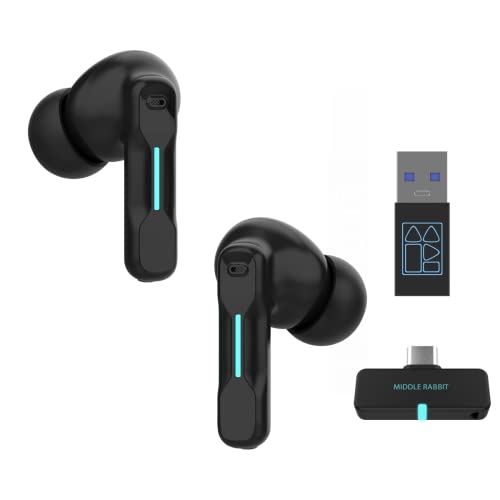
Budget-focused PlayStation, Switch, and mobile players: Middle Rabbit SW5 Wireless Gaming Earbuds provide 20-millisecond latency via a USB-C transmitter, dual-device connectivity, and app-based equalizer adjustments. Pros: rapid response speed, Bluetooth 5.4 support, and simultaneous dual connection. Cons: plastic body lacks active noise cancellation. Who should skip it: players in loud environments who require active noise suppression.
Purists seeking zero wireless lag and high acoustic detail: Linsoul KZ ZS10 Pro, 4BA+1DD 5 Driver in Ear eliminates latency and battery constraints through an analog 3.5mm connection. Five acoustic drivers in each earpiece deliver detailed sound separation and up to 26dB of passive noise isolation. Pros: no latency, zero battery management, and durable stainless steel faceplates. Cons: tethered cable restricts mobility and this version lacks a built-in microphone. Who should skip it: gamers who want wireless convenience or need integrated voice chat right out of the box.
Frequently Asked Questions
Can standard Bluetooth earbuds match the latency of a 2.4GHz dongle?
Standard Bluetooth connections generally exhibit between 100 and 200 milliseconds of latency, which creates a noticeable lag in fast-paced action games. Dedicated 2.4GHz USB transmitters lower transmission delay to around 20 milliseconds, keeping sound effects in close sync with visual action.
Do wireless gaming earbuds work on Xbox Series consoles?
Most 2.4GHz Type-C USB transmitters do not work directly with Xbox Series X and S consoles because Microsoft uses a proprietary wireless standard. Earbuds from AOC explicitly state they do not support Xbox hardware. Check platform documentation carefully before purchasing.
How does hybrid multipoint benefit players?
Hybrid multipoint keeps earbuds connected to a 2.4GHz wireless dongle and a Bluetooth device at the same time. This lets you hear game audio from a PC or console while remaining ready to take phone calls from a smartphone without manual re-pairing.
Are gaming earbuds comfortable for smaller ears?
Comfort depends on nozzle size and the ear tips provided. Earbuds with ergonomic contours sit comfortably, though large shells can cause ear fatigue over long sessions. If you have narrow ear canals, consult our guide to the best wireless earbuds for small ears for focused recommendations.
Can gaming earbuds double as workout headphones?
Only earbuds with certified ingress ratings, like the IPX4 water resistance on the Razer Hammerhead V3, handle sweat and light rain safely. Many gaming sets lack official water resistance ratings. For fitness activities, check our guide to the best wireless earbuds for working out.
Why consider wired in-ear monitors instead of wireless earbuds?
Wired monitors remove transmission delay, wireless interference, and battery limits. Multi-driver designs split the sound across dedicated drivers for crisp audio positioning without needing recharging intervals.



Write Your Review
No reviews yet. Be the first to share your experience!