

Choosing a gaming desktop under $1,500 means deciding which parts matter most for your games and setup. This guide compares the Best Gaming PC Under $1,500 options by graphics card, processor, memory, wireless features, and room for upgrades, so you can narrow the choices for 1080p or 1440p gaming.

Pros
- 8-core AMD Ryzen 7 processor
- 1TB PCIe 4.0 NVMe SSD
- Wi-Fi 6 and Bluetooth 5.3
- Keyboard and mouse included
Cons
- 8GB graphics memory may limit some workloads
- Skip it if you need more than 8GB graphics memory

Pros
- Ryzen 7 8700F and RTX 5060 Ti 8GB
- 1TB Gen4 NVMe SSD
- WiFi 7 and Bluetooth
- Four DDR5 DIMM slots and three M.2 slots
Cons
- 16GB DDR5 may limit heavier multitasking
- Skip if you need VGA or DVI without an adapter

Pros
- 8-core, 16-thread Ryzen 7 5700X
- 32GB DDR4 memory
- 1TB M.2 NVMe SSD
- Built-in WiFi and Bluetooth
Cons
- Graphics card brand may vary
- Who should skip it: buyers needing a named GPU brand
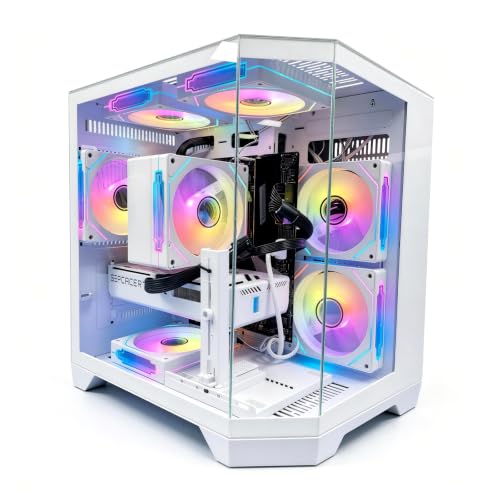
Pros
- Ryzen 7 8700F and RTX 5060 8GB
- 16GB DDR5 and 1TB NVMe SSD
- Six RGB fans and tempered-glass side panel
- Four monitor outputs
Cons
- Who should skip it: buyers needing more than three USB 3.0 ports
The Best Gaming PCs by Use Case
Best Overall: CyberPowerPC Gaming PC, AMD Ryzen 7 8700F
The CyberPowerPC Gaming PC, AMD Ryzen 7 8700F pairs an eight-core Ryzen 7 8700F with an RTX 5060 Ti 8GB, making it a strong fit for players who want a capable graphics card alongside a current-generation processor. The listing also specifies 16GB DDR5 memory and a 1TB PCIe 4.0 NVMe SSD. Its stated Wi-Fi 6, Bluetooth 5.3, and included keyboard and mouse make it a convenient starting point for a desktop setup.
Its graphics card is the main reason to choose this model over the RTX 5060 options below. The published information does not include game-specific frame rates, so match your expectations to independent benchmarks for the games and resolution you use. See the Xbox controller guide if you also need a controller for compatible PC games.
Reasons to buy:
- RTX 5060 Ti 8GB graphics, the higher-tier listed GPU among these four PCs.
- Ryzen 7 8700F, 16GB DDR5, and a 1TB PCIe 4.0 NVMe SSD.
- Wi-Fi 6, Bluetooth 5.3, a tempered side panel, and included keyboard and mouse.
Reasons to avoid:
- Memory is listed at 16GB, so check whether you want to add memory for demanding multitasking.
- The listing does not specify the power supply rating or available memory and storage slots.
Skip it if you prioritize Wi-Fi 7 or explicitly documented future upgrade slots over the RTX 5060 Ti.
Best for Wireless Features and Upgrades: KOTIN Gaming PC Desktop, Ryzen 7 8700F
The KOTIN Gaming PC Desktop, Ryzen 7 8700F has the same listed processor and RTX 5060 Ti 8GB graphics pairing as the CyberPowerPC, but its specifications emphasize connectivity and expansion. Wi-Fi 7, a 650W 80 PLUS Gold power supply, four DDR5 DIMM slots, and three M.2 SSD slots give buyers specific details to consider when planning upgrades. The listing positions it for 1080p and 1440p gaming, streaming, and creative work.
Five 120mm ARGB fans and an air cooler with six copper heat pipes are also listed. Those are design details, not proof of a particular operating temperature or noise level. The manufacturer notes that you must connect a monitor to the graphics card ports on the lower back of the PC; connecting to the motherboard video ports will not produce a display.
Reasons to buy:
- Wi-Fi 7 and Bluetooth are listed for wireless networking and peripherals.
- Four DDR5 DIMM slots and three M.2 SSD slots provide stated upgrade options.
- 650W 80 PLUS Gold power supply and RTX 5060 Ti 8GB graphics.
Reasons to avoid:
- It comes with 16GB DDR5, rather than the 32GB included with the YAWYORE model.
- Confirm your monitor accepts HDMI or DisplayPort, or plan for a suitable adapter if it uses VGA or DVI.
Skip it if you want 32GB memory out of the box or do not need its listed wireless and expansion features.
Best for More Memory at the Start: YAWYORE Gaming PC, AMD Ryzen 7 5700X
The YAWYORE Gaming PC, AMD Ryzen 7 5700X is the only pick here listed with 32GB of memory, supplied as two 16GB DDR4 modules. That extra capacity may suit players who keep games, browsers, chat, or streaming apps open together. It combines an eight-core, 16-thread Ryzen 7 5700X with an RTX 5060 8GB, a 1TB M.2 NVMe SSD, and built-in Wi-Fi and Bluetooth.
Its platform differs from the three PCs with Ryzen 7 8700F processors and DDR5 memory: this one uses DDR4-3200 and an MSI B550M-A PRO motherboard. The listing says the graphics card brand may vary, so confirm the exact card and included components before purchase. For gaming audio choices, our guide to wireless earbuds for gaming covers another part of a PC setup.
Reasons to buy:
- 32GB DDR4 memory is included, more than the 16GB listed for the other options.
- RTX 5060 8GB graphics support DLSS 4, ray tracing, and Reflex 2, according to the listing.
- 650W 80 PLUS Bronze power supply and a 1TB NVMe SSD.
Reasons to avoid:
- It uses DDR4, while the other three picks specify DDR5.
- The graphics card brand may vary, and the listing does not state memory or M.2 expansion capacity.
Skip it if you specifically want a Ryzen 7 8700F and DDR5 memory in your new PC.
Best for a Multi-Fan Case: LXZ Prebuilt Gaming PC Ryzen 7 8700F RTX 5060 16GB
The LXZ Prebuilt Gaming PC Ryzen 7 8700F RTX 5060 16GB combines the Ryzen 7 8700F with an RTX 5060 8GB and 16GB DDR5. Its listing highlights six RGB fans, a tempered-glass side panel, and a tool-free panel for access during cleaning or upgrades. This pick may suit buyers who value a fan-filled case and visible RGB components as part of their gaming setup.
The listed 1TB NVMe 3.0 SSD and 650W power supply cover core desktop needs, while the video outputs include three DisplayPort connections and one HDMI. The listing also describes seven USB 2.0 ports and three USB 3.0 ports. It does not specify wireless connectivity, so check whether Wi-Fi is included or plan a wired network connection or compatible adapter.
Reasons to buy:
- Six listed RGB fans and a tempered-glass case with a tool-free side panel.
- Ryzen 7 8700F, RTX 5060 8GB, and 16GB DDR5.
- Four listed display outputs and ten USB ports across the stated types.
Reasons to avoid:
- It has an RTX 5060, not the RTX 5060 Ti found in two other picks.
- Wi-Fi and Bluetooth are not specified in the published listing details.
Skip it if you need confirmed wireless networking or want the RTX 5060 Ti graphics card.
How to Choose the Best Gaming PC Under $1,500
Match the graphics card to your monitor and games
The graphics card has a direct role in game rendering, so compare GPU models before choosing based on case lighting or accessory bundles. Two PCs here list the RTX 5060 Ti 8GB, while the other two list the RTX 5060 8GB. Both tiers support modern features named in the listings, including ray tracing and DLSS, but the published data does not provide frame rates or game-by-game results.
For 1080p or 1440p gaming, look for benchmarks from trusted sources for your specific games, settings, and target frame rate. Check that the graphics card has the display connection your monitor needs. Gaming PCs often have video ports on both the graphics card and motherboard, but KOTIN specifically warns that its monitor must connect to the graphics card ports.
Compare processor, memory type, and capacity
The Ryzen 7 8700F appears in the CyberPowerPC, KOTIN, and LXZ, while YAWYORE lists the Ryzen 7 5700X. Each listing identifies an eight-core processor, but processor names alone do not establish performance in every game. Check independent results for games that rely heavily on the CPU, especially if you play competitive titles at high refresh rates or stream while playing.
Memory also separates these options. Three list 16GB DDR5, and YAWYORE lists 32GB DDR4-3200. More memory can help when you run multiple apps alongside a game, but DDR4 and DDR5 are different memory types and are not interchangeable. Before planning an upgrade, check the motherboard’s supported memory type, available slots, and maximum capacity. KOTIN explicitly lists four DDR5 DIMM slots; do not assume the other systems offer the same arrangement.
Check storage capacity and upgrade details
Each desktop lists a 1TB SSD, which gives you a starting point for Windows, applications, and a game library. Game sizes vary, so consider how many titles you expect to keep installed and whether you are comfortable uninstalling games or adding storage later. The CyberPowerPC specifies PCIe 4.0 NVMe, while the LXZ listing identifies an NVMe 3.0 SSD.
KOTIN provides the clearest stated expansion information, with three M.2 SSD slots. The other listings do not provide enough detail to confirm spare storage slots or upgrade limits. If future expansion matters, verify the motherboard model, open slots, and any installation restrictions before buying.
Choose connectivity and ports for your room
Wireless standards differ: CyberPowerPC lists Wi-Fi 6, KOTIN lists Wi-Fi 7, and YAWYORE says it has built-in Wi-Fi. LXZ does not specify Wi-Fi in the published details. A newer Wi-Fi label does not guarantee better signal in every home; router support, distance, walls, and network congestion also matter. If you play online, compare wireless support with the option of connecting by Ethernet.
Count the ports you need for a headset, controller, webcam, external drive, and other accessories. CyberPowerPC lists USB-C and USB-A ports, while LXZ provides a stated count of USB 2.0 and USB 3.0 ports. Do not infer USB-C speed or charging support unless the listing names it. For controller compatibility and features, see our guide to Xbox controllers.
Verify setup details, power supply, and support
A prebuilt can save assembly time, but you still need a monitor and may need other peripherals. CyberPowerPC lists a keyboard and mouse; do not assume the other PCs include them. Check whether your monitor uses HDMI or DisplayPort, and confirm whether your preferred network connection is available before ordering.
Power supply details can help when comparing systems and planning compatible upgrades. KOTIN lists a 650W 80 PLUS Gold unit, YAWYORE specifies a 650W 80 PLUS Bronze unit, and LXZ lists a 650W supply without a certification in the published details. CyberPowerPC does not specify its power supply here. Confirm the exact component and warranty terms on the product listing, especially if you plan to replace or add parts.
How We Compared
This comparison uses the published product specifications and design details, including processor and graphics models, memory type and capacity, storage, connectivity, ports, cooling features, stated upgrade options, and support information. Customer feedback information available for these products does not provide usable review details, so this guide does not make claims about owner satisfaction or recurring reliability. Recommendations reflect listed features and the different needs those features may suit.
Frequently Asked Questions
Are these PCs suitable for 1440p gaming?
The KOTIN and LXZ listings describe their PCs for 1080p and 1440p gaming. The other options include RTX 5060-series graphics, but the published information does not give game-specific frame rates. Check independent benchmarks for the games and graphics settings you use, and confirm your monitor’s resolution and refresh rate.
Is the RTX 5060 Ti better than the RTX 5060 for gaming?
The RTX 5060 Ti is the higher-tier model listed among these picks, and it appears in the CyberPowerPC and KOTIN. The YAWYORE and LXZ list an RTX 5060. The published data does not quantify the performance gap, so compare independent benchmarks for your games before deciding whether the Ti model fits your needs.
Is 16GB of RAM enough for a gaming PC?
Sixteen gigabytes is the listed capacity for three of these PCs, while YAWYORE includes 32GB. The right amount depends on the games you play and what you run at the same time. If you stream, keep many browser tabs open, or use creative apps alongside games, check the software’s memory recommendations and verify upgrade options.
Can I use my existing monitor with these desktops?
Check the monitor’s input and the graphics card’s available outputs before connecting it. CyberPowerPC lists HDMI and DisplayPort outputs, KOTIN supports HDMI and DisplayPort and advises using the graphics card ports, and LXZ lists three DisplayPort outputs and one HDMI. For VGA or DVI monitors, KOTIN says an HDMI or DisplayPort adapter is needed; verify adapter compatibility with your monitor.
Which option has the clearest path to storage upgrades?
KOTIN explicitly lists three M.2 SSD slots, giving buyers the clearest published information about storage expansion. The other product details do not confirm how many slots remain available. Check the motherboard information and ask the seller to confirm free slots if adding an SSD is important to your plans.
Do all four PCs include Wi-Fi?
CyberPowerPC lists Wi-Fi 6, KOTIN lists Wi-Fi 7, and YAWYORE specifies built-in Wi-Fi. The LXZ details provided here do not identify Wi-Fi, so confirm wireless support on its listing or plan for Ethernet or a compatible adapter. Bluetooth is also explicitly listed by CyberPowerPC, KOTIN, and YAWYORE, but not in the supplied LXZ details.




Write Your Review
No reviews yet. Be the first to share your experience!