

A dash cam can record the road ahead, but adding rear or cabin coverage changes what you can document and how much wiring installation may involve. The best dash cam under $200 for your car depends on whether you value front-camera detail, coverage behind you, rideshare recording, or a discreet setup.
This guide compares nine models by camera layout, resolution, night-recording features, connectivity, included storage, and parking-mode requirements. Check each listing for current availability and compatible accessories before buying, since several parking features need a separately purchased hardwire kit.
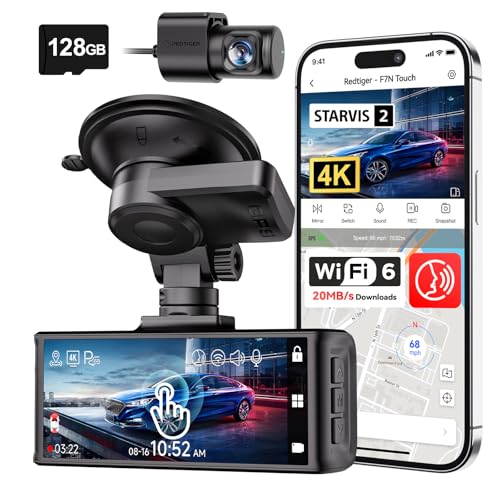
Pros
- 4K front and 1080p rear recording
- 128GB card included
- Built-in GPS
- Touchscreen, voice, and button controls
Cons
- Parking monitoring requires a separate hardwire kit
- Who should skip it: drivers unwilling to hardwire parking mode

Pros
- 4K recording from front and rear cameras
- Built-in GPS trip information
- 128GB card included
- Phone access over 5.8GHz WiFi
Cons
- Skip if you need parking monitoring without a separate hardwire kit

Pros
- 4K front and 2K rear recording
- Built-in GPS
- Dual-band Wi-Fi
- Discreet screen-free design
Cons
- Parking monitoring requires a hardwire kit
- Skip it if you want an onboard screen

Pros
- 4K front and 1080p rear recording
- GPS-tagged video
- Includes 64GB memory card
- Supercapacitor rated for -20°C to 70°C
Cons
- 24-hour parking monitoring requires hardware kit
- Skip if you need parking mode without extra hardware

Pros
- 1440P front and rear recording
- HDR support on both channels
- Voice controls and GPS data
- Three parking mode options
Cons
- MicroSD card sold separately
- HK4 hardwire cable sold separately for parking mode
- Skip it if you need 60fps front recording with HDR enabled

Pros
- Compact design for mounting behind the rearview mirror
- CPL filter included
- Supercapacitor rated for 5°F to 149°F operation
Cons
- MicroSD card not included
- Parking hardwire cable not included
- Skip it if you need a rear-camera recording

Pros
- Front, cabin, and rear recording
- Two recording-mode options
- Built-in GPS and Wi-Fi
- Includes 64GB card
Cons
- Parking monitoring requires extra hardwire kit
- Who should skip it: drivers unwilling to add hardwire kit for parking modes

Pros
- 4K front and rear recording
- 128GB card included
- Built-in GPS
- Three-year guarantee
Cons
- Parking monitoring requires separately sold hardwire kit
- Skip it if you need parking monitoring without hardwiring

Pros
- Front and cabin recording
- Infrared cabin night vision
- GPS data logging
- Front 1440p at 60fps
Cons
- No rear camera
- Parking mode needs separate hardwire kit
- Skip it if you need rear-window coverage
The Best Dash Cams by Use Case
Best for Front-and-Rear Detail: VIOFO A229 Plus Dash Cam Front and Rear
The VIOFO A229 Plus records 1440P video from both front and rear cameras using two STARVIS 2 IMX675 sensors. Its dual-channel HDR is designed to manage bright and dark areas, while the front camera can record at up to 60 frames per second when HDR is off. That makes this a strong fit if you want matched front and rear coverage and can choose between HDR and the faster front frame rate.
It also includes voice commands, 5GHz Wi-Fi, and a quad-mode GPS module supporting GPS, BeiDou, Galileo, and GLONASS. The maker specifies three parking modes, including event detection with buffered footage, but the HK4 hardwire cable is sold separately.
Reasons to buy:
- 1440P recording from both front and rear cameras.
- Dual-channel HDR and three listed parking modes.
- Voice commands and four satellite positioning systems.
Reasons to avoid:
- HDR disables the front camera’s 1440P 60fps mode.
- The hardwire cable for parking mode is an extra purchase.
Skip it if you want 4K front video or a memory card included; the published details do not list either as included.
See the Dash Cams category for more options in this product type.
Best for Front-and-Rear 4K: JOCRELA 4K+4K Dash Cam Front and Rear
The JOCRELA records 4K video from both front and rear cameras, a useful distinction for drivers who want the same listed resolution at both ends of the car. A 3.39-inch IPS screen supports setup, live viewing, playback, and angle adjustment. The package includes a 128GB card, so the listing describes a ready-to-record storage setup.
Built-in GPS adds route, speed, and location information to recordings, while 5.8GHz Wi-Fi supports app preview and file handling. Parking monitoring and time-lapse recording need a compatible hardwire kit sold separately. Although 4K resolution is specified for both cameras, actual plate visibility can depend on lighting, motion, windshield glare, and camera placement.
Reasons to buy:
- 4K recording from both front and rear cameras.
- Included 128GB card and built-in GPS.
- On-device screen for framing and playback.
Reasons to avoid:
- Parking monitoring needs a separately purchased compatible hardwire kit.
- Verify rear-camera placement and cable routing suit your vehicle.
Skip it if you prefer a screen-free camera or do not need a rear view.
Read the listing carefully for hardwire-kit compatibility before planning a parking-mode installation.
Best for Discreet Installation: Coxpal 4K+2K Dual Dash Cam Front and Rear
The Coxpal combines a 4K front camera with a 2K rear camera in a screen-free design intended to mount behind the rearview mirror. Its front camera uses a STARVIS 2 IMX678 sensor and HDR, while GPS and 5GHz Wi-Fi support route data and phone-based video access. This layout suits drivers who want a compact-looking front unit and do not need an onboard display.
The listing says the camera supports cards up to 512GB, but no card is included, and it specifies a high-speed UHS-1 U3 microSD card for 4K recording. Parking options include continuous FHD 1080P or 1fps time-lapse recording after installing a hardwire kit. Confirm the app and phone connection meet your needs, since the camera itself has no screen for reviewing clips.
Reasons to buy:
- Screen-free design for a less prominent windshield setup.
- 4K front and 2K rear recording, with built-in GPS.
- Supports up to 512GB storage, subject to card requirements.
Reasons to avoid:
- Memory card is not included.
- Parking monitoring requires a hardwire kit, and setup uses a phone or computer for viewing.
Skip it if you want an included card or an integrated screen for setup and playback.
For vehicle accessories beyond cameras, browse the Car Tech category.
Best for Rideshare and Cabin Recording: Vantrue N2X 2.7K Dash Cam Front and Inside
The Vantrue N2X records the road ahead and the vehicle cabin, making its layout relevant to rideshare, taxi, delivery, and family use. The listing specifies 1944P front and 1080P interior recording at 30fps, plus a front-camera option for 1440P at 60fps. Its cabin lens rotates 45 degrees and includes four infrared LEDs for recording the interior in darkness.
Dual HDR, GPS, voice control, and 5GHz Wi-Fi add tools for reviewing and managing footage. The interior camera and audio can be turned off, a useful option when cabin recording is not appropriate. Parking modes need a separately sold hardwire kit, and the maker advises using its supplied car charger or Vantrue cable rather than PD fast chargers or cables.
Reasons to buy:
- Records both the road and cabin, with infrared cabin lighting.
- Cabin camera and audio can be disabled.
- Voice commands and multiple listed parking modes.
Reasons to avoid:
- It records the cabin rather than the rear road, so it is not a substitute for a rear-facing exterior camera.
- Parking mode needs a hardwire kit, and the maker warns against PD charging cables.
Skip it if your priority is recording traffic behind the vehicle or you do not want an interior-facing camera.
Drivers using cabin recording should tell passengers where appropriate and follow local privacy rules.
Best for Three-Angle Coverage: REDTIGER F17 4K 3CH Dash Cam
The REDTIGER F17 records the road ahead, cabin, and rear of the vehicle. Its front camera uses a STARVIS 2 IMX675 sensor, while the inside and rear cameras record at 1080P. The listing offers two recording setups: 2.5K dual-channel recording, or 4K front and 1080P rear when the inside camera is turned off.
This flexibility suits drivers who want cabin evidence on some trips and higher front resolution on others. The package includes a 64GB card, and the camera supports 5GHz and 2.4GHz Wi-Fi plus GPS. Parking monitoring offers time-lapse and collision-detection modes, but requires an extra hardwire kit. Consider whether three camera views and their mounting positions fit your vehicle and privacy needs.
Reasons to buy:
- Front, rear, and cabin recording in one system.
- Two listed recording modes let you disable the interior camera for 4K front recording.
- Includes a 64GB card and supports GPS.
Reasons to avoid:
- The inside and rear cameras are 1080P, not 4K.
- Parking modes require a separately purchased hardwire kit.
Skip it if you only need a front camera or want the rear road camera to record above 1080P.
Route wires so they do not obstruct the driver’s view or interfere with vehicle controls. Follow the vehicle and camera installation instructions.
Also Considered
The guide to tire chains for snow and ice covers another practical part of preparing a vehicle for changing road conditions.
The REDTIGER 4K STARVIS 2 Dashcam Front Rear could suit drivers who want a touchscreen, voice commands, GPS, and an included 128GB card, but its rear camera records at 1080P rather than 4K.
The BOTSLAB G300H Plus 4K Dual Dash Cam Front may appeal to buyers seeking voice control, GPS, and a supercapacitor, though its included card is 64GB and parking monitoring needs a hardware kit.
The VIOFO A119M Pro 4K HDR Mini Dash Cam is a front-only choice with a compact design, Wi-Fi 6, and a CPL filter, but it does not include a microSD card or record a rear view.
The Terunsoul 4K+4K Dash Cam, Free 128GB Card offers 4K front and rear recording, GPS, and an included card; its parking monitoring still needs a separately purchased hardwire kit.
How to Choose the Best Dash Cam Under $200
Choose camera coverage for your driving
A front-only camera records what happens ahead, while a front-and-rear system adds a view behind your vehicle. Three-channel models add cabin footage, which may be useful for rideshare work or family trips but can raise privacy concerns. Match the camera layout to the evidence you expect to need, and check whether the rear camera records through the back window or faces the cabin.
Resolution can differ by channel. For example, the JOCRELA specifies 4K front and rear, while the Coxpal pairs 4K front with 2K rear. The REDTIGER F17 records its interior and rear cameras at 1080P. Compare each camera’s resolution separately rather than relying on a headline that describes the front camera alone.
Understand resolution, HDR, and frame rate
Higher listed resolution records more image detail, but it does not guarantee that every plate will be readable. Lighting, movement, glare, lens angle, and windshield condition also affect footage. HDR can help manage scenes with both bright and dark areas, but check whether enabling it changes resolution or frame rate. The VIOFO A229 Plus, for instance, does not offer front 1440P at 60fps while HDR is enabled.
Think about when you drive. Night-oriented features such as STARVIS 2 sensors, HDR, WDR, or infrared cabin LEDs may be relevant, but product descriptions are manufacturer claims rather than a guarantee of plate capture in every situation. Look for the exact camera and mode specifications, not only broad phrases such as “night vision.”
Check parking-mode power needs
Parking modes can record an impact, motion, or a time-lapse while the vehicle is off, depending on the model. Most options here require a separately purchased hardwire kit. Before buying one, confirm the kit is compatible with the dash cam and your vehicle, and review the installation instructions. A hardwired setup connects to vehicle power, so seek qualified installation help if you are not comfortable routing or connecting cables.
Also compare what each mode records. Buffered event detection can save footage from before and after an event, while time-lapse records at a reduced rate. These modes are not interchangeable, and the listing may specify different resolutions or recording behavior for parking use than for normal driving.
Account for storage and file transfer
Loop recording overwrites older unlocked files when the card fills, while a G-sensor can lock footage after a detected impact. Check whether a card is included, its capacity, and the supported card type. The Coxpal listing says its card is not included and specifies a high-speed UHS-1 U3 card for 4K; several other models list an included card.
Wi-Fi can let you preview or download clips on a phone without removing the card, while GPS can add route, speed, or location data to recordings. Check that the maker’s app supports your phone and that you are comfortable connecting to the camera’s Wi-Fi. If you need to archive long trips, compare card support and file-transfer options before purchase.
Plan installation and screen placement
A screen can make setup and playback easier, as with the JOCRELA’s 3.39-inch display. A screen-free camera such as the Coxpal keeps the front unit more discreet but depends on a phone or computer to view footage. Check windshield placement, rear-camera cable routing, and power-cable reach against your vehicle before committing to a layout.
Do not place a camera where it blocks the driver’s view or interferes with airbags, controls, or vehicle sensors. Follow the vehicle manual and camera instructions. If the installation calls for wiring near vehicle systems and the instructions are unclear, use a qualified installer.
How We Compared
This comparison uses the published product specifications and listing details, including camera layouts, stated recording resolutions, sensor and night-recording features, GPS and Wi-Fi functions, included memory cards, and parking-mode requirements. We also considered stated installation details and customer feedback where supplied. Review the current product listing for updated compatibility information, included accessories, and exact operating requirements before purchase.
Frequently Asked Questions
Do all dash cams in this guide include a memory card?
No. The published details list included cards for some models, including the JOCRELA, REDTIGER F17, and Terunsoul. The Coxpal and VIOFO A119M Pro listings say a card is not included. Confirm the card capacity and required speed class on the product page before ordering.
Can these cameras record while the car is parked?
Several models list parking modes, but the published descriptions generally say a separate hardwire kit is required. Modes vary: some use collision detection, buffered event recording, time-lapse, or low-bitrate recording. Check the specific model’s compatible kit and parking options before planning installation.
Is a cabin camera the same as a rear camera?
No. A cabin camera records the vehicle interior, while a rear camera points toward traffic behind the vehicle. The Vantrue N2X records the road and cabin; the JOCRELA records front and rear road views. The REDTIGER F17 includes front, interior, and rear cameras.
Do I need a screen on my dash cam?
A built-in screen can help with setup, framing, and playback without first opening an app. A screen-free model can be less prominent, but you will rely on a phone or computer to view clips. Choose based on how often you expect to adjust the camera or review footage in the car.
Does 4K guarantee that license plates will be readable?
No. Resolution is only one factor. Distance, speed, lighting, glare, weather, and camera angle all affect whether a plate appears clearly. HDR and low-light sensors may help in certain conditions, but the listed features do not guarantee that every plate will be legible.





Write Your Review
No reviews yet. Be the first to share your experience!