

Gaming keyboards under $100 can differ sharply in layout, switch feel, and connection options. This guide compares models for competitive play, wireless setups, compact desks, and players who want macro keys or customization, so you can focus on features that fit your games and daily use.

Pros
- Six dedicated programmable macro keys
- Built-in switch sound dampeners
- Roller and secondary media keys
- Customizable per-key RGB lighting
Cons
- Skip it if you prefer tactile or clicky switches

Pros
- Three connection modes
- Hot-swappable 3-pin and 5-pin switch support
- Full-size layout with number pad
- 8000mAh battery
Cons
- Screen customization requires Windows software and wired mode
- Who should skip it: users needing Linux F-zone compatibility

Pros
- Compact 75% layout
- Three connection modes
- Hot-swappable linear switches
- Windows and macOS compatibility
Cons
- Who should skip it: buyers who need a full-size layout
Pros
- Tactile, clicky hybrid switches
- Customizable OLED display
- Per-key RGB lighting
- Magnetic wrist rest included
Cons
- Clicky switches may be noisy in shared spaces
- Who should skip it: users seeking quiet switches
Pros
- Three connection modes
- Bluetooth supports three devices
- Hot-swappable 3-pin and 5-pin switches
- Touch-screen controls and built-in tools
Cons
- Programming software requires Windows and wired mode
- Who should skip it: users needing wireless macro programming

Pros
- Compact layout with numpad
- Hot-swappable linear switches
- Double-shot PBT keycaps
- Onboard dial and display
Cons
- Skip if you prefer a smaller layout without a numpad
- G HUB handles listed lighting and key customization

Pros
- Wired, Bluetooth, and 2.4 GHz connectivity
- Hot-swap support for 3-pin and 5-pin switches
- QMK/VIA key customization
- Walnut wood shell
Cons
- QMK/VIA remapping requires wired mode; skip if you need wireless remapping

Pros
- Three connection modes
- Hot-swappable 3-pin and 5-pin switches
- Five-device storage
- PBT keycaps
Cons
- Some screen setup requires Windows and wired mode
- Skip it if you need screen setup without Windows software

Pros
- Bluetooth, 2.4GHz, and USB-C connectivity
- Hot-swappable switches
- Compact 75% layout
- Five-layer sound dampening
Cons
- Skip if you need a full-size number pad

Pros
- Compact tenkeyless layout
- Pre-lubricated linear switches
- Two-layer sound dampening
- Rotary media control
Cons
- No number pad
- Who should skip it: users who need a number pad
The Best Gaming Keyboards by Use Case
Best for Dedicated Macros: Razer BlackWidow V4 X Mechanical Gaming Keyboard
The Razer BlackWidow V4 X Mechanical Gaming Keyboard suits players who want quick access to custom commands without relying on key combinations. Its six dedicated macro keys can be programmed for a preferred play style, while the listing specifies linear Yellow switches with 1.2 mm actuation and reset points and 45 g actuation force. A multi-function roller and media keys add convenient controls for volume and playback.
Reasons to buy:
- Six dedicated macro keys provide direct access to custom commands.
- Linear switches have built-in sound dampeners, according to the listing.
- Per-key Chroma RGB and a media roller offer lighting and playback controls.
Reasons to avoid:
- Its full-size layout takes more desk space than compact options.
- The listing specifies a wired keyboard, so choose another pick if you need wireless play.
Skip it if you want a wireless keyboard or need a smaller layout to leave more room for mouse movement.
Best for High Report Rate: Logitech G316 X 98 Mechanical Gaming Keyboard
The Logitech G316 X 98 Mechanical Gaming Keyboard is aimed at players who want a compact footprint but still use a number pad. Logitech specifies an 8 kHz report rate, hot-swappable linear switches, and a gasket-mounted design with sound-dampening layers. The report-rate feature makes this the clearest match in this group for buyers prioritizing frequent input reporting, though the listing alone does not establish how much that difference will matter in a particular game or PC setup.
Reasons to buy:
- The 98% layout keeps a number pad while using less space than a full-size layout.
- Hot-swappable switches let you replace compatible switches without soldering.
- A dial and dot-matrix display control report rate, volume, brightness, and media.
Reasons to avoid:
- USB-C wired connectivity may not suit a setup that needs wireless operation.
- G HUB is needed for the listed report-rate and customization controls.
Skip it if you prefer a wireless keyboard or do not need a number pad and want a smaller 75% or tenkeyless layout.
Best Compact Wireless Option: GravaStar Mercury K1 Lite 75% Wireless Mechanical
The GravaStar Mercury K1 Lite 75% Wireless Mechanical suits players who want more mouse space without giving up arrow keys and a compact set of function keys. Its 80-key layout connects through Bluetooth 5.0, 2.4 GHz wireless, or USB-C, and the listing names Windows and macOS compatibility. The linear switches have a listed 40 g actuation force and 2 mm pre-travel; the hot-swappable design also gives owners an option to change compatible switches later.
Reasons to buy:
- Tri-mode connectivity supports wired and two wireless connection types.
- The 75% layout leaves more desk space than a full-size keyboard.
- Gasket mounting and five layers of foam are specified for a cushioned feel and sound dampening.
Reasons to avoid:
- The compact layout omits the number pad.
- The published information does not specify a polling rate for wireless play.
Skip it if you need a full-size layout, or if a particular wireless latency specification is essential to your decision.
Best Full-Size Wireless Pick: AULA F108 PRO – Wireless Mechanical Keyboard
The AULA F108 PRO – Wireless Mechanical Keyboard fits players who want a number pad, wireless flexibility, and a screen in one full-size board. It supports Bluetooth 5.0, 2.4 GHz wireless, and USB-C wired connections, and can save up to five devices. The listing specifies 1,000 Hz polling in wired and 2.4 GHz modes, plus an 8,000 mAh battery; battery life in actual use is not stated.
Reasons to buy:
- Full-size 104-key layout includes a number pad and function keys.
- Three connection modes and saved-device switching suit multi-device desks.
- Hot-swappable sockets support compatible 3-pin and 5-pin switches.
Reasons to avoid:
- Screen-image setup and macro software require Windows and wired mode, according to the listing.
- The full-size footprint is less suitable for a crowded desk.
Skip it if you want a compact board or need to customize the screen from a Mac or phone.
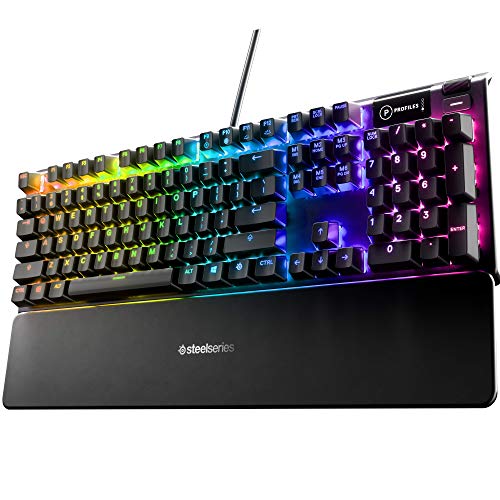
Best for Display and Wrist Support: SteelSeries USB Apex 5 Hybrid Mechanical
The SteelSeries USB Apex 5 Hybrid Mechanical is a wired full-size choice for players who value an OLED display and included wrist support. Its hybrid blue switches combine tactile clicks with a membrane mechanism, so the feel differs from the linear switches on several other picks. The aircraft-grade aluminum alloy frame, per-key RGB lighting, and magnetic wrist rest make it a fit for a desk setup where display features and palm support matter.
Reasons to buy:
- The OLED display can show GIFs, game information, and Discord messages.
- The included magnetic wrist rest provides full palm support.
- Hybrid blue switches offer a tactile, click-style feel rather than a linear stroke.
Reasons to avoid:
- Click-style switches may be distracting in a shared or quiet room.
- The full-size keyboard and wrist rest need substantial desk space.
Skip it if you need wireless connectivity, a compact footprint, or quieter linear switches.
Best Tenkeyless Layout: Corsair K70 CORE TKL RGB Tenkeyless Mechanical
The Corsair K70 CORE TKL RGB Tenkeyless Mechanical is a wired option for players who want a familiar key arrangement without a number pad. Its pre-lubricated MLX Red v2 switches are linear, while two sound-dampening foam layers and pre-lubricated stabilizers are specified to temper unwanted typing sounds. A multi-function dial and programmable media button provide controls without adding a number pad or separate media cluster.
Reasons to buy:
- Tenkeyless layout leaves more room for mouse movement than a full-size board.
- Linear switches and pre-lubricated stabilizers suit players who prefer smooth key travel.
- The dial and media button offer direct control, with customization through iCUE.
Reasons to avoid:
- It has no number pad.
- ABS keycaps may not suit buyers who specifically want PBT keycaps.
Skip it if your work depends on a number pad or you want Bluetooth or 2.4 GHz wireless.
Also Considered
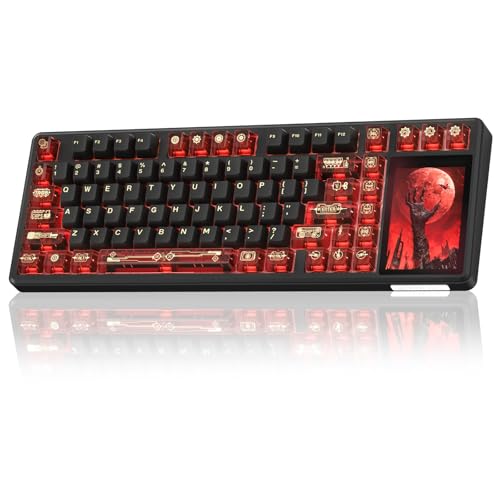
The Aula L99 Wireless Mechanical Gaming Creamy could suit buyers who want a screen, tri-mode connections, and a 96% layout, but its listing says software functions require Windows and wired mode.
The Womier 75% Wireless Creamy Keyboard with Wood offers QMK/VIA remapping and a distinctive wood shell, but remapping must be done in wired mode.
The AULA S98 Pro Wireless Mechanical Gaming Keyboard combines a 96-key layout, screen, knob, and tri-mode connections, though its software customization is limited to Windows in wired mode.
The GravaStar Mercury K1 Lite 75% Wireless Mechanical is another compact wireless option with a Crystal Rose finish and listed 21 lighting effects, but the published data gives it a lower rating than the other Mercury K1 Lite listing.
How to Choose the Best Gaming Keyboard Under $100
Match switch type to feel and surroundings
Linear switches move without a tactile click, which can suit rapid repeated inputs or players who prefer a smooth stroke. Tactile or click-style switches provide more noticeable feedback, but audible clicks may be unwelcome around other people. The Razer and Corsair picks use linear switches, while the SteelSeries model has hybrid blue switches. Check the exact switch name and whether the maker describes it as linear, tactile, or clicky; do not assume every switch from one brand feels alike.
Choose layout around your desk and tasks
A full-size keyboard keeps the number pad and function row, which can help with data entry and shortcuts, but takes more desk space. Tenkeyless models remove the number pad, while 75% designs keep a more compact arrangement of essential keys. The Logitech 98% option keeps a number pad in a more compact layout, and the GravaStar 75% model lists 80 keys. Check a layout image before buying, especially if you rely on navigation keys, function keys, or a number pad.
Decide whether wireless is worth the extra setup
Wireless models can reduce cable clutter and connect to more than one device, but they add battery charging and connection-mode choices. A 2.4 GHz connection, Bluetooth, and USB-C wired mode do not serve identical needs: wired use avoids charging during play, while Bluetooth can be convenient for switching among everyday devices. Check which modes the listing supports, which operating systems it names, and whether software features need a wired Windows connection. Do not treat a battery capacity figure as a promise of a particular runtime.
Check polling rate and customization claims
Polling rate describes how often a keyboard reports input to a connected system. Logitech lists an 8 kHz report rate, while the AULA F108 PRO specifies 1,000 Hz in wired and 2.4 GHz modes. These specifications can help narrow choices if you prioritize frequent reporting, but they do not establish how a keyboard will perform in every game or PC setup. Also check whether macros, remapping, and lighting controls depend on software, a specific operating system, or wired mode.
Consider repair and sound preferences
Hot-swappable sockets let you replace compatible switches without soldering, which can make it easier to change the feel or replace an individual switch. Confirm the supported pin count: several listed models accept 3-pin and 5-pin switches, but this should not be assumed for every keyboard. Foam, gasket mounting, lubricated stabilizers, and dampeners describe design choices that may affect feel and sound; they are not measured noise ratings. If sound matters, look for the specific switch type and acoustic details rather than relying only on phrases such as creamy or quiet.
How We Compared
We compared the published product specifications, layout details, connection options, switch descriptions, software requirements, and stated customization features. Customer ratings were included as provided, but the published data does not include written customer feedback. Recommendations reflect how those listed features fit different desk sizes and gaming preferences; they do not establish real-world performance beyond the published information.
Frequently Asked Questions
Are these keyboards compatible with consoles?
Compatibility depends on the specific keyboard and console. The AULA S98 Pro listing names PS and Xbox among compatible devices, but the other published descriptions do not establish console support. Check the maker’s compatibility details for your console and game before choosing a keyboard; a USB connection alone does not guarantee every function will work.
Is a wireless keyboard suitable for competitive gaming?
Some listings specify 2.4 GHz wireless and polling rates, but the published information does not provide comparable measured latency for all models. If responsiveness is your priority, compare the exact connection mode and polling-rate claims, and consider a wired mode when available. The GravaStar and AULA options include both wireless and wired connections.
What is the difference between 75%, 98%, and tenkeyless layouts?
A 75% keyboard uses a compact arrangement and usually omits the number pad, as reflected by the GravaStar’s listed 80-key layout. A tenkeyless board also removes the number pad but keeps a more traditional arrangement. A 98% model retains a number pad in a compact footprint, making it a useful middle ground if you need number entry but want to save some desk space.
Can I change the switches after buying a hot-swappable keyboard?
Hot-swappable models let you remove and replace compatible switches without soldering. Compatibility still matters: the AULA F108 PRO and several other listed models specify support for 3-pin or 5-pin switches. Check the keyboard’s supported switch type and follow the maker’s instructions; one product listing also advises turning off the keyboard before replacing switches.
Do keyboard screens and macro controls work on every computer?
No. Software support can depend on operating system and connection mode. For example, the AULA F108 PRO listing says its driver supports Windows in wired mode for functions such as screen-image setup and macros. Review the model’s software notes before buying if you plan to customize it from macOS, Linux, or a mobile device.





Write Your Review
No reviews yet. Be the first to share your experience!