

A router that works well in a small apartment may leave dead zones in a multi-story home, while a powerful Wi-Fi 7 model can be wasted on devices and internet plans that cannot use its newer features. This guide to the best Wi-Fi router under $200 compares standalone routers, mesh systems, wired port options, and built-in network controls so you can match a model to your connection and home layout.
Check both wireless compatibility and Ethernet connections before choosing. A Wi-Fi 7 label alone does not tell you how many multi-gig ports a router has, whether it includes a second mesh node, or how much setup its VPN tools involve.

Pros
- Four 2.5 Gbps LAN ports
- 10 Gbps WAN port
- EasyMesh compatible
- Works with earlier Wi-Fi generations
Cons
- Skip if devices and plan do not need Wi-Fi 7

Pros
- One 10 Gbps port and four 2.5 Gbps ports
- Tri-band Wi-Fi 7
- App and web-based management
- VPN client and server support
Cons
- Full Wi-Fi 7 benefits require compatible devices
- Who should skip it: shoppers without multi-gigabit networking needs

Pros
- Four 2.5G WAN/LAN ports
- Tri-band Wi-Fi 7
- Deco mesh compatibility
- VPN client and server support
Cons
- One unit cannot provide multi-node mesh backhaul
- Modem required for most ISPs
- Skip it if you need a complete multi-node mesh kit
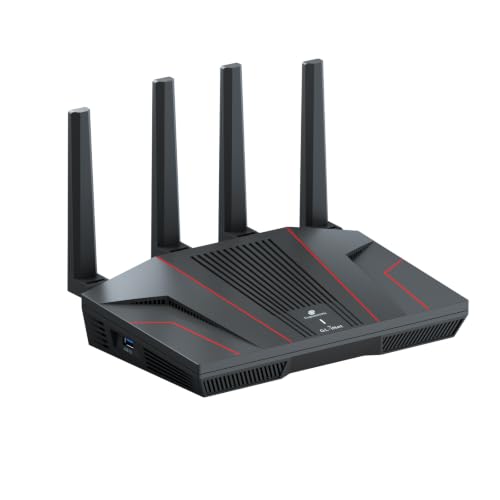
Pros
- Built-in ExpressVPN with 12-month Advanced plan
- Two 2.5 GbE ports
- Four 1 GbE LAN ports
- Supports VPN client and server
Cons
- Skip if you need over four built-in 1 GbE LAN ports

Pros
- Three-pack mesh system
- 6 GHz band supports backhaul
- Deco app offers remote management
Cons
- 6 GHz client access requires compatible devices
- Most internet providers require a separate modem
- Skip it if you do not need mesh coverage

Pros
- Four 2.5G ports
- Tri-band Wi-Fi 7 with 6GHz
- AiMesh network expansion
- Parental controls included
Cons
- Who should skip it: Buyers without Wi-Fi 7 or multi-gig needs

Pros
- Dual-band WiFi 7
- Four Ethernet ports, including one 2.5G port
- App-guided setup and network management
Cons
- Requires an existing modem or gateway
- Walls and floors can reduce coverage
- Who should skip it: owners of larger, multi-story homes

Pros
- Four 2.5GbE ports
- Wi-Fi 7 with Multi-Link Operation
- Gaming traffic prioritization features
Cons
- Who should skip it: Buyers who need tri-band Wi-Fi

Pros
- Wi-Fi 7 with MLO and 4K-QAM
- OpenVPN and WireGuard support
- Supports more than 100 devices
- AdGuard Home and Bark support
Cons
- Who should skip it: buyers needing published port specifications
The Best Wi-Fi Routers by Use Case
Best for Multi-Gig Wired Networks: TP-Link Tri-Band BE9700 WiFi 7 Router
The TP-Link Tri-Band BE9700 WiFi 7 Router (Archer BE550 Pro) suits homes that need several fast wired connections alongside Wi-Fi 7. Its listed ports include one 10 Gbps WAN port and four 2.5 Gbps LAN ports, so a compatible multi-gig modem, desktop, or network switch can connect at higher rates than gigabit Ethernet allows. The 6 GHz band supports channels up to 320 MHz, and EasyMesh-compatible devices can extend coverage.
Reasons to buy:- Four 2.5 Gbps LAN ports support multiple wired multi-gig devices.
- Wi-Fi 7 includes a 6 GHz band and Multi-Link Operation support.
- Tether app or web interface handles setup and network management.
- The 10 Gbps port is specified as WAN, not an additional 10 Gbps LAN port.
- Using the 6 GHz band at its widest channels depends on compatible client devices and local conditions.
Who should skip it: Skip it if your home has no multi-gig wired devices and your current Wi-Fi meets your needs. Read the port labels carefully if you need a 10 Gbps connection to a local storage device.
Choose this model when wired connections matter as much as wireless speed. Its six internal antennas and Beamforming are listed features, but the published data does not specify a coverage area, so compare its placement options with your floor plan rather than assuming a particular range.
Best for Larger Homes: TP-Link Deco XE75 AXE5400 Tri-Band WiFi 6E System
The TP-Link Deco XE75 AXE5400 Tri-Band WiFi 6E System is a three-unit mesh set aimed at homes where one router may not reach every room. The listing claims coverage up to 7,200 square feet and describes the 6 GHz band as a default wireless backhaul between nodes. That can help spread a network across a larger layout, though walls and floors affect actual signal coverage.
Reasons to buy:- Three mesh units are included in the listed system.
- Tri-band Wi-Fi 6E adds 6 GHz, which can serve as backhaul or connect compatible clients.
- The Deco app provides guided setup and network management.
- The listed Ethernet connections are gigabit, not multi-gig.
- Wi-Fi 6E is not Wi-Fi 7, and older devices cannot use the 6 GHz band.
Who should skip it: Skip it if a single router already covers your home or if you need multi-gig Ethernet ports. Confirm that the three-unit system suits your placement needs and that your modem or gateway can connect to it.
The system makes more sense for a spread-out home than for a compact apartment. Its 6 GHz band can also be enabled for compatible Wi-Fi 6E clients, but using it as a wireless link between nodes means placement and backhaul behavior matter to the overall setup.
Best for Router-Level VPN Control: GL.iNet Fortify (GL-MT6000)
The GL.iNet Fortify (GL-MT6000) is a Wi-Fi 6 router for households that want more control over VPN routing and connected devices. Its listing specifies OpenWrt-based software, a quad-core 2.0 GHz processor, and WireGuard VPN speeds up to 900 Mbps, with actual results dependent on the VPN server, service, and network. Router-level VPN support can cover devices such as smart TVs that may not offer their own VPN app.
Reasons to buy:- VPN client and server features, policy routing, and AdGuard Home support.
- Two 2.5 GbE ports provide multi-gig WAN or WAN/LAN connectivity.
- Four additional 1 GbE LAN ports support wired devices.
- Wi-Fi 6 does not include the newer Wi-Fi 7 features in several other picks.
- Advanced routing and package options may take more attention than app-first consumer controls.
Who should skip it: Skip it if you want a straightforward mesh app experience or do not plan to use VPN and routing controls. Check the VPN plan terms and service requirements before relying on the included ExpressVPN offer.
The listed coverage claim is up to 1,500 square feet, making this a more considered choice for a smaller home than for a broad, multi-story layout. Its mix of OpenWrt features and wired ports is useful for remote work or a home network with devices that need different routing rules.
Best for Gaming and Multi-Gig LAN: ASUS TUF Gaming BE6500 WiFi 7 Router – Dual-Band
The ASUS TUF Gaming BE6500 WiFi 7 Router – Dual-Band targets gaming households that want prioritization tools and multiple fast wired connections. ASUS lists four 2.5 GbE ports, Multi-Link Operation, a dedicated Gaming Port, and Open NAT features for simplifying multiplayer port forwarding. These controls can help organize traffic and setup, but they do not remove limits imposed by an internet plan, game server, or Wi-Fi conditions.
Reasons to buy:- Four 2.5 GbE ports support multi-gig wired connections.
- Gaming features include packet prioritization and Open NAT setup.
- ASUS lists mesh and VPN compatibility, plus subscription-free network security.
- Dual-band design does not provide a separate 6 GHz band.
- The published product details do not state a coverage area, so check fit for larger homes.
Who should skip it: Skip it if your priority is tri-band Wi-Fi 7 or a specified multi-node mesh kit. A gamer who connects only over Wi-Fi may not use all four multi-gig Ethernet ports.
The router is the clearest fit here for someone who values game-specific controls over a third wireless band. Wired consoles and PCs can connect directly, while compatible ASUS AiMesh routers offer a path to extend a network if one router does not cover the home.
Best for VPN Throughput and Broad Device Support: GL.iNet GL-BE6500 Flint 3e Wi-Fi 7 Router with VPN
The GL.iNet GL-BE6500 Flint 3e Wi-Fi 7 Router with VPN combines Wi-Fi 7 with network-wide VPN options and AdGuard Home support. The listing claims WireGuard and OpenVPN speeds up to 1,100 Mbps, while noting that actual speeds depend on the provider, server, and network. It also claims coverage up to 2,500 square feet and support for more than 100 devices, claims to treat as planning estimates rather than guaranteed results in every home.
Reasons to buy:- Wi-Fi 7 features include MLO and 4K-QAM.
- VPN client options and AdGuard Home support suit users who want network-level controls.
- The listing describes support for more than 100 connected devices.
- The published details do not specify its Ethernet port count or speeds.
- Advanced VPN and filtering tools may require more setup than a basic router app.
Who should skip it: Skip it if you need documented multi-gig Ethernet ports or prefer a mesh kit with multiple included units. Verify the wired connections and parental-control service details before buying for those requirements.
This model may suit a busy household that wants newer wireless features and router-level privacy options in one unit. Its listing mentions Bark support for parental controls, but buyers should check which features depend on a separate service or account.
Also Considered
The TP-Link Tri-Band BE9700 WiFi 7 Router (Archer BE600) could suit a larger home needing a listed coverage claim of up to 2,600 square feet and several multi-gig ports, but its port arrangement differs from the Archer BE550 Pro and the product data does not give its price for comparison.
The TP-Link Deco 7 Pro BE63 Tri-Band WiFi 7 BE10000 is worth considering if you want a Wi-Fi 7 mesh system with four 2.5G WAN/LAN ports per unit; the listed product is a one-pack, so broader mesh coverage calls for additional Deco units.
The ASUS RT-BE90U WiFi 7 Router – Tri-Band (6GHz) may fit homes seeking tri-band Wi-Fi 7, four 2.5G ports, and AiMesh expansion, but it lacks a listed coverage claim in the published details.
The NETGEAR Nighthawk WiFi 7 Router RS140 could suit someone seeking a simpler dual-band Wi-Fi 7 router with app setup; it has one 2.5G port and three gigabit ports, fewer multi-gig wired connections than the picks above.
How to Choose the Best Wi-Fi Router Under $200
Choose Wi-Fi generation and bands for your devices
Wi-Fi 7, Wi-Fi 6E, and Wi-Fi 6 routers can serve different client devices, but a newer router does not make an older phone or laptop use a newer Wi-Fi standard. Wi-Fi 7 models in this selection include features such as MLO, while 6 GHz access is available only to compatible devices. If most of your devices use older Wi-Fi, a Wi-Fi 6 router may be sufficient; if you are adding newer clients, Wi-Fi 7 may offer a longer upgrade path.
Check whether a listing is dual-band or tri-band and confirm which bands it supports. The Deco XE75 adds 6 GHz as part of Wi-Fi 6E, while several Wi-Fi 7 picks offer a 6 GHz band. A third band can help with compatible devices or mesh backhaul, but it does not guarantee faster service through walls or at long distances.
Match Ethernet ports to your internet and local devices
Start with the Ethernet port on your modem or gateway and the speed of your internet plan. A router with a 10 Gbps WAN port can accept a multi-gig internet connection, but that does not mean its LAN ports also run at 10 Gbps. The Archer BE550 Pro lists a 10 Gbps WAN and four 2.5 Gbps LAN ports; the ASUS TUF model lists four 2.5 GbE ports.
Count the wired devices you plan to connect, such as a gaming PC, console, network storage, or switch. Check each port’s stated speed and WAN/LAN role on the product listing. If a port layout is not specified, as with the Flint 3e details available here, confirm it directly before choosing the router for a wired network.
Use coverage claims to compare, not guarantee, range
Manufacturers’ square-foot coverage figures help compare listings, but walls, floors, router placement, and nearby networks affect real coverage. A central, open position can help a standalone router reach more rooms. For a home with multiple floors or dead zones, a mesh system such as the three-unit Deco XE75 may offer more flexible placement than one router.
Check whether the product is a single router, a one-pack mesh unit, or a multi-unit set. The Deco 7 Pro listing is for one unit and says that at least two Deco units are needed for backhaul between units. Do not assume a one-pack provides the same whole-home coverage as a multi-node kit.
Consider setup, security, and VPN management
App-led setup can suit buyers who want guided installation and basic network management. TP-Link lists Tether or Deco app setup for its routers and mesh system, while NETGEAR lists Nighthawk app setup. Check whether your modem or gateway needs bridge mode, and whether your internet provider requires a separate modem. For provider and modem basics, see our guide to the best cable modem.
VPN features vary. The GL.iNet Fortify lists OpenWrt-based advanced routing tools and VPN support, while the Flint 3e lists WireGuard, OpenVPN, and AdGuard Home. Those options can cover devices without their own VPN apps, but may involve more configuration. Check which features are built in, which require a separate VPN account, and whether parental controls or security tools have service requirements.
How We Compared
We compared the published product specifications, listed design features, setup and management options, and available customer feedback. The evaluation focused on Wi-Fi generation and bands, stated coverage and device capacity, Ethernet port type and count, mesh support, and VPN or security controls. Manufacturer coverage, speed, and capacity claims are presented as listing claims because actual results depend on client devices, internet service, placement, and the home environment.
Frequently Asked Questions
Will a Wi-Fi 7 router work with older devices?
Wi-Fi routers generally support older Wi-Fi generations, but a connected device uses the standard it supports. Older clients will not gain Wi-Fi 7 features such as MLO simply by connecting to a Wi-Fi 7 router. Check the client device’s specifications if you are buying for a particular band or feature.
Do I need a modem with a new router?
Most homes need a modem or an ISP-provided gateway to connect the router to cable or fiber service. The NETGEAR RS140 listing says it connects to an existing modem or gateway by Ethernet and notes that some combined gateway devices may need bridge mode. Confirm your provider’s equipment and connection requirements before replacing a router.
Is mesh better than one powerful router?
Mesh can help distribute coverage when a home has dead zones or a complex floor plan, because you can place nodes in different areas. A standalone router can be simpler when one well-positioned unit covers the space. Mesh systems also need node placement and a backhaul connection, so compare the included unit count and Ethernet options rather than relying only on a coverage figure.
What does a 2.5 Gbps or 10 Gbps port do?
Multi-gig Ethernet ports can connect compatible internet equipment or wired devices at rates above gigabit Ethernet. The benefit depends on what is connected: a gigabit device will not use a 2.5 Gbps link at its full rate. Check which ports are WAN, LAN, or configurable, and match them to your modem, switch, computer, or storage device.
Can a router VPN protect devices without VPN apps?
A router VPN client can route traffic from connected devices through a VPN, including devices that do not support VPN apps. Speed depends on the router, VPN protocol, service, server, internet plan, and network conditions. Check whether a VPN subscription is needed and whether the router supports the provider and routing setup you intend to use.
Should I choose dual-band or tri-band Wi-Fi?
Dual-band routers use 2.4 GHz and 5 GHz. Tri-band models add another band, such as 6 GHz, which can serve compatible clients or mesh backhaul. Tri-band can help in some crowded or mesh setups, but older devices may not use the added band. Verify your devices’ Wi-Fi support and how the router uses its third band.






Write Your Review
No reviews yet. Be the first to share your experience!