

Choosing a Copilot+ PC is not only about AI features. You also need to decide whether you want a traditional laptop, a tablet-style 2-in-1, or a small desktop, and whether an ARM-based processor suits the apps you rely on. This guide compares listed specifications, screen and storage options, and compatibility details to help you choose a device for your routine.

Pros
- Keyboard and stylus included
- Touch, typing, and handwriting workflows
- 16GB RAM and 512GB SSD
Cons
- Keyboard and stylus are third-party accessories
- Some older or specialized apps may have limited compatibility
- Skip it if you rely on driver-dependent software

Pros
- High-resolution 13-inch touchscreen
- Keyboard and Slim Pen included
- 16GB RAM
- Windows 11 Pro
Cons
- Skip it if 256GB storage is too limited

Pros
- High-resolution 2.8K display with 120Hz dynamic refresh rate
- Includes detachable Pro Keyboard and rechargeable Slim Pen
- Generous 16GB RAM and 512GB SSD storage capacity
- Front-facing camera features automatic AI video framing
Cons
- Listed total weight reaches five pounds
- Buyers seeking minimal carry weight should skip it

Pros
- 13-inch touchscreen
- Snapdragon X Plus 8-core processor
- 16GB RAM and 512GB storage
- Manufacturer claims up to 23 hours of battery life
Cons
- Display resolution and ports are not specified
- Who should skip it: buyers needing confirmed ports or resolution

Pros
- 13.8-inch touchscreen
- 16GB RAM and 512GB SSD
- 2.96 lb listed weight
Cons
- Skip if you need confirmed ports or display resolution

Pros
- 20-core Intel Core Ultra 7 265
- 32GB DDR5 RAM and 1TB PCIe SSD
- Four DisplayPort outputs
- Six USB-A and two USB-C ports
Cons
- No HDMI port
- Skip if displays require HDMI and you do not want an adapter
Pros
- 1TB SSD storage
- 14-inch WUXGA display
- 3.09-pound weight
- Aluminum chassis and 180-degree hinge
Cons
- Up to 22-hour battery claim uses video playback scenarios
- Who should skip it: buyers needing confirmed port or OS details

Pros
- 14-core Intel Core Ultra 5 235T processor
- Four DisplayPort outputs
- Compact, VESA-mount-compatible design
- Windows 11 Pro included
Cons
- RAM and SSD capacities conflict across listing details
- Who should skip it: buyers needing confirmed configuration
The Best Copilot+ PCs by Use Case
Best for Everyday Laptop Work: Microsoft Surface Laptop (2024)
The Microsoft Surface Laptop (2024) pairs a 13.8-inch touchscreen with a Snapdragon X Plus processor, 16GB of RAM, and a 512GB SSD. Its conventional laptop design suits people who mainly type, browse, join video calls, and carry one computer between home, school, and work. Microsoft lists up to 20 hours of battery life, but actual runtime depends on how you use the laptop.
Reasons to buy:
- The 13.8-inch touchscreen gives you more screen area than the 13-inch Surface Laptop (2025).
- 16GB of RAM and a 512GB SSD suit everyday multitasking and local file storage.
- The listing identifies it as a Copilot+ PC and claims up to 20 hours of battery life.
Reasons to avoid:
- The listing does not specify the display resolution or a detailed port selection.
- Its Snapdragon processor is ARM-based, so check compatibility with older or specialized Windows apps before buying.
Skip it if you need a specified high-resolution display, a tablet-and-pen setup, or confirmed support for a particular legacy app.
Best for a Lower-Cost Copilot+ Laptop: Acer Aspire 14 AI Copilot+ PC
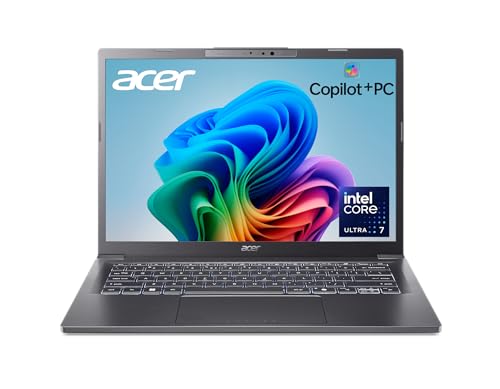
The Acer Aspire 14 AI Copilot+ PC offers a 14-inch WUXGA display, an Intel Core Ultra 7 256V processor, 16GB of LPDDR5X memory, and a 1TB SSD. Its Intel processor may suit buyers who want a Copilot+ laptop without choosing one of the Snapdragon-based Surface models. Acer lists Wi-Fi 6E and claims up to 22 hours of battery life under specific video-playback conditions, which should not be treated as a promise for mixed everyday use.
Reasons to buy:
- The 1TB SSD provides more listed storage than the 512GB options in this guide.
- The 1920 x 1200 display provides a 16:10 workspace for documents and browsing.
- The Intel Core Ultra 7 256V includes an NPU listed at up to 47 TOPS.
Reasons to avoid:
- The listing specifies LPDDR5X memory but does not describe user-upgrade options.
- The advertised battery figure comes from a video-playback scenario, not a general-use guarantee.
Skip it if you want a detachable tablet, a pen-and-keyboard bundle, or a screen larger than 14 inches.
Best for a Large, High-Refresh Touch Display: Microsoft Surface Pro 11 Copilot PC Bundle
The Microsoft Surface Pro 11 Copilot PC Bundle with 512GB storage combines a 13-inch PixelSense Flow touchscreen with a Snapdragon X Plus processor, 16GB of RAM, a black Pro Keyboard, and a business pen. The display resolution is 2880 x 1920, and the listing specifies a refresh rate of up to 120Hz. The detachable format can work well for note-taking, touch navigation, and typing, though buyers should confirm the exact bundle contents and keyboard arrangement in the listing before ordering.
Reasons to buy:
- The 13-inch display has a specified 2880 x 1920 resolution and up to 120Hz refresh rate.
- The listed bundle includes a keyboard and Slim Pen, supporting both typing and handwritten notes.
- Windows 11 Pro is specified for this model.
Reasons to avoid:
- Snapdragon X Plus is ARM-based, so specialist, older, plugin-based, or driver-dependent apps may need compatibility checks.
- The listing does not provide a battery-life figure for this particular bundle.
Skip it if you prefer a fixed laptop design or rely on software whose ARM compatibility you cannot confirm.
Best for a Compact 2-in-1 Bundle: Microsoft Surface Pro 12″ Copilot+ AI PC
The Microsoft Surface Pro 12″ Copilot+ AI PC is a 12-inch touchscreen 2-in-1 with a Snapdragon X Plus processor, 16GB of RAM, and 512GB of storage. The listing says the package includes a compatible backlit keyboard, stylus pen, 65W dual USB-C/USB-A charger, and a 12-month Microsoft 365 Personal subscription card. These keyboard and pen accessories are third-party compatible products, not original Microsoft Surface accessories, so buyers who want official accessories should account for that distinction.
Reasons to buy:
- The 12-inch screen and detachable format suit travel, meetings, reading, and handwritten notes.
- The listing specifies 16GB of RAM and 512GB of storage.
- The package description includes a keyboard, stylus, charger, and Microsoft 365 Personal subscription card.
Reasons to avoid:
- The included keyboard and stylus are third-party compatible accessories, not Microsoft-made Surface accessories.
- The Snapdragon processor is ARM-based, and the listing warns that some specialized or driver-dependent software may have limited compatibility.
Skip it if you need a traditional laptop hinge, want original Surface accessories, or depend on software that may not work on ARM Windows.
Best for a Multi-Monitor Business Desk: Dell Pro Micro Plus Mini PC
The Dell Pro Micro Plus Mini PC is a compact Windows 11 Pro desktop with an Intel Core Ultra 7 265 processor, 32GB of DDR5 memory, and a 1TB PCIe SSD. It is not a laptop, despite appearing in this roundup: it makes more sense for a fixed workspace where you provide a monitor, keyboard, and mouse or use the included wired keyboard and mouse. Dell lists four DisplayPort 1.4a connections for up to four displays, but the listing explicitly says there is no HDMI port.
Reasons to buy:
- 32GB of RAM and a 1TB SSD give this configuration more listed memory and storage than the laptop picks.
- Four DisplayPort outputs support a multi-monitor setup when your screens have compatible connections.
- The listing includes Windows 11 Pro, Wi-Fi 6, Bluetooth, and a wired keyboard and mouse.
Reasons to avoid:
- This is a desktop, so it does not include a built-in screen or laptop battery.
- There is no HDMI port; verify monitor and adapter needs before purchase.
Skip it if you need a portable computer, an all-in-one setup, or direct HDMI output.
Best for a Compact Windows Pro Desktop: Dell Pro Micro Plus Mini PC, Intel Ultra 5 235T
The Dell Pro Micro Plus Mini PC, Intel Ultra 5 235T is a small desktop with a 14-core Intel Core Ultra 5 235T processor, 16GB of DDR5 memory, and Windows 11 Pro. Its listed NPU performance is 13 TOPS, so do not assume that this desktop qualifies for every Copilot+ PC feature: the product title calls it an AI Copilot+ business desktop, but the published specifications do not establish Copilot+ PC certification. Dell lists four DisplayPort outputs and support for up to four 4K displays, making display connections a key reason to consider it.
Reasons to buy:
- The compact desktop format saves desk space compared with a conventional tower.
- Four DisplayPort 1.4a connections support the listed multi-display setup.
- The product listing includes Windows 11 Pro, Wi-Fi 6, Bluetooth, a keyboard, and a mouse.
Reasons to avoid:
- The specified 13 TOPS NPU is below the 40 TOPS NPU threshold associated with Copilot+ PCs, so verify eligibility for the features you want.
- The listing’s storage description is inconsistent: its heading says 512GB SSD, while its feature text mentions dual 512GB PCIe NVMe SSDs. Confirm the delivered storage configuration.
Skip it if you need a laptop, confirmed Copilot+ PC eligibility, or an unambiguous storage configuration without checking with the seller.
Also Considered
The Microsoft Surface Laptop (2025) may suit buyers who want a 13-inch Copilot+ laptop with a Snapdragon X Plus processor and a listed claim of up to 23 hours of battery life, but its 8-core processor and 16GB of RAM do not clearly offer a stronger fit than the Surface Laptop (2024) for this guide.
The Microsoft Surface Pro 11 Copilot PC Bundle with 256GB storage offers the same listed 13-inch display and Snapdragon X Plus processor as the 512GB bundle, but its listed storage is smaller and the published product data gives no reason to prefer it over the other bundle.
The Dell Pro Micro Plus Mini PC with an Intel Core Ultra 7 265, 32GB of RAM, and a 1TB SSD could suit a business desk needing a compact multi-monitor desktop. It remains a desktop rather than a portable laptop, and its listing specifies 13 TOPS for the NPU, so verify Copilot+ feature eligibility.
The Dell Pro Micro Plus Mini PC, Intel Ultra 5 235T is a smaller-footprint option for a Windows 11 Pro desk setup, but its conflicting storage description makes it important to confirm the exact SSD configuration before ordering.
How to Choose the Best Copilot+ PC
Check Copilot+ eligibility and processor type
Copilot+ PC is a specific device category, not a label that automatically applies to every computer with an AI-related processor. The Acer listing specifies an NPU of up to 47 TOPS, while both Dell desktop listings specify 13 TOPS. Microsoft Surface products are described as Copilot+ PCs in their listings, but you should check the exact model and the availability of the Windows features you plan to use. Feature rollouts can vary by device, market, and software updates.
Processor type matters for ordinary software, too. The Surface options use Snapdragon processors based on ARM, and one listing explicitly warns about older, specialized, plugin-based, or driver-dependent apps. Before buying, check software-maker support pages for your exact apps, peripherals, and required drivers. The Acer’s Intel processor may be a more suitable starting point if you need to preserve compatibility with Windows software, but confirm support for your specific tools.
Match screen size and form factor to your routine
A traditional laptop is usually the straightforward choice if you type for long stretches and want a screen and keyboard in one unit. The Surface Laptop (2024) has a listed 13.8-inch touchscreen, while the Acer has a 14-inch WUXGA display. The Surface Pro bundles instead offer detachable tablet-style designs; their touchscreen and pen workflows can suit handwritten notes or touch-based tasks, but buyers should check how the keyboard is included and used.
The two Dell Pro Micro Plus products are desktops, not portable PCs. They can suit a fixed desk where monitor choice and multi-screen connections matter, but they do not provide a built-in display or battery. If you move between rooms or need to work away from a power outlet, choose a laptop or 2-in-1 instead.
Compare display details, not just screen size
Resolution and refresh rate help describe a screen, but they do not establish every part of picture quality. The Surface Pro 11 bundle specifies a 13-inch, 2880 x 1920 PixelSense Flow display with up to a 120Hz refresh rate. The Acer lists a 14-inch, 1920 x 1200 WUXGA display. The Surface Laptop listings identify touchscreens but do not supply resolution in the provided product data.
If you work with fine text, review the resolution and screen size together. If smooth scrolling matters, check whether refresh rate is listed. Also confirm details that matter to your room or work, such as brightness, color coverage, and glare handling, because the published specifications do not establish them for every model.
Choose RAM and storage for the apps and files you keep
Every listed laptop has 16GB of RAM. The Dell Ultra 7 desktop lists 32GB, which may give more room for memory-heavy desktop tasks, though the published data does not include benchmark results. Storage varies: the Acer and several Surface models list 512GB, the 2025 Surface Laptop lists 512GB, and the Acer and Dell Ultra 7 list 1TB. Compare that capacity with your local documents, media, and apps rather than assuming a larger drive makes every task faster.
Check the precise model variation before purchasing. The Surface Pro 11 bundles have separate 256GB and 512GB listings, while the Dell Ultra 5 product data gives conflicting descriptions of its SSD capacity. The product listing or seller should confirm the exact delivered storage before you rely on it.
Verify battery claims, ports, and accessories
Battery-life figures are manufacturer claims, not guaranteed results for your workload. Microsoft lists up to 20 hours for the Surface Laptop (2024) and up to 23 hours for the Surface Laptop (2025). Acer’s up-to-22-hour claim is tied to a specific video-playback scenario. Brightness, apps, wireless use, and other settings affect actual runtime, so use the figures as product claims rather than direct comparisons.
Ports can change whether a computer fits your desk without extra adapters. The Dell desktops list four DisplayPort outputs and no HDMI on the Ultra 7 model; check your monitor’s inputs and any adapter needs. For the Surface Pro 12-inch bundle, the keyboard and stylus are described as third-party compatible accessories. Confirm the included items and whether you want official accessories before choosing a bundle.
How We Compared
This comparison uses the published product listings, including processor and memory details, display specifications, storage, connectivity, operating system, stated accessories, and manufacturer battery-life claims. We also considered the provided customer rating information, but each listing shows zero reviews, so it does not provide a base for conclusions about recurring buyer experiences. Where specifications conflict or leave important questions open, such as the Dell Ultra 5 storage description or ARM app compatibility, the guide flags what to verify instead of filling in missing information.
Frequently Asked Questions
Is every AI-ready Windows PC a Copilot+ PC?
No. AI-related branding alone does not establish Copilot+ PC eligibility. Check the exact model’s product details and NPU specification, and confirm that the Windows features you want are available for that device and region. The Dell mini PC listings specify 13 TOPS NPUs, so their Copilot branding should not be treated as proof of Copilot+ eligibility.
Will Snapdragon Surface PCs run my Windows apps?
Many mainstream apps can run on ARM-based Windows PCs, but compatibility depends on the app, plugins, drivers, and connected devices. The Surface Pro 12-inch listing specifically warns that some older, specialized, plugin-based, or driver-dependent software may have limited compatibility. Check the software maker’s support information for the exact program and peripherals you use.
Should I choose a laptop, a 2-in-1, or a mini desktop?
Choose a traditional laptop if you want a built-in screen and keyboard for work in different places. A Surface Pro 2-in-1 can suit touch input, typing, and pen notes in one portable device, but check bundle accessories. A Dell mini desktop fits a fixed workstation with separate displays and peripherals, not mobile use.
Which model has the largest listed storage?
The Acer Aspire 14 AI Copilot+ PC and the Dell Pro Micro Plus Mini PC with the Intel Core Ultra 7 265 each list a 1TB SSD. They serve different needs: the Acer is a laptop, while the Dell is a desktop. The Dell Ultra 5 listing has inconsistent SSD details, so confirm its exact configuration.
Are the Surface Pro keyboard and pen included?
The Surface Pro 11 bundles list a keyboard and Slim Pen, while the Surface Pro 12-inch listing says it includes a compatible keyboard and stylus. For the 12-inch model, the listing identifies those accessories as third-party compatible products rather than original Microsoft Surface accessories. Check the exact listing before purchase, since bundle contents can differ by model.
Can the Dell mini PCs connect to four monitors?
The Dell listings specify four DisplayPort connections and support for up to four displays, with the Ultra 5 listing describing up to four simultaneous 4K displays. Check that your monitors accept DisplayPort or that suitable adapters are available. The Dell Ultra 7 listing explicitly notes that it has no HDMI port.



Write Your Review
No reviews yet. Be the first to share your experience!