

A Chromebook can handle writing, research, video calls, and web-based coursework, but these nine options differ in screen resolution, processor, memory, and portability. This guide to the best Chromebook for college students compares those details so you can match a model to your classes, workload, and campus routine.

Pros
- Portable build weighing 3.35 pounds
- Bundled 64GB memory card expands base storage
- Claimed 14-hour battery life for video playback
Cons
- Modest 4GB memory limits multi-tab browsing
- Entry-level processor struggles with heavier software

Pros
- Sharp 14-inch Full HD IPS display
- Modern connectivity with Wi-Fi 6 and HDMI
- Energy-efficient LPDDR5 memory configuration
Cons
- Modest 64GB internal storage requires external drives
- Entry-level Celeron chip struggles with heavy workloads
- Power users needing heavy multitasking should skip it
Pros
- Lightweight Chrome OS environment for web work
- Anti-glare screen reduces reflections
- Fast-charging capability shortens downtime
Cons
- Low 1366 x 768 display resolution
- Modest 64GB eMMC internal storage space
- Power users needing heavy software should skip it

Pros
- Quad-core Celeron processor handles everyday browsing
- Versatile port selection including HDMI and USB-C
- Integrated 720p webcam for basic video calls
Cons
- Limited 1366 x 768 screen resolution
- Modest 64GB storage capacity restricts local files
- Who should skip it: power users needing heavy multitasking

Pros
- Full HD 1080p touchscreen display
- Lightweight design at under three pounds
- Modern Wi-Fi 6 wireless connectivity
- Versatile USB-C and USB-A port selection
Cons
- 4GB RAM limits intense multitasking
- 64GB local eMMC storage fills quickly
- Power users needing high performance should skip it

Pros
- Spacious 16:10 WUXGA anti-glare display
- Solid multitasking with 8GB LPDDR5 memory
- Versatile port selection with USB-C and HDMI
- Claimed battery life up to 12.5 hours
Cons
- Non-touch display restricts input options
- Four-pound weight adds bulk during travel
- Modest 128GB local storage capacity

Pros
- Multiple ports including HDMI, USB-C, and USB-A
- Lightweight design at 3.35 pounds for easy transport
- Anti-glare display minimizes reflections in bright rooms
Cons
- Modest 1366 x 768 display resolution
- Limited 64GB eMMC onboard storage capacity
- Skip if requiring Windows apps or high performance

Pros
- Quad-core processor handles web tasks and video calls
- Up to 14 hours of rated battery life
- Versatile connectivity with HDMI, USB-A, and USB-C
Cons
- Modest 64GB eMMC storage limits local file capacity
- 4GB RAM constrains heavy multitasking performance
- Power users and gamers should skip this configuration

Pros
- Lightweight design at 3.35 pounds
- Anti-glare screen minimizes reflections
- Multiple physical ports including HDMI and USB-C
Cons
- Low 1366 x 768 display resolution
- Modest 4GB memory limits heavy multitasking
- Power users requiring Windows software should skip it
The Best Chromebooks by Use Case
Best for Demanding Coursework: Acer Chromebook Plus 516-16″ WUXGA Student Laptop
The Acer Chromebook Plus 516-16″ WUXGA Student Laptop stands out for students who keep several research tabs open, work on presentations, or use online learning platforms at once. Its Intel Core i3-1315U processor, 8GB of memory, and 128GB UFS storage give it the strongest listed memory and processor combination here. The 16-inch 1920 x 1200 IPS display offers extra vertical space for documents, while the larger screen makes this a less compact campus carry.
Reasons to buy:
- 8GB LPDDR5 memory and Intel Core i3 processor suit heavier browser-based multitasking.
- The 16:10 WUXGA screen provides more vertical room for reading and editing.
- Listing specifies Wi-Fi 6E, HDMI, two USB-C ports, and two USB-A ports.
Reasons to avoid:
- The 16-inch screen may take more room in a backpack than a 14-inch model.
- ChromeOS may not support specialized desktop software required by some courses.
Skip it if you prioritize a smaller device for carrying between classes or need Windows-only applications.
See the student laptop guide focused on Linux compatibility if your coursework depends on a different operating system.
Product: Acer Chromebook Plus 516-16″ WUXGA Student Laptop
Best Touchscreen Study Option: Lenovo 14” FHD Touchscreen Slim 3 Chromebook
The Lenovo 14” FHD Touchscreen Slim 3 Chromebook pairs a 14-inch Full HD touchscreen with an eight-core MediaTek Kompanio 520 processor. Touch input can be convenient for scrolling through readings or interacting with compatible Android apps, while the 1920 x 1080 resolution gives you more detail than the HD screens in several other picks. Its 4GB of RAM is better suited to ordinary coursework than intensive multitasking, so avoid expecting the memory headroom of the Acer.
Reasons to buy:
- 14-inch Full HD touchscreen supports touch navigation and clear text.
- Wi-Fi 6 and Bluetooth are listed for wireless connections.
- MediaTek processor has eight cores according to the product information.
Reasons to avoid:
- 4GB RAM may constrain workloads with many demanding tabs or apps open.
- The listing describes up to 64GB eMMC plus a 128GB MicroSD card; verify which storage accessories are included in the exact offer.
Skip it if your course needs more memory for complex multitasking or you prefer a traditional non-touch display.
Product: Lenovo 14” FHD Touchscreen Slim 3 Chromebook
Best for Full HD and Peripherals: ASUS CX14 Chromebook Laptop for Business
The ASUS CX14 Chromebook Laptop for Business is a 14-inch option for students who want a Full HD IPS screen and several ways to connect accessories. The listing specifies a 1920 x 1080 display rated at 300 nits, plus USB-C, USB-A, HDMI, and a headphone/microphone combo jack. Its 4GB of RAM and two-core Intel Celeron N50 point toward browsing, documents, and streaming rather than demanding creative workloads.
Reasons to buy:
- Full HD IPS display provides a sharper listed resolution than HD panels in this roundup.
- HDMI and both USB-C and USB-A connections can reduce the need for adapters, depending on your accessories.
- Wi-Fi 6 is listed for wireless networking.
Reasons to avoid:
- 4GB RAM and a two-core processor are modest for heavy multitasking.
- The advertised storage combines 64GB SSD with a docking set; confirm what the set includes and how it connects before relying on its stated capacity.
Skip it if you need a high-memory Chromebook or want a large internal drive without relying on an accessory bundle.
Product: ASUS CX14 Chromebook Laptop for Business
Best Budget Pick: HP Chromebook 14” HD Laptop
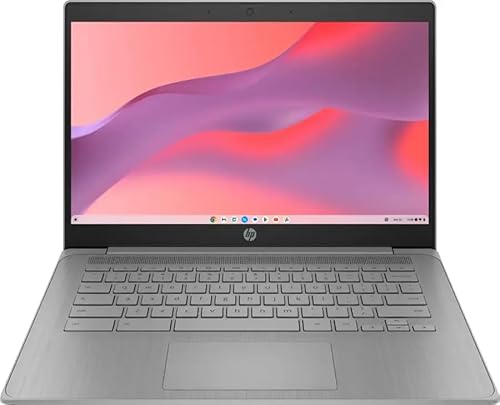
The HP Chromebook 14” HD Laptop is the lowest-priced choice among the featured picks, based on the published listing prices, and uses an Intel Celeron N4500 with 4GB of DDR4 memory and 64GB eMMC storage. Its 14-inch anti-glare HD display is listed at 1366 x 768 and 250 nits. The product is marked Renewed, which makes condition, seller terms, and return coverage important checks before purchase.
Reasons to buy:
- The N4500 processor and 4GB memory are aimed at basic ChromeOS tasks such as web research and documents.
- Anti-glare screen treatment may help reduce distracting reflections in bright indoor spaces.
- 64GB eMMC storage is specified for local files and downloads.
Reasons to avoid:
- The HD resolution offers less screen detail than Full HD options in this guide.
- Renewed condition means you should check the seller’s condition description and coverage terms.
Skip it if you want a new-condition unit or regularly edit large files and keep many demanding apps open.
Product: HP Chromebook 14” HD Laptop
Best for a Long Listed Video Runtime: HP 14″ HD Chromebook Laptop for Students
The HP 14″ HD Chromebook Laptop for Students may suit a student who wants a conventional 14-inch Chromebook for classes, video calls, and everyday web use. Its listing specifies a quad-core Intel Celeron N4120, 4GB RAM, 64GB eMMC, and claims up to 14 hours of battery life. Treat that runtime as a manufacturer listing claim, not a guarantee for your schedule: video calls, screen brightness, and workload can affect battery use.
Reasons to buy:
- The listing’s up-to-14-hour battery claim may appeal to students planning long days away from an outlet.
- Quad-core N4120 supports everyday browsing and document work.
- HDMI and USB-A and USB-C ports are named in the listing.
Reasons to avoid:
- 4GB RAM is a basic amount for multitasking.
- The listing does not specify display resolution beyond HD or provide a measured battery result.
Skip it if you need a Full HD screen or regularly run specialized software outside ChromeOS.
Product: HP 14″ HD Chromebook Laptop for Students
Also Considered
The Chromebook buying guide for seniors covers another use case, while these remaining models may suit students who prefer their specific bundles or configurations.
The HP Chromebook 14″ HD Laptop PC for College could suit basic cloud-based coursework, but its listing’s 14-hour video playback claim and included MicroSD capacity should be verified for the exact package.
The HP Chromebook 14″ Business & Student Laptop lists an N4120 processor, 720p webcam, and HDMI, but its HD resolution and 4GB RAM make it less distinctive beside the selected options.
The HP Chromebook Laptop Student Business lists a 14-inch HD screen, 3.35 lb weight, and a USB-C port. Consider it for everyday classes, but compare its bundle and connectivity against other HD HP listings.
The HP Chromebook 14″ HD Laptop for Business adds a docking-station set and MicroSD card to its listed 64GB eMMC, but confirm the accessory contents and storage arrangement before buying.
How to Choose the Best Chromebook for College Students
Match processor and memory to your workload
For notes, browser research, email, and web-based documents, a Chromebook with 4GB RAM may cover basic needs, but multiple heavy tabs can make that limit noticeable. The Acer’s 8GB RAM and Core i3 processor give it the clearest advantage for heavier multitasking in this group. Check both the processor model and memory on the product listing; a core count alone does not establish how fast a computer will feel in every task.
Choose screen size and resolution for your study setup
A 14-inch screen is a practical middle ground for carrying between classes and viewing documents. The Acer’s 16-inch display gives more room for split-screen reading and writing, but takes more space. Resolution matters for text detail: Full HD options such as the ASUS and Lenovo list 1920 x 1080, while several HP models list 1366 x 768. Do not assume resolution alone guarantees better color, brightness, or viewing comfort; check panel type and brightness where provided.
Check storage type and bundle details
Many picks specify 64GB eMMC, which leaves less room for large offline media libraries than a larger drive. College work saved in cloud services may need less local space, but download requirements vary by course and connectivity. Listings that combine internal storage with a docking station, card, or accessory set can describe total capacity in ways that are easy to misread. Confirm whether extra storage is internal, removable, or part of a separate accessory, and verify the bundle contents.
Verify ports and wireless needs
Check the ports against the equipment you plan to use, such as a monitor, flash drive, headphones, or classroom presentation adapter. HDMI can connect to a compatible external display, while USB-A and USB-C serve different peripherals. USB-C features vary, so do not assume every port supports identical charging, display output, or data speeds. The ASUS and Acer list HDMI and multiple USB ports; confirm the exact port capabilities if your accessories depend on a particular function.
Confirm ChromeOS and course software compatibility
ChromeOS is designed around web services and supports Google apps, but some courses may require desktop software that runs on Windows or macOS. Ask your department or check course requirements before choosing a Chromebook for specialized engineering, design, accounting, or programming applications. Also confirm that required exam tools, printers, VPN services, and campus systems support ChromeOS. If they do not, a Windows laptop comparison for school and work may be a more suitable starting point.
How We Compared
This comparison uses the published product listings, including processor and memory details, screen size and resolution, storage descriptions, ports, wireless standards, operating system, and stated battery-life claims. We also considered listed design details and customer feedback information where available. The published ratings show no review totals, so they do not establish a customer consensus. Bundle descriptions and some storage claims are unclear, and those points are flagged for buyers to confirm with the seller.
Frequently Asked Questions
Can a Chromebook handle college coursework?
It can handle coursework that works in a browser or in ChromeOS-compatible apps, including common document and video-call tasks. Check your department’s software requirements first, especially for specialized desktop programs, exam platforms, or technical tools.
Is 4GB of RAM enough for a college Chromebook?
Four gigabytes may be adequate for basic browsing, notes, and documents, but it gives you less room for many simultaneous tabs or demanding apps. The Acer model in this guide lists 8GB and is the more suitable choice among these picks for heavier multitasking.
Should I choose an HD or Full HD Chromebook screen?
Full HD listings provide a higher stated resolution, which can make text and images more detailed at a similar screen size. HD models may still work for basic reading and writing. Compare resolution, screen size, panel type, and listed brightness rather than treating resolution as the only measure of display quality.
Can I use a Chromebook when campus Wi-Fi is unavailable?
Some apps and files can work offline if they support offline access and you set them up in advance. Not every website or service works without an internet connection, so check the offline features of the apps required for your classes and save needed materials before traveling.
Are storage bundles the same as internal Chromebook storage?
No. A listing may combine built-in eMMC storage with a memory card, docking station, or separate drive to advertise a larger total. Verify which items are included, how they connect, and whether the stated capacity is internal or removable before relying on it for coursework.




Write Your Review
No reviews yet. Be the first to share your experience!