

Power outages and off-grid trips create different demands: home backup may need to start appliances, while camping calls for manageable charging and enough stored energy for essential devices. The best portable generator depends on which loads you need to run, how long you need them, and whether you can recharge from an outlet or solar panels.
This guide reviews one battery power station, the EF ECOFLOW Portable Power Station Delta 3 Classic. Its listed output, battery capacity, charging claims, and expansion limits help clarify whether it suits your plans. It belongs to a different category from fuel-powered generators, so compare its battery capacity and emissions profile with your actual backup needs. Browse our generators category for related options.
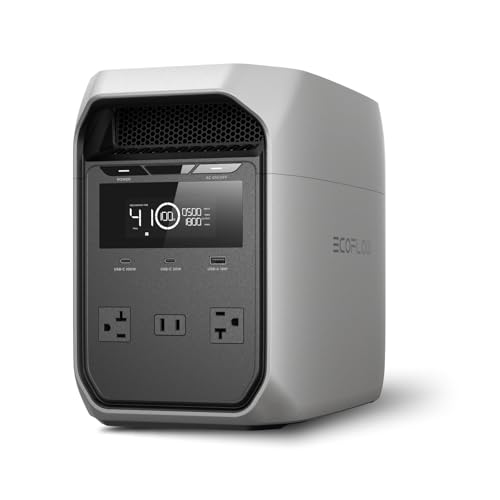
Pros
- 1,024Wh LiFePO4 battery
- 100W USB-C output
- 45-minute charge to 80% claimed
- 26.7 lb listed weight
Cons
- Incompatible with specified DELTA extra batteries
- Skip it if you need compatibility with those extra batteries
The Best Portable Power Station by Use Case
Best for Indoor Backup and Sensitive Electronics: EF ECOFLOW Portable Power Station Delta 3 Classic
The EF ECOFLOW Portable Power Station Delta 3 Classic is a 1024Wh battery station with a listed 1800W continuous AC output and 3600W surge rating. Its manufacturer specifies an under-10ms UPS switchover, making it a possible fit for a home office where brief outages could interrupt connected electronics. The listing also specifies LiFePO4 cells and 100W USB-C output, useful for people who want one station for backup and device charging.
Its fast AC charging claim may help when an outage is forecast, and optional solar charging gives campers another way to replenish the battery. Those features do not make it a whole-home generator: the 1024Wh capacity is finite, and the product is not compatible with Delta 2 Smart Extra Batteries or Delta 3 Series Smart Extra Batteries. Confirm the load and runtime you need before choosing it.
Reasons to buy:
- The listing specifies 1800W continuous output and 3600W surge capacity for checking appliance requirements.
- Manufacturer-listed UPS switchover is under 10ms, and the unit includes a 100W USB-C output.
- AC charging is listed at 0 to 80% in 45 minutes; optional 500W solar charging is listed at 2.5 hours.
Reasons to avoid:
- Its 1024Wh capacity may not cover long outages or multiple high-draw appliances for extended periods.
- It does not support the specified Delta 2 or Delta 3 Series Smart Extra Batteries, so those battery packs cannot expand its capacity.
Skip it if you need expandable storage, extended multi-day backup, or a fuel-powered generator for sustained loads.
How to Choose the Best Portable Generator for Your Needs
Battery stations and fuel generators solve some of the same power problems, but they work differently. This product is a rechargeable battery station: it stores energy, supplies power through its outlets, and must be replenished when its charge runs down. Start with the devices you intend to use, then check the product listing and appliance labels rather than assuming that a headline wattage covers every situation.
Separate running power from startup demand
Continuous output describes the power a station can supply while devices run. Surge capacity describes a brief higher output for starting loads that need an initial burst. The Delta 3 Classic lists 1800W continuous output and 3600W surge, but those figures alone do not confirm that every refrigerator, pump, or tool will work with it. Check each appliance’s running and startup wattage, and account for devices that might operate at the same time.
Do not treat X-Boost as a replacement for checking appliance requirements. The product listing says the feature can expand output up to 2600W, but does not explain the operating conditions or performance behavior for every load. Verify those details with the manufacturer and compare them with the appliance’s specifications before relying on that feature.
Match watt-hours to the runtime you need
Watt-hours describe stored energy, while watts describe power delivered at a given moment. The Delta 3 Classic has 1024Wh of listed capacity, but usable runtime varies with the connected load and conversion losses. A device drawing more power will generally use the stored energy faster than a low-power phone or lamp. Treat capacity as a planning figure, not a guaranteed number of hours.
List essential devices and estimate how long each must run. Add their energy needs for the same period, while remembering that appliance consumption can change during use. For a short outage, keeping a router, phone, and laptop available may be a different goal from running a refrigerator overnight. If you need several days of backup, a fixed-capacity station may not fit unless you have a dependable way to recharge it.
Check charging sources and claimed recharge times
Wall charging is useful when you have grid power before or between outages. The manufacturer lists 0 to 80% AC charging in 45 minutes for this model. That is a stated charging figure, not a guarantee for every outlet, temperature, or charging setting, so confirm the required input and conditions in current product documentation.
Solar charging can extend use away from outlets, but it depends on compatible panels, available sunlight, and charging input limits. The listing says the station can recharge in 2.5 hours with a 500W solar panel, which is optional. Before buying panels, verify connector and voltage compatibility, the permitted solar input, and whether the panel is included. Do not assume any panel will work simply because it is marketed for portable power.
Consider UPS behavior and connection requirements
A UPS function can switch connected equipment to battery power when incoming electricity fails. The listing specifies under-10ms switching for the Delta 3 Classic. That may suit some computers or networking devices, but not every device handles a transfer the same way. Check the equipment maker’s requirements, and confirm the station’s operating mode and connection instructions before relying on it to protect important work.
For critical equipment, a portable station should not automatically be treated as a substitute for a dedicated UPS. Confirm any required uptime, grounding, and connection setup for your devices. Medical equipment users should follow the equipment manufacturer’s backup-power guidance and contact the relevant provider when compatibility is unclear.
Review battery expansion, ports, and practical use
Expansion compatibility matters if you expect to add capacity later. The Delta 3 Classic listing explicitly excludes Delta 2 Smart Extra Batteries and Delta 3 Series Smart Extra Batteries. Do not assume another EcoFlow battery or accessory will work; verify compatible products against the exact model documentation.
Check the port types and output ratings against the devices you own. The published information identifies a 100W USB-C output, but does not establish the capabilities of every other port. USB-C describes a connector type, not a guarantee that each port supports the same power or data functions. For travel, also check the product’s dimensions, weight, and transport rules in the current listing, since those details were not supplied here.
LiFePO4 describes the battery chemistry, and the manufacturer says the cells are rated for 10+ years of daily use. That is a manufacturer claim, not a promise of a particular lifespan under every charging pattern or environment. Use the published documentation for storage, charging, and maintenance instructions, and check the seller or manufacturer for warranty details rather than assuming coverage.
How We Compared
This comparison uses the published product listing details, including stated capacity, output and surge ratings, charging claims, battery chemistry, UPS behavior, solar input claim, USB-C output, and battery expansion limits. The available product information did not include customer feedback or independent performance results, so conclusions focus on listed specifications and how they relate to common backup and travel needs.
Frequently Asked Questions
Can the Delta 3 Classic run a refrigerator?
Possibly, if the refrigerator’s running demand and startup surge fit within the station’s ratings. The product lists 1800W continuous output and 3600W surge, but refrigerator requirements vary. Check the appliance label or manual, and consider how long the station’s 1024Wh capacity must sustain it.
Can I use this power station indoors?
It is a battery power station rather than a fuel-burning engine, so it does not create combustion exhaust during battery operation. Follow the manufacturer’s instructions for placement, ventilation, charging, moisture, and electrical connections. Never operate a fuel-powered generator indoors or in an enclosed space because exhaust can contain deadly carbon monoxide.
Does the package include a solar panel?
The published listing describes solar charging with an optional 500W panel. It does not state that a panel is included. Confirm package contents and panel compatibility before purchasing accessories.
Can I add a Delta 2 or Delta 3 Series Smart Extra Battery?
No. The product data says the Delta 3 Classic is not compatible with Delta 2 Smart Extra Batteries or Delta 3 Series Smart Extra Batteries. If expandable capacity is important, verify compatibility for the exact station and battery models before choosing a different setup.
Will the UPS function prevent every computer interruption?
The listing specifies under-10ms switchover, which may help compatible electronics stay powered during an outage. It does not establish that every computer, server, or connected device will remain uninterrupted. Check equipment requirements and confirm the station’s UPS setup with its manufacturer.
Is this a substitute for a whole-home backup generator?
Not automatically. The station has a listed 1024Wh capacity and 1800W continuous output, so its suitability depends on the loads, their startup needs, and how long you need power. Whole-home backup usually involves different power needs and installation considerations. List essential circuits and consult a qualified electrician about safe, code-compliant connection options.





Write Your Review
No reviews yet. Be the first to share your experience!