

A magnetic connector can make plugging in easier, but it does not make every cable interchangeable. Connector tips, charging limits, data support, and cable lengths differ, so choosing the best magnetic charging cable starts with matching the cable to your devices and daily routine.
This guide compares options for USB-C devices, older connector types, car use, and keeping cords tidy. Check your device’s charging requirements and the exact cable’s connector system before buying, especially if you need laptop charging, phone data transfer, or Android Auto.

Pros
- Six cables in three lengths
- Three magnetic tip types
- Rotating, bendable charging head
Cons
- Charging only, no data transfer
- Does not support CarPlay or Android Auto
- Skip if you need data transfer or car integration

Pros
- Four cables included
- Three cable lengths
- Rotating magnetic connector
Cons
- No video transmission; skip if cable must carry display output

Pros
- Self-coiling magnetic design
- 3-foot cable length
- CarPlay compatibility listed
- 2-year warranty listed
Cons
- Skip it if you need USB-C to USB-C
- 480 Mbps transfer rate may not suit faster transfers
Pros
- Magnetic self-coiling design
- Six-foot cable length
- 480Mbps data transfer
- Stated two-year warranty
Cons
- USB-A to USB-C only
- Who should skip it: users needing USB-C on both ends

Pros
- Three device tip types included
- USB-A adapter included
- 2-year warranty
- 6-foot cable length
Cons
- 480 Mbps data rate limits large-file transfers
- Who should skip it: users needing faster data transfers
Pros
- Five cables in three lengths
- Tips for three connector types
- Rotating magnetic connection
Cons
- Skip if you need cable without separate magnetic tips

Pros
- Three cables included
- USB-C-to-USB-C charging up to 60W
- Magnetic, one-hand connection
Cons
- No video output
- Laptop charging requires USB-C-to-USB-C and an adapter above 45W
- Who should skip it: anyone needing video output or cable tips that work with 1-, 5-, or 7-pin adapters

Pros
- Two cable lengths included
- Three connector tip types
- Rotating, bending magnetic head
- USB-C and USB-A adapters included
Cons
- Does not support Samsung fast charging
- No data transfer for iPhone 15
- Skip if standard direct-plug cables are preferred

Pros
- Three connector tip types included
- Four cables with varied lengths
- Adjustable rotating connector
- Advertised data syncing support
Cons
- Charging protocols and device-specific speeds unspecified
- Skip it if you need confirmed compatibility with a specific device
The Best Magnetic Charging Cables by Use Case
Best for USB-C Device Households: MIGRALEX USB C Magnetic Charging Cable 240W,C to C Magnetic
The MIGRALEX USB C Magnetic Charging Cable 240W,C to C Magnetic suits buyers who want several USB-C-to-USB-C cables for phones, tablets, or compatible laptops. Its listing specifies up to 240W charging, an E-Marker 2.0 chip, and 480 Mbps data transfer, plus a four-cable pack in 1-, 3-, and 6-foot lengths. Those figures describe the cable’s stated capability, not the charging speed every device will achieve.
Reasons to buy:
- USB-C-to-USB-C format fits compatible USB-C chargers and devices.
- Multiple lengths suit a desk, travel bag, or nearby outlet.
- Listing specifies data transfer, useful for compatible file transfers.
Reasons to avoid:
- Does not support video transmission, according to the listing.
- Its 240W claim does not mean a phone or charger will draw that much power.
Skip it if you need Micro-USB or Apple-device magnetic tips, or video output over the cable.
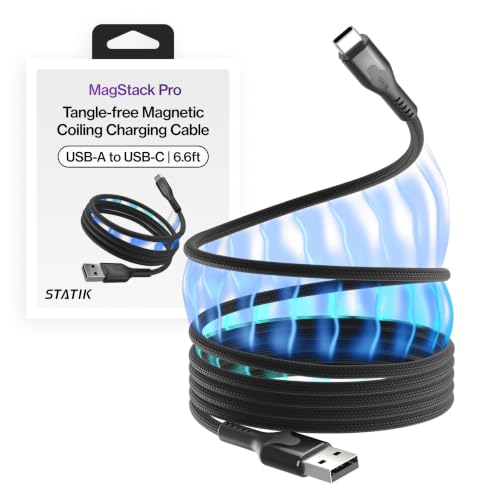
Best for a Tidy Car Console: Statik MagStack Magnetic Charging USB A to USB C
The 3-foot Statik MagStack Magnetic Charging USB A to USB C is aimed at people who want a cable that coils together instead of tangling in a car console or bag. This USB-A-to-USB-C model lists 27W charging and 480 Mbps data transfer, and its product information specifically names Apple CarPlay compatibility. The magnetic material helps the cable snap into a coil for storage, a different feature from a magnetic plug tip.
Reasons to buy:
- Self-coiling design helps keep a short cable organized.
- USB-A-to-USB-C connection suits compatible older car ports and chargers.
- Listing specifies CarPlay compatibility and 480 Mbps data transfer.
Reasons to avoid:
- USB-A connector and listed 27W limit may not suit a USB-C-only charger or higher-power device.
- One 3-foot length offers less placement flexibility than multi-length packs.
Skip it if you need a USB-C-to-USB-C cable or a detachable magnetic tip for one-handed connection.
Best for Mixed Connector Types: Statik 360 Pro Universal Magnetic Charging Cable
The Statik 360 Pro Universal Magnetic Charging Cable is a practical choice for households with compatible Apple, USB-C, and Micro-USB devices. The listing states support for up to 100W charging and 480 Mbps data transfer, and includes three connector tips plus a USB-A adapter. Its stated 2-year warranty may also appeal to buyers who prefer a listed coverage period.
Reasons to buy:
- Three tip types cover more connector formats than a USB-C-only cable.
- USB-A adapter provides another connection option.
- Listed 100W capability and data transfer support broaden its potential uses.
Reasons to avoid:
- Confirm that your specific device and magnetic tip support the charging speed and data features you need.
- A magnetic tip system adds small pieces that can be misplaced.
Skip it if your devices all use USB-C and you prefer a direct USB-C cable without interchangeable tips.
Best for Long Reach and Multiple Rooms: Terasako Magnetic Charging Cable 5-Pack
The Terasako Magnetic Charging Cable 5-Pack offers five cables in 3-, 6-, and 10-foot lengths, with Micro-USB, Type-C, and i-product tips listed in the package. That mix can help when outlets sit far from a sofa or bed, or when several people use different connector types. Its rotating connection and LED light are convenience features; the published details do not state a charging wattage or data-transfer support.
Reasons to buy:
- Five cables and three length options support different rooms and reach needs.
- Listed tip types cover several device connector formats.
- Product information states a 12-month warranty and a rotating connector design.
Reasons to avoid:
- Charging speed and data-transfer capability are not specified in the published details.
- Check that the magnetic tips fit your device and case before relying on them.
Skip it if you need a stated high-wattage rating, documented data sync, or only one cable.
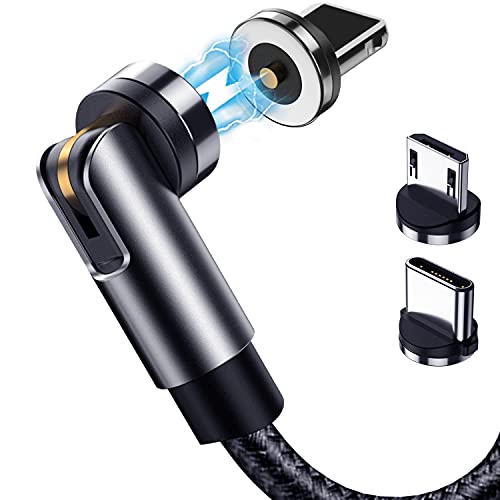
Best for a Four-Cable Mixed-Device Set: Ankndo 540° Rotation Magnetic Charging Cable
The four-cable Ankndo 540° Rotation Magnetic Charging Cable combines Micro-USB, Type-C, and i-product tips with 3-, 6-, and 10-foot cable lengths. Its listing specifies up to 3A charging and 480 Mbps data sync, and describes a connector that rotates 360 degrees and bends 180 degrees. That design can make it easier to position a connected device, but the listing does not give a wattage rating or guarantee a particular device’s fast-charge mode.
Reasons to buy:
- Four cables and multiple lengths suit several charging locations.
- Three magnetic tip formats serve compatible devices with different ports.
- Listing specifies data sync and a rotating, bendable connector.
Reasons to avoid:
- Maximum listed current is 3A, with no wattage or device-specific charging result stated.
- Confirm tip and data compatibility for each device before use.
Skip it if you need a documented 100W or 240W USB-C laptop cable.
Also Considered
The A.S 100W 540 Rotation Magnetic Charging Cable may suit buyers wanting two USB-C-to-USB-C cables and multiple tips, but its listing notes that Samsung fast charging is unsupported and Phone 15 data transfer is unsupported.
The Aripps USB C to USB C Magnetic Charging Cable[3-Pack offers 60W USB-C-to-USB-C charging and three cable lengths, but its listing warns that its 9-pin tips do not work with 1-, 5-, or 7-pin magnetic tips.
The Ankndo Magnetic Charging Cable, 540° Rotating Magnetic offers six cables and three tip types, but the listing explicitly says it does not support data transfer or car integration.
The 6-foot Statik MagStack Magnetic Charging USB A to USB C shares the 3-foot version’s listed 27W charging and magnetic coiling, but its published rating is lower. Consider it if you need extra reach and value the tidy coil.
How to Choose the Best Magnetic Charging Cable
Match the connector and magnetic tip
Start with the ports on both your charger and device. USB-C-to-USB-C cables, USB-A-to-USB-C cables, and multi-tip magnetic sets are different products, not interchangeable versions of one standard. A multi-tip model can reduce the number of cables you carry, but you must keep the small tips matched to the cable’s connector system.
Check the listing for the exact tip types and any pin-system restrictions. The Aripps listing, for example, specifies a 9-pin connection and warns against other pin counts. Also check whether your case leaves enough room around the charging port for a magnetic tip to seat properly.
Read charging claims as limits, not promises
A cable’s stated wattage is not a promise that your device will charge at that rate. The charger, device, cable type, and supported charging protocol all affect the result. The MIGRALEX listing specifies up to 240W, while the Statik MagStack listings specify 27W; those numbers help screen options, but they do not establish the speed on every phone or laptop.
For a laptop, confirm that the cable’s connector arrangement and rating match the laptop and power adapter. Some products limit which configuration can charge a laptop: Aripps states that laptop charging uses USB-C-to-USB-C with a power adapter above 45W, and that its USB-A-to-USB-C setup cannot charge a laptop.
Decide whether you need data transfer
Charging and data support are separate features. Some listings specify 480 Mbps transfer, while Ankndo’s six-pack explicitly supports charging only. If you use a cable for file transfers, CarPlay, or Android Auto, confirm that the exact product supports the required data function. A listed transfer rate does not mean the cable supports video output; MIGRALEX explicitly excludes video transmission.
For car use, check the vehicle connection and the phone’s required interface as well as the cable listing. Statik identifies its MagStack USB-A-to-USB-C cable as CarPlay compatible. A magnetic connector alone does not establish compatibility with a car’s data system.
Choose cable length and connector movement for your routine
Short cables reduce slack around a desk or car console, while longer ones can reach outlets beside a bed or sofa. Multi-length packs cover more locations but add cables to store. Compare the listed lengths against your actual outlet placement rather than assuming a long cable is always more convenient.
Rotating or bendable connectors can help when you hold a phone while it charges. They do not replace checking that the tip stays seated and that the cable’s magnetic connection matches your device. If cable organization matters more than connector movement, MagStack’s magnetic coiling addresses storage rather than using a detachable magnetic tip.
Check what the listing leaves unspecified
Do not infer charging speed, data support, or device compatibility from a product title alone. The Terasako details available here list connector types and lengths but do not state a charging wattage or data-transfer rate. If either feature matters, verify it in the current product specifications before choosing.
Magnetic connectors can collect metal particles because their exposed contact area attracts debris. The Aripps listing specifically advises keeping contacts clean. Check the connector periodically and avoid forcing a tip into a port; use the cable only when its connector fits properly.
How We Compared
We compared the published product listings by connector type, stated charging limits, data-transfer details, cable lengths, magnetic design, included tip formats, and listed warranty coverage. Product-specific claims above reflect those published details; where a specification was missing or a limitation was stated, the guide identifies it rather than filling the gap with an assumption. Customer feedback and ratings were not provided as usable review evidence for these products.
Frequently Asked Questions
Will a magnetic charging cable work with any phone?
No. The phone must have a compatible port and magnetic tip, and the cable must support the charging features you need. Check the connector type, pin system, case clearance, and device-specific notes in the listing.
Can I leave a magnetic tip in my phone?
Some magnetic cable designs use a small tip that stays in the device port, but the published listings do not establish that every tip fits every phone or case. Confirm the fit and keep the exposed contacts clean, since metal particles can interfere with a connection.
Do magnetic cables support fast charging?
Some list charging limits such as 27W, 60W, 100W, or 240W, while others do not provide a wattage in the published details. The device, adapter, cable format, and charging protocol must all support the desired rate. Treat the stated figure as a cable specification, not a guaranteed result for every device.
Can I use one for Android Auto or Apple CarPlay?
Only if the cable supports data transfer and the specific car and phone connection. Statik identifies its MagStack cable as CarPlay compatible, and some other listings state data sync or Android Auto support. Charging-only cables will not provide the needed data connection.
Are magnetic cables suitable for laptops?
Some listings state high-power USB-C charging, but compatibility depends on the laptop, adapter, cable configuration, and required wattage. Check the laptop’s power requirements and the cable’s exact USB-C arrangement. Do not assume that a multi-tip phone cable can charge a laptop.



Write Your Review
No reviews yet. Be the first to share your experience!