

A child’s first camera should be easy to carry and operate, but the right choice depends on age, creative interests, and how the family plans to transfer photos. This guide to the best digital camera for kids compares simple play cameras with compact models offering higher listed video resolutions, memory cards, or more conventional camera features.
Check more than megapixel claims: the cameras differ in age guidance, batteries, storage, zoom type, and included accessories. The picks below connect those differences to practical needs, so you can decide whether a young child needs playful effects or an older beginner would benefit from a larger screen and more camera controls.

Pros
- Includes a 32GB memory card
- Several creative features and five games
- Compact, lightweight design with lanyard
Cons
- Who should skip it: Buyers needing detailed imaging specifications

Pros
- Includes 32GB memory card
- Simple menu for beginners
- Compact, lightweight design
- Multiple shooting modes and filters
Cons
- Digital zoom may reduce detail compared with optical zoom
- Skip if optical zoom is essential

Pros
- Photo and video creativity tools
- Panorama and animation features
- Four built-in games
- Designed for ages 3–8
Cons
- Four AA batteries, microSD card, and USB cord not included
- Who should skip it: buyers wanting included memory or cable
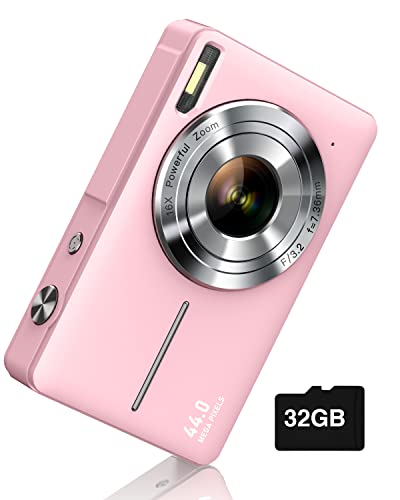
Pros
- Includes 32GB memory card
- Two batteries included
- Simple controls for beginners
- 16X zoom and 20 filters
Cons
- Skip if you need specified frame rates or sensor size

Pros
- 64GB TF card included
- USB-C charging and data transfer
- Lightweight body with lanyard
- Simple controls for beginners
Cons
- 16x zoom is digital
- No safety certifications are specified
- Who should skip it: buyers seeking advanced camera controls

Pros
- 4x optical zoom
- 27mm wide-angle lens
- 1080p video recording
- Uses two AA batteries
Cons
- Skip if you need more than 4x optical zoom
The Best Kids’ Digital Cameras by Use Case
Best for Younger Children: VTech KidiZoom Camera Pix Plus, Blue
The VTech KidiZoom Camera Pix Plus, Blue suits children ages 3–8 who are more interested in playful photo projects than high-resolution image files. Its 40-plus effects, talking-photo feature, four games, panoramas, and animation tools offer several ways to experiment. Its listing specifies a 2.0-megapixel camera, 4X zoom, and a 1.8-inch screen, so its appeal is creative play rather than a long specification sheet.
Reasons to buy:
- Intended age range of 3–8 years.
- Creative features include talking photos, collages, panoramas, and animations.
- MicroSD slot supports memory expansion up to 32GB.
Reasons to avoid:
- MicroSD card and USB cord are not included.
- It requires four AA batteries, which are also not included.
Skip it if you want a camera supplied with a memory card or rechargeable battery.
Best for Simple Everyday Play: Desuccus Kids Camera for Ages 3-12
The Desuccus Kids Camera for Ages 3-12 is a straightforward option for children who want to take photos, record video, and try built-in activities. It has a 2-inch screen, simple buttons, a supplied 32GB card, and USB-C charging through the included cable. Fifteen frames, six filters, five games, voice recording, burst shooting, and delayed capture provide variety without requiring a separate editing device.
Reasons to buy:
- The 32GB card is included, with the listing estimating storage for over 3,000 photos.
- USB-C cable and lanyard are included.
- Photo, video, voice recording, games, and effects support different kinds of play.
Reasons to avoid:
- The listing does not specify photo resolution or video resolution, so buyers seeking a particular output should verify it.
- Its 2-inch screen may feel small to children who prefer reviewing pictures on a larger display.
Skip it if you need clearly specified high-resolution video or a larger screen.
Best for Included Storage and a Larger Screen: Digital Camera UHD 4K with 64G Card 16X Zoom Light
The Digital Camera UHD 4K with 64G Card 16X Zoom Light is aimed at children ages 5–13 and beginners who want a compact camera with a 2.4-inch IPS screen. Its listing specifies 48MP photos, UHD 4K video, a fill light, and a 64GB TF card. The included USB-C cable is listed for charging and computer transfer, while 12 filters and features such as slow motion and a pause function give kids more ways to experiment.
Reasons to buy:
- Includes a 64GB TF card and USB-C data cable.
- The 2.4-inch IPS screen is larger than the screens specified for the VTech and Desuccus models.
- Listed features include fill light, slow motion, continuous shooting, and 12 filters.
Reasons to avoid:
- Its 16X zoom is digital, not optical.
- Do not treat the listed megapixel and 4K figures alone as proof of image quality; the published information does not specify sensor size or measured results.
Skip it if you specifically want optical zoom or a camera with an age range below five years.
Best for Older Beginners’ Video Features: Digital Camera 4K for Kids-48MP Autofocus Vlogging
The Digital Camera 4K for Kids-48MP Autofocus Vlogging is listed for children ages 5–13 who want a compact camera with autofocus and 4K video. The listing specifies 48MP photos, a 2.8-inch LCD, a 32GB card, and 16X digital zoom. It also includes a card reader, storage bag, lanyard, adapter, and cable, making it a comparatively complete starter bundle for a child who wants to move files to a computer.
Reasons to buy:
- Half-press shutter autofocus is described in the listing.
- The 2.8-inch screen is the largest specified among these six cameras.
- The supplied accessories include a 32GB memory card, card reader, and storage bag.
Reasons to avoid:
- The listed 16X zoom is digital, which is different from optical zoom.
- Battery-life wording is not a defined runtime; expect to charge as needed rather than relying on the vague extended-use claim.
Skip it if you prefer a camera with optical zoom or a more established, clearly specified age range for younger children.
Best for Two Included Batteries: Camkory Digital Camera FHD 1080P with 32G Card 16X
The Camkory Digital Camera FHD 1080P with 32G Card 16X fits families who want two batteries included for outings and a conventional point-and-shoot layout. Its listing specifies FHD 1080p video, 44MP photos, a 32GB card, and 16X digital zoom. It also lists 20 filters and features such as anti-shake, face and smile detection, webcam use, and continuous shooting.
Reasons to buy:
- Includes two batteries, a 32GB card, lanyard, storage bag, adapter, and cable.
- Listed age guidance covers children ages 5–13.
- Twenty creative filters and several shooting modes offer options beyond automatic photos.
Reasons to avoid:
- The zoom is digital rather than optical.
- The published information does not state screen size or battery runtime.
Skip it if a rechargeable USB-C design or a stated screen size is a priority.
Best for Optical Zoom: KODAK PIXPRO FZ45 16MP Compact Digital Camera
The KODAK PIXPRO FZ45 16MP Compact Digital Camera is the most conventional compact camera here, with a 16MP sensor, 4X optical zoom, and a 27mm wide-angle lens. It records 1080p video and supports Class 10 SD, SDHC, or SDXC cards up to 512GB. This may suit an older child who wants optical zoom and more memory-card flexibility, but the listing does not include a card.
Reasons to buy:
- 4X optical zoom differs from the digital zoom on several other picks.
- Supports compatible memory cards up to 512GB.
- Includes a 2.7-inch LCD and records 1080p video.
Reasons to avoid:
- Memory card is not listed as included.
- It uses two AA alkaline batteries, and the published data does not specify included batteries.
Skip it if you want a camera bundled with storage, child-focused games, or a rechargeable USB-C connection.
How to Choose the Best Digital Camera for Kids
Match controls and features to the child’s age
Age guidance gives you a starting point, not a guarantee that every child will find a camera easy to use. VTech lists its model for ages 3–8, while the Desuccus model is described for ages 3–12; the other kid-oriented compact models specify ages 5–13. For a younger child, prioritize simple buttons and inviting effects over a long feature list. For an older beginner, autofocus, a larger screen, and file-transfer accessories may be more useful.
Check how the camera handles basic tasks: taking a photo, recording video, reviewing a file, and changing modes. The published descriptions do not fully explain menu layouts for every model, so confirm the manual or listing details if a child needs especially simple controls. Games can add appeal, but they may matter less to a child who wants to learn framing and capture family events.
Read resolution claims alongside the actual camera features
Several listings advertise 48MP photos and 4K video, while the VTech specifies a 2.0MP camera and the Kodak specifies a 16MP sensor with 1080p video. Those numbers describe different advertised capabilities; they do not, by themselves, establish which camera will make better-looking photos. Sensor size, lens details, and measured image results are not supplied for most models, so avoid choosing on megapixels alone.
Consider the child’s task. For fun snapshots and effects, the VTech’s creative tools may matter more than resolution claims. For recording clips, compare the stated video formats and confirm that the child’s computer or playback device can handle the files. If a camera will be used mainly for distant subjects, distinguish optical zoom, such as the Kodak’s 4X, from digital zoom, listed on the other zoom-equipped picks.
Check storage and how files reach a computer
A memory card included in the box lets a child start saving photos without a separate purchase. Desuccus and Camkory include 32GB cards, QUIOF includes a 32GB card, and ocxu includes a 64GB TF card. VTech accepts a separately purchased microSD card up to 32GB, while the Kodak supports compatible SD-family cards up to 512GB but does not list one as included.
Storage capacity is only part of the transfer question. QUIOF lists a card reader and cable, while ocxu specifies computer transfer through its included USB-C data cable. Desuccus includes a USB-C charging cable, but the published details do not describe its computer-transfer process. Check whether your computer accepts the card directly, needs a reader, or can connect to the camera before choosing a model for frequent file sharing.
Compare power, screen size, and portability
Power differences affect what you need to pack. VTech uses four AA batteries; Kodak uses two AA alkaline batteries. Desuccus specifies a built-in 1000mAh battery and USB-C charging, while ocxu lists USB-C charging. Camkory includes two batteries, and QUIOF describes a 1500mAh battery. The published information does not give comparable runtime figures, so do not assume one model lasts longer based on capacity or promotional wording alone.
Screen size can affect how easily a child reviews a picture: listed sizes range from VTech’s 1.8-inch screen to QUIOF’s 2.8-inch LCD. A compact, light body may be easier for a child to carry, but the listing for only some models gives specific weight or drop-related design details. Compare the size and weight information in the listing, and consider whether a lanyard or storage bag is included for the child’s usual outings.
Separate useful creative tools from extra features
Filters and frames make pictures playful, while games, voice recording, slow motion, and animation support different activities. VTech has games, talking photos, and animation tools; Desuccus includes games and voice recording; ocxu lists slow motion and a pause function. Choose around the child’s interests rather than assuming more modes mean a better camera. If a camera will be used for family photos, a comfortable grip, accessible shutter, storage, and transfer method may matter more than effects.
For broader camera accessories, see our guide to smartphone tripods for content creators. A phone tripod is a separate accessory category, so check device compatibility and mounting needs rather than assuming it fits these cameras.
How We Compared
This comparison uses the published product descriptions and listed specifications, including stated age ranges, screen sizes, storage, power, video formats, zoom types, and included accessories. We considered how those details could suit different child and family use cases, and noted where the published information leaves a practical question unanswered. No customer feedback was supplied for these products, so the recommendations do not rely on review consensus.
Frequently Asked Questions
Which camera is suitable for a child who is three?
The VTech KidiZoom Camera Pix Plus is listed for ages 3–8, and Desuccus lists its camera for ages 3–12. Compare the control style and activities with the child’s needs, and check the current product listing for age guidance and instructions before use.
Do these cameras include memory cards?
Desuccus, QUIOF, Camkory, and ocxu list included cards, with capacities of 32GB, 32GB, 32GB, and 64GB respectively. VTech’s microSD card is not included, and the Kodak listing describes supported SD-family cards but does not list a card in the package.
Is digital zoom as useful as optical zoom?
They are different features. Digital zoom enlarges the image electronically, while optical zoom changes the lens’s framing; the Kodak specifies 4X optical zoom, and the other zoom-equipped models describe digital zoom. If photographing distant subjects is a priority, compare samples and product details rather than treating equal zoom numbers as equivalent.
Can a child connect these cameras to a computer?
The published details specifically describe computer transfer for VTech, QUIOF, and ocxu, though the methods differ. VTech lists USB transfer but says the USB cord is not included; QUIOF includes a card reader and cable; ocxu lists an included USB-C data cable. Check the computer’s ports and the camera’s instructions before buying if direct transfer is important.
Are the listed 4K and megapixel figures enough to predict photo quality?
No. Those figures describe listed resolution capabilities, not verified image quality. The published data does not give consistent sensor-size, lens, or image-sample information across the models. Choose based on the child’s intended use, zoom type, controls, storage, and transfer needs as well as resolution claims.
What should parents check before a child uses a camera?
Review the manufacturer’s age guidance, charging or battery instructions, and any included lanyard instructions. Adults should supervise young children around small accessories and cords, and should make sure a lanyard is used in the way the manufacturer recommends. The published product data does not specify safety certifications, so check the product documentation for applicable safety information.


Write Your Review
No reviews yet. Be the first to share your experience!