

Choosing a Hisense TV can mean deciding whether smoother motion and glare control matter more than a familiar streaming platform and a lower-cost feature set. This guide compares two 65-inch 4K models, so you can match their listed display, HDR, audio, and smart-TV features to your room and viewing habits.

Pros
- Mini-LED backlighting with QLED color
- Native 144Hz refresh rate
- Supports four listed HDR formats
- Built-in subwoofer
Cons
- HDMI version is not specified
- Who should skip it: shoppers needing HDMI-version details before comparing
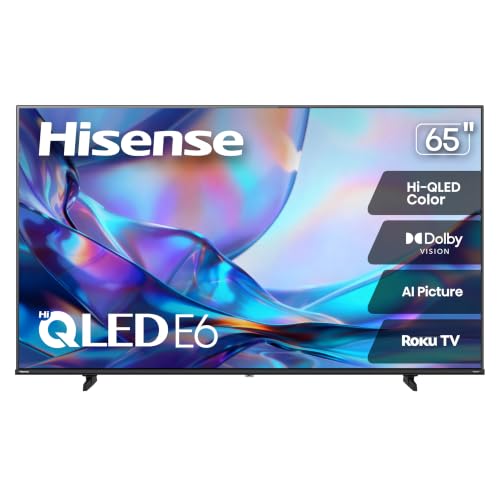
Pros
- 65-inch 4K QLED display
- Supports Dolby Vision, HDR10, and HLG
- Includes VRR and ALLM gaming features
Cons
- Skip if you need specified refresh rate or HDMI version
The Best TVs by Use Case
Best for Fast Gaming and Bright Rooms: Hisense 65″ U6 Pro Series Mini‑LED ULED 4K UHD HDR
The Hisense 65″ U6 Pro Series Mini‑LED ULED 4K UHD HDR is the more gaming-focused choice in this pair. Its listing specifies a native 144Hz refresh rate, Mini-LED backlighting with hundreds of light zones, and an anti-reflection, glare-free screen, features that suit fast-moving games and rooms where reflections can distract. The listing also names Dolby Vision IQ, HDR10+, a built-in subwoofer, Fire TV, and Alexa+; buyers should confirm that supported formats and services match their sources and region. Read the Hisense TV comparison alongside our Roku TV guide if platform choice is part of your decision.
Reasons to buy:
- Native 144Hz refresh rate is a clear fit for users prioritizing fast motion in games and sports.
- Mini-LED backlighting and the listed anti-reflection screen address contrast and distracting room glare.
- Fire TV, Alexa+, Dolby Vision IQ, and HDR10+ provide a broad set of listed viewing and voice features.
Reasons to avoid:
- The listing does not specify HDMI port count, supported HDMI bandwidth, or which inputs support 144Hz. Verify these details for your console or PC before buying.
- Fire TV may not suit viewers who prefer Roku or another smart-TV interface.
Skip it if you want Roku built in, or if your main priority is spending less on a 4K set rather than the listed gaming and glare-control features.
Best for Roku and Everyday Streaming: Hisense 65″ Class E6SR Series Hi-QLED 4K UHD
The Hisense 65″ Class E6SR Series Hi-QLED 4K UHD suits viewers who want a Roku smart TV with 4K resolution and a more straightforward feature set. Its listing names Dolby Vision, HDR10, HLG, AI picture processing with 4K upscaling, and DTS Virtual:X. Game Mode Plus, VRR, and ALLM are also listed, but the published details do not state a refresh rate or explain supported VRR ranges, so confirm compatibility with your gaming device if those features are decisive.
Reasons to buy:
- Roku provides a different smart-TV platform from the Fire TV model, which can suit viewers already comfortable with Roku navigation.
- Dolby Vision, HDR10, and HLG support offer several listed HDR formats for compatible content.
- Apple AirPlay and compatibility with Alexa and Google Assistant are listed for buyers who use those ecosystems.
Reasons to avoid:
- The listing does not specify a native refresh rate, HDMI port details, or the exact VRR range. Verify the inputs and gaming support you need.
- It does not list Mini-LED backlighting, a glare-free screen, or a built-in subwoofer, features specified for the other pick.
Skip it if you need a specifically listed native 144Hz refresh rate or glare-reduction feature, and consider the U6 Pro instead.
How to Choose the Best Hisense TV
Match refresh rate and gaming features to your system
Refresh rate matters most when you watch fast action or play games that can output high frame rates. The U6 Pro listing specifies native 144Hz, while the E6SR listing names Game Mode Plus, VRR, and ALLM but does not state a refresh rate. Those are not interchangeable details: if you want a particular frame rate, check the TV’s official specifications for supported resolution and refresh rate on each input.
Also check the ports. The published product information does not give HDMI counts, HDMI bandwidth, or which inputs support particular gaming features. Confirm these details against your console or PC, especially if you need to connect more than one device or use high-refresh-rate output.
Consider room brightness and reflections
A bright room with windows or lamps opposite the screen can make reflections distracting. The U6 Pro listing specifically describes its screen as anti-reflection and glare-free. That is a manufacturer-listed feature, not a guarantee that every reflection disappears; if glare is a concern, consider where the screen will face and check the model’s display details before purchase.
The E6SR listing does not specify a glare-control feature. It may still suit a room where reflections are less troublesome, but the published information does not support treating its screen as equivalent to the U6 Pro’s listed anti-reflection display. For a television intended for outdoor use, weather and brightness needs call for a different checklist; see our guide to outdoor TVs for Arizona.
Check HDR formats against the content you watch
HDR format support only helps when the TV, content, and playback device support the same format. The U6 Pro listing names Dolby Vision IQ and HDR10+, while the E6SR listing names Dolby Vision, HDR10, and HLG. Compare those formats with the services and devices you use, and avoid assuming that a longer format list alone proves better picture quality.
Both listings describe 4K resolution, but resolution does not describe every part of image quality. The U6 Pro also lists Mini-LED zones and Hi-QLED color; the E6SR lists Hi-QLED color and AI 4K upscaling. Upscaling can process lower-resolution material for a 4K screen, but the source remains important, so consider what you typically stream or connect.
Pick a smart platform and check ecosystem details
The U6 Pro uses Fire TV and lists Alexa+, while the E6SR is a Roku TV and lists Apple AirPlay plus compatibility with Alexa and Google Assistant. Choose the interface that fits your household’s habits, then verify that your preferred streaming apps and voice-control features are available in your region. The published information does not list every app or describe setup requirements.
For Apple device owners, AirPlay is specifically listed for the E6SR. Do not assume the same feature is present on the U6 Pro from the published details. Likewise, assistant compatibility does not establish that every voice command or smart-home routine will work identically; check the exact integration you plan to use.
Think about built-in sound and external connections
The U6 Pro listing specifies a built-in subwoofer, while the E6SR lists DTS Virtual:X. These are different sound features, and neither listing provides measured audio performance or a complete speaker specification. If dialogue clarity, bass, or surround effects matter, compare the manufacturers’ full audio details and check which audio outputs and connections each model provides.
Neither published listing states audio output connections or supported soundbar formats. Check those details before buying a soundbar or connecting an existing receiver. The E6SR’s DTS Virtual:X listing does not, by itself, confirm a particular external audio setup.
How We Compared
This comparison uses the published product listings, including stated screen technology, resolution, refresh and gaming features, HDR formats, smart platforms, audio descriptions, and listed integrations. The available product data includes no customer-review details, and it does not provide full port specifications or complete app lists. We therefore distinguish stated features from information buyers should verify, and base each recommendation on the use case supported by the listing.
Frequently Asked Questions
Which Hisense TV is better for gaming?
The U6 Pro is the clearer fit if you prioritize a stated native 144Hz refresh rate. The E6SR lists Game Mode Plus, VRR, and ALLM, but the published information does not specify its refresh rate or VRR range. Check the port-level specifications and your console or PC’s output before choosing either model.
Do both models support Dolby Vision?
Yes. Dolby Vision is listed for the E6SR, and Dolby Vision IQ is listed for the U6 Pro. The U6 Pro also lists HDR10+, while the E6SR lists HDR10 and HLG. Confirm that your streaming service or connected device provides content in the format you want.
Is Fire TV or Roku a better fit?
Neither platform is automatically the better choice for every household. The U6 Pro uses Fire TV and lists Alexa+, while the E6SR is a Roku TV and lists compatibility with Alexa and Google Assistant, as well as Apple AirPlay. Choose based on the interface and device integrations you use, then verify specific app and feature availability.
Which TV should I consider for a room with glare?
The U6 Pro is the only model here whose listing describes an anti-reflection, glare-free screen. That feature makes it the more directly supported option for a bright room, though room layout and light sources still matter. The E6SR listing does not specify a comparable screen treatment.
Do I need a soundbar with either TV?
The published details do not establish whether either TV will meet your listening needs. The U6 Pro lists a built-in subwoofer, and the E6SR lists DTS Virtual:X, but neither listing supplies measured sound performance or full audio-output details. Compare the full audio specifications and connection options with your room and soundbar plans.
What should I verify before ordering?
Confirm the model number, HDMI inputs, supported refresh rates per input, VRR details, audio connections, and availability of the apps and voice features you need. The published descriptions do not specify all these details. If you are also comparing other screen sizes, our 55-inch TV guide and TCL TV comparison offer related buying context.


Write Your Review
No reviews yet. Be the first to share your experience!