

Choosing the best Fire TV depends first on whether you need a television or want to add streaming to a screen you already own. Screen resolution, refresh rate, HDR support, and room size then help narrow the choice, especially if you plan to play games as well as watch shows.
This guide compares four options with different strengths: a large Mini-LED television with advanced gaming features, a 4K streaming stick, and two smart TVs in different sizes and resolutions. The listed details can help you decide what fits your setup, while missing information such as port counts is a reason to verify the product listing before purchase.

Pros
- 4K Mini-LED with full-array local dimming
- Native 144Hz refresh rate
- Broad HDR format support
- Fire TV platform with Alexa
Cons
- Who should skip it: buyers needing confirmed HDMI specifications
Pros
- 4K Ultra HD and HDR10+ support
- Alexa voice search across apps
- Access to free, ad-supported content
Cons
- 4K and HDR10+ benefit requires a compatible TV
- Some content and cloud gaming require subscriptions
- Who should skip it: viewers without a 4K TV seeking no Alexa features

Pros
- Built-in Fire TV streaming platform
- Alexa voice remote with preset app buttons
- Wi-Fi 6 support
- AirPlay content sharing
Cons
- 720p resolution may not suit viewers seeking sharper detail
- Who should skip it: viewers needing more than two HDMI inputs

Pros
- 4K resolution with HDR10+
- Four HDMI inputs
- Alexa voice remote included
- AirPlay support
Cons
- Who should skip it: shoppers needing a specified refresh rate
The Best Fire TVs by Use Case
Best for High-Refresh-Rate Gaming: Toshiba 65" Class Z670R Series Mini-LED 4K UHD
The Toshiba 65" Class Z670R Series Mini-LED 4K UHD suits a living room where a large 4K screen and gaming features matter. Its listed native 144Hz refresh rate, VRR 144Hz, AMD FreeSync Premium, and ALLM make it the most gaming-focused television in this group. Mini-LED with Full Array Local Dimming and QLED color also give it a more advanced picture feature set than the other televisions here.
Reasons to buy:
- Native 144Hz refresh rate, VRR 144Hz, FreeSync Premium, and ALLM are listed for compatible gaming setups.
- Mini-LED, local dimming, and QLED are specified alongside Dolby Vision IQ and HDR10+ support.
- REGZA Power Audio Pro includes a bass woofer, with Dolby Atmos also listed.
Reasons to avoid:
- At 65 inches, it may not suit a small room or a viewing distance that favors a smaller screen.
- The published details do not identify HDMI port count or specific console connection requirements, so check the listing before planning a multi-device setup.
Skip it if you want an inexpensive way to add streaming to a television you already own, or you need a compact bedroom screen.
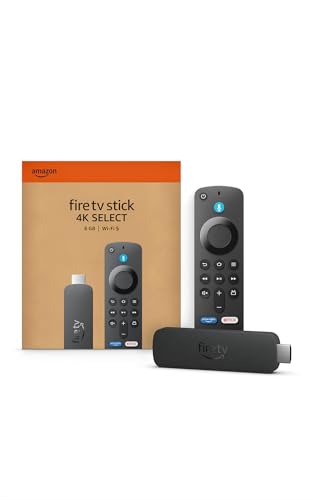
Best for Adding 4K Streaming: Amazon Fire TV Stick 4K Select
The Amazon Fire TV Stick 4K Select is a streaming device, not a replacement television. It is the straightforward fit when your existing TV is suitable but needs Fire TV apps and a newer streaming interface. The listing specifies 4K Ultra HD and HDR10+, plus Alexa voice search and access to major streaming apps, though subscriptions may be needed for some content.
Reasons to buy:
- Provides 4K streaming and HDR10+ on a compatible television.
- Connects to Wi-Fi and is described as a plug-in setup, rather than a full TV replacement.
- Supports Alexa searches and cloud gaming through Xbox Game Pass and Luna, with compatible subscriptions and a controller required for Xbox play.
Reasons to avoid:
- It cannot upgrade the television’s native resolution, refresh rate, or HDR capabilities; picture output depends on the connected screen.
- The listing does not provide detailed network requirements or port information. Confirm your TV has a suitable connection and your Wi-Fi can support streaming.
Skip it if you need a complete television, or if your current screen cannot display the resolution and HDR features you want.
Best for Compact HD Viewing: Amazon Ember 32" 2-Series with Fire TV
The Amazon Ember 32" 2-Series with Fire TV is a small smart TV for spaces such as a bedroom or secondary room where HD is sufficient. Its listed resolution is 720p, making it a different proposition from the 4K televisions in this guide. Wi-Fi 6 support, a quad-core processor, Alexa voice controls, and the Ambient Experience add convenience features, but the listing does not specify an HDR format.
Reasons to buy:
- The 32-inch size can fit spaces where a larger television would be impractical.
- Fire TV apps, Alexa voice search, and free and live TV options are described in the listing.
- Omnisense sensors are listed for waking the display to show artwork or start viewing.
Reasons to avoid:
- Its 720p resolution is less detailed than 4K, which matters more when sitting close or viewing high-resolution content.
- The listing does not specify HDMI port count, so check connectivity if you plan to connect a console or other devices.
Skip it if you want a 4K main-room television or prioritize detailed gaming visuals on a larger screen.
Best for a Mid-Size 4K Smart TV: Amazon Ember 43" 4-Series with Fire TV
The Amazon Ember 43" 4-Series with Fire TV offers a middle ground for buyers who want a complete 4K smart TV without choosing the largest screen in this comparison. The listing specifies 4K Ultra HD, HDR10+, enhanced brightness, Wi-Fi 6, and a quad-core processor. Amazon Luna and Xbox Game Pass cloud gaming are also listed, but the published details do not state a native refresh rate or variable refresh rate support.
Reasons to buy:
- 4K resolution and HDR10+ suit viewers who want more detail than an HD screen provides.
- Fire TV, Alexa+ voice search, and Omnisense Ambient Experience are built into the television.
- Cloud gaming options are listed for Luna and Xbox Game Pass, without a console being required for those services.
Reasons to avoid:
- The listed HDR format is HDR10+, not Dolby Vision, and the published specifications do not establish support for other HDR formats.
- Refresh rate and HDMI port details are not provided here, so gaming buyers should verify them against the intended console or PC.
Skip it if you need a documented high-refresh-rate gaming display or a particularly large screen for a spacious room.
How to Choose the Best Fire TV for Your Setup
Decide whether you need a television or a streaming device
A Fire TV television combines the screen and streaming platform in one device. A streaming stick adds apps to a compatible TV you already own, which can be a better fit when the display remains satisfactory. It will not change that TV’s panel, resolution, or refresh rate, so do not expect a stick to turn an HD screen into a native 4K display.
Before choosing a stick, confirm your television has a suitable connection and supports the picture formats you want to use. Before choosing a TV, consider whether replacing your current screen makes sense, rather than adding streaming access alone.
Match screen size and resolution to viewing distance
Screen size should fit the room and the distance from your seat, not just the available wall space. A 32-inch HD television can be a sensible secondary-room choice, while a larger 4K display may suit a main viewing area. A higher resolution provides more pixels, but it does not by itself guarantee better contrast, color, or motion handling.
Check the exact size and resolution on the listing, then measure the available space and consider where viewers will sit. If you are comparing room sizes or other screen options, our guide to 55-inch TVs offers another size-focused comparison.
Check refresh rate and gaming support separately
Refresh rate describes how often a display can update its image, while features such as VRR and ALLM address variable frame rates and automatic low-latency operation. These specifications matter if you play games where smooth motion and responsiveness are priorities. Among these options, the Toshiba listing explicitly gives a native 144Hz rate and gaming features; the supplied Ember 4-Series information does not state its refresh rate.
Do not infer gaming performance from a television’s 4K label alone. Check the product listing for refresh rate, VRR support, and the connection details needed by your console or PC. The Fire TV Stick 4K Select lists cloud gaming, but cloud play also depends on network conditions and the required service or controller.
Compare HDR formats with your content sources
HDR format support affects which HDR signals a screen can handle, but the source must offer compatible content too. The Toshiba listing names Dolby Vision IQ, HDR10+, HDR10+ Adaptive, and HLG. The Ember 4-Series specifies HDR10+, while the streaming stick also lists HDR10+. The published details for the 2-Series do not identify an HDR format.
Look at both the TV’s supported formats and the services or devices you use. Do not assume that an app’s HDR program will use every format supported by a screen, or that a streaming stick can add HDR capability to a television that lacks it.
Verify apps, audio, and connections for your room
Fire TV brings apps and live content together, and the published listings name services such as Prime Video, Netflix, YouTube, Disney+, and others. App access does not mean every title is included without a subscription. Check whether the services you use are available and account for any separate subscription requirements.
Audio details also differ. The Toshiba listing specifies Dolby Atmos and a built-in bass woofer, while the Ember models list Dolby Audio. These descriptions do not establish how a television will sound in your room. If you plan to use external audio equipment or several HDMI devices, verify the TV’s port count and audio connection options because those details are not supplied for these models.
How We Compared
This comparison uses the published product descriptions and listed specifications, including screen size, resolution, display technology, refresh rate, HDR formats, smart features, gaming support, and audio details. We also considered the supplied customer-rating information as listing context, but no written customer feedback was provided. Recommendations reflect stated features and intended use; missing details, such as port counts on these products, are identified as items to verify rather than filled in with assumptions.
Frequently Asked Questions
Can a Fire TV Stick make any television a 4K TV?
No. The stick can provide 4K streaming only when connected to a compatible 4K television. It cannot change an HD television’s native screen resolution. Check the television’s specifications as well as the streaming device’s supported formats.
Which option is intended for high-refresh-rate gaming?
The Toshiba listing explicitly specifies native 144Hz, VRR 144Hz, AMD FreeSync Premium, and ALLM. The published information for the other televisions does not identify comparable native refresh-rate support. Confirm the required connections and console compatibility on the listing before buying.
Is a 720p television suitable for a bedroom?
It can suit a smaller room or secondary viewing space if HD resolution meets your needs. The 32-inch 2-Series is listed at 720p, which has fewer pixels than 4K. If you sit close, watch detailed 4K content, or want one television for a main room, compare 4K options instead.
Do Fire TV apps include their movies and shows at no extra cost?
No. The listings describe access to streaming apps and content, including some free, ad-supported programming, but subscription fees may apply. Check the terms for each service and title you plan to watch.
Can the Ember 4-Series stream games without a console?
The listing names Amazon Luna and Xbox Game Pass cloud gaming as options that do not require a console. Cloud gaming depends on the relevant service and its requirements; the published information does not specify network performance needs. Check current service and controller requirements before relying on this feature.
What should I check before connecting a soundbar or several devices?
Verify the television’s HDMI port count and audio connection options on its product listing. Those details are not provided for the compared models. Also confirm that your soundbar or other equipment supports the connection and audio formats you intend to use.


Write Your Review
No reviews yet. Be the first to share your experience!