

Choosing between Kindle Paperwhite and Kindle Colorsoft means deciding whether color content matters more to you than the Paperwhite’s longer listed battery life. Both lines offer 7-inch glare-free displays, adjustable warm light, waterproof designs, and distraction-free reading.
The listed options include 16GB models and 32GB Signature Editions. Colorsoft adds color for covers, illustrations, comics, and highlights; Paperwhite keeps text reading in black and white and lists up to 12 weeks of battery life.
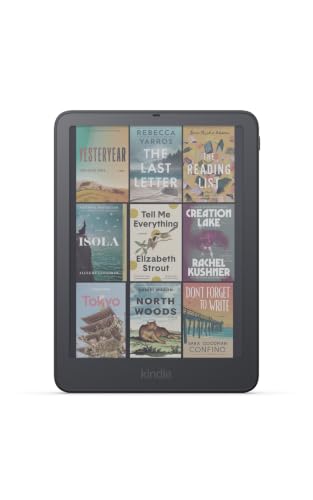
Pros
- Paper-like color display
- 32GB of storage
- Auto-adjusting front light
- Replaceable battery
Cons
- Page-turn cover and remote sold separately
- Who should skip it: readers who do not need color


Pros
- 7-inch paper-like color display
- 32GB of storage
- Auto-adjusting front light
- Replaceable battery
Cons
- Page-turn accessories sold separately
- Who should skip it: readers who do not need color
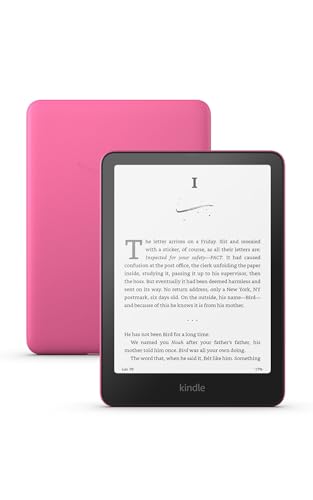

Pros
- 7-inch color display
- Four highlight colors
- Adjustable display tone and Dark Mode
- USB-C charging
Cons
- Who should skip it: readers focused on black-and-white reading
Quick Verdict
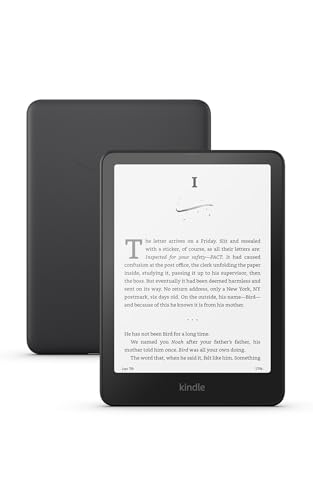
Choose the Amazon Kindle Paperwhite Signature Edition 32GB if you mainly read novels and want the longer listed battery life, auto-adjusting front light, and 32GB storage. Its black-and-white display suits text-focused reading, but it cannot show page content in color.
Choose the Amazon Kindle Colorsoft Signature Edition 32GB if comics, graphic novels, or colored highlights are part of your reading. Its color screen and 32GB storage add flexibility, while its listed battery life is shorter than Paperwhite’s.
Kindle Paperwhite vs. Kindle Colorsoft: Key Differences
Display and color content
The Paperwhite models have a 7-inch, high-contrast, glare-free display intended for black-and-white reading. Colorsoft models have a 7-inch paper-like color display, with the listing naming comics, graphic novels, covers, and colored highlights as uses. Both lines include adjustable warm light, and listed Colorsoft models also include Dark Mode.
For novels and other text, Paperwhite gives you the simpler monochrome option. Colorsoft is the more suitable choice when illustrations or color-coded highlights help you follow the page, though the published information does not specify color resolution or color accuracy.
Battery life
Amazon lists up to 12 weeks on a charge for the supplied Paperwhite models and up to 8 weeks for the Colorsoft models. These are manufacturer claims, not a guarantee of your reading time between charges. The listings say display use draws power when you turn a page or use the front light.
If you travel often or prefer charging less frequently, Paperwhite has the longer stated runtime. Your results may differ with reading habits and light use.
Storage and Signature Edition features
The supplied standard Paperwhite and Colorsoft models have 16GB of storage. Their Signature Edition counterparts have 32GB, auto-adjusting front lights, and listings that specify no ads. The standard Colorsoft listing does not specify those Signature Edition features, so check the individual listing when choosing between variants.
Either capacity supports different reading libraries, but the published information does not state how much space specific books or downloads use. Choose 32GB if you want more listed storage; do not assume that every feature on a Signature Edition applies to a standard model.
Design, reading comfort, and water
The published listings describe both lines as waterproof and suitable for reading by a pool or in a bath. They also specify glare-free screens and adjustable warm light. The newest Signature Editions are described as thinner and having an aluminum design, but those details should not be applied to the standard 2024 models without confirmation.
Both lines are designed for indoor and bright-light reading, with warm light for evening use. The product information does not provide a water-resistance rating, so verify the device’s care guidance before exposing it to water.
Battery replacement and page turns
The two supplied Signature Editions specify a replaceable battery and double-tap page turns. Those details are not listed for the standard models. If either feature matters, confirm it on the exact model’s product page rather than assuming it comes with every Paperwhite or Colorsoft.
Which Should You Buy?
For novels and longer trips: The Amazon Kindle Paperwhite 16GB (2024 model) offers a 7-inch glare-free screen and a listed battery life of up to 12 weeks. Pros: longer stated runtime and adjustable warm light. Cons: black-and-white display and 16GB storage. Who should skip it: readers who want color pages.
For comics and illustrated books: The Amazon Kindle Colorsoft 16 GB (2024 model) brings color to covers, content, and highlights. Pros: color display and Dark Mode. Cons: shorter listed battery life than Paperwhite. Who should skip it: readers who do not need color and prioritize the longer Paperwhite battery claim.
For more listed storage and Signature Edition features: The Amazon Kindle Paperwhite Signature Edition 32GB suits text readers who want 32GB, auto-adjusting light, and no ads according to the listing. Pros: these listed features and up to 12 weeks of battery life. Cons: no color display. Who should skip it: readers who need color for their books.
For color reading with more storage: The Amazon Kindle Colorsoft Signature Edition 32GB combines color pages with 32GB and an auto-adjusting front light. Pros: color, 32GB, and listed replaceable battery. Cons: up to 8 weeks of stated battery life. Who should skip it: readers who mainly want monochrome text and longer listed runtime.
The published listings also include a second color option, the Amazon Kindle Colorsoft Signature Edition 32GB in Fig, and a black standard Paperwhite, the Amazon Kindle Paperwhite 16GB (2024 model). Their listed core features match their respective color and storage variants. Pros: choice of listed finish. Cons: the published information does not establish a functional difference between finishes. Who should skip either: anyone seeking features not specified for that variant.
If you are still weighing an e-reader against a general-purpose screen, our guide to tablets versus Kindles explains the broader differences. Browse the Reading Tablets category for more e-reader comparisons.
How We Compared
We compared the published product listings for display type, storage, stated battery life, lighting, water-related claims, and Signature Edition features. The listings provide specifications and feature descriptions, but do not establish typical battery results or differences between color finishes.
Frequently Asked Questions
Is Kindle Colorsoft better than Kindle Paperwhite?
It depends on what you read. Colorsoft is the better fit for color content and colored highlights, while Paperwhite is a strong fit for black-and-white reading and has the longer listed battery life.
Do both devices have a 7-inch screen?
Yes. The supplied Paperwhite and Colorsoft models specify 7-inch displays. Paperwhite uses a high-contrast monochrome display, while Colorsoft uses a color display.
Which Kindle has longer listed battery life?
The supplied Paperwhite listings say up to 12 weeks per charge. The Colorsoft listings say up to 8 weeks. These are manufacturer estimates, and actual battery life can vary.
Should I choose 16GB or 32GB?
The standard models listed here have 16GB, while the Signature Editions have 32GB. The published data does not state the space used by books or other content, so consider how much you plan to keep on the device and verify the exact model listing.
Are these Kindles waterproof?
The published listings describe the models as waterproof and suitable for settings such as a pool or bath. They do not provide a water-resistance rating, so check Amazon’s model-specific care instructions before exposing a device to water.


Write Your Review
No reviews yet. Be the first to share your experience!