

A retractable cable can keep a desk, car, or travel bag tidier, but one design may not suit every device. Some cables offer USB-C power for laptops, while multi-connector models prioritize compatibility with phones and accessories.
This guide compares retractable charging cables by connector type, stated power, length, and extra features. Check your device ports and charger before choosing, especially if you need laptop charging, data transfer, or a connection to CarPlay.

Pros
- Three built-in connector types
- Retractable 4-foot design
- Two cables included
Cons
- 3A output is shared across devices
- Only Lightning supports data transfer and Apple CarPlay
- Who should skip it: buyers needing data sync on USB-C or Micro-USB

Pros
- Five preset cable lengths
- Compact retractable storage
- Two cables included
- Up to 240W charging support
Cons
- 480 Mbps data transfer, no video transmission
- Who should skip it: users needing USB-C video output

Pros
- Retracts for compact storage
- Adjustable from either side
- Supports up to 100W charging
- Light 50-gram weight
Cons
- No video transmission; data transfer tops out at 480 Mbps
- Skip it if you need video output or faster data transfer
Pros
- Three connector types in one cable
- Four adjustable cable lengths
- Two cables per pack
Cons
- 3.5A maximum output is shared
- Only Lightning supports data transfer and CarPlay
- Who should skip it: buyers needing data transfer on USB-C

Pros
- Three connector types in one cable
- Retractable, 3.3-foot design
- Two cables included
Cons
- Who should skip it: users wanting a dedicated single-connector cable

Pros
- Two cables included
- Retractable design
- Built-in phone stand
- Multiple connector types
Cons
- Wall charger not included
- Who should skip it: buyers needing a cable longer than 4 feet

Pros
- USB-C, Lightning, and Micro-USB connectors
- Four adjustable cord lengths
- Retractable design for compact storage
Cons
- Lightning connection does not support CarPlay
- Who should skip it: drivers needing CarPlay through Lightning
The Best Retractable Charging Cables by Use Case
Best for High-Power USB-C Charging: SOOPII 240W Retractable USB C Cable with Mag Snap
The SOOPII 240W Retractable USB C Cable with Mag Snap suits people carrying USB-C laptops and phones who want one compact cable. Its listing specifies up to 240W charging with PD 3.1 and an E-Mark chip, along with five preset lengths and magnetic snap storage. It is a USB-C-to-USB-C cable, so it will not directly connect devices that need Lightning or Micro-USB.
Reasons to buy:
- Stated 240W capacity supports devices that call for high USB-C power, provided the charger and device also support the needed power level.
- Five preset lengths and a magnetic storage design help limit loose cable in a bag or on a desk.
- The listing states a 24-month warranty and protection features through its E-Mark chip.
Reasons to avoid:
- The cable supports USB-C charging and 480Mbps data transfer, but not video transmission.
- It has USB-C connectors only, so older devices may need another cable.
Skip it if you need HDMI-style video from a laptop or a cable with Lightning and Micro-USB ends.
Best for a Simple USB-C Setup: Baseus USB C to USB C Cable
The Baseus USB C to USB C Cable is a straightforward option for someone who wants a retractable USB-C cable without multi-device connectors. Its listing specifies up to 100W power delivery, a 3.3-foot cable, four preset lengths, and adjustment from either side. That makes it a practical fit for a USB-C phone, tablet, or laptop when the charging setup supports the device’s needs.
Reasons to buy:
- USB-C connectors at both ends suit compatible phones, tablets, and laptops.
- Stated 100W charging gives more headroom than low-power phone-only cables.
- Both ends can be pulled to adjust the cable, and the design has four preset lengths.
Reasons to avoid:
- Data transfer is limited to 480Mbps, and the cable does not support video transmission.
- It cannot directly charge devices that use Lightning or Micro-USB connectors.
Skip it if you need display output over USB-C or regularly charge devices with different connector types.
Best for Mixed Devices on Trips: 5 in 1 Retractable Cable
The 5 in 1 Retractable Cable is designed for travelers who carry a mix of USB-C and Lightning devices. The listing describes USB-A and USB-C inputs, multiple device connectors, a 4-foot retractable cable, and a built-in phone stand. It also claims up to 100W charging through USB-C, but the actual charging rate depends on the charger, device, and connector path used.
Reasons to buy:
- Multiple input and device connector options can reduce the number of separate cables needed for mixed devices.
- The listing states support for CarPlay and Android Auto, subject to vehicle compatibility.
- A built-in stand gives the cable a viewing use while a phone charges.
Reasons to avoid:
- The advertised 100W figure does not mean every connector or connected device receives that power.
- USB-A and USB-C input options make it important to check which connection matches your wall adapter or car charger.
Skip it if you only use USB-C devices and want a dedicated cable with clearly stated USB-C-to-USB-C power and data limits.
Best Value for Everyday Compatibility: LISEN Multi Charging Cable
The LISEN Multi Charging Cable combines USB-C, Lightning, and Micro-USB connectors in a compact retractable design. Its four length settings extend to 3.67 feet, and the listing says it can charge three devices at once from one USB-A charging head. USB-C supports 480Mbps data transfer and CarPlay when used on its own; Lightning is listed for charging only.
Reasons to buy:
- Three connector types cover many older and newer phones and small electronics.
- Four length settings help adapt the cable to a car, desk, or travel bag.
- The listing describes a flat TPE cable and aluminum housing, plus more than 10,000 tensile tests as a manufacturer claim.
Reasons to avoid:
- Its stated USB-C output is 9V/3.1A, not a laptop-class 100W or 240W specification.
- Lightning does not support CarPlay or data transfer according to the listing.
Skip it if you need high-power laptop charging or want Lightning data and CarPlay support.
Best for Two-Cable Travel Kits: 4 in 2 Multi Charging Cable 4A,Retractable USBA/C
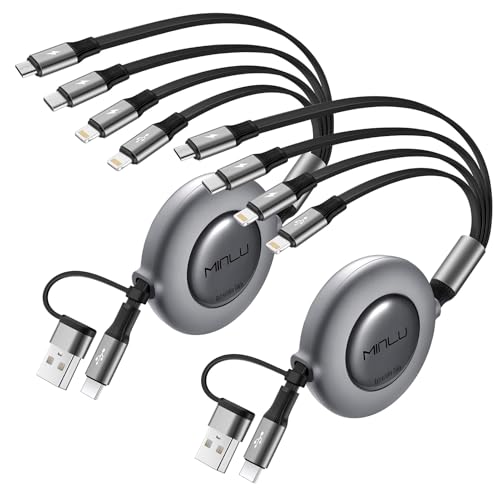
The 4 in 2 Multi Charging Cable 4A,Retractable USBA/C comes as a two-pack and offers USB-A and USB-C inputs with Lightning, Micro-USB, and USB-C device connectors. Its listed length settings range from 1.5 to 4 feet, which gives flexibility in a car or shared charging area. The listing states a maximum total output current of 3.5A, not 3.5A for each connected end.
Reasons to buy:
- Two cables can be kept in separate places, such as a travel bag and car.
- USB-A and USB-C inputs work with a wider range of charger ports than a cable with one input type.
- Four length settings and several device connectors suit mixed-device households.
Reasons to avoid:
- The stated 3.5A output is shared total current, so simultaneous charging does not provide that amount to every device.
- Only the Lightning port is listed as supporting fast data transfer and CarPlay; USB-C and Micro-USB are for charging.
Skip it if you need high-wattage laptop charging or frequent data transfer through USB-C.
Also Considered
The Multi Charging Cable 3A, Retractable Car Charger may suit people wanting a two-pack of 4-foot cables with Lightning, USB-C, and Micro-USB ends, but its 3A figure is shared total output and it lacks the extra stand or higher stated USB-C power of the main picks.
The 3 in 1 Retractable Multi Charging Cable could fit someone who wants a two-pack of 3.3-foot cables and stated 480Mbps data support across its connector types, but its listing provides less detail on adjustable length presets and other travel features than the selected multi-connector options.
How to Choose a Retractable Charging Cable
Match connectors at both ends
Start with the device port and the charger port. A USB-C-to-USB-C cable, such as the Baseus or SOOPII, will not plug directly into a USB-A adapter. Multi-connector cables may accept USB-A and USB-C inputs, but verify which device connectors are included and whether they support charging, data, or both.
Connector shape alone does not guarantee full feature support. For example, the LISEN listing limits CarPlay and data support by connector type. If you rely on CarPlay, check the specific port and cable instructions along with your vehicle’s compatibility.
Check power needs and shared output
Compare the cable’s stated power with the maximum input supported by your device and charger. The SOOPII lists up to 240W and the Baseus up to 100W, but those figures do not make a phone charge at that level if its charger or device supports less. A cable also cannot increase a wall adapter’s output.
Multi-device models often quote total current rather than power for each connector. The Minlu 4 in 2 listing specifies up to 3.5A total, while the Minlu 3A listing specifies 3A total. If several devices charge together, do not read those numbers as a per-device guarantee.
Separate charging from data and video
For file transfers, confirm the stated data rate and which connector supports it. The Baseus and SOOPII specify 480Mbps data transfer and no video transmission. The LISEN listing says USB-C supports 480Mbps data and CarPlay when used alone, while its Lightning connector is charging-only.
If you want to connect a laptop to a monitor, do not assume any USB-C cable carries a display signal. The Baseus and SOOPII explicitly do not support video, so choose a cable whose listing clearly states video support for your device and display.
Choose length settings for where you charge
A short retractable cable can be easier to store, while a longer extension can reach across a car console or desk. The products here list different maximum lengths, from 3.3 feet on Baseus and ASICEN models to 4 feet on several Minlu cables. Check whether the listed length is enough for your charging location, and consider how the cable will sit when pulled out.
Preset lengths may make it easier to avoid excess slack. SOOPII specifies five settings, while Baseus specifies four and allows adjustment from either side. Those design details affect convenience, not charging compatibility.
Decide whether extras justify added complexity
A built-in phone stand, multiple connector types, or a two-pack may help with travel and shared use. The 5 in 1 model adds a phone stand and claims compatibility with CarPlay and Android Auto; the Minlu 4 in 2 and ASICEN models are listed as two-packs. These features can reduce what you carry, but a dedicated cable may be clearer when you need a specific power or data capability.
For more cable and charging comparisons, browse our charging cable category and the wider Power & Charging section.
How We Compared
We compared the supplied product specifications and listing details, including connector combinations, stated power and data limits, length settings, pack quantities, and extra features. Customer feedback data supplied for these products did not include review text, so the recommendations focus on listed features and their fit for different charging needs.
Frequently Asked Questions
Can a retractable USB-C cable charge a laptop?
It can if the cable, charger, and laptop support compatible USB-C power levels. The SOOPII lists up to 240W and the Baseus up to 100W, but check your laptop’s charging requirements and the charger’s output before buying.
Can I use these cables to connect a phone to a car for CarPlay?
Some listings describe CarPlay support, but support depends on the connector and device. The Minlu 5 in 1 listing says it supports CarPlay and Android Auto when the vehicle supports the system. LISEN lists CarPlay for its USB-C connector used alone, not its Lightning connector.
Do retractable charging cables transfer data?
Some do, but data support varies by model and connector. Baseus and SOOPII list 480Mbps data transfer and no video transmission. Other multi-connector cables may limit data to particular ends, so check the listing before using one for syncing or file transfers.
Can a multi-connector cable charge several devices at once?
Some models state simultaneous charging support, but their total output is shared. The Minlu 4 in 2 lists up to 3.5A total, and the Minlu 3A lists up to 3A total. Actual charging speed also depends on the charger and connected devices.
Will a USB-C cable work with every USB-C device feature?
No. USB-C describes the connector, not a guarantee of power level, data speed, or video support. Check the listing for each capability you need, especially when using a cable with a laptop, external display, or data connection.


Write Your Review
No reviews yet. Be the first to share your experience!