

Adding wired devices can leave a router short on Ethernet ports, but a larger switch is not always the right fix. The best Ethernet switch for your setup depends on how many devices you connect, whether your network supports speeds above 1 Gbps, and whether you need basic plug-and-play expansion or extra network controls.
This guide compares compact gigabit models, multi-gigabit options for NAS and gaming connections, and switches with more ports for busy home or office networks. Check the speeds of your router, internet plan, connected devices, and cables before choosing: a faster switch cannot make a slower part of the network run faster.

Pros
- Five Gigabit Ethernet ports
- No software or configuration required
- Fanless design for silent operation
- Desktop or wall mounting
Cons
- Who should skip it: users outside the U.S. or Canada

Pros
- Eight 10/100/1000 Mbps ports
- No-configuration setup
- Fanless, quiet operation
- Sturdy metal housing
Cons
- No managed network controls
- Who should skip it: users needing managed controls

Pros
- Eight 2.5 Gbps ports
- No software installation required
- Fanless operation
- Desktop or wall mount
Cons
- Who should skip it: users needing optical SFP ports

Pros
- Four gigabit output ports
- No software setup required
- Fanless, quiet operation
- Compact desktop size
Cons
- Skip it if you need more than four added ports
Pros
- Five Gigabit Ethernet ports
- No software or configuration required
- Desktop or wall-mount placement
- Fanless design
Cons
- Who should skip it: users outside the U.S. and Canada

Pros
- Five 2.5 Gbps ports
- Three-speed auto-negotiation
- Fanless, silent operation
- Desktop or wall mounting
Cons
- Unmanaged, with no network controls
- Skip it if you need managed controls or faster-than-2.5G ports

Pros
- Five 2.5 Gbps ports
- Simple plug-and-play setup
- Fanless operation
- Desktop or wall mounting
Cons
- No SFP ports for fiber connections
- Who should skip it: buyers needing fiber ports
Pros
- 16 Gigabit Ethernet ports
- Fanless, quiet operation
- Desktop or wall mounting
- No software setup required
Cons
- Skip it if you need configurable managed-switch controls

Pros
- Five 2.5Gb Ethernet ports
- 10Gb SFP+ connectivity
- Link Aggregation and VLAN modes
- Desktop or wall mounting
Cons
- SFP+ module not included; skip if you need one included
Pros
- 24 Gigabit Ethernet ports
- Fanless, quiet design
- Desktop or 1U rackmount use
- No configuration required
Cons
- Who should skip it: buyers needing managed network controls
The Best Ethernet Switches by Use Case
Best Budget: TP-Link LS1005G, LiteWave 5 Port Gigabit Ethernet
The TP-Link LS1005G, LiteWave 5 Port Gigabit Ethernet is a straightforward choice when you need a few more wired connections for a desk or entertainment area. Its five 10/100/1000 Mbps ports support auto-negotiation and Auto MDI/MDIX, while its fanless design keeps operation quiet. At this entry level, the listing describes a compact plastic switch rather than the metal construction found on several alternatives. A home-office cable organization guide may also help when adding wired devices around a desk.
Reasons to buy:
- Five gigabit ports suit a small group of wired devices.
- Plug-and-play setup needs no software or configuration.
- Small, fanless design can tuck out of sight and operate quietly.
Reasons to avoid:
- Gigabit ports do not provide 2.5 Gbps links for multi-gig devices.
- Listing specifies an unshielded design, not the metal case of larger options.
Skip it if your NAS or other devices need a 2.5 Gbps connection, or you need more than five ports.
Connect the switch to your router, then connect devices to its remaining ports. The switch expands wired connections; it does not replace a router or create an internet connection on its own.
Best for Eight Gigabit Devices: TP-Link 8 Port Gigabit Ethernet Network Switch
The TP-Link 8 Port Gigabit Ethernet Network Switch suits a home office or shared room where five ports would leave little room to grow. Eight 10/100/1000 Mbps RJ45 ports provide connections for computers, printers, consoles, and other Ethernet devices. The listing also specifies a fanless metal case, energy-efficient operation, flow control, and traffic optimization. Its unmanaged design keeps setup simple, but it does not offer the selectable network modes found on the UGREEN pick.
Reasons to buy:
- Eight gigabit ports offer useful expansion for several wired devices.
- Metal case and shielded ports are specified in the listing.
- Fanless design suits rooms where switch noise would be distracting.
Reasons to avoid:
- All ports are gigabit, so multi-gig devices will not link at 2.5 Gbps.
- Unmanaged operation does not provide the listed VLAN or link-aggregation modes of the UGREEN switch.
Skip it if you need faster-than-gigabit connections or want network modes you can switch manually.
For ordinary wired expansion, eight gigabit ports may be a more practical fit than paying for unused multi-gig speeds. The TP-Link model is also fanless, which can matter when the switch sits near a desk or television.
Best for Multi-Gig Gaming and NAS: BrosTrend 2.5Gb Switch, 8 Port Unmanaged Network
The BrosTrend 2.5Gb Switch, 8 Port Unmanaged Network is aimed at homes with several devices that can use 2.5 Gbps Ethernet, such as a compatible PC, NAS, or access point. Its eight RJ45 ports each support 2.5 Gbps, and the listing specifies switching capacity up to 40 Gbps. A fanless design and desktop or wall-mount placement add flexibility. These faster links help only when the connected devices and the rest of the network also support multi-gig speeds.
Reasons to buy:
- Eight 2.5 Gbps ports provide room for multiple multi-gig devices.
- RJ45 connections avoid the need for SFP transceivers for ordinary Ethernet cabling.
- Fanless operation and desktop or wall mounting suit home and office spaces.
Reasons to avoid:
- Multi-gig ports may be unnecessary for devices limited to gigabit Ethernet.
- It is unmanaged, so the published details do not specify VLAN or link-aggregation controls.
Skip it if your router, NAS, computers, and internet connection use gigabit links and you have no need for faster local transfers.
Before upgrading, check each device’s Ethernet port speed and your router’s available uplink speed. A 2.5 Gbps switch can support faster connections between capable devices, but it cannot turn a gigabit port into a multi-gig port.
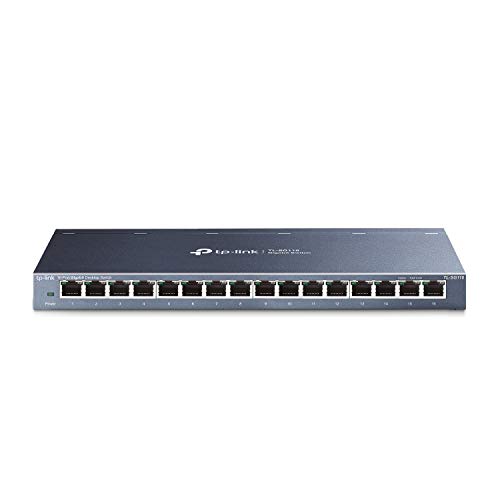
Best for a Larger Gigabit Network: TP-Link TL-SG116, 16 Port Gigabit Unmanaged
The TP-Link TL-SG116, 16 Port Gigabit Unmanaged fits a home, studio, or small office with many wired devices and no stated need for 2.5 Gbps ports. It has 16 gigabit RJ45 ports, a fanless metal case, and desktop or wall-mount placement. The listing specifies QoS and IGMP Snooping, features that can help prioritize certain traffic and manage multicast traffic. This is an unmanaged model, so confirm that its listed features meet your needs rather than assuming it offers full managed-switch controls.
Reasons to buy:
- Sixteen ports can connect a larger group of wired devices.
- Fanless metal construction suits a quiet workspace.
- Listing names port-based 802.1p/DSCP QoS and IGMP Snooping.
Reasons to avoid:
- Gigabit ports are not suited to a network that needs 2.5 Gbps links.
- Its larger port count may be unnecessary for a small desk setup.
Skip it if you only need a few extra connections or want multi-gig ports for a NAS or workstation.
Think about the number of devices you expect to connect, including printers, access points, and network storage. Sixteen ports provide more room than compact switches, but each connected device still shares the switch’s path back to the router.
Best for SFP+ and Network Modes: UGREEN 2.5Gb Switch, 6-Port Ethernet Switch
The UGREEN 2.5Gb Switch, 6-Port Ethernet Switch stands out for its mix of five 2.5 Gbps RJ45 ports and one 10Gb SFP+ port. Its mode selector offers Standard, Link Aggregation, and VLAN modes; in the listed aggregation mode, ports 4 and 5 combine for a 5 Gbps link with compatible multi-port equipment. The SFP+ port accepts supported 1G, 2.5G, or 10G modules, but the listing says modules are not included. Check equipment compatibility and required modules before choosing it.
Reasons to buy:
- Five 2.5 Gbps RJ45 ports serve multi-gig devices.
- One SFP+ port allows a suitable fiber or copper-module connection.
- Selectable VLAN and link-aggregation modes add options beyond basic unmanaged switching.
Reasons to avoid:
- The SFP+ module is not included, adding a compatibility check and possible extra purchase.
- Only five ports are RJ45, fewer than the eight-port multi-gig BrosTrend.
Skip it if you need many RJ45 connections, or your network does not use SFP+ equipment or the listed modes.
Link aggregation depends on compatible equipment at the other end and does not automatically make every connection faster. For a simple multi-gig setup, compare the available RJ45 port count with the number of devices you plan to connect.
Also Considered
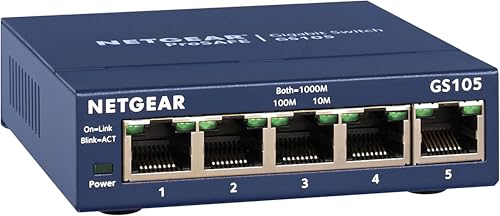
The NETGEAR 5-Port Gigabit Ethernet Unmanaged Network offers five gigabit ports, a metal design, and desktop or wall mounting, but the TP-Link LiteWave is the more compact budget choice among these picks.
The NETGEAR 5-Port Gigabit Ethernet Unmanaged Network is another five-port metal gigabit option; consider it if its mounting style or regional compatibility suits your setup.
The TP-Link TL-SG105S-M2, 5 Port Multi-Gigabit 2.5G suits a compact multi-gig network, but its five ports offer less room than the eight-port BrosTrend option.
The BrosTrend 2.5Gb Switch, 5 Port Unmanaged Switch provides five 2.5 Gbps ports for a smaller multi-gig setup, but it was not selected because the eight-port model accommodates more devices.
How to Choose the Best Ethernet Switch
Match port speed to every part of the connection
Gigabit switches suit devices with 10/100/1000 Mbps Ethernet ports. Multi-gig switches can offer up to 2.5 Gbps on supported links, which may help with local transfers between a compatible NAS and computer. The connection negotiates a speed supported by both ends, so check the specifications for your router, adapters, computers, and storage device before paying for faster ports.
Also separate local network speed from internet speed. A faster switch can improve a capable local link, but an internet connection remains limited by your service plan, router, and other network equipment. The TP-Link 8-port model suits a typical gigabit group; the BrosTrend or UGREEN options make more sense when you can use multi-gig links.
Count ports, including the router connection
List devices that need wired connections, then leave room for additions such as a printer or access point. One switch port connects to your router, so a five-port switch generally leaves four ports for other devices when used this way. Choose a compact switch for a few connections, or consider the 16-port TP-Link model when a room or office has many wired devices.
Remember that adding ports does not create separate internet bandwidth for every device. Devices share the connection back to the router and any limits on that upstream link. If most of your equipment is gigabit, extra ports may be more useful than faster individual ports.
Decide whether you need unmanaged simplicity or extra modes
An unmanaged switch is usually the simple choice for extending a home network: connect it to the router and attach devices, with no software configuration specified. That suits basic expansion, but it offers fewer controls than a managed switch. The listed products are described as unmanaged, even where a model lists features such as QoS, IGMP Snooping, VLAN mode, or link aggregation.
Read the model’s specific feature list rather than assuming that every switch supports the same controls. The UGREEN listing describes selectable VLAN and link-aggregation modes; aggregation also needs compatible equipment. If you need detailed network administration, confirm the exact management features before buying.
Check cables, mounting, and noise needs
Ethernet cable and port capability affect the link you get. The NETGEAR GS305 listing names Cat5e or Cat6 cable compatibility, while the TP-Link TL-SG105S-M2 listing says its 2.5 Gbps upgrade does not require Cat6 wiring. Verify cable condition and the specifications of your existing devices rather than assuming every cable or adapter supports the same speed.
Fanless models can be a sensible fit for bedrooms, offices, and media areas where fan noise would be unwelcome. If the switch will sit away from a desk, prioritize port count and mounting. Check each listing for desktop or wall-mount support, and consider whether a larger metal-cased model fits the space you have.
How We Compared
This comparison uses the published product listings, including stated port counts and speeds, unmanaged setup, design and mounting details, and named networking features. We considered how those specifications fit common home, gaming, NAS, and small-office needs, while distinguishing gigabit expansion from multi-gig connectivity. The published rating figures were not treated as proof of reliability or performance, and no customer feedback details were provided to support broader conclusions.
Frequently Asked Questions
Can I connect an Ethernet switch to my router?
Yes. Connect one switch port to a LAN port on your router, then attach wired devices to the remaining ports. The switch expands the number of wired connections; it does not replace the router or modem.
Will a 2.5 Gbps switch make my internet faster?
Not by itself. Internet speed depends on your service plan and the devices between your switch and internet connection. A 2.5 Gbps switch can provide faster local links when connected devices and the router support that speed.
Do gigabit devices work with a 2.5 Gbps switch?
The TP-Link TL-SG105S-M2 listing specifies auto-negotiation among 100 Mbps, 1 Gbps, and 2.5 Gbps. A device connects at a speed supported by its own Ethernet port and the switch. Check the specifications for other models before assuming they support a particular speed.
Does an Ethernet switch need setup software?
The products in this guide are listed as plug-and-play unmanaged switches, with no configuration or software installation required for basic use. The UGREEN model adds selectable operating modes, so check its instructions if you plan to use VLAN or link aggregation.
What does an SFP+ port do, and do I need a module?
SFP+ provides a slot for a compatible optical or copper module rather than a standard RJ45 cable connection. The UGREEN listing says its SFP+ port supports specified 1G, 2.5G, and 10G modules, and that the module is not included. Verify the module type, speed, and connected equipment before choosing this port.
How many ports should I choose?
Count your wired devices and reserve one port for the router connection. A five-port model fits a small group, while an eight-port or 16-port switch leaves more room for additional equipment. Consider future devices, but avoid paying for ports or speeds your network is unlikely to use.



Write Your Review
No reviews yet. Be the first to share your experience!